Pwodwi souview
The Feit Electric Smart Wi-Fi LED Color Changing Dimmable 60W Light Bulbs offer advanced lighting control for your home. These A19 shape bulbs provide 800 lumens of brightness and are designed for indoor use. They feature color-changing capabilities, tunable white light, and dimming functionality, all controllable via a smartphone app or voice commands through compatible smart assistants.

Image: Front packaging of the Feit Electric Smart Wi-Fi LED Light Bulbs, showing two bulbs and features like Wi-Fi connectivity, Energy Star rating, 800 lumens brightness, and compatibility with Alexa, Siri, and Google Assistant.
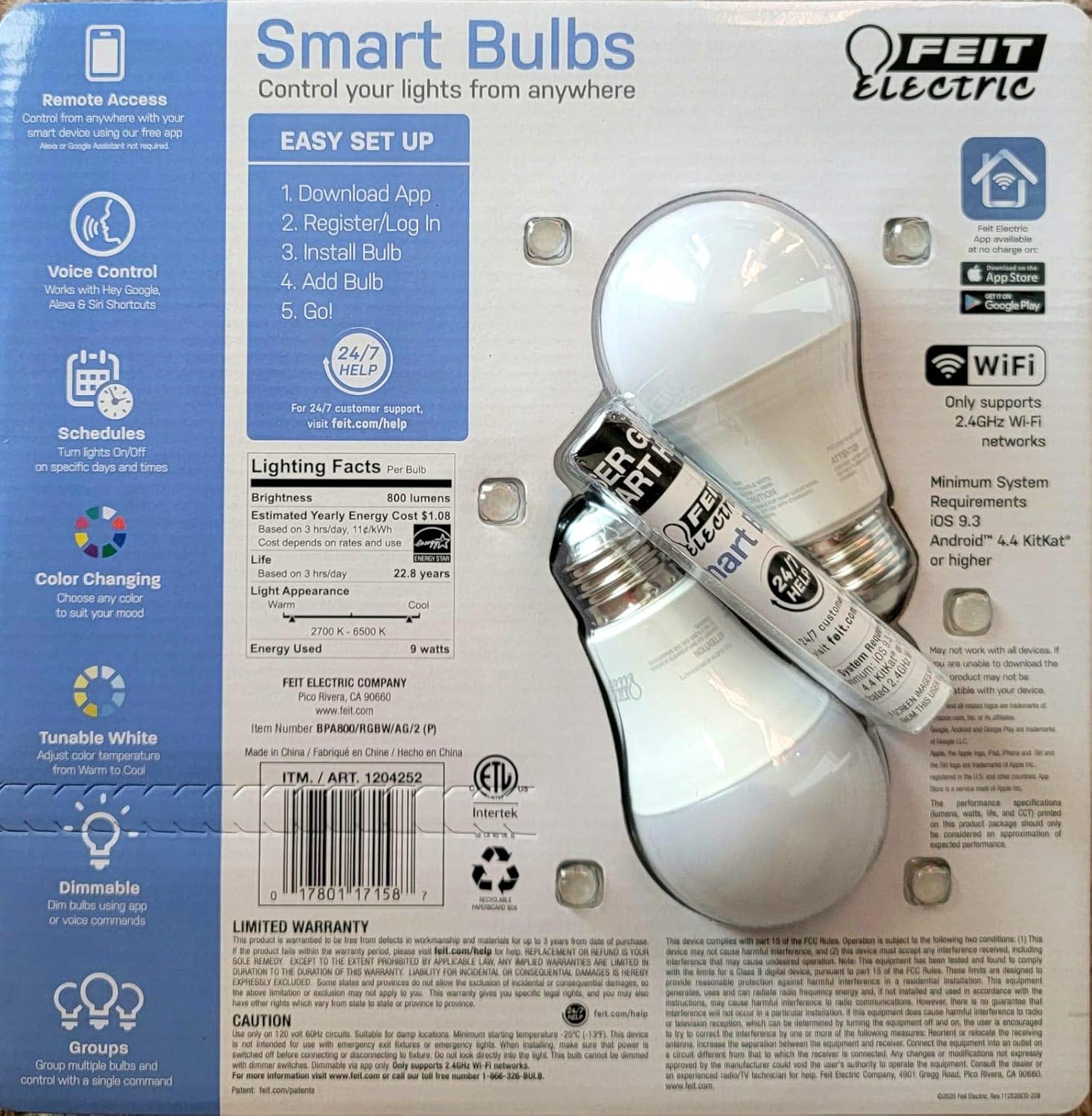
Image: Back packaging of the Feit Electric Smart Wi-Fi LED Light Bulbs, detailing easy setup steps, lighting facts (800 lumens, $1.08 estimated yearly cost, 22.8 years life), and system requirements.
Karakteristik kle
- Color Changing and Tunable White: Adjust light color from millions of options or choose from various shades of white (2700K-6500K).
- Dimmable: Smooth dimming from 100% down to 1% via the app or voice commands.
- Kontwòl vwa: Works seamlessly with Amazon Alexa, Google Assistant, and Siri Shortcuts.
- Aksè Remote: Control your lights from anywhere using the Feit Electric mobile app.
- Orè: Set custom schedules to turn lights on/off at specific times.
- Enèji efikas: 9W power consumption, equivalent to a 60W incandescent bulb, with an estimated yearly energy cost of $1.08.
- Long Lifespan: Designed to last up to 22.8 years based on 3 hours of daily use.
Gid Enstalasyon
Follow these steps to set up your Feit Electric Smart Wi-Fi LED Bulbs:
- Download the Feit Electric App: Chèche pou "Feit Electric" in the Apple App Store or Google Play Store and download the official app.
- Enskri/Konekte: Louvri app a epi kreye yon nouvo kont oswa konekte si ou deja genyen youn.
- Enstale anpoul la: Screw the Feit Electric Smart Wi-Fi LED bulb into any standard E26 medium base light fixture. Ensure the fixture is powered on.
- Add the Bulb in App:
- Open the Feit Electric app.
- Tape ikòn "+" la pou ajoute yon nouvo aparèy.
- Select "Lighting" and then "Light Source (Wi-Fi)".
- Follow the in-app instructions to connect the bulb to your 2.4GHz Wi-Fi network. (Note: These bulbs only support 2.4GHz Wi-Fi networks).
- The bulb will blink to indicate pairing mode. If it doesn't, turn the light switch off and on 5 times to reset it.
- Go!: Once connected, you can rename your bulb and start controlling it from the app.
For a visual guide, you can scan the QR code on the product packaging for a "HOW TO" video (if available).
Enstriksyon Operasyon
Kontwòl App
The Feit Electric app provides full control over your smart bulbs:
- On/Off: Tap the power icon next to the bulb's name to turn it on or off.
- Klate: Use the slider to adjust the brightness level from 1% to 100%.
- Seleksyon koulè: Access the color wheel to choose from millions of colors.
- Ajisteman Limyè Blan: Select different shades of white, from warm (2700K) to cool (6500K).
- Sèn: Apply pre-set scenes or create custom scenes for different moods or activities.
- Orè: Set daily or weekly schedules for your lights to turn on/off automatically.
- Gwoupman: Group multiple bulbs together to control them simultaneously.
Kontwòl vwa
Integrate your Feit Electric Smart Bulbs with your preferred voice assistant:
- Amazon Alexa:
- Enable the "Feit Electric" skill in the Alexa app.
- Dekouvri aparèy.
- Example commands: "Alexa, turn on [Light Name]", "Alexa, dim [Light Name] to 50%", "Alexa, set [Light Name] to blue".
- Google Asistan:
- Link your Feit Electric account in the Google Home app.
- Example commands: "Hey Google, turn off [Light Name]", "Hey Google, change [Light Name] to warm white".
- Siri rakoursi:
- Create custom Siri Shortcuts within the Feit Electric app or Apple's Shortcuts app to control your lights with voice commands.
- Example: "Hey Siri, good morning lights" (if you've set up a shortcut for this).
Antretyen
Feit Electric Smart Wi-Fi LED bulbs are designed for long-lasting performance with minimal maintenance. Follow these general guidelines:
- Netwayaj: Asire w anpoul la etenn epi li frèt anvan ou netwaye li. Siye l avèk yon twal mou epi sèk. Pa sèvi ak pwodui netwayaj likid oswa abrazif.
- Enstalasyon: Always ensure the bulb is securely screwed into the fixture. Do not overtighten.
- Anviwònman: These bulbs are designed for indoor use in dry locations. Avoid exposure to water or high humidity.
- Onn pouvwa: While LED bulbs are generally robust, consider using surge protectors for your lighting circuits in areas prone to power fluctuations.
Depanaj
If you encounter issues with your Feit Electric Smart Wi-Fi LED Bulbs, try the following solutions:
| Pwoblèm | Kòz posib / Solisyon |
|---|---|
| Bulb not connecting to Wi-Fi / App |
|
| Anpoul pa reponn a kòmandman vwa |
|
| Bulb is flickering or dimming unexpectedly |
|
Espesifikasyon
| Karakteristik | Detay |
|---|---|
| Mak | Feit elektrik |
| Kalite limyè | dirije |
| Karakteristik espesyal | Chanje koulè, Blan reglabl |
| Wattage | 9 Watts (60 Watts Incandescent Equivalent) |
| Gwosè fòm anpoul | A19 |
| Koulè limyè | Plizyè koulè |
| Voltage | 110 Volts |
| Konte inite | 2 Konte |
| Tanperati Koulè | 2700-6500 Kelvin |
| Klète | 800 Lumen |
| Fòm | Round |
| Materyèl | Kwiv |
| Koneksyon Teknoloji | Wi-Fi (2.4GHz sèlman) |
| Itilizasyon Andedan kay la / Deyò | Andedan kay la |
| Kalite kontwolè | Amazon Alexa, Google Assistant, Siri Shortcuts |
| Endèks rann koulè (CRI) | 80 |
| Estimasyon pri enèji chak ane | $1.08 (based on 3 hrs/day) |
| Viv lavi | 22.8 ane (baze sou 3 èdtan/jou) |
| UPC | 810744036599 |
| ASIN | B07RL48PFF |
Garanti ak sipò
For customer support, warranty information, and additional resources, please visit the official Feit Electric websit:
Feit Electric offers 24/7 customer support to assist with any questions or issues you may have regarding your smart bulbs.


