Entwodiksyon
This user manual provides detailed instructions for the installation, operation, and maintenance of your Lepro Smart LED Ceiling Light. This smart light offers versatile lighting options, including 16 million colors and tunable white light, controllable via a smartphone app or voice commands through Amazon Alexa and Google Assistant. Please read this manual thoroughly before installation and use to ensure proper functionality and safety.

Image: The Lepro Smart LED Ceiling Light, shown with compatible smart home devices like Amazon Alexa and Google Home speakers, and a smartphone displaying the control app interface. The background features a gradient of colors, highlighting the light's RGB capabilities.
Enfòmasyon sou Sekirite
- Ensure the power supply is turned off at the main circuit breaker before installation or maintenance.
- Si ou pa sèten, se yon elektrisyen kalifye ki ta dwe fè enstalasyon an.
- Do not attempt to disassemble or modify the light fixture.
- This product is designed for indoor use and is IP54 rated for protection against splashing water, making it suitable for bathrooms (zones 1, 2 & 3).
- Opere limyè a nan volim espesifye atagranje e (240 vòlt).
Ki sa ki nan bwat la
Verifye ke tout konpozan yo prezan anvan ou kòmanse enstalasyon an:
- 1 x Lepro Smart LED Ceiling Light
- Vis
- Mi Ploge
- Kousinen anti-Vibration
- 1 x Manyèl Itilizatè (dokiman sa a)
Enstalasyon
1. Verifikasyon Pre-enstalasyon
- Confirm that your home Wi-Fi network operates on the 2.4GHz frequency. This device is not compatible with 5GHz Wi-Fi.
- Ensure the installation location is suitable and the power supply can be safely disconnected.

Image: A visual representation indicating that the smart light connects to a smartphone via a 2.4GHz Wi-Fi network only.
2. Enstalasyon Fizik
Follow these steps to physically install the ceiling light:
- Etenn pouvwa: Before starting, ensure the main power switch to the circuit is OFF.
- Retire bracket: Gently remove the mounting bracket from the light fixture.
- Fix Bracket: Secure the mounting bracket to the ceiling using the provided screws and wall plugs. Ensure it is firmly attached.
- Konekte fil yo: Connect the electrical wires from your ceiling to the "N" (Neutral) and "L" (Live) terminals on the light fixture. Ensure connections are secure.
- Tache Limyè a: Align the light fixture with the mounted bracket and push it firmly until it clicks into place.

Image: Step-by-step diagram illustrating the physical installation process of the ceiling light, including fixing the bracket to the ceiling, inserting electrical wires into the N and L terminals, and attaching the lamp nan bracket aliye a.
3. Telechaje Aplikasyon an ak Koneksyon
To control your smart light, download the "Smart Life" app and follow the pairing process:
- Telechaje App: Chèche pou and download the "Smart Life" app from your smartphone's app store (Google Play Store for Android or Apple App Store for iOS).
- Limyè sik pouvwa: Turn the light switch ON and OFF three times consecutively. The light should begin to blink rapidly, indicating it is in pairing mode.
- Ajoute Aparèy: Open the Smart Life app, register or log in, and tap "Add Device" or the "+" icon. Select "Lighting" and then "Ceiling Light (Wi-Fi)".
- Konekte ak Wi-Fi: Enter your 2.4GHz Wi-Fi network password when prompted. Ensure your phone is also connected to the 2.4GHz network.
- Peyaj: The app will search for and connect to the light. Once connected, you can rename the device and begin controlling it.
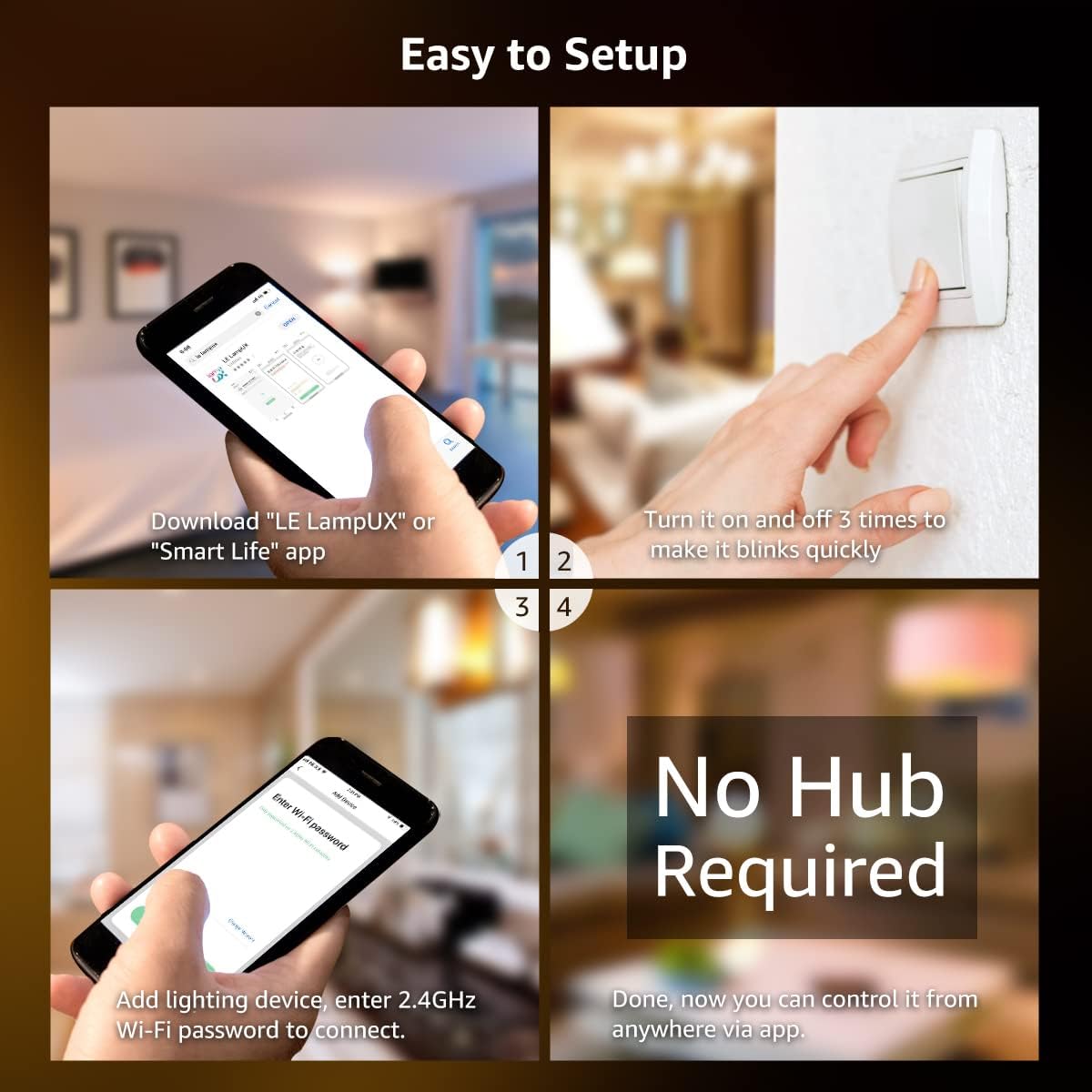
Image: A four-panel graphic detailing the easy setup process: downloading the "Smart Life" app, power cycling the light three times to enter pairing mode, adding the lighting device in the app, and entering the 2.4GHz Wi-Fi password to connect. No hub is required for operation.
Enstriksyon Operasyon
1. Kontwòl App
The "Smart Life" app provides full control over your Lepro Smart LED Ceiling Light:
- Seleksyon koulè: Choose from over 16 million colors to create various ambiances.
- Tunable Blan: Adjust the white light temperature from warm white (2700K) to cool white (6500K).
- Diminisyon klète: Seamlessly dim the light from 1% to 100% brightness.
- Orè: Set custom schedules for the light to turn on or off automatically at specific times.
- Mòd sèn: Utilize pre-set scene modes for different occasions (e.g., Party, Reading, Relax).

Image: A smartphone screen showing the "Smart Life" app interface with a color wheel, brightness slider, and saturation slider, demonstrating the ability to select from 16 million colors for the ceiling light.

Image: A visual comparison demonstrating the tunable white feature, showing the same room illuminated with warm white (2700K), daylight white (4000K), and cool white (6500K) light temperatures.

Image: A visual representation of the brightness dimming capability, showing the light intensity adjustable from 1% to 100%.

Image: A composite image demonstrating remote control of the light from anywhere using the app, and the ability to set schedules for automatic turn-on (e.g., 9:00 AM) and turn-off (e.g., 9:00 PM).
2. Kontwòl vwa
Integrate your Lepro Smart LED Ceiling Light with Amazon Alexa or Google Assistant for convenient voice control:
- Kont ki konekte: Follow the instructions in the Smart Life app to link your account with Amazon Alexa or Google Home.
- Kòmandman vwa: Once linked, you can use commands such as:
- "Alexa, limen limyè plafon an."
- "Hey Google, set the ceiling light to warm white."
- "Alexa, dim the ceiling light to 50%."
- "Hey Google, chanje limyè plafon an an ble."

Image: A person relaxing in a bathtub, demonstrating voice control by saying, "Alexa, set ceiling light to warm white," with smart speakers (Amazon Echo and Google Home) visible, indicating compatibility.
Antretyen
To ensure the longevity and optimal performance of your Lepro Smart LED Ceiling Light, follow these simple maintenance guidelines:
- Netwayaj:
- Ensure the light is turned off and cooled down before cleaning.
- Siye sifas la avèk yon twal mou, sèk, oubyen yon ti kras mouye.amp twal.
- Pa sèvi ak pwodui netwayaj abrazif, solvan, oswa pwodui chimik ki agresif, paske sa yo ka domaje fini an.
- Enspeksyon: Periodically check the light fixture for any signs of damage or loose connections. If any issues are found, consult a qualified electrician.
- Rezistans dlo: While IP54 rated for splashing water, avoid direct water jets or submerging the fixture.

Imaj: Yon gwo plan view of the light fixture's edge with water droplets, illustrating its IP54 water-resistant design, suitable for environments where splashing water may occur.
Depanaj
If you encounter issues with your Lepro Smart LED Ceiling Light, refer to the following common problems and solutions:
| Pwoblèm | Kòz posib | Solisyon |
|---|---|---|
| Limyè pa limen. | Pa gen kouran; fil elektrik ki lach; switch ki gen pwoblèm. | Check circuit breaker. Ensure wires are securely connected. Test the light switch. |
| Light is not blinking for pairing. | Incorrect power cycle sequence. | Ensure you turn the light ON and OFF three times consecutively, waiting a few seconds between each cycle. |
| Pa ka konekte ak Wi-Fi. | Incorrect Wi-Fi frequency (5GHz); weak signal; wrong password. | Ensure your router is broadcasting a 2.4GHz signal and your phone is connected to it. Move closer to the router. Double-check Wi-Fi password. |
| Kontwòl vwa a pa fonksyone. | Account not linked; incorrect device name; internet connectivity issues. | Verify that your Smart Life account is correctly linked to Alexa/Google Home. Use the exact device name configured in the app. Check your internet connection. |
| Limyè a tranble oswa li diminye sanzatann. | Unstable power supply; Wi-Fi interference. | Check household electrical system. Reduce Wi-Fi interference by moving other devices or adjusting router channels. |
Espesifikasyon
| Karakteristik | Detay |
|---|---|
| Mak | Lepro |
| Nimewo Modèl | PR901503-RGB-EU |
| Dimansyon pwodwi | 8.66 x 8.66 x 2.56 cm; 580 g (Diameter: 22 cm, Height: 4.8 cm) |
| Zòn Lighting Klasifikasyon | IP54 (Rezistan a dlo) |
| Voltage | 240 Volts |
| Kalite anpoul | dirije |
| Flux lumineux | 1250 Lumen |
| Wattage | 15 Watts (100 Watts Incandescent Equivalent) |
| Tanperati Koulè | 2700K - 6500K (Blan reglabl) |
| Endèks rann koulè (CRI) | 85 |
| Mwayèn lavi | 15000 èdtan |
| Karakteristik espesyal | Compatible with Alexa and Google Home, 16 million colors, Dimmable via app or voice, App remote control, Schedule on/off. |
| Koneksyon | 2.4GHz WiFi sèlman |
| Materyèl | Plastic, Acrylic (Shade Material) |
| Fini Kalite | Bwose |
| Direksyon limyè | Downlight |
| Chanje style | Remote (via app/voice) |
| Chanje Kalite Enstalasyon | Mòn plafon |

Image: A diagram illustrating the compact dimensions of the Lepro Smart LED Ceiling Light, showing a diameter of 22 cm and a height of 4.8 cm.

Image: A visual comparison highlighting the energy efficiency of the 15W LED ceiling light, equivalent to a 100W incandescent bulb, demonstrating significant energy savings.
Garanti ak sipò
For warranty information and customer support, please refer to the documentation included with your purchase or visit the official Lepro website. Typically, warranty details and contact information for technical assistance are provided by the manufacturer.
Ou ka vizite tou Lepro Store on Amazon pou plis enfòmasyon sou pwodwi a ak resous sipò.


