1. Entwodiksyon
This user manual provides detailed instructions for the safe and efficient operation of your Veidoo 10-inch Android Tablet PC. Please read this manual thoroughly before using the device and retain it for future reference. This tablet is designed for various uses, including communication, entertainment, and productivity.

This image shows the Veidoo 10-inch Android Tablet PC. The front of the tablet displays the home screen with the current time, date, and various application icons such as Camera, Gallery, Settings, and Music. The rear of the tablet, visible behind the front, is black with a subtle textured design and features the rear camera module.
2. Enfòmasyon sou Sekirite
- Pa ekspoze aparèy la nan tanperati ekstrèm, limyè solèy dirèk, oswa imidite ki wo.
- Evite jete oswa sibi aparèy la nan gwo enpak.
- Itilize sèlman chajè ak akseswa manifakti apwouve.
- Pa eseye demonte oswa repare aparèy la tèt ou. Konsilte pèsonèl sèvis kalifye.
- Kenbe aparèy la lwen timoun ak bèt kay.
- Jete aparèy la ak batri li yon fason responsab dapre règleman lokal yo.
3. Pwodwi souview
3.1 Karakteristik Fizik
Familiarize yourself with the various ports and buttons on your Veidoo Tablet PC:

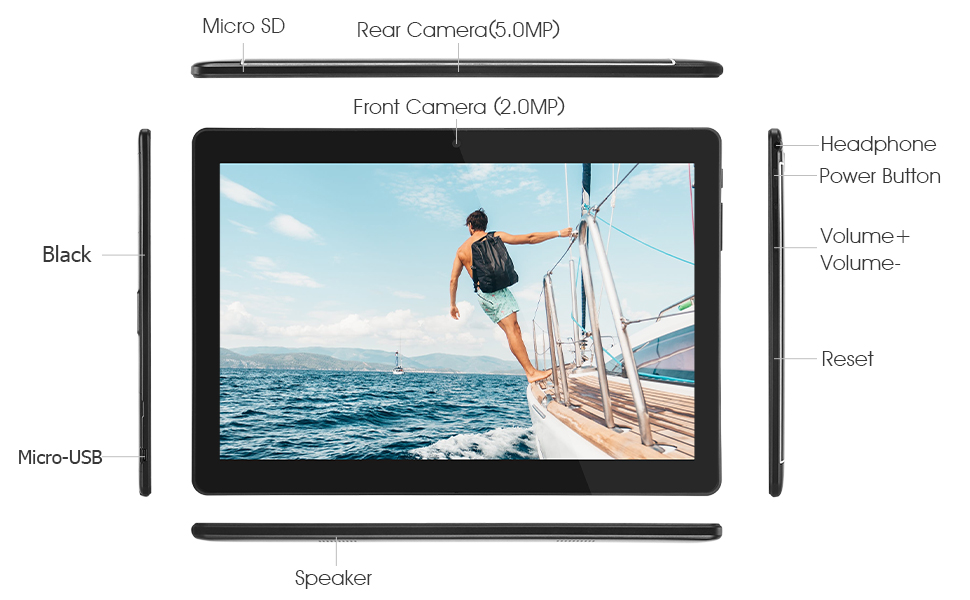
This diagram illustrates the various physical components and ports of the Veidoo 10-inch Android Tablet PC. It clearly labels the Micro SD card slot, the 5.0MP rear camera, the 2.0MP front camera, the headphone jack, the power button, the volume up and down buttons, the reset pinhole, the Micro-USB charging port, and the speaker.
- Mikwo SD plas: Pou depo ki ka elaji.
- Kamera dèyè (5.0MP): Pou pran foto ak videyo.
- Kamera Devan (2.0MP): Pou apèl videyo ak selfie.
- Kas ekoutè Jack: Konekte kas ekoutè 3.5mm.
- Bouton pouvwa: Press and hold to power on/off, short press to sleep/wake.
- Bouton Volim: Ajiste volim odyo a.
- Reyajiste Pinhole: Use a thin object to reset the device if unresponsive.
- Mikwo-USB pò: Pou chaje ak transfè done.
- Oratè: Pwodiksyon odyo.
3.2 Kontni pake a
Asire w tout atik yo prezan nan bwat pwodwi w la:

This image displays the items typically found inside the Veidoo 10-inch Android Tablet PC product box. It includes the tablet itself, a black protective case, a power adapter (wall charger), a USB charging and data cable, a service warranty card, and a leaflet containing frequently asked questions and support information.
- Veidoo 10-inch Android Tablet PC
- Adaptè pouvwa
- USB kab
- Protective Case (optional, may vary by package)
- Manyèl Itilizatè (dokiman sa a)
- Kat Garanti Sèvis
- FAQ Leaflet
4. Enstalasyon
4.1 Chaje batri a
Before first use, fully charge the tablet. Connect the USB cable to the tablet's Micro-USB port and the other end to the power adapter. Plug the adapter into a wall outlet. The charging indicator will show the charging status. A full charge typically takes 3-4 hours.

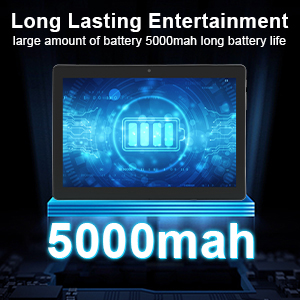
This image focuses on the Veidoo 10-inch Android Tablet PC's battery capacity, prominently displaying a battery icon and '5000mAh'. This signifies the tablet's 5000mAh battery, designed to provide extended usage time for entertainment and productivity.
4.2 Limen/Etenyen
- Pou limen: Press and hold the Power button until the Veidoo logo appears on the screen.
- Pou etenn: Press and hold the Power button until a menu appears. Select "Power off" and confirm.
- Dòmi/Reveye: Briefly press the Power button to put the tablet to sleep or wake it up.
4.3 Inserting SIM and Micro SD Cards
The tablet supports dual SIM cards for 3G phone calls and a Micro SD card for expandable storage.
- Locate the SIM/SD card slot on the side of the tablet.
- Carefully open the slot cover.
- Insert the SIM card(s) and/or Micro SD card into the designated slots with the gold contacts facing down. Ensure they are correctly seated.
- Close the slot cover securely.
This image demonstrates the storage capabilities of the Veidoo 10-inch Android Tablet PC, showing multiple applications and content open. It highlights the device's 16GB internal storage (ROM) and its ability to expand storage up to 32GB via a Micro SD card, allowing for ampespas pou aplikasyon, foto ak videyo.
4.4 Inisyal Enstalasyon
Lè w limen tablèt la pou premye fwa, li pral gide w nan pwosesis konfigirasyon inisyal la:
- Chwazi lang ou pi pito.
- Konekte nan yon rezo Wi-Fi.
- Konekte avèk kont Google ou a oubyen kreye yon nouvo. Sa nesesè pou telechaje aplikasyon nan Google Play Store la.
- Konfigire blokaj ekran an (Kòd PIN, modèl, modpas).
- Review epi aksepte tèm ak kondisyon yo.
5. Itilizasyon Tablèt la
5.1 Navigasyon debaz
- Tape: Chwazi yon atik oubyen louvri yon aplikasyon.
- Tape epi kenbe: Access context menus or move icons.
- Glise: Defile nan ekran yo oswa lis yo.
- Zoom-pou-Zoom: Agrandi oswa diminye imaj yo epi web paj.
5.2 Connectivity (Wi-Fi & Bluetooth)
- Wi-Fi: Ale nan Anviwònman > Rezo ak entènèt > Wi-Fi. Turn Wi-Fi on, select your network, and enter the password.
- Bluetooth: Ale nan Anviwònman > Aparèy konekte > Bluetooth. Turn Bluetooth on, scan for devices, and pair with your desired accessory.
5.3 Making Phone Calls (3G)
With a valid SIM card inserted, you can make and receive 3G phone calls:

This image shows a group of four individuals participating in a video call using the Veidoo 10-inch Android Tablet PC. This illustrates the tablet's capability for video conferencing and its 3G phone call functionality, allowing users to connect with others remotely.
- Louvri a Telefòn app.
- Dial the number using the keypad or select a contact.
- Tape bouton apèl la pou kòmanse apèl la.
5.4 Sèvi ak Kamera yo
The tablet is equipped with a front and rear camera for photos and videos.
- Louvri a Kamera app.
- Chanje ant kamera devan ak dèyè a avèk ikòn kamera a.
- Tape bouton deklanchè a pou pran yon foto oswa pou kòmanse/sispann anrejistreman videyo.
5.5 Jesyon Depo
Ou kapab view and manage your tablet's internal and external storage:
- Ale nan Anviwònman > Depo.
- Here you can see storage usage and free up space by deleting unnecessary files or uninstalling apps.
5.6 Installing and Uninstalling Apps
This image features the Veidoo 10-inch Android Tablet PC showcasing its Android 10 operating system with a multitude of application icons. This highlights that the device is GMS (Google Mobile Services) certified, ensuring access to Google Play Store and other Google services.
- Enstale: Louvri a Google Play Store aplikasyon an, chèche aplikasyon ou vle a, epi tape Enstale.
- Dezenstale: Ale nan Anviwònman > Aplikasyon ak notifikasyon > Gade tout aplikasyon yo. Select the app you wish to uninstall and tap Dezenstale.
6. Antretyen
- Netwayaj: Sèvi ak yon twal mou ki pa gen pousyè pou netwaye ekran an ak kò a. Evite pwodui netwayaj abrazif oswa solvan.
- Mizajou lojisyèl: Tcheke regilyèman pou mizajou sistèm nan Anviwònman > Sistèm > Mizajou sistèm pou asire pèfòmans ak sekirite optimal.
- Swen batri: To prolong battery life, avoid fully discharging the battery frequently. Store the tablet in a cool, dry place when not in use for extended periods.
- Sovgad done: Regularly back up important data to a cloud service or external storage device to prevent data loss.
NAN. Depanaj
| Pwoblèm | Solisyon posib |
|---|---|
| Tablèt la pa limen | Ensure the battery is charged. Connect the charger and wait a few minutes before attempting to power on. If unresponsive, try pressing the reset pinhole. |
| Ekran an pa reponn | Restart the tablet by holding the Power button. If that doesn't work, use the reset pinhole. Ensure the screen is clean and dry. |
| Pa ka konekte ak Wi-Fi | Check if Wi-Fi is enabled in settings. Ensure the Wi-Fi password is correct. Restart your router and the tablet. |
| Aplikasyon yo ap plante oswa yo bloke | Close and reopen the app. Clear the app's cache in Anviwònman> Apps & notifikasyon. Update the app or uninstall and reinstall it. Ensure sufficient storage space. |
| Pòv lavi batri | Reduce screen brightness. Close unused apps running in the background. Turn off Wi-Fi, Bluetooth, and GPS when not in use. Limit background data usage. |
8. Espesifikasyon
Key technical specifications for the Veidoo 10-inch Android Tablet PC (Model T10):

This image provides a visual summary of the Veidoo Tablet PC's key specifications. It highlights features such as 1GB RAM, a 2MP front and 5MP rear camera setup, a 10.1-inch IPS HD display with 1280x800 resolution, 16GB of internal storage, Android 10 operating system, Wi-Fi connectivity, a Quad-Core CPU, and dual SIM card support.
| Karakteristik | Detay |
|---|---|
| Non modèl | Touch (T10) |
| Kanpe Screen Display Size | 10.1 pous |
| Rezolisyon ekran | 800 x 1280 (IPS) |
| RAM | 1 GB (DDR3 SDRAM) |
| Gwosè Disk Di / Memwa Flash | 16 GB (ou ka ogmante l jiska 32 GB atravè yon kat Micro SD) |
| Kalite san fil | 802.11b, 802.11b/g (Wi-Fi), Bluetooth |
| Mwayèn lavi batri | 6 Hours (5000mAh Lithium Polymer) |
| Platfòm pyès ki nan konpitè | Android |
| Sistèm operasyon | Android 6.0 Marshmallow (GMS Certified) |
| Pwa atik | 2.86 liv |
| Dimansyon pwodwi | 9.49 x 6.69 x 0.37 pous |
| Dèyè WebCam Rezolisyon | 5 MP |
| Devan WebCam Rezolisyon | 2 MP |
| Kantite processeurs | 4 (Quad-Core) |
| Sous pouvwa | Batri Powered, fil elektrik |
9. Garanti ak sipò
Your Veidoo Tablet PC comes with a service warranty. Please refer to the included Service Warranty Card for specific terms and conditions, including warranty period and coverage details.
For technical support, troubleshooting assistance, or warranty claims, please contact Veidoo customer service. Contact information can typically be found on the warranty card or the official Veidoo website. When contacting support, please have your model number (T10) and purchase information ready.
You can also visit the official Veidoo store on Amazon for more information and support resources: Veidoo Store


