Entwodiksyon
Thank you for choosing the Filius 0543-14 Radio Controlled Solar Alarm Clock. This manual provides essential information for the safe and efficient operation of your new alarm clock. Please read it thoroughly before use and retain it for future reference.
The Filius 0543-14 features a silver plastic casing, a clear white analog dial, illumination, a loud alarm, and a snooze function. It is designed for indoor use and incorporates radio-controlled time synchronization and solar power capabilities.
Enfòmasyon sou Sekirite
- Do not expose the clock to extreme temperatures, direct sunlight for prolonged periods (beyond normal operation), or high humidity.
- Evite lage revèy la oswa sibi gwo enpak.
- Pa eseye demonte oswa repare revèy la tèt ou. Konfye tout antretyen bay pèsonèl kalifye.
- Kenbe pil yo pa rive jwenn timoun yo. Si vale, chèche swen medikal imedya.
- Jete pil yo itilize dapre règleman lokal yo.
Kontni pake
Verifye ke tout atik yo prezan nan pakè a:
- Filius 0543-14 Alarm Clock
- 1 x batri AA
- Manyèl Itilizatè (dokiman sa a)
Enstalasyon
1. Enstalasyon batri
The Filius 0543-14 alarm clock requires one AA battery for operation. A battery is included in the package.
- Jwenn kouvèti konpatiman pil la sou dèyè revèy la.
- Retire kouvèti a lè w glise l oswa lè w leve l.
- Insert the AA battery, ensuring the correct polarity (+ and -) as indicated inside the compartment.
- Ranplase kouvèti lòj batri a byen.

Imaj: Dèyè view of the Filius 0543-14 alarm clock, showing the battery compartment and controls.
2. Initial Time Synchronization (Radio Controlled)
This clock is radio-controlled and will automatically set itself to the correct time once the battery is installed and it receives a signal. This process may take a few minutes to several hours depending on your location and signal strength.
- Place the clock near a window or in an open area to facilitate signal reception.
- Avoid placing it near electronic devices that may cause interference (e.g., TVs, computers, microwaves).
- The clock will automatically search for the time signal. The hands will move to 12:00 and then adjust to the correct time.
- If the clock does not set itself after 24 hours, try moving it to a different location or manually setting the time (refer to the "Manual Time Setting" section if available on the device, otherwise rely on radio control).
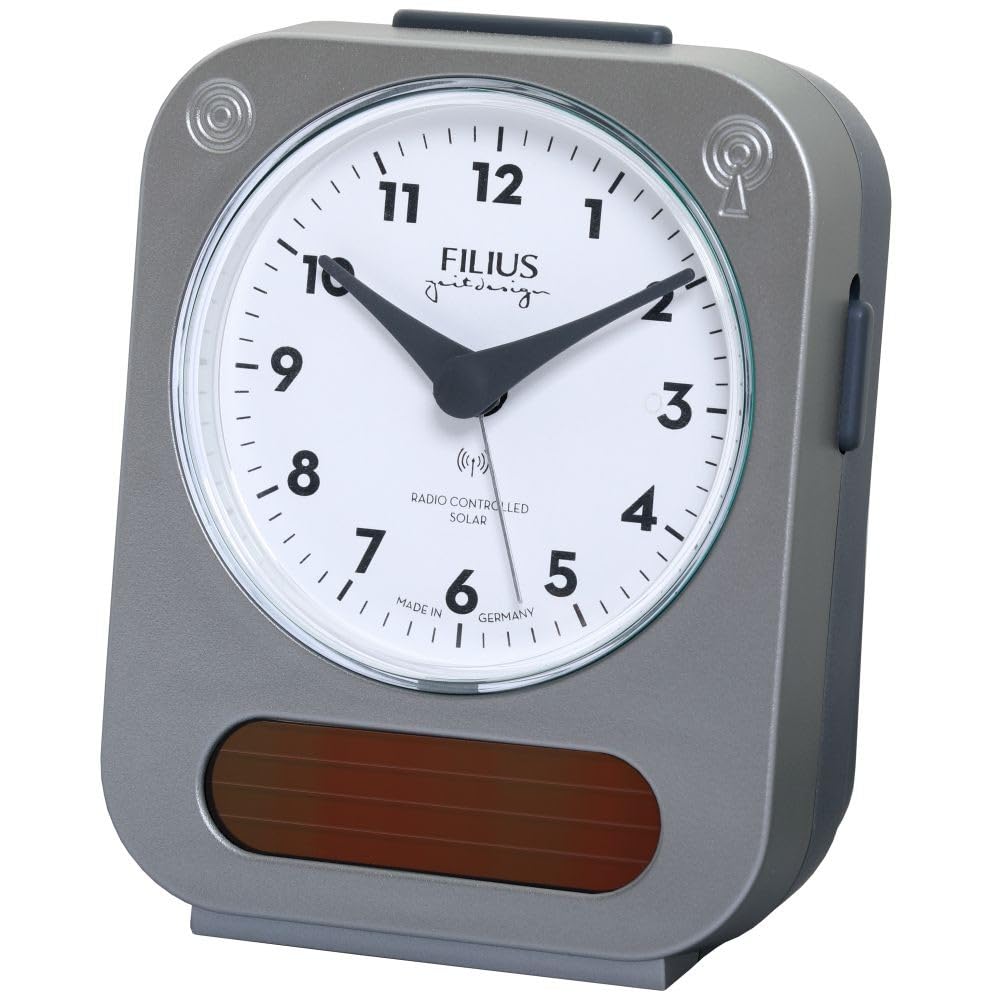
Image: Detail of the clock face, highlighting the "RADIO CONTROLLED SOLAR" indicator.
Enstriksyon Operasyon
1. Mete alam la
Pou fikse lè alam la:
- Locate the alarm setting knob, usually on the back or side of the clock.
- Vire bouton an pou deplase zegwi alam la nan lè alam ou vle a.
- Activate the alarm by sliding the alarm ON/OFF switch (typically on the side or back) to the "ON" position.
2. Fonksyon repetisyon
When the alarm sounds, press the large button on top of the clock to activate the snooze function. The alarm will temporarily stop and sound again after approximately 5-10 minutes.
3. Ekleraj
To illuminate the clock face in low light conditions, press the large button on top of the clock. The backlight will activate for a few seconds, allowing you to read the time.

Image: The Filius 0543-14 alarm clock displaying its blue illumination feature in the dark.
4. Solar Power Feature
The clock is equipped with a solar panel to supplement power. Ensure the clock is exposed to ambient light (not necessarily direct sunlight) to utilize this feature and extend battery life. The solar panel is visible on the front bottom of the clock.
Antretyen
1. Netwayaj
Wipe the clock with a soft, dry cloth. Do not use abrasive cleaners, solvents, or chemical sprays, as these may damage the casing oubyen rele.
2. Ranplasman batri
When the clock's display dims or the alarm weakens, it is time to replace the AA battery. Follow the "Battery Installation" steps in the Setup section.
Depanaj
| Pwoblèm | Kòz posib | Solisyon |
|---|---|---|
| Revèy la pa montre lè kòrèk la oswa zegwi yo pa deplase. | Battery is dead or incorrectly installed. No radio signal received. | Check and replace the battery. Move the clock to a location with better signal reception (e.g., near a window). Allow up to 24 hours for synchronization. |
| Alam lan pa sonnen. | Alarm is not activated. Alarm time is incorrectly set. Battery is low. | Ensure the alarm ON/OFF switch is in the "ON" position. Verify the alarm hand is set to the desired time. Replace the battery. |
| Illumination is dim or not working. | Batri a ba. | Ranplase batri a. |
Espesifikasyon
- Nimewo Modèl: 0543-14
- Mak: Filius
- Materyèl: Plastik (Ajan)
- Kalite ekspozisyon: Analòg
- Karakteristik espesyal: Illuminated, Loud Alarm, Snooze, Radio Controlled, Solar Powered
- Sous pouvwa: 1 x AA Battery (included), Solar
- Dimansyon pwodwi (L x W x H): Apeprè 9.5 cm (L) x 5 cm (Lajè) x 12.5 cm (Wotè)
- Pwa atik: 195 gram
- Itilizasyon entansyonèl: Andedan kay la
- Peyi orijin: Almay
Enfòmasyon sou Garanti
Specific warranty details are not provided in the product information. Please refer to the retailer's return policy or contact Filius customer support for warranty information. Typically, electronic devices come with a standard manufacturer's warranty against defects in materials and workmanship.
Sipò
For further assistance, technical support, or inquiries regarding your Filius 0543-14 alarm clock, please contact your retailer or visit the official Filius websit pou enfòmasyon kontak.
Tanpri sonje: Yo pa bay enfòmasyon konsènan disponiblite pyès rezèv.


