Pwodwi souview
This manual provides detailed instructions for the Anlapus H.265+ Security System, a comprehensive wired analog surveillance camera kit designed for home and business monitoring. It features a Full HD 1080P 8-channel DVR recorder with a pre-installed 1TB hard drive and 2MP outdoor surveillance cameras.

Figure 1: Anlapus H.265+ Security System Components
Karakteristik kle:
- H.265+ Full HD 1080p System: Includes an 8-channel 1080p DVR with a built-in 1TB hard drive and four 2.0MP surveillance cameras.
- Vizyon lannwit avanse: Cameras are equipped with 24 IR LEDs and an IR-CUT filter, providing clear night vision up to 24 meters (80 feet).
- Deteksyon Mouvman Entelijan: Receive push alerts via the free mobile application when motion is detected, keeping you informed even when away from home.
- Kamera ki reziste move tan IP66: Durable plastic housing designed for both indoor and outdoor use, capable of withstanding extreme weather conditions. The cable is integrated into the camera mount for added protection.
- Pre-installed 1TB Hard Drive: Ready for immediate use, specifically designed for continuous surveillance data recording.
- Mòd anrejistreman miltip: Supports 24/7 continuous recording, motion detection recording, scheduled recording, and manual recording.
- Remote Viewing: Access live and recorded footage anytime, anywhere via smartphone, tablet, or PC.
Kontni pake
Anvan ou kòmanse enstalasyon an, tanpri verifye si tout konpozan ki nan lis anba a yo prezan nan pake ou a:

Figi 2: Kontni pake a
- 1 x DVR (Digital Video Recorder) with 1TB HDD pre-installed
- 4 x 1080p Surveillance Cameras
- 4 x BNC Video Cables (approx. 18.3m / 60ft each)
- 2 x adaptè pouvwa
- 1 x Kab Separatè Pouvwa 1 a 4
- 1 x USB sourit
- 1 x Manyèl Enstriksyon (dokiman sa a)
- 4 x Sak Vis pou Monte
- 4 x Autokolan Avètisman
Gid Enstalasyon
1. DVR Connection
- Konekte Kamera yo: Connect each surveillance camera to the BNC video input ports on the back of the DVR using the provided BNC cables. Ensure connections are secure.
- Konekte pouvwa: Use the power adapters and the 1-to-4 power splitter cable to power the cameras. Connect the DVR to a power outlet using its dedicated power adapter.
- Konekte ak monitè a: Connect the DVR to a monitor or TV using an HDMI or VGA cable (not included) to view emisyon an dirèk la ak paramèt sistèm aksè a yo.
- Konekte Sourit USB a: Plug the included USB mouse into a USB port on the DVR for navigation.
- Koneksyon Rezo (Si ou vle men ou rekòmande): Pou aleka viewing and email alerts, connect the DVR to your router using an Ethernet cable (not included).
2. Enstalasyon Kamera
The cameras are designed for both indoor and outdoor use, with an IP66 weatherproof rating. Choose strategic locations that provide optimal coverage and are within reach of the BNC cables.
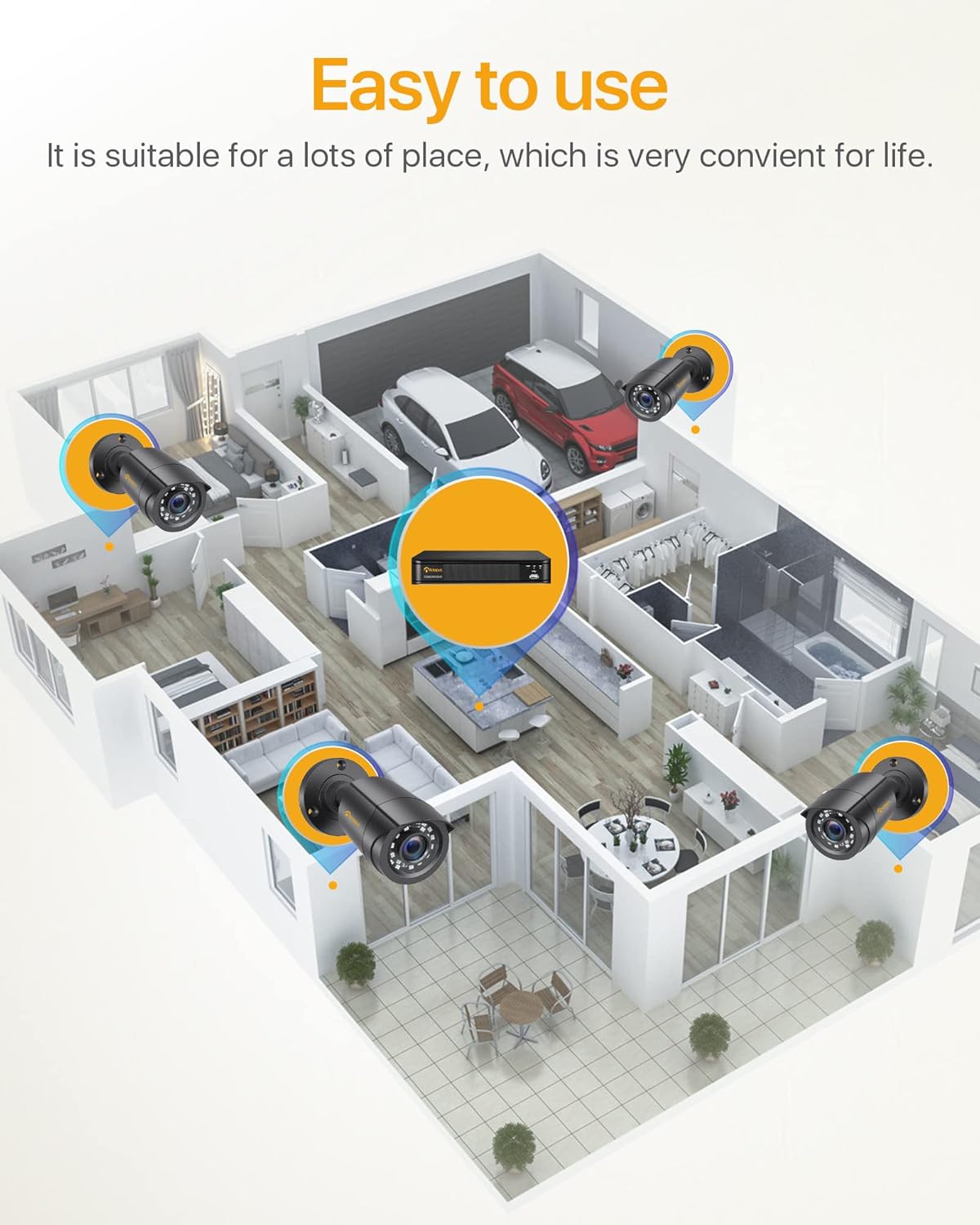
Figi 3: Egzample Camera Placement for Optimal Coverage
- Montaj: Use the provided mounting screws and anchors to securely attach the cameras to walls or ceilings.
- Ajiste ang: Adjust the camera's angle (180° horizontal, 360° vertical) to cover the desired area. Ensure the lens is clean and free from obstructions.
- Jesyon kab: Route the BNC cables neatly and securely to prevent damage and tripping hazards. The cable is integrated into the camera mount for protection.

Figure 4: Camera Features and Adjustability
Enstriksyon Operasyon
1. Initial Setup and Login
Upon first power-on, the DVR will guide you through an initial setup wizard. You will be prompted to create a strong password for the administrator account. It is crucial to remember this password.
2. Viv View
Once logged in, the system will display the live view from all connected cameras on the monitor. You can switch between single-camera view ak griy milti-kamera view.

Figure 5: 24/7 Live Monitoring Setup
3. Mòd Anrejistreman
- Anrejistreman kontinyèl: The system is pre-configured for 24/7 continuous recording to the 1TB hard drive.
- Mouvman Deteksyon Anrejistreman: To enable, navigate to the DVR's menu, select "Record" > "Motion Detection." Configure the detection area and sensitivity for each camera.
- Anrejistreman pwograme: Set specific times for recording via "Record" > "Schedule."
- Anrejistreman manyèl: Initiate recording manually from the live view koòdone.
4. Remote Viewatravè aplikasyon mobil lan
Download the official Anlapus mobile application (available for iOS and Android) to view kamera ou adistans.
- Telechaje App: Chèche pou "Anlapus" in your device's app store.
- Enskri kont: Kreye yon nouvo kont itilizatè nan aplikasyon an.
- Ajoute Aparèy: Scan the QR code displayed on your DVR's monitor (found in Network settings) or manually enter the device ID to add your DVR to the app.
- Viv View & Lekti: Yon fwa ou ajoute l, ou kapab view live feeds, play back recorded footage, and receive motion detection alerts on your smartphone or tablet.

Figi 6: Kontwòl a distans Viewing Across Devices
5. Alèt Deteksyon Mouvman
Configure email alerts for motion detection events through the DVR's network settings. Ensure your DVR is connected to the internet.

Figure 7: Smart Motion Detection Alerts
Antretyen
- Netwayaj regilye: Periodically clean the camera lenses with a soft, dry cloth to ensure clear image quality. For outdoor cameras, check for dirt, dust, or spiderwebs.
- Mizajou mikrolojisyèl: Check the Anlapus official website for any available firmware updates for your DVR. Updates can improve performance and add new features.
- Sante Disk Di: The 1TB hard drive is designed for continuous recording. Monitor its health through the DVR's system settings. If the hard drive becomes full, older footage pral efase otomatikman (anrejistreman an bouk).
- Enspeksyon kab: Regularly inspect all cables for any signs of wear, damage, or loose connections, especially for outdoor installations.
- Pwovizyon pou pouvwa: Ensure the DVR and camera power adapters are connected to stable power sources.
Depanaj
| Pwoblèm | Kòz posib | Solisyon |
|---|---|---|
| Pa gen imaj sou monitè a. | Kab videyo ki lach, move antre chwazi sou monitè a, DVR a pa limen. | Check all BNC and HDMI/VGA cable connections. Ensure monitor input matches DVR output. Verify DVR power. |
| Kamera yo pa ap montre anyen. | Camera power issue, BNC cable disconnected, faulty camera. | Check camera power connections and power splitter. Re-seat BNC cables. Test camera on a different port if possible. |
| Pa gen remote viewing. | DVR not connected to network, incorrect network settings, app configuration issue. | Ensure DVR is connected to router via Ethernet. Check network settings on DVR (DHCP enabled or static IP configured correctly). Verify app device ID/QR code. |
| Poor night vision. | IR LEDs obstructed, camera lens dirty, insufficient ambient light. | Clean camera lens. Ensure no obstructions are blocking the IR LEDs. Consider adding external IR illuminators if needed. |
| Deteksyon mouvman pa travay. | Motion detection not enabled, sensitivity too low, detection area not set. | Enable motion detection in DVR settings. Adjust sensitivity. Define the detection area correctly. |
Espesifikasyon
| Karakteristik | Detay |
|---|---|
| Nimewo Modèl | 6971627216065 |
| Chanèl DVR yo | 8-chanèl |
| Rezolisyon anrejistreman videyo | 1080p plen HD |
| Konpresyon videyo | H.265 + |
| Kapasite Depo | Disk difisil 1TB (pre-enstale) |
| Rezolisyon kamera | 2.0 megapiksèl |
| Kalite Kamera | Bullet, Wired |
| Vizyon lannwit Range | Up to 24 meters (80 feet) with 24 IR LEDs |
| Rating ki enpèmeyab | IP66 (Indoor/Outdoor use) |
| Koneksyon | Wired (BNC), Ethernet for network features |
| Pwovizyon pou pouvwa | 12 Volts (via included power adapters) |
| Tanperati Fonksyònman | -10 ° C a 55 ° C (14 ° F a 131 ° F) |
| Dimansyon (DVR) | Apeprè. 27.94 x 35.56 x 17.78 cm (L x W x H) |
| Weight (Total Package) | 4.56 kilogram |
Garanti ak sipò
Anlapus products are designed for reliability and performance. For specific warranty details, please refer to the warranty card included in your package or visit the official Anlapus websit.
For technical assistance, troubleshooting, or any inquiries regarding your security system, please contact Anlapus customer support. Our team is dedicated to providing prompt and helpful solutions.
- Sipò sou entènèt: Visit the Anlapus official websit pou FAQ, atik sipò, ak fòm kontak.
- Sipò Imèl: Refer to your product documentation for the dedicated support email address.


