1. Entwodiksyon
Thank you for choosing the RCF F-6X 6 Channel Mixing Console. This manual provides essential information for the safe and efficient operation of your new mixer. Please read it thoroughly before connecting or operating the unit to ensure proper setup and to maximize its performance and longevity. The F-6X is designed for professional audio applications, offering high-quality sound, versatile connectivity, and integrated PRO DSP effects.
2. Enfòmasyon enpòtan sou sekirite
Always observe the following basic precautions when using this product to avoid the risk of electric shock, short circuit, damage, fire, or other hazards.
- Pwovizyon pou pouvwa: Use only the specified external universal power supply. Ensure the voltage kòrèk pou rejyon ou an.
- Atè: Do not defeat the grounding purpose of the polarized or grounding-type plug.
- Imidite: Do not expose this equipment to rain or moisture. Do not place objects filled with liquids, such as vases, on the unit.
- Vantilasyon: Asire w ke gen ase vantilasyon. Pa bloke okenn ouvèti vantilasyon. Enstale l dapre enstriksyon manifakti a.
- Chalè: Pa enstale tou pre okenn sous chalè tankou radyatè, rejis chalè, recho, oswa lòt aparèy (tankou amplifiers) ki pwodui chalè.
- Câbles: Pwoteje kòd elektrik la pou yo pa mache oswa kwense, sitou nan priz, resipyan konvenyans, ak pwen kote yo sòti nan aparèy la.
- Sèvis: Refere tout sèvis yo bay pèsonèl sèvis kalifye. Reparasyon nesesè lè aparèy la domaje nenpòt fason, tankou kòd kouran oswa ploge domaje, likid koule oswa objè tonbe nan aparèy la, aparèy la te ekspoze a lapli oswa imidite, li pa fonksyone nòmalman. , oswa li te tonbe.
Warning: To reduce the risk of fire or electric shock, do not expose this equipment to rain or moisture.

Figi 2.1: Rear panel of the RCF F-6X, displaying the power input (12V DC - 2000 mA), power on/off switch, serial number, and important safety warnings regarding electric shock and moisture exposure. The CE compliance mark is also visible, indicating conformity with European safety standards.
3. Pwodwi souview
The RCF F-6X is a compact yet powerful 6-channel mixing console designed for a variety of audio applications. It features two Mic/Line inputs, two stereo line inputs, and a balanced main output audio path. The mixer also includes a 16-preset PRO DSP internal effects processor for enhanced sound shaping.
3.1 Aranjman Panèl Devan an
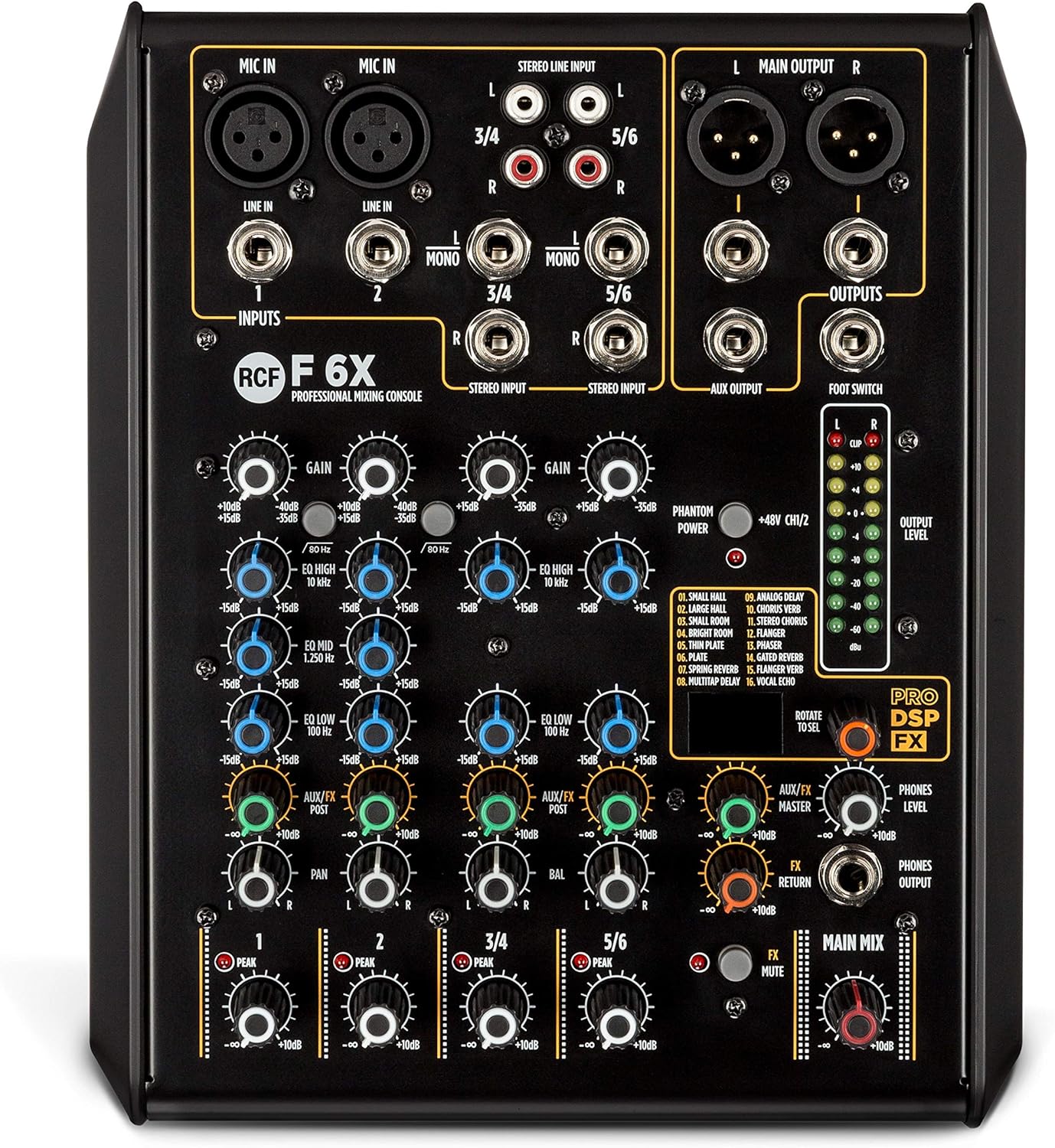
Figi 3.1: The RCF F-6X front panel, showcasing the input section with XLR/Jack combo inputs for Mic/Line channels 1 and 2, and stereo line inputs for channels 3/4 and 5/6. Each channel features GAIN, EQ (HIGH, MID, LOW), AUX/FX, and PAN controls. The master section includes FX MASTER, FX RETURN, PHONES LEVEL, and MAIN MIX controls, along with the PRO DSP FX section and output level meters.
3.2 Karakteristik kle
- 2 Mic/Line inputs with XLR/Jack combo connectors.
- 2 stereo line inputs (channels 3/4 and 5/6).
- One AUX/FX (POST) send.
- Balanced main output audio path from input to output.
- 16 presets PRO DSP internal FX processor.
- Sturdy metal chassis for durability.
- External universal power supply.
- Designed and engineered in Italy.
4. Gid Enstalasyon
4.1 Debake
Carefully remove the mixer and all accessories from the packaging. Retain the packaging for future transport or storage.
4.2 Koneksyon pouvwa
- Asire w ke switch pouvwa mixer a nan pozisyon OFF (Off).
- Connect the provided external power supply to the 12V DC input on the rear panel of the mixer.
- Branche ekipman pou pouvwa a nan yon priz kouran AC ki apwopriye.
- Turn the power switch to the ON position. The power indicator LED will illuminate.
4.3 Konekte Aparèy Audio
Before making any connections, ensure all audio equipment is turned off to prevent damage to speakers or other devices.
- Microphones (Mic In 1-2): Connect microphones to the XLR or 1/4" Jack inputs. For condenser microphones requiring phantom power, activate the +48V PHANTOM POWER switch.
- Mono Line Inputs (Line In 1-2): Connect mono line-level sources (e.g., instruments, preamps) to the 1/4" Jack inputs for channels 1 and 2.
- Stereo Line Inputs (Line In 3/4, 5/6): Connect stereo line-level sources (e.g., keyboards, media players) to the 1/4" Jack (L/R) or RCA (L/R) inputs for channels 3/4 and 5/6.
- Main Outputs (Main Output L/R): Connect the mixer's main outputs to your power amplifier, powered speakers, or recording device using XLR or 1/4" Jack cables.
- AUX Output (AUX Output): Connect this output to external effects processors or monitor systems.
- Phones Output (Phones Output): Connect your headphones to the 1/4" Jack for monitoring.
- Footswitch: Connect an optional footswitch to control the internal effects bypass.
5. Operasyon Enstriksyon
5.1 Kontwòl Chanèl
- GAY: Adjusts the input sensitivity for each channel. Set this to achieve a healthy signal level without clipping (indicated by the PEAK LED).
- Egalizè (WO, MWAYEN, BA): Egalizè twa-band pou bay ton chak kanal yon fòm espesyal.
- Segondè: +/-15 dB @ 10 kHz Shelving.
- MID: +/-15 dB @ 1.25 kHz Bell.
- BA: +/-15 dB @ 100 Hz Shelving.
- AUX/Efè: Controls the amount of signal sent from the channel to the internal effects processor or external AUX output. This is a POST-fader send.
- PAN (Chanèl Mono) / BAL (Chanèl Stereo): Adjusts the stereo position of the channel's signal in the main mix.
- NIVO: Controls the overall output level of the individual channel to the main mix.
5.2 Seksyon Mèt la
- MELANJ PRENSIPAL: The master fader controls the overall output level of the main stereo mix.
- FX MASTER: Controls the overall level of the internal effects return to the main mix.
- FX RETOUNEN: Adjusts the level of the signal returning from the internal effects processor.
- NIVO TELEFÒN: Kontwole volim pwodiksyon ekoutè a.
- OUTPUT LEVEL METERS: LED meters display the output level of the main mix. Aim for levels around 0 dB to avoid clipping.
5.3 Internal Effects (PRO DSP FX)
The RCF F-6X features a high-quality PRO DSP effects processor with 16 selectable presets:
- TI SAL
- GWO SAL
- KALE KALE
- WARM ROOM
- PLAK
- SPRING REV
- ANALOG DETA
- VERB REFREN
- FLANGER VERB
- ROTARY VERB
- TREMOLO VERB
- PHASER VERB
- ANALOG DETA
- REFREN
- FLANGER
- ROTARY
To select an effect, rotate the 'ROTATE TO SEL' knob to browse through the presets. Press the knob to confirm your selection. Adjust the FX MASTER and individual channel AUX/FX sends to control the effect amount.
5.4 Footswitch Functionality
A footswitch can be connected to the dedicated input to remotely bypass (turn on/off) the internal effects, providing hands-free control during performance.
6. Antretyen ak Swen
Proper maintenance ensures the longevity and optimal performance of your RCF F-6X mixer.
- Netwayaj: Sèvi ak yon twal mou epi sèk pou netwaye deyò aparèy la. Pa sèvi ak pwodui netwayaj abrazif, sir, oswa solvan.
- Depo: Lè w pa itilize mixer a pou yon bon bout tan, sere l nan yon kote ki fre epi sèk, lwen limyè solèy dirèk ak tanperati ekstrèm.
- Vantilasyon: Ensure that the ventilation openings are not obstructed by dust or debris.
- Jesyon kab: Avoid bending or kinking cables excessively. Disconnect cables by pulling the plug, not the cable itself.
NAN. Depanaj
If you encounter issues with your RCF F-6X mixer, refer to the following common problems and solutions:
| Pwoblèm | Kòz posib | Solisyon |
|---|---|---|
| Pa gen pouvwa | Power cable not connected; Power supply faulty; Power switch off. | Tcheke koneksyon kab kouran an; Eseye yon lòt priz; Asire w ke switch kouran an limen. |
| No sound from a channel | GAIN too low; Channel LEVEL too low; Input cable faulty; Mute engaged (if applicable). | Increase GAIN and LEVEL; Check input cable; Ensure no mute is active. |
| Pa gen son ki soti nan pwodiksyon prensipal la | MAIN MIX fader too low; Output cables faulty; Connected ampanplifikatè/oratè yo etenn oubyen mete son an sou silans. | Increase MAIN MIX fader; Check output cables; Verify amplifier/speaker status. |
| Son defòme | GAIN too high (clipping); Output level too high; Faulty cable/device. | Reduce GAIN and output levels; Check all cables and connected devices. |
| Efè pa travay | AUX/FX send too low; FX MASTER too low; Effect not selected; Footswitch engaged. | Increase AUX/FX send and FX MASTER; Select an effect; Disengage footswitch. |
If the problem persists after trying these solutions, please contact RCF customer support or a qualified service technician.
8. Espesifikasyon teknik
| Kategori | Spesifikasyon |
|---|---|
| Jeneral | |
| Modèl | F-6X |
| Chanèl | 6 |
| Materyèl kabinè/ka | Metal |
| Koulè | Nwa |
| Ajans Sekirite | CE konfòme |
| Espesifikasyon elektwonik | |
| Repons Frekans | 20 Hz - 20 kHz |
| THD+N (20dB gain, 0dBu out) | <0.02% A-Weighted |
| Ranje dinamik | > 85dB |
| Espesifikasyon Antre | |
| Mic Antre | 2 (XLR, Jack) |
| Mic Gain Range | 0 dB – -50 dB |
| Mic Enpedans Antre | 14 kohm |
| Low Koupe Filter | 80 Hz |
| Phantom pouvwa | +48V |
| Antre Liy Mono | 2 (Jack) |
| Mono Line Gain Selection | 20 dB – -30 dB |
| Mono Line Input Impedance | 21 kohm |
| Antre Liy Estereo | 2 (Jack, RCA) |
| Stereo Line Gain Selection | 20 dB – -30 dB |
| Stereo Line Input Impedance | 15 kohm |
| Spesifikasyon pwodiksyon | |
| Main MIX Outputs | 1 (XLR, Jack) |
| Main soti Nivo | 28 dBu |
| AUX Sòti | 1 (Jack) |
| Aux Out Level | 28 dBu |
| Sòti telefòn yo | 1 (Jack) |
| Phones Out Impedance | 150 ohm |
| EQ | |
| Segondè | +/-15 dB @ 10 kHz etajè |
| Mid | +/-15 dB @ 1.25 kHz Bell |
| Ba | +/-15 dB @ 100 Hz etajè |
| Espesifikasyon Fizik | |
| Wotè | 79 mm / 3.11 pous |
| Lajè | 210 mm / 8.27 pous |
| Pwofondè | 255 mm / 10.04 pous |
| Pwa | 1.8 kg / 3.97 liv |
9. Garanti ak sipò
RCF products are designed and manufactured to the highest quality standards. This product is covered by a limited warranty against defects in materials and workmanship. For specific warranty terms and conditions, please refer to the warranty card included with your product or visit the official RCF websit.
For technical support, service, or spare parts, please contact your authorized RCF dealer or distributor. You can also find additional resources and contact information on the official RCF websit: www.rcf.it
Please have your product model number (F-6X) and serial number ready when contacting support.


