Entwodiksyon
The Robus RC-8860 Vantage Series 5 Carbon Fiber Tripod is engineered for stability and versatility, designed to support camera rigs weighing up to 77 lb (34.93 kg). Its 10x carbon fiber legs and anodized CNC-machined spider provide a robust platform for various photographic and videographic applications. This manual provides essential information for the proper setup, operation, and maintenance of your tripod.
Key features include a maximum working height of 63.8 inches (162.1 cm), a minimum working height of 4 inches (10.2 cm), and three variable leg angles (25°, 55°, and 85°) with independent leg spread for adaptability to diverse terrains and shooting requirements.
Enstalasyon
- Depliye Tripod la: Gently spread the tripod legs until they are fully extended. The central spider features a lock mechanism.
- Ajiste Ang Janm yo: Each leg can be independently adjusted to one of three positions: 25°, 55°, or 85°. To adjust, push in the leg lock mechanism located at the top of each leg and move the leg to the desired angle. Ensure the lock engages securely.
- Lonje seksyon janm yo: The tripod features 4-section legs with twist locks. To extend a leg section, turn the twist lock a quarter turn counter-clockwise to loosen, pull the leg section out to the desired length, and then turn the twist lock a quarter turn clockwise to secure it. Repeat for all sections and legs.
- Mounting a Head: The tripod's top plate features a 3/8"-16 screw for mounting most standard tripod heads. Ensure the head is securely tightened. The top plate is interchangeable with the included 75mm video bowl for video applications. To interchange, release the safety pull latch and loosen the lock on the central spider.
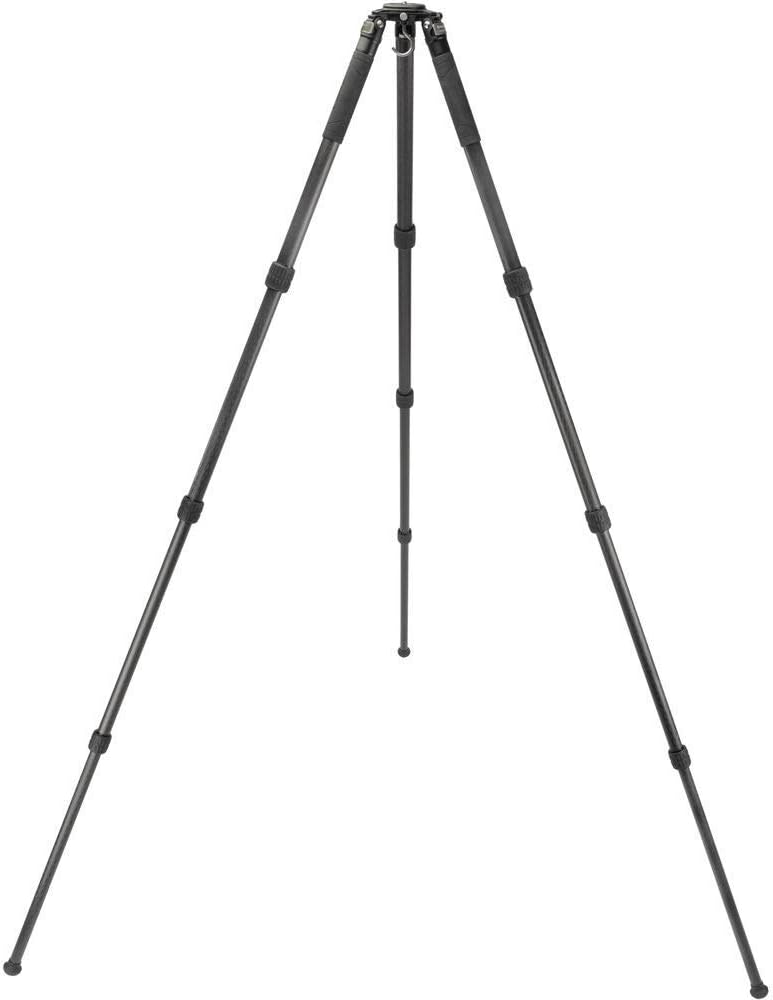
Image: The Robus RC-8860 tripod fully extended, showcasing its carbon fiber legs and stable design.

Image: Illustration demonstrating the three variable leg angles (25°, 55°, 85°) for versatile positioning.
Opere
- Mete Ekipman an Sekirite: Always ensure your camera, lens, and tripod head are securely mounted and tightened before use.
- Tcheke estabilite: Before leaving your equipment unattended, gently test the tripod's stability to ensure all locks are engaged and the setup is balanced.
- Interchanging Feet: The tripod comes with modular rubber feet, spiked feet, and wide rubber feet. To change feet, unscrew the current feet from the 3/8"-16 socket at the end of each leg and screw in the desired type. This allows adaptation to various terrains.
- Using the Bubble Level: Utilize the integrated bubble level to ensure your tripod is perfectly level for accurate shots.
- Pliye pou transpò: To fold the tripod, retract all leg sections by loosening twist locks and pushing them in. Then, fold the legs upwards towards the central column. Two legs feature tactile rubber grips for comfortable carrying.

Imaj: Gwo plan view of the interchangeable tripod feet, including standard rubber, spiked, and wide rubber options.
Antretyen
- Netwayaj: After use, especially in dusty or sandy environments, wipe down the tripod legs and locks with a clean, damp twal. Evite itilize pwodwi chimik piman bouk yo.
- Lubrifikasyon: Periodically check the leg locks and moving parts for smooth operation. If necessary, apply a small amount of silicone-based lubricant to the leg sections to maintain smooth extension and retraction.
- Depo: Store the tripod in a dry, clean environment, preferably in its carrying case, to protect it from dust and moisture.
- Enspeksyon: Regularly inspect all screws, bolts, and connections for tightness. Tighten any loose components to ensure continued stability and safety.
Depanaj
- Legs are Stiff to Fold/Extend: If the legs feel stiff, use an Allen wrench to slightly loosen the screws connecting each leg to the spider base. Adjust incrementally until the desired tension is achieved. Avoid over-loosening, as this can cause the legs to become too loose.
- Tripod Not Level: Ensure all leg sections are fully extended and locked. Verify that the leg angle locks are securely engaged. Use the built-in bubble level to make fine adjustments.
- Equipment Wobbles: Check that the tripod head and camera are securely mounted. Ensure all leg locks are fully tightened. If using a heavy setup, consider adding weight to the tripod's hook for increased stability.
Espesifikasyon
| Kapasite chaj | 77 lb / 34.93 kg |
| Maksimòm Wotè Travay | 63.8" / 162.1 cm (78.6" / 199.6 cm with optional center column) |
| Minimòm Wotè Travay | 4 pous / 10.2 santimèt |
| Longè ki plwaye | 24.5 pous / 62.23 santimèt |
| Head Mount Kalite | 3/8"-16 Screw (interchangeable with 75mm video bowl) |
| Pwa | 6.3 lb / 2.86 kg |
| Materyèl | Aluminum Alloy, 10x Carbon Fiber |
| Nivo jarèt | Wi |
| Janm Lock Kalite | Tòde Lock |
| Pozisyon janm yo | 3 Positions (25°, 55°, 85°) |
| Endepandan Janm Gaye | Wi |
| Seksyon Janm | 4 |
| Dyamèt Janm | 36 mm, 32 mm, 28 mm, 25 mm |
| Tripod Feet Features | Modular Rubber, Spiked, Wide Feet |
Garanti
The Robus RC-8860 Vantage Series 5 Carbon Fiber Tripod comes with a Garanti 10-ane limite. Please retain your proof of purchase for warranty claims. For detailed terms and conditions, refer to the official Robus websit oswa kontakte sipò kliyan.
Sipò
For technical assistance, spare parts, or further inquiries regarding your Robus RC-8860 tripod, please visit the official Robus websit entènèt la oubyen kontakte depatman sèvis kliyan yo. Anjeneral, ou ka jwenn enfòmasyon pou kontakte yo sou sit fabrikan an. websit oswa anbalaj pwodwi a.