1. Entwodiksyon
This manual provides essential information for the safe and efficient operation of your Vonyx CDJ450 DJ Workstation. Please read it thoroughly before using the device and retain it for future reference. The Vonyx CDJ450 is a versatile DJ workstation featuring dual CD/MP3 players, Bluetooth connectivity, two USB ports, and a 2-channel mixer, designed for comprehensive audio control.
2. Enstriksyon Sekirite
- Asire ke ekipman pou pouvwa a matche ak voltage espesifye sou inite a.
- Pa ekspoze aparèy la anba lapli oswa imidite pou evite chòk elektrik.
- Evite mete aparèy la toupre sous chalè oswa anba limyè solèy dirèk.
- Pa ouvri c laasing; konfye tout antretyen bay pèsonèl kalifye.
- Kenbe ouvèti vantilasyon yo klè pou anpeche surchof.
- Dekonekte kòd kouran an pandan tanpèt zèklè oswa lè ou pa itilize li pou yon bon bout tan.
3. Pwodwi souview
The Vonyx CDJ450 integrates two media players and a central mixer into a single unit, offering a compact and powerful solution for DJs.

Figi 3.1: Top-desann view of the Vonyx CDJ450 DJ Workstation, showing the dual players and central mixer controls.

Figi 3.2: Angle view of the workstation, highlighting its compact design and accessible controls.

Figi 3.3: Close-up of the central mixer and player controls, including jog wheels, pitch faders, and display screens.

Figi 3.4: USB ports located on the top panel, demonstrating USB drive connectivity for MP3 playback.

Figi 3.5: Devan view with both CD trays open, ready for disc insertion.

Figi 3.6: Detaye view of a player's display, showing track information, and associated playback controls.
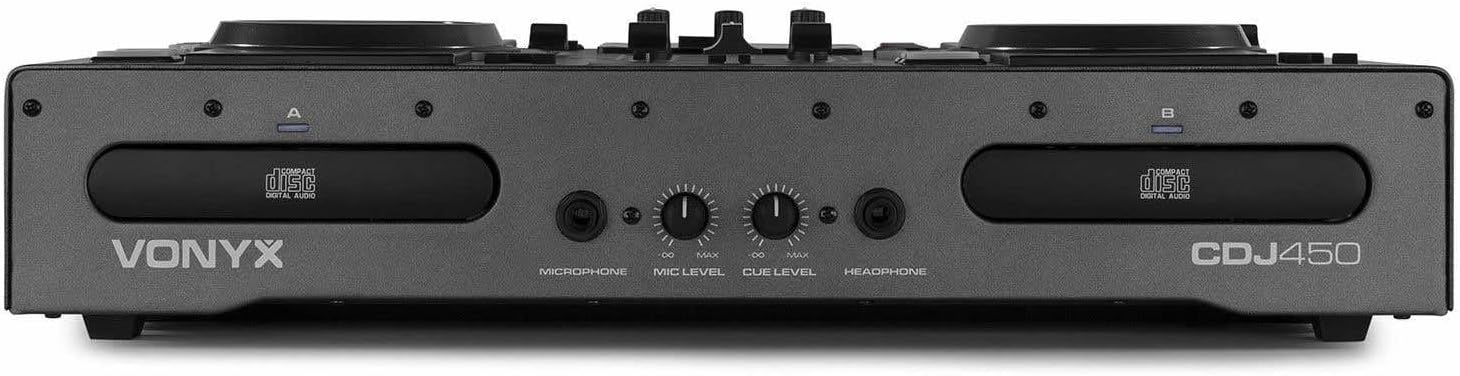
Figi 3.7: Front panel featuring microphone input, microphone level control, cue level, and headphone output.

Figi 3.8: Rear panel showing power input, main outputs (XLR, RCA), record output, USB Type-B port, and switchable Phono/Line inputs.
4. Enstalasyon
- Plasman: Place the CDJ450 on a stable, flat surface with adequate ventilation.
- Koneksyon pouvwa: Connect the included power cable to the unit's power input and then to a suitable wall outlet. Ensure the power switch is in the OFF position before connecting.
- Sòti odyo: Connect the main outputs (XLR or RCA) to your amplifier, powered speakers, or PA system.
- Aparèy Ekstèn (Si ou vle): Connect external audio sources (e.g., turntables, additional CD players) to the Phono/Line inputs on the rear panel. Use the switches to select the correct input type.
- Microphone/Headphones: Connect your microphone to the XLR-DJ input or the 6.3mm jack on the front. Plug your headphones into the 3.5mm jack on the front.
- Koneksyon USB (Si ou vle): For computer control or recording, connect a USB Type-B cable from the unit to your computer.
5. Operasyon Enstriksyon
5.1. Power On/Off
Flip the power switch on the rear panel to the 'ON' position. The displays will illuminate. To power off, flip the switch back to 'OFF'.
5.2. Media Playback (CD/USB)
- CD lèktur: Insert an audio CD or MP3 CD into one of the CD trays. The unit will automatically read the disc.
- USB lèktur: Mete yon kondwi flash USB ki gen MP3 files into one of the USB ports on the top panel.
- Seleksyon sous: Use the 'SOURCE' button above each player to switch between CD and USB input.
- Seleksyon Track: Use the navigation buttons or the numeric keypad to select tracks. The integrated folder search function allows quick access to files sou kle USB.
- Kontwòl lèktur: Use the 'PLAY/PAUSE' and 'CUE' buttons for standard playback control.
5.3. Bluetooth Koneksyon
- Aktive Bluetooth sou telefòn entelijan ou, tablèt ou, oswa òdinatè pòtab ou.
- Select 'Bluetooth' as the source on the desired player.
- Chèche pou available devices on your external device and select 'Vonyx CDJ450'.
- Once paired, you can stream audio wirelessly to the workstation.
5.4. Mixer Functions
- Chèn Faders: Adjust the volume level for each player (Channel A and B).
- Kontwòl EQ: Use the HIGH, MID, and LOW knobs for each channel to adjust the frequency response.
- Gain/Level: Adjust the input gain for each channel to match levels.
- Crossfader: Blend between Channel A and Channel B.
- Mèt Sòti: Control the overall volume of the mix.
- Mikwofòn: Adjust microphone volume using the 'MIC LEVEL' knob on the front panel.
- kas ekoutè: Use the 'CUE LEVEL' knob to adjust headphone volume and the 'CUE' buttons on each channel to monitor specific sources.
5.5. Karakteristik espesyal
- Grate: Use the jog wheels for scratching effects.
- Ranvèse: Play audio in reverse.
- Kraze: Create a brake effect on playback.
- Anplasman: Adjust the playback speed and pitch using the pitch faders.
- Bouk: Use 'LOOP IN', 'LOOP OUT', and 'RELOOP' buttons to create and manage seamless loops.
6. Koneksyon
The CDJ450 offers a variety of input and output options:
- Sòti:
- 2 x XLR Speaker Outputs
- 1 x RCA Master Output
- 1 x RCA Recorder Output
- Antre:
- 2 x Switchable Phono/Line RCA Inputs (for external devices)
- 1 x XLR-DJ Microphone Input
- 1 x 6.3mm Jack Microphone Input (front)
- Digital/Control:
- 2 x USB Ports (Type-A, top panel, for media playback)
- 1 x USB Type-B Port (rear, for computer connection)
- Koneksyon Bluetooth
- Siveyans:
- 1 x 3.5mm Jack Headphone Output (front)
7. Antretyen
- Netwayaj: Sèvi ak yon twal mou epi sèk pou netwaye deyò aparèy la. Pa sèvi ak pwodui netwayaj abrazif oswa solvan.
- CD Trays: Keep CD trays free of dust and debris. Avoid touching the lens inside the CD player.
- Depo: Lè w pa ap itilize aparèy la, sere l nan yon kote ki fre epi sèk, lwen limyè solèy dirèk ak tanperati ekstrèm.
NAN. Depanaj
| Pwoblèm | Kòz posib | Solisyon |
|---|---|---|
| Pa gen pouvwa | Kab kouran an dekonekte; switch kouran an etenn; priz kouran an gen pwoblèm. | Check power cable connection; ensure power switch is ON; try a different outlet. |
| Pa gen pwodiksyon son | Volume levels too low; incorrect input/output connections; external amplifier koupe. | Increase master/channel volumes; verify all audio connections; ensure external amplifier se sou. |
| CD not playing/reading | Disc dirty or scratched; incorrect disc format; source not selected. | Clean or replace disc; ensure disc is audio CD or MP3 CD; select 'CD' source. |
| USB pa jwe | Kle USB a pa fòma byen; li pa sipòte file type; source not selected. | Asire w ke USB a fòma FAT32; sèlman MP3 files supported; select 'USB' source. |
| Bluetooth pa konekte | Bluetooth not enabled on external device; unit not in pairing mode; interference. | Enable Bluetooth on your device; select 'Bluetooth' source on CDJ450; try re-pairing. |
9. Espesifikasyon
- Non modèl: CDJ450
- Koneksyon Teknoloji: Bluetooth, USB
- Kantite Disk: 2
- Fòma odyo sipòte: CD, MP3, USB, AAC (Bluetooth)
- Kalite konektè: Bluetooth, Jack 6.35 mm, RCA, USB, XLR 3-pin
- Kantite chanèl: 2
- Pwa atik: 7.8 Kilogram
- Aparèy konpatib: Ekoutè, Oratè
- Manifakti: Vonyx
10. Garanti ak sipò
For warranty information, please refer to the documentation provided at the time of purchase or contact your retailer. For technical support, please visit the official Vonyx websit oswa kontakte depatman sèvis kliyan yo.


