Enstriksyon Sekirite Enpòtan
Please read this manual carefully before using the appliance and keep it for future reference. Incorrect use may result in electric shock, fire, or serious injury.
- Asire ekipman pou pouvwa a voltage koresponn ak etikèt klasman ki sou aparèy la.
- Pa plonje aparèy la, kòd kouran an, oswa ploge a nan dlo oswa lòt likid.
- Unplug the appliance from the power outlet when not in use, before filling water, or before cleaning.
- Pa opere aparèy la ak yon kòd oswa ploge ki domaje, oswa apre aparèy la fonksyone mal oswa li te domaje nan nenpòt fason.
- Kenbe aparèy la pa rive jwenn timoun yo.
- Pa bloke antre oswa priz lè yo.
- Mete aparèy la sou yon sifas ki estab, ki plat.
- Only use clean water in the water tank.
Pwodwi souview
Karakteristik kle
- Fonksyonalite 3-an-1: Air Cooler, Humidifier, and Purifier.
- Kapasite tank dlo: 4 Liters.
- Vitès fanatik: 3 adjustable speeds.
- Osilasyon: Oscillating ventilation grille for wide air distribution.
- Revèy: Revèy pwogramasyon 7 èdtan.
- Kontwòl: Operable via control panel and remote control.
- Mobilite: Ekipe ak 4 wou pou deplase fasil.
Pwodwi konpozan
Familiarize yourself with the main parts of your LIVOO Mobile Air Cooler.

Imaj: Devan view of the LIVOO Mobile Air Cooler, displaying the air outlet grille and the transparent water level indicator at the bottom.

Imaj: Side view of the LIVOO Mobile Air Cooler, highlighting its compact design and the four castor wheels for portability.
Enstalasyon
Debake
- Retire radyatè lè a nan anbalaj li avèk prekosyon.
- Remove all packaging materials and ensure no parts are missing or damaged.
- Kenbe materyèl anbalaj lwen timoun yo.
Konble tank dlo
- Asire w ke aparèy la debranche nan priz kouran an.
- Locate the water tank. For this model, the tank is typically accessed from the rear or bottom.
- Fill the tank with clean, cool water. Do not exceed the maximum fill line indicated on the tank. The capacity is 4 liters.
- For enhanced cooling, you may add ice packs (not included) to the water tank if a dedicated compartment is available.
- Fèmen kouvèti tank dlo a byen fèm.
Pozisyon inite a
Place the air cooler on a firm, level surface. Ensure there is adequate space around the unit (at least 20 cm) for proper air circulation. The integrated wheels allow for easy repositioning.
Operasyon
Once the unit is set up and the water tank is filled, plug the power cord into a suitable electrical outlet.
Kontwòl Panel Plis paseview
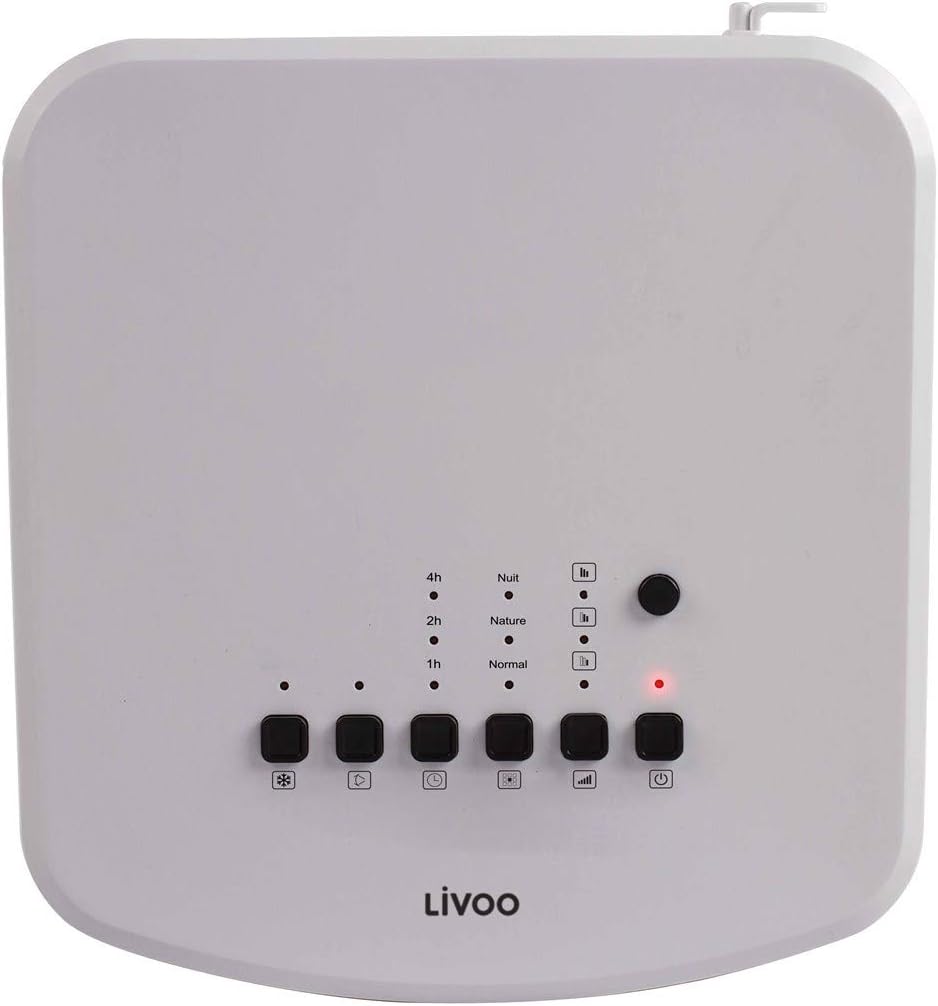
Imaj: Top-mounted control panel of the air cooler, featuring buttons for power, mode, speed, oscillation, and cooling function, along with indicator lights for timer and mode settings.
- Bouton pouvwa (⏻): Li limen oswa etenn aparèy la.
- Bouton Mòd (□□□): Chanje nan mòd Nòmal, Lanati, ak Lannwit.
- Bouton Vitès (|||): Ajiste vitès vantilatè a (Ba, Mwayen, Wo).
- Bouton Osilasyon (⟳): Activates or deactivates the oscillating grille.
- Cooling/Humidifier Button (❄): Engages the cooling and humidifying function.
- Bouton revèy (L): Sets the operating timer (1h, 2h, 4h, up to 7 hours).
Remote kontwòl souview

Imaj: The remote control for the air cooler, featuring buttons for power, mode, speed, oscillation, cooling, and timer functions, mirroring the main control panel.
The remote control provides the same functionality as the control panel for convenient operation from a distance. Ensure batteries are correctly inserted.
Fonksyon
- Air Cooler: Uses water evaporation to cool the air. Activate by pressing the 'Cooling' button.
- Imidite: Adds moisture to the air, beneficial in dry environments. This function is integrated with the cooling feature.
- Purifier: Filters dust and other particles from the air as it passes through the unit. This function operates whenever the fan is on.
Anviwònman vitès
Press the 'Speed' button to cycle through Low, Medium, and High fan speeds to adjust airflow intensity.
Fonksyon osilasyon
Press the 'Oscillation' button to activate the automatic swing of the vertical louvers, distributing cool air over a wider area. Press again to stop oscillation.
Fonksyon revèy
Press the 'Timer' button repeatedly to set the desired operating time (1, 2, 4 hours, or combinations up to 7 hours). The unit will automatically turn off after the set time.
Mòd
- Mòd nòmal: Sif lè konstan nan vitès ki chwazi a.
- Mòd nati: Simile yon briz natirèl lè li varye vitès vantilatè a.
- Mòd lannwit: Li fonksyone nan yon vitès ki pi ba, pi trankil pou yon dòmi trankil.
Antretyen
Regular maintenance ensures optimal performance and extends the lifespan of your air cooler. Always unplug the unit before cleaning.
Netwaye inite a
- Siye sifas eksteryè yo ak yon mou, damp twal. Pa sèvi ak pwodui netwayaj abrazif oswa solvang.
- Clean the air inlet and outlet grilles with a soft brush or vacuum cleaner to remove dust accumulation.
Netwayaj tank dlo
To prevent mold and mildew growth, clean the water tank regularly, especially if the unit is used frequently.
- Vide nenpòt dlo ki rete nan tank la.
- Remove the water tank (if detachable) and wash it with mild soap and water. Rinse thoroughly.
- For stubborn deposits, use a solution of white vinegar and water, let it sit for 30 minutes, then scrub and rinse.
- Kite tank la seche nèt nan lè a anvan ou rasanble li.
Netwayaj filtè
The air cooler includes a filter for air purification. This filter should be cleaned periodically.
- Locate the air filter, usually at the back of the unit.
- Retire filtè a avèk prekosyon.
- Rinse the filter under running water to remove dust and debris. For deeper cleaning, use a soft brush.
- Allow the filter to air dry completely before placing it back into the unit. Do not use the unit with a wet filter.
Depo
Lè w ap estoke aparèy la pou yon peryòd tan pwolonje:
- Asire w ke tank dlo a vid epi pwòp.
- Clean the entire unit as described above.
- Sere aparèy la nan yon kote ki fre epi sèk, lwen limyè solèy dirèk ak tanperati ekstrèm.
Depanaj
If you encounter issues with your air cooler, refer to the following common problems and solutions:
| Pwoblèm | Kòz posib | Solisyon |
|---|---|---|
| Inite pa limen | Pa gen ekipman pou pouvwa Bouton pouvwa pa peze | Check if the power cord is securely plugged in. Check the power outlet. Peze bouton an pouvwa (⏻) sou panèl kontwòl la oswa sou kontwòl remote la. |
| Pa gen efè refwadisman | Tank dlo vid Cooling function not activated Tanperati chanm twò wo | Ranpli tank dlo a. Press the Cooling/Humidifier button (❄). Evaporative coolers are most effective in dry climates. For very hot and humid conditions, cooling effect may be limited. |
| Flux lè fèb | Vitès fanatik twò ba Antre/sorti lè yo bloke Filtre sal | Increase fan speed using the Speed button (|||). Asire w pa gen anyen ki bloke griyaj yo. Netwaye filtè lè a dapre enstriksyon antretyen yo. |
| Dezagreyab odè | Stagnan dlo nan tank la Filtre sal | Drain and clean the water tank thoroughly. Use fresh water. Netwaye filtè lè a. |
| Remote kontwòl pa travay | Batri depui oswa mal mete Obstriksyon ant kontwòl remote la ak inite a | Ranplase pil yo epi asire w ke polarite a kòrèk. Retire tout objè ki bloke chemen siyal la. |
Espesifikasyon
Technical details for the LIVOO Mobile Air Cooler DOM389.
| Karakteristik | Detay |
|---|---|
| Mak | Livoo |
| Nimewo Modèl | DOM389 |
| Koulè | Nwa ak blan |
| Dimansyon pwodwi (L x W x H) | 26 x 24 x 57 cm |
| Pwa atik | 5.3 Kilogram |
| Kapasite (Tank Dlo) | 4 lit |
| Nivo bri | 65 Desibèl |
| Kalite kontwòl | Kontwòl remote, panèl kontwòl |
| Karakteristik espesyal | Air Cooler, Humidifier, Purifier |
| Kalite aliye | Mount Floor |
| Materyèl | Metal (and plastic components) |

Imaj: Dimensional diagram of the air cooler, indicating a height of 57cm, width of 24cm, and depth of 26cm.
Garanti ak sipò
This product is covered by a manufacturer's warranty. For specific warranty terms and conditions, please refer to the warranty card included with your purchase or contact your retailer.
For technical support, spare parts, or service inquiries, please contact the Livoo customer service department or your local distributor. Contact information can typically be found on the Livoo official websit la oswa dokiman acha ou a.


