1. Entwodiksyon
Thank you for choosing the Antec P101S Silent Performance Mid-Tower PC Case. This manual provides essential information for the proper installation, operation, and maintenance of your new computer case. Please read this manual thoroughly before beginning assembly to ensure optimal performance and longevity of your system.
The Antec P101S is engineered for quiet computing, featuring sound-dampening panels and efficient cooling solutions, making it ideal for users who prioritize a silent and high-performance computing environment.
2. Karakteristik kle
- Operasyon an silans: Equipped with sound-dampening top, front, and side panels for quiet computing.
- Extensive Drive Bays: Supports 11 drive bays, including 1 x 5.25" ODD bay, 8 x 3.5" HDD/2.5" SSD removable bays, and 2 x dedicated 2.5" SSD bays.
- Refwadisman Avanse: Includes 4 pre-installed 120/140mm cooling fans (3 front, 1 rear). Supports up to 4 fan mounts with a maximum of 360mm radiator support for enhanced cooling.
- Convenient I/O Panel: Features power/reset buttons, a fan speed controller (High/Stop/Low), Audio/Mic ports, 2 x USB 2.0, and 2 x USB 3.0 ports with white LED lighting.
- Broad Motherboard Compatibility: Supports E-ATX, ATX, Micro-ATX, and ITX motherboards.
- Generous Component Clearance: Accommodates CPU coolers up to 180mm, graphics cards up to 450mm, and PSUs up to 290mm in length.
3. Pake kontni
Tanpri verifye ke tout atik yo prezan nan pakè ou a:
- Antec P101S Mid-Tower PC Case
- 3 x 120mm Front Fans (Pre-installed)
- 1 x 140mm Rear Fan (Pre-installed)
- Accessory Box (screws, cable ties, user manual)
4. Konpozan souview
Familiarize yourself with the various parts of your Antec P101S case.

Figure 1: Front, Back, Left, and Right views of the Antec P101S case, illustrating its external design and panel layout.

Figi 2: Enteryè view of the Antec P101S, showing the spacious layout, drive bays, and fan mounts.

Figure 3: Close-up of the top I/O panel, highlighting the power, reset, fan speed controller, audio, USB 2.0, and USB 3.0 ports.
5. Enstalasyon ak Enstalasyon
Follow these steps to install your components into the Antec P101S case.
5.1 Prepare Ka a
- Retire Panno Side: Unscrew the thumbscrews on the rear of the side panels and slide them backward to remove.
- Aksè Enteryè: The interior is now accessible for component installation.
5.2 Enstalasyon mèr
- Enstale Standoffs: Ensure the correct motherboard standoffs are installed for your motherboard form factor (ATX, Micro-ATX, ITX, E-ATX).
- Mete kat manman an: Aliyen kat manman ou avèk anpil atansyon ak distans yo ak ouvèti plak pwotèj I/O a.
- Kat manman an sekirite: Fasten the motherboard with the provided screws.
5.3 Enstalasyon kondwi
The P101S offers versatile drive mounting options.
5.3.1 3.5" HDD / 2.5" SSD Removable Bays

Figure 4: Illustration of the various drive bay locations within the Antec P101S case.
- Retire plato kondwi a: Pull out an empty 3.5" drive tray from the drive cage.
- Enstale Drive la: For a 3.5" HDD, flex the tray and insert the drive. For a 2.5" SSD, secure it to the bottom of the tray with screws.
- Re-mete plato a: Slide the loaded tray back into the drive cage until it clicks into place.
5.3.2 Dedicated 2.5" SSD Bays
Two dedicated 2.5" SSD mounts are located behind the motherboard tray.
- SSD an sekirite: Attach your 2.5" SSD to the dedicated mounting bracket using screws.
- Sipò pou monte: Secure the bracket with the SSD to the chassis behind the motherboard tray.
5.3.3 5.25" ODD Bay
- Remove Front Bezel: Gently remove the 5.25" bay cover from the front bezel.
- Insert ODD: Slide your optical disc drive into the bay from the front until it aligns with the screw holes.
- Secure ODD: Fasten the ODD with screws.
5.4 Enstalasyon Kat Grafik ak Kat Ekspansyon
- Retire kouvèti plas PCIe yo: Unscrew and remove the necessary PCIe slot covers from the rear of the case.
- Mete kat: Carefully insert your graphics card or other expansion card into the appropriate PCIe slot on the motherboard.
- Kat Sekirite: Fasten the card with screws.
5.5 Enstalasyon Power Supply Unit (PSU).
- Pozisyon PSU: Glise PSU a nan konpatiman ki fèt pou li a, anba dèyè bwat la.
- Alimantasyon elektrik an sekirite: Fasten the PSU to the rear of the chassis with screws.
5.6 Jesyon kab
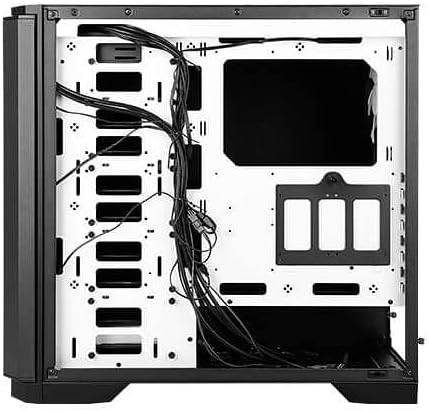
Figi 5: Dèyè view of the motherboard tray, showing cable routing channels and tie-down points for organized cable management.
Utilize the cable routing holes and tie-down points behind the motherboard tray to organize cables for improved airflow and aesthetics.
6. Operating Your PC Case
6.1 Power On/Off
Press the large power button on the top I/O panel to turn your system on or off.
6.2 Kontwòl vitès fanatik
Use the fan speed controller switch on the top I/O panel to adjust the speed of the pre-installed fans:
- Segondè: Maximum fan speed for optimal cooling.
- Ba: Reduced fan speed for quieter operation.
- Sispann: Fans are turned off.
7. Antretyen
7.1 Netwayaj Filtè Pousyè yo
Regularly clean the dust filters located at the front, top, and bottom of the case to maintain optimal airflow and prevent dust buildup. The front filter is easily removable for cleaning.
7.2 Netwayaj jeneral
Use a soft, dry cloth to clean the exterior of the case. For stubborn marks, a slightly damp Ou ka itilize yon twal, epi apre sa ou ka seche l. Evite pwodui netwayaj abrazif oswa solvan.
NAN. Depanaj
- Sistèm nan pa limen: Double-check all power connections, including the 24-pin ATX, 8-pin CPU, and GPU power cables. Ensure the PSU switch is in the 'On' position.
- Vantilatè yo pa vire: Verify that the fan speed controller on the I/O panel is not set to 'Stop'. Check fan connections to the motherboard or fan hub.
- Surchof: Ensure all fans are spinning correctly and dust filters are clean. Verify proper component installation and thermal paste application.
- Pò USB pa travay: Check the internal USB header connections from the I/O panel to the motherboard.
9. Espesifikasyon
| Karakteristik | Detay |
|---|---|
| Non modèl | P101S Silent |
| Kalite Ka | Mid-Tower |
| Mèr konpatibilite | E-ATX, ATX, Micro-ATX, ITX |
| Dimansyon (LxWxH) | 20.74 x 9.13 x 19.92 pous |
| Pwa atik | 26.1 liv |
| Materyèl | Alloy Steel |
| Kondwi Bays | 1 x 5.25" ODD, 8 x 3.5" HDD/2.5" SSD, 2 x 2.5" SSD |
| Fanatik pre-enstale | 3 x 120mm Front, 1 x 140mm Rear |
| Sipò pou radyatè | Front: Up to 360mm, Rear: Up to 140mm |
| Max CPU Cooler Wotè | 180mm |
| Max GPU Longè | 450mm |
| Max PSU Longè | 290mm |
| Front I / O pò | 2 x USB 2.0, 2 x USB 3.0, Audio/Mic, Power, Reset, Fan Speed Controller |
10. Garanti ak sipò
Pou enfòmasyon sou garanti a ak sipò teknik, tanpri al gade paj ofisyèl Antec la. website or contact your local Antec distributor. Keep your proof of purchase for warranty claims.
Ofisyèl Antec Websit: www.antec.com


