1. Entwodiksyon
This manual provides detailed instructions for the TRACER GAMEZONE IGNIS AVAGO 3050 4000DPI USB Gaming Mouse. Please read this manual thoroughly before using the product to ensure proper operation and to maximize your gaming experience.
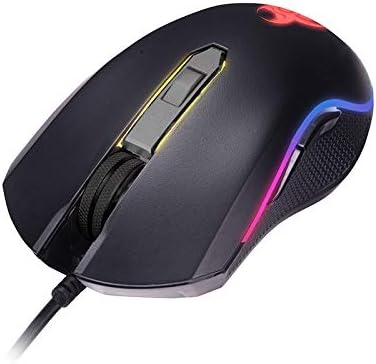
Imaj 1.1: Plis paseview of the TRACER GAMEZONE IGNIS AVAGO 3050 Gaming Mouse. This image shows the mouse from a slightly elevated angle, highlighting its ergonomic design, scroll wheel, and the integrated RGB lighting along its sides.
2. Pake kontni
Asire w tout atik yo prezan nan pakè a:
- TRACER GAMEZONE IGNIS AVAGO 3050 4000DPI USB Gaming Mouse
- Manyèl Itilizatè (dokiman sa a)
3. Pwodwi Features
- High Precision Optical Laser: Equipped with an AVAGO 3050 optical sensor for superior tracking accuracy.
- DPI reglabl: Supports DPI switching up to 4000 DPI for customizable sensitivity.
- 6 Customizable Buttons: Provides six programmable buttons for enhanced control during gameplay.
- Ekleraj RGB: Integrated internal RGB lighting for a modern and aggressive aesthetic.
- Koneksyon USB: Standard USB connection for wide compatibility with PC and Mac platforms.
- Sliding Base: Designed for smooth operation on various surfaces, including mouse mats.

Imaj 3.1: Kote view of the gaming mouse, showcasing the ergonomic shape, textured grip on the side, and the vibrant RGB light strip running along the edge.
4. Enstalasyon
Follow these steps to set up your TRACER GAMEZONE IGNIS AVAGO 3050 Gaming Mouse:
- Depake Sourit la: Retire sourit la nan anbalaj li avèk prekosyon.
- Konekte ak òdinatè: Plug the USB connector of the mouse into an available USB port on your PC or Mac.
- Enstalasyon chofè: The mouse is plug-and-play. Your operating system will automatically detect and install the necessary drivers. No additional software installation is typically required for basic functionality.
- Plasman: Place the mouse on a flat, clean surface or a mouse pad for optimal performance.

Imaj 4.1: Devan view of the gaming mouse, showing the USB cable extending from the front, the scroll wheel, and the primary left and right click buttons.
5. Operasyon Enstriksyon
The TRACER GAMEZONE IGNIS AVAGO 3050 Gaming Mouse is designed for intuitive use. Here are the basic operating principles:
5.1. Fonksyon debaz sourit la
- Klike Goch: Bouton aksyon prensipal la.
- Klike sou dwa: Secondary action button, often used for context menus.
- wou woulo liv: Used for vertical scrolling. Can also be pressed as a middle button.
5.2. Ajisteman DPI
The mouse features a dedicated DPI button (usually located behind the scroll wheel) to cycle through different sensitivity settings. Press this button to instantly change the DPI (Dots Per Inch) to match your preference or game requirements. The mouse supports multiple DPI levels up to 4000 DPI.
5.3. Button Customization
The TRACER GAMEZONE IGNIS AVAGO 3050 mouse has 6 customizable buttons. While basic functionality is plug-and-play, advanced customization (such as remapping buttons or creating macros) typically requires third-party software compatible with generic gaming mice, as Tracer may not provide proprietary software for this model. Refer to your operating system's mouse settings or third-party utility software for advanced configuration options.
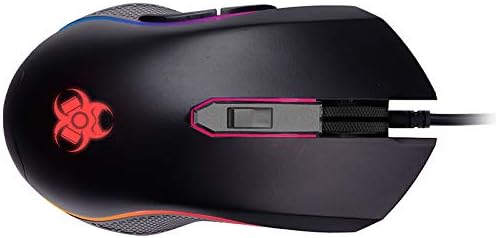
Imaj 5.1: Anwo-anba view of the gaming mouse, clearly showing the scroll wheel, the DPI adjustment button behind it, and the left and right click buttons. The Tracer logo with RGB lighting is visible at the rear.
6. Antretyen
To ensure the longevity and optimal performance of your gaming mouse, follow these maintenance guidelines:
- Netwayaj: Sèvi ak yon twal mou epi sèk pou siye sifas sourit la. Pou pousyè tè ki difisil pou retire, siye yon ti kras.ampRense twal la avèk dlo oswa yon solisyon netwayaj dou. Evite pwodui chimik ki agresif oswa materyèl abrazif.
- Netwayaj Capteur: Periodically clean the optical sensor on the underside of the mouse with a cotton swab lightly dampened with rubbing alcohol. Ensure no lint is left behind.
- Swen kab: Evite pliye byen file oswa rale kab USB a twòp pou anpeche li domaje.
- Depo: Store the mouse in a clean, dry environment away from extreme temperatures and direct sunlight when not in use.
NAN. Depanaj
If you encounter issues with your TRACER GAMEZONE IGNIS AVAGO 3050 Gaming Mouse, refer to the following common problems and solutions:
| Pwoblèm | Kòz posib | Solisyon |
|---|---|---|
| Sourit pa reponn | Koneksyon USB ki lach, pò USB ki defektye, pwoblèm chofè. |
|
| Kisè a pa fiks oswa li pa deplase byen | Capteur optik sal, sifas ki pa apwopriye, entèferans lojisyèl. |
|
| Bouton DPI a pa chanje sansiblite a | Button malfunction, software conflict. |
|
8. Espesifikasyon
| Karakteristik | Detay |
|---|---|
| Non modèl | GAMEZONE IGNIS AVAGO 3050 4000DPI |
| Nimewo Modèl Atik | TRAMYS46085 |
| Mak | Tracer |
| Koneksyon Teknoloji | USB |
| Teknoloji deteksyon mouvman | Laser, Optical (AVAGO 3050) |
| Ranje DPI | Jiska 4000 DPI (reglabl) |
| Kantite bouton | 6 |
| Platfòm pyès ki nan konpitè | Mac, PC |
| Pwa atik | 12.3 ons (apeprè 348.7 gram) |
| Dimansyon pake | 7.87 x 5.91 x 1.97 pous |
| Manifakti | TRACER |
| Premye Dat ki disponib | 4 fevriye 2019 |
9. Garanti ak sipò
For warranty information and technical support, please refer to the official Tracer website or contact your local retailer where the product was purchased. Keep your proof of purchase for warranty claims.
Manifakti: TRACER


