Pwodwi souview
The Daytech Wireless Caregiver Alert System is designed to provide peace of mind for caregivers and independence for those needing assistance. This system includes multiple portable receivers and call buttons, enabling quick and reliable communication within a significant range. It is ideal for elderly individuals, those with mobility challenges, or anyone who may require immediate help.

Image: The complete Daytech Wireless Caregiver Alert System, showing three white receivers and two green and white call buttons.
Kontni pake
- 3 x Portable Receivers
- 2 x Caregiver Call Buttons
- AAA Batteries (included for receivers)
Enstriksyon Enstalasyon
- Mete pil: Open the battery compartment on the back of each receiver and insert 3x AAA batteries (included).
- Chwazi sonri: On the receiver, use the "Forward" and "Backward" buttons to cycle through the 55 available ringtones. Stop when you find your preferred alert sound.
- Pair Receiver: Press and hold the "Volume Control" key on the receiver until you hear a chime, indicating it is ready for pairing.
- Pair Call Button: While the receiver is in pairing mode, press the "Call" button on the desired call unit. A chime from the receiver confirms successful pairing. Repeat for all call buttons.

Image: A visual guide illustrating the four steps for setting up the receiver and pairing it with a call button, including battery insertion and ringtone selection.
Enstriksyon Operasyon
Once paired, the Daytech Wireless Caregiver Alert System is ready for use. The call buttons are designed for ease of access and can be positioned conveniently for the user.
- Initiate Call: To alert the caregiver, simply press the large "CALL" button on the call unit.
- Receive Alert: The paired receiver(s) will sound the selected ringtone and flash its LED indicator to notify the caregiver.
- Ajiste Volim: Use the volume control buttons on the side of the receiver to adjust the alert volume from 0 dB (mute) to 110 dB.
- Plasman: The call button can be worn around the neck using the included strap, or secured to a surface with the provided bracket or double-sided adhesive. Consider placing buttons in key areas such as the bedside, bathroom, or living room.
Video: An official product video demonstrating the Daytech Portable Caregiver Pager/Emergency Call Button Bell in various usage scenarios, highlighting its functionality and ease of use.
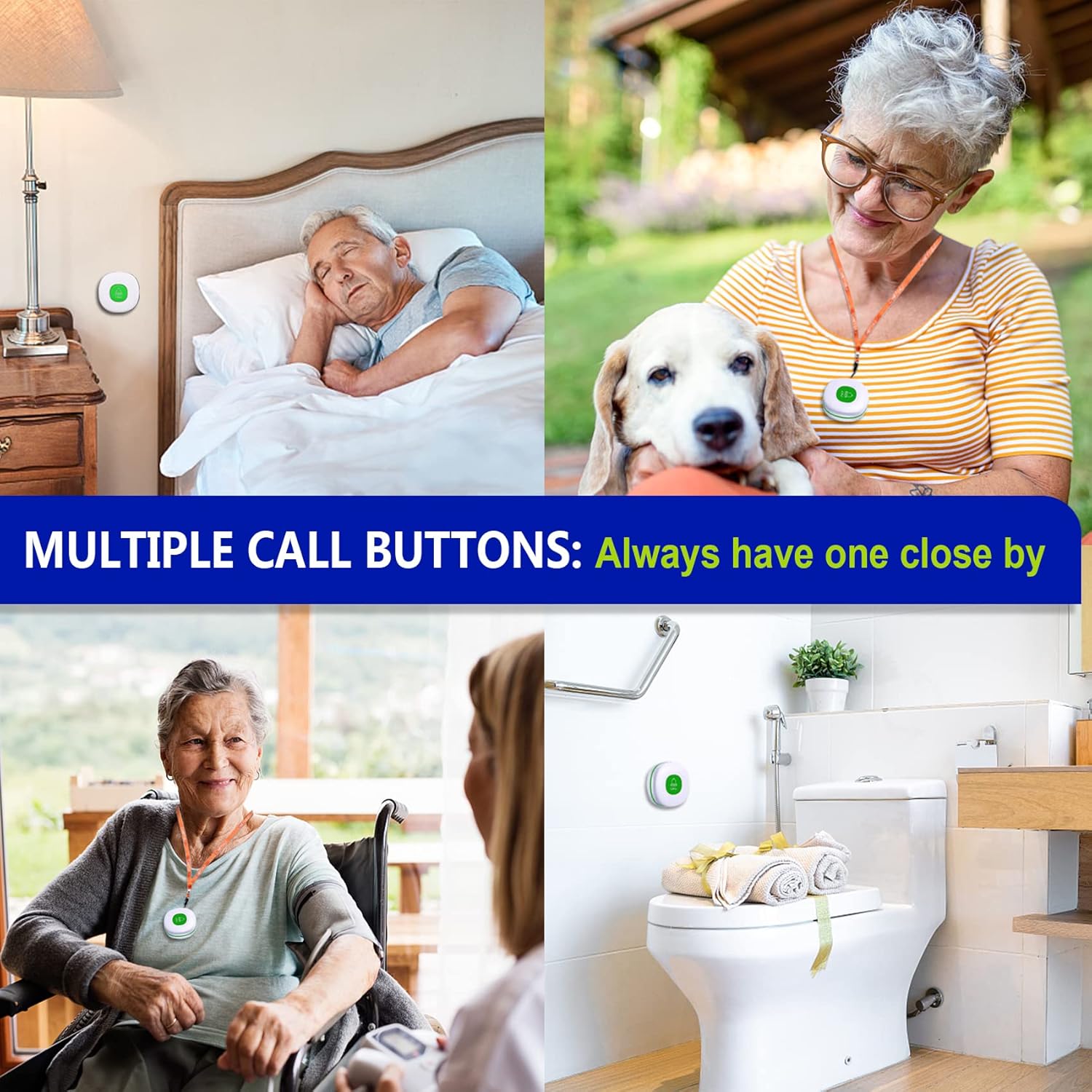
Imaj: Egzamples of optimal placement for the call button, including a bedside table, bathroom wall, and wheelchair, ensuring it is always within reach.
Karakteristik kle
- Ranje pwolonje: Operates effectively up to 500+ feet (approximately 90 meters) in open areas, allowing caregivers flexibility.
- Pòtabilite: Both receivers and call buttons are battery-operated, offering complete portability without being limited by power outlets.
- Dirab: Call buttons and receivers are IP55 rated, making them dustproof and resistant to water splashes. Constructed from sturdy ABS material for long-lasting use.
- Avètisman Customizable: Choose from 55 distinct ringtones and adjust volume levels from silent (0 dB) to very loud (110 dB).
- Endikatè vizyèl: LED indicators on the receiver provide visual alerts, beneficial for the hearing impaired.
- Fonksyon memwa: The system retains your selected ringtone and volume settings even after battery replacement.

Image: An illustration demonstrating the extensive 500ft (90m) operating range of the system, suitable for various home layouts.

Image: The call button is shown with water splashing, emphasizing its IP55 dustproof and waterproof capabilities, making it suitable for bathrooms or outdoor use.
Antretyen
To ensure the longevity and optimal performance of your Daytech Caregiver Alert System, follow these simple maintenance guidelines:
- Netwayaj: Wipe the surfaces of the receivers and call buttons with a soft, dry cloth. Avoid using abrasive cleaners or solvents.
- Ranplasman batri: Replace AAA batteries in the receivers as needed. The call buttons also contain a battery that may require replacement over time. Refer to the setup section for battery compartment access.
- Depo: Lè w pa itilize sistèm nan pou yon bon bout tan, sere l nan yon kote ki fre epi sèk, lwen limyè solèy dirèk ak tanperati ekstrèm.
Depanaj
| Pwoblèm | Kòz posib | Solisyon |
|---|---|---|
| Receiver does not sound/flash. | Low or dead batteries in receiver or call button; not paired; out of range. | Replace batteries in both units. Re-pair the receiver and call button. Ensure units are within the specified operating range. |
| Call button lanyard breaks or detaches easily. | Weak attachment point design. | Consider securing the lanyard internally by opening the call button case and routing the string around a screw mount before reassembling, if comfortable doing so. Alternatively, use the adhesive backing for fixed placement. |
| Interference or reduced range. | Thick walls, metal objects, or other wireless devices interfering. | Relocate receiver or call button to minimize obstructions. Avoid placing near large metal objects or other strong wireless signals. |
Espesifikasyon
- Mak: Daytech
- Nimewo Modèl: 3 Reseptè yo
- Metòd kontwòl: Remote
- Nivo bri: Jiska 110 dB
- Ranje maksimòm: 500+ Feet (approx. 90 meters)
- Dimansyon pwodwi: 3.2 x 3.2 x 5.91 inches (receivers)
- Pwa atik: 16 ons (pakè total)
- Batri: 6 AAA batteries required (included for receivers)
- Koulè: Green (call buttons)
- Evalyasyon ki enpèmeyab: IP55 (dustproof and splash-resistant)

Imaj: Detaye view of the receiver and call button, including their dimensions and battery specifications.
Garanti ak sipò
Daytech is committed to providing reliable products and excellent customer service. Your Daytech Wireless Caregiver Alert System comes with a full lifetime warranty ak yon money-back guarantee.
For any inquiries, technical assistance, or warranty claims, please contact Daytech customer service. Round-the-clock support is available to ensure your peace of mind.
For more information, visit the official Daytech store: Daytech Store on Amazon


