1. Entwodiksyon
This manual provides essential information for the safe and effective operation of your Rothenberger ROSCOPE Mini Inspection Camera. Please read these instructions carefully before using the device and retain them for future reference. The ROSCOPE Mini is a compact, portable inspection camera designed for visual inspection in hard-to-reach areas.
2. Enfòmasyon sou Sekirite
Toujou obsève prekosyon sekirite sa yo pou evite blesi ak domaj nan aparèy la:
- Do not immerse the main unit in water. Only the camera head is waterproof.
- Asire w ke pil yo byen mete dapre mak polarite yo.
- Pa eseye ouvri oswa modifye aparèy la. Konfye tout antretyen bay pèsonèl kalifye.
- Kenbe aparèy la lwen tanperati ekstrèm, limyè solèy dirèk, ak sibstans koroziv.
- Pwodui sa a gen pwodui chimik Eta Kalifòni konnen ki lakòz kansè ak domaj nesans oswa lòt domaj repwodiktif. Lave men w apre w fin manyen w.
3. Pake kontni
Verifye ke tout atik yo prezan nan pakè a:
- ROSCOPE Mini Inspection Camera (main unit with integrated camera cable)
- 4 pil AA

Figi 3.1: The ROSCOPE Mini Inspection Camera shown in its retail packaging, alongside the four included AA batteries.

Figi 3.2: A closer front view of the ROSCOPE Mini within its packaging, highlighting the device and the batteries.
4. Pwodwi souview
The Rothenberger ROSCOPE Mini is a compact inspection camera featuring a flexible camera with 4x digital zoom and a waterproof camera head. It is designed for easy handling and storage.

Figi 4.1: The Rothenberger ROSCOPE Mini Inspection Camera, displaying its main unit and the flexible camera probe with an illuminated tip.

Figi 4.2: The ROSCOPE Mini with its camera cable fully extended, demonstrating its flexibility for various inspection tasks.
Karakteristik kle:
- Waterproof camera head for use in wet environments.
- Flexible camera with 4x digital zoom for detailed inspection.
- Konsepsyon kontra enfòmèl ant pou portabilite fasil ak depo.
- On-board storage for up to 30 images.
- Integrated belt clip for convenient carrying.
5. Enstalasyon
5.1 Enstalasyon batri
- Locate the battery compartment on the back of the ROSCOPE Mini.
- Louvri kouvèti lòj batri a.
- Mete 4 pil AA yo nan plas yo, asire w ke polarite a kòrèk (+/-) jan yo endike anndan konpatiman an.
- Fèmen kouvèti lòj batri a byen.

Figi 5.1: Dèyè a view of the ROSCOPE Mini, showing the battery compartment and product specification label.
5.2 Tache Pwodwi pou Telefòn (Si ou vle)
If your inspection requires a different viewing angle or retrieval, you may attach optional accessories to the camera head.

Figi 5.2: Yon ansyenample of a mirror attachment, which can be affixed to the camera head for side viewing.

Figi 5.3: Yon ansyenample of a hook attachment, useful for retrieving small objects during inspection.
6. Operasyon Enstriksyon
6.1 Limen/Etenyen
- To power on: Press and hold the power button (usually marked with a circle and a vertical line) until the screen illuminates.
- To power off: Press and hold the power button again until the screen turns off.
6.2 Fè yon Enspeksyon
- Once powered on, the live video feed from the camera head will appear on the display.
- Carefully guide the flexible camera probe into the area you wish to inspect. The waterproof camera head allows for use in damp oswa kondisyon mouye.
- Use the navigation buttons (often marked with arrows or zoom icons) to adjust the 4x digital zoom for a clearer view of specific details.
- The camera head is equipped with adjustable lighting. Use the light button (often marked with a light bulb icon) to increase or decrease illumination as needed.
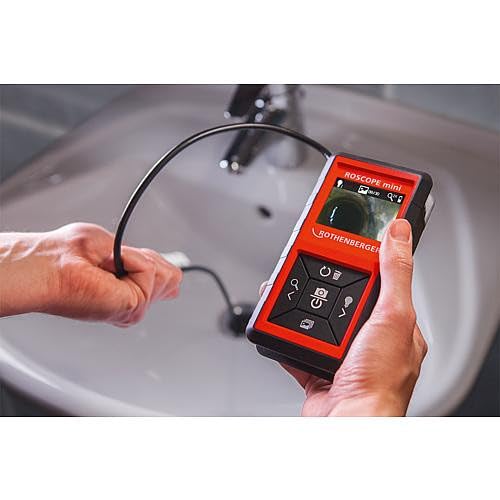
Figi 6.1: A user demonstrating the ROSCOPE Mini in action, guiding the camera probe into a sink drain for inspection.
6.3 Kaptire Imaj
The ROSCOPE Mini can save up to 30 images on its internal storage.
- To capture an image: Press the camera button (often marked with a camera icon) while viewing the live feed. The image will be saved automatically.
- Pou review images: Navigate to the gallery mode (refer to on-screen icons for specific button).
- To delete images: In gallery mode, select the image and press the delete button (often marked with a trash can icon).
7. Antretyen
7.1 Netwayaj
- Tèt kamera: After use, especially in dirty or wet conditions, gently wipe the waterproof camera head with a soft, damp cloth. Ensure no debris obstructs the lens or LED lights.
- Inite Prensipal: Clean the main unit with a dry, soft cloth. Do not use abrasive cleaners or solvents.
7.2 Ranplasman batri
Replace all 4 AA batteries when the low battery indicator appears on the display or when the device fails to power on. Refer to Section 5.1 for battery installation instructions.
7.3 Depo
Store the ROSCOPE Mini in a cool, dry place, away from direct sunlight and extreme temperatures. The cable inlets are designed for perfect storage of the flexible probe.
NAN. Depanaj
If you encounter issues with your ROSCOPE Mini, consult the following table:
| Pwoblèm | Kòz posib | Solisyon |
|---|---|---|
| Aparèy la pa vire. | Pil ki mouri oswa ki mal mete. | Ranplase pil ak nouvo pil AA epi asire polarite kòrèk. |
| Poor image quality / Insufficient lighting. | Camera lens is dirty; insufficient LED illumination; object too far/close. | Clean the camera lens. Adjust the LED brightness. Adjust the distance to the object. |
| Pa ka sove imaj yo. | Internal storage is full. | Delete unnecessary images from the device's memory. |
| Ekran se nan frizè. | Pwoblèm lojisyèl tanporè. | Remove and reinsert batteries to perform a hard reset. |
If the problem persists after attempting these solutions, please contact Rothenberger customer support.
9. Espesifikasyon
| Karakteristik | Spesifikasyon |
|---|---|
| Nimewo Modèl | 10000002268 |
| Dimansyon pwodwi | 3.54 x 1.57 x 6.1 pous |
| Pwa | 1.01 liv |
| Batri | 4 pil AA (enkli) |
| Kalite Kontwòl Ekspozisyon | Otomatik |
| Rezolisyon Capture Videyo | 480p |
| Kalite Zoom | Zoom dijital (4x) |
| Nivo rezistans dlo | Waterproof (camera head only) |
| Depo imaj | Up to 30 images (on-board) |
10. Garanti ak sipò
Rothenberger products are manufactured to high-quality standards. For information regarding warranty coverage and terms, please refer to the warranty card included with your product or visit the official Rothenberger websit.
For technical support, service, or to inquire about replacement parts, please contact Rothenberger customer service. Contact details can typically be found on the manufacturer's websit oswa nan anbalaj pwodwi a.
Ou ka vizite tou Rothenberger Store on Amazon pou plis enfòmasyon pwodwi.


