Entwodiksyon
The CURT Echo mobile trailer brake controller is a Bluetooth enabled device that wirelessly connects to your smartphone and allows you to control and monitor all trailer brake activity right from your device. It features a simple, plug-and-play installation, a portable design to easily switch between vehicles and a highly durable construction to outlast the elements. The Echo brake controller brings your towing experience into the modern age. Powered by Bluetooth, it wirelessly connects to your smartphone without any extra wiring harnesses or modules required. Simply download the Smart Control app on your Apple iOS or Android OS device, plug the Echo into your vehicle and you're ready to start towing.
This manual provides detailed instructions for the setup, operation, maintenance, and troubleshooting of your CURT Echo Mobile Electric Trailer Brake Controller.
Karakteristik kle
- Konsepsyon pòtab: Non-invasive installation, easily transferable between vehicles. Plugs into any standard 7-way connector.
- Koneksyon Smartphone: Wirelessly syncs with Apple iOS or Android OS devices via Bluetooth using the Smart Control app.
- Zero-Tool Installation: Simple plug-and-play setup without the need for tools, extra wires, or hardware. Includes a locking tab and strap for secure connection.
- Highly Responsive Braking: Utilizes a triple-axis accelerometer for smooth, safe, and proportional braking. Maintains responsiveness even if the phone screen is locked, during incoming calls, or if Bluetooth connection is temporarily lost.
- Konpatibilite versatile: Works with virtually any trailer equipped with 1 to 2 axles (2 to 4 brakes). Fully compatible with cruise control, anti-lock brakes, and low-voltage sistèm yo.
- Konstriksyon dirab: Features a potted enclosure with epoxy resin to protect internal electronics from dirt, moisture, and vibration, ensuring long-lasting durability.
Enstalasyon ak Enstalasyon
The CURT Echo brake controller is designed for a straightforward, plug-and-play installation. Follow these steps to set up your device:
- Telechaje App a: Download the "Smart Control" app from your device's app store (Apple iOS or Android OS).
- Locate 7-Way Connector: Identify the 7-way RV blade plug on your vehicle, typically located near the trailer hitch.
- Plug in the Echo: Insert the CURT Echo mobile brake controller directly into your vehicle's 7-way connector. Ensure it is firmly seated.
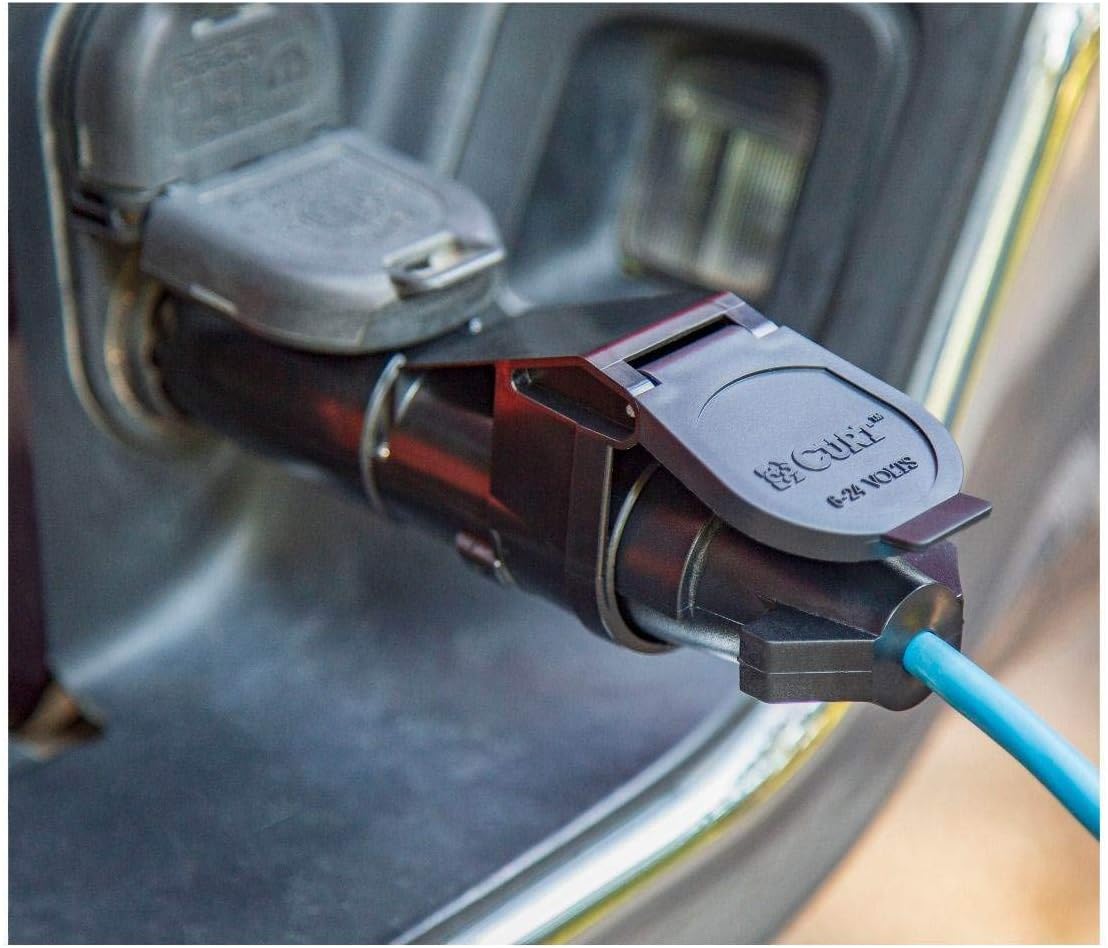
Image: The CURT Echo device securely plugged into the vehicle's 7-way trailer wiring socket, ready for use.
- Secure with Strap: Use the integrated retention strap and locking tab to firmly secure the Echo to the vehicle's socket. Note: The strap is stored inside the cap.

Image: The CURT Echo mobile brake controller with its protective cap closed, illustrating its compact and integrated design when connected.
- Connect to Trailer: Plug your trailer's 7-way connector into the CURT Echo device.

Image: The CURT Echo mobile brake controller with its cap open, revealing the 7-pin connector interface for trailer attachment.
- Pè ak Smartphone: Open the Smart Control app on your smartphone. The app will guide you through the Bluetooth pairing process.

Image: A smartphone displaying the "Connect to Controller via Bluetooth" screen within the Smart Control app, prompting the user to scan for devices.
Once paired, you can begin configuring your towing profiles and brake settings within the app.
Enstriksyon Operasyon
The CURT Echo controller operates seamlessly with your smartphone to provide precise trailer braking. Here’s how to use it:
Smart Control App Usage
- Entèfas prensipal: The app's main screen typically shows a large button to activate manual trailer brakes and sliders for adjusting Max Output and Aggressiveness.

Image: A hand holding a smartphone displaying the main interface of the Smart Control app, showing a large red button to activate trailer brakes and controls for Max Output and Aggressiveness.
- Kreye Profiles: The app allows you to create and save multiple vehicle-trailer profiles. This is useful if you tow different trailers or use the Echo with multiple vehicles.

Image: A smartphone displaying the "Application Profiles" section within the Smart Control app, showing options to create, edit, and delete saved towing profiles.
- Ajisteman Anviwònman:
- Pwodiksyon maksimòm: Controls the maximum braking power applied to the trailer. Adjust this based on the weight of your trailer and desired braking force.
- Aggressiveness: Determines how quickly the trailer brakes engage. A higher setting provides more immediate braking.
- Manyèl Override: Use the large button on the app's main screen to manually apply trailer brakes. This is useful for testing or in situations requiring immediate trailer braking independent of the vehicle's brakes.
Pwopòsyonèl frenaj
The Echo controller uses a tri-axis circuit to provide proportional braking. This means the trailer brakes are applied with a force proportional to the vehicle's braking, ensuring smooth and controlled stops, whether going uphill or downhill.
Videyo Demonstrasyon
Video: An instructional video demonstrating the setup and operation of the CURT Echo Mobile Brake Controller (Model 51180).
Antretyen
The CURT Echo mobile brake controller is designed for minimal maintenance due to its durable construction. However, regular checks can ensure optimal performance and longevity:
- Tcheke Koneksyon: Before each tow, ensure the Echo unit is securely plugged into the vehicle's 7-way connector and the trailer's connector is firmly attached to the Echo. Verify the retention strap and locking tab are engaged.
- Lapwòpte: Keep the connectors free from dirt, debris, and moisture. Use a clean, dry cloth to wipe down the unit as needed. The potted enclosure protects internal electronics, but external contacts should remain clean for reliable connection.
- Depo: When not in use, store the Echo in a clean, dry place to protect the connectors from environmental elements.
- Mizajou aplikasyon an: Periodically check for updates to the Smart Control app on your smartphone to ensure you have the latest features and bug fixes.
Depanaj
If you encounter issues with your CURT Echo Mobile Electric Trailer Brake Controller, refer to the following common problems and solutions:
| Pwoblèm | Kòz posib | Solisyon |
|---|---|---|
| Pa gen koneksyon Bluetooth |
|
|
| Trailer Brakes Not Engaging |
|
|
| Erratic Braking |
|
|
| Aplikasyon an ap kraze oswa li bloke |
|
|
For further assistance, please refer to the official CURT support resources or contact customer service.
Espesifikasyon
| Karakteristik | Detay |
|---|---|
| Nimewo Modèl | 51180 |
| Kalite fren | Pwopòsyonèl |
| Trailer Axle Capacity | 1 to 2 axles (2 to 4 brakes) |
| Kalite Koneksyon | 7-way RV blade plug |
| Koneksyon san fil | Bluetooth (pou aplikasyon telefòn entelijan) |
| Konpatibilite App | Apple iOS, Android OS (Smart Control app) |
| Dimansyon (apwoksimatif) | 6-5/8" (Length) x 1-5/8" (Width) x 2-7/8" (Height)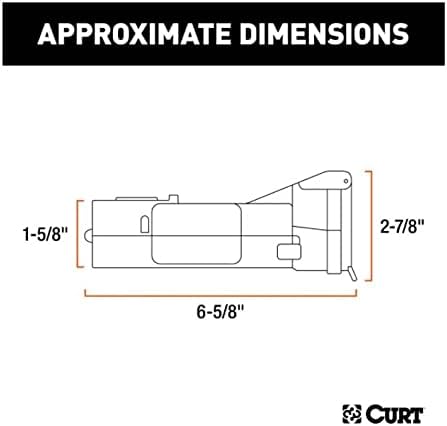 Image: A technical diagram illustrating the approximate dimensions of the CURT Echo mobile brake controller. |
| Karakteristik rezistans | Potted enclosure (epoxy resin) for protection against dirt, moisture, and vibration. |
| Konpatibilite | Cruise control, anti-lock brakes, low-voltage sistèm yo. |
Garanti ak sipò
For detailed warranty information and customer support, please refer to the official CURT website or the documentation included with your product. You can also find additional resources and FAQs on the CURT brand store page on Amazon.
Official Documents:
Resous sou entènèt:


