Pwodwi souview
The MIFA X1 True Wireless Earbuds offer a seamless audio experience with Bluetooth 5.0 connectivity, stereo sound, and a portable charging case. Designed for comfort and durability, these earbuds are sweatproof and suitable for various activities.
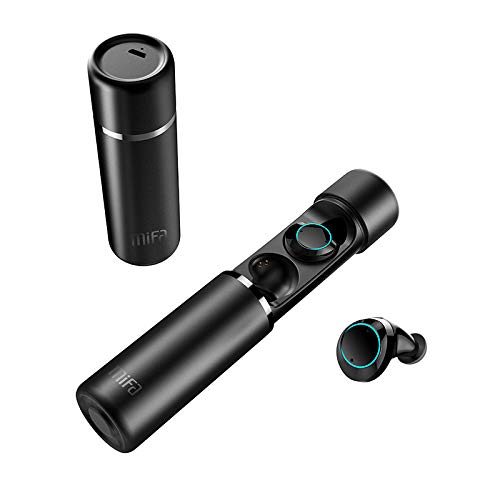
An image displaying the MIFA X1 True Wireless Earbuds. The cylindrical charging case is shown both closed and open, revealing the earbuds inside. One earbud is also shown outside the case.
Kontni pake
- MIFA X1 True Wireless Earbuds
- Ka chaje pòtab
- Multi-sized Ear Gels (S, M, L)
- USB Chaje Kab
- Manyèl Itilizatè (dokiman sa a)
Enstalasyon
1. Premye Chajman
Before first use, ensure both the earbuds and the charging case are fully charged. Remove any protective films from the earbud charging contacts if present.
- Mete ekoutè yo nan ka chaje a.
- Connect the charging case to a power source using a standard USB charging cable.
- Charging indicators on the case and/or earbuds will show charging status.
2. Pairing ak yon Aparèy
The MIFA X1 earbuds feature one-step pairing.
- Ensure Bluetooth is enabled on your smartphone or other device.
- Retire tou de ekoutè yo nan bwat chaje a. Y ap limen otomatikman epi antre nan mòd koneksyon.
- On your device, search for Bluetooth devices and select "MIFA X1" from the list.
- Yon fwa konekte, yon mesaj vokal ap konfime koneksyon an reyisi.
Note: If only one earbud connects, place both back into the case, then remove them again to re-initiate pairing.
Enstriksyon Operasyon
Mete ekoutè yo
- Choose the ear gels that provide the most comfortable and secure fit for optimal sound quality and stability.
- Gently insert the earbuds into your ears and rotate them slightly to ensure a snug fit.
Kontwòl debaz (kontwòl taktil)
| Fonksyon | Aksyon |
|---|---|
| Pouvwa sou | Take out of charging case (automatic) |
| Power Off | Place into charging case (automatic) |
| Jwe/Poz Mizik | Tape yon sèl sou chak ekoutè |
| Next Track | Tape doub sou ekoutè dwat |
| Previous Track | Tape de fwa sou ekoutè gòch la |
| Reponn/Fen Apèl | Tape yon sèl sou chak ekoutè |
| Rejte apèl | Peze epi kenbe swa ekoutè pou 2 segonn |
| Aktive Asistan Vwa (Siri, Asistan Google) | Tape twa fwa sou nenpòt ekoutè |
Antretyen
- Netwayaj: Netwaye ekoutè yo ak bwat chaje a regilyèman avèk yon twal mou, sèk, ki pa gen pousyè. Pa sèvi ak pwodui chimik ki agresif oswa materyèl abrazif.
- Kontak chaje: Asire w ke kontak chaje yo sou tou de ekoutè yo ak sou bwat la pwòp epi san debri pou kenbe chaj la byen.
- Depo: Lè w pa ap itilize ekoutè yo, sere yo nan bwat chaje yo pou pwoteje yo epi kenbe yo chaje.
- Rezistans dlo: The earbuds are sweatproof, but not fully waterproof. Avoid submerging them in water or exposing them to heavy rain.
Depanaj
- Ekoutè yo pa konekte youn ak lòt: Place both earbuds back into the charging case, then remove them simultaneously. This should force them to re-sync.
- Ekoutè yo pa konekte ak aparèy la:
- Asire w ke Bluetooth aktive sou aparèy ou an.
- Forget "MIFA X1" from your device's Bluetooth settings and attempt to pair again.
- Asire w ke ekoutè yo chaje.
- Pa gen son ki soti nan youn nan ekoutè yo:
- Tcheke si tou de ekoutè yo chaje.
- Eseye mete tou de ekoutè yo nan bwat la epi retire yo ankò.
- Perform a factory reset (if applicable, consult MIFA support for specific instructions if this manual doesn't detail it).
- Pwoblèm chaj:
- Asire w ke kab chaje a byen konekte ak tou de bwat la ak sous kouran an.
- Netwaye kontak chaje yo sou ekoutè yo ak anndan bwat la.
- Eseye yon lòt kab chaje USB ak yon lòt adaptè kouran.
Espesifikasyon
| Karakteristik | Detay |
|---|---|
| Non modèl | X1 |
| Koneksyon Teknoloji | Bluetooth 5.0 |
| Teknoloji kominikasyon san fil | Bluetooth |
| Audio Sòti Mode | Stereo |
| Fòma mikwofòn | Bati-an |
| Metòd kontwòl | Manyen |
| Plasman Zòrèy | Nan Zòrèy |
| Dire batri (ekoutè) | Jiska 4 èdtan |
| Dire total batri a (ak bwat chaje a) | Jiska 12 èdtan |
| Materyèl | Plastik |
| Karakteristik espesyal | Mikwofòn enkli, Sweatproof |
| Manifakti | MIFA INNOVATIONS LLC |
Enfòmasyon sou Garanti
This product typically comes with a manufacturer's warranty. Please refer to the warranty card included in your product packaging or visit the official MIFA website for detailed warranty terms and conditions. A 30-day warranty is generally provided.
Sipò pou Kliyan
For further assistance, technical support, or inquiries regarding your MIFA X1 True Wireless Earbuds, please visit the official MIFA website or contact their customer service department. Contact information can usually be found on the product packaging or the official brand websit.


