1. Entwodiksyon
The Leitz IQ Office Pro P5+ Shredder is designed for secure and efficient document destruction in office environments. Featuring advanced micro-cut technology, it ensures a high level of security for your confidential information. This manual provides essential information for the safe and effective operation, maintenance, and troubleshooting of your shredder.

Imaj: Devan view of the Leitz IQ Office Pro P5+ Shredder, showing its sleek design and the waste bin filled with shredded paper.
2. Enfòmasyon sou Sekirite
Prekosyon Sekirite Jeneral
- Li tout enstriksyon anvan ou itilize.
- Keep hands, hair, loose clothing, and ties away from the paper entry slot.
- Kenbe timoun ak bèt kay lwen shredder la.
- Do not insert more sheets than specified (7-8 sheets A4, 70-80 gsm).
- Do not shred metal objects, plastic cards, or adhesive labels unless explicitly stated as compatible. This shredder is designed for paper, staples, and paper clips.
- Empty the waste bin regularly to prevent jams.
Sekirite elektrik
- Asire priz kouran an matche ak voltage requirements of the shredder.
- Do not use the shredder if the power cord is damaged.
- Unplug the shredder before moving, cleaning, or performing maintenance.
- Avoid placing the shredder near water or in damp anviwònman.
3. Pwodwi souview
Karakteristik kle
- Micro Cut Security (DIN P5+): Shreds documents into tiny 2x5mm particles for enhanced security.
- Kapasite segondè: Shreds up to 7-8 sheets of A4 paper (70-80 gsm) per pass.
- Large Waste Bin: 30-liter removable bin holds up to 350 shredded sheets.
- Anti-Jam Technology: Automatically reverses if too much paper is inserted, preventing jams.
- Operasyon trankil: Designed for a calm working environment.
- Tan Egzekisyon Pwolonje: Operates continuously for up to 4 hours (240 minutes).
- Kontwòl manyen entwisyon: Easy-to-use interface for simple operation.

Imaj: Gwo plan view of the shredder's control panel with touch buttons and the fine micro-cut shredded paper in the bin.
4. Enstalasyon
Debake
- Retire dechikteur a nan anbalaj li avèk prekosyon.
- Remove any protective materials or plastic bags.
- Ensure all components are present, including the shredder unit and waste bin.

Image: The Leitz IQ Office Pro P5+ Shredder next to its instruction manual, indicating the contents of the package.
Plasman
- Mete dechikteur a sou yon sifas plat epi ki estab.
- Ensure there is adequate space around the shredder for ventilation and easy access to the waste bin.
- Position the shredder near a power outlet.
Koneksyon pouvwa
- Insert the waste bin securely into the shredder unit.
- Ploge kòd elektrik la nan yon priz elektrik ki gen tè.
- The shredder is now ready for operation.
5. Operasyon Enstriksyon
Dechiktaj Dokiman
- Asire w ke dechikteur a branche epi ke bwat fatra a byen mete.
- Turn on the shredder using the power button on the control panel.
- Insert up to 7-8 sheets of A4 paper (70-80 gsm) into the paper entry slot. The shredder will automatically start shredding.
- The shredder can also handle small staples and paper clips.
- For optimal performance and quiet operation, consider using Leitz pre-lubricated paper.

Image: The shredder with visual indicators for its 7-sheet capacity and 30-liter waste bin, highlighting its efficiency.
Teknoloji Anti-Jam
The Leitz IQ Office Pro P5+ Shredder features advanced anti-jam technology. If too much paper is inserted, the shredder will automatically reverse to clear the jam. Remove the excess paper and re-insert a smaller quantity.

Image: Graphic illustrating the Anti-Jam feature and the 2+1 year guarantee offered with the shredder.
Vide bin fatra a
- Lè bwat fatra a plen, dechikteur a ap sispann fonksyone.
- Pull out the removable waste bin from the front of the shredder.
- Dispose of the shredded paper.
- Reinsert the waste bin firmly until it clicks into place. The shredder will then be ready for use again.
6. Antretyen
Netwayaj
- Toujou debranche dechiktè a anvan ou netwaye li.
- Siye deyò machin nan ak yon twal mou epi sèk. Pa sèvi ak pwodui netwayaj abrazif oswa solvang.
- Periodically clean the paper entry area to remove any paper dust or debris.
Lubrifikasyon
To maintain optimal performance and extend the life of your shredder, it is recommended to lubricate the cutting blades regularly. Use shredder oil or lubrication sheets specifically designed for paper shredders. Follow the instructions provided with the lubrication product.
NAN. Depanaj
| Pwoblèm | Kòz posib | Solisyon |
|---|---|---|
| Dechikteur a pa limen. | Not plugged in; Waste bin not fully inserted; Overheat protection activated. | Check power connection; Ensure bin is correctly seated; Allow shredder to cool down for 30-60 minutes. |
| Konfiti papye. | Twòp papye mete; Papye a pa mete dwat. | Use the reverse function to clear the jam; Remove excess paper; Insert fewer sheets straight into the slot. |
| Dechikteur a sispann pandan l ap travay. | Waste bin is full; Overheat protection activated. | Empty the waste bin; Allow shredder to cool down. |
| Shredder is noisy. | Bezwen wilaj. | Lubricate the cutting blades with shredder oil. |
8. Espesifikasyon
| Karakteristik | Detay |
|---|---|
| Nimewo Modèl | 80040000 |
| Mak | Leitz |
| Koupe Kalite | Mikwo Koupe |
| Nivo Sekirite | DIN P5+ |
| Gwosè Shred | 2x5mm |
| Kapasite fèy | 7-8 sheets (A4, 70-80 gsm) |
| Kapasite Bin fatra | 30 lit |
| Tan kouri kontinyèl | 240 minit (4 èdtan) |
| Materyèl konpatib | Paper documents, staples, paper clips |
| Dimansyon (HxLxP) | 58.9 x 40.6 x 32 cm |
| Pwa | 22 kg |
| Materyèl | Plastik |
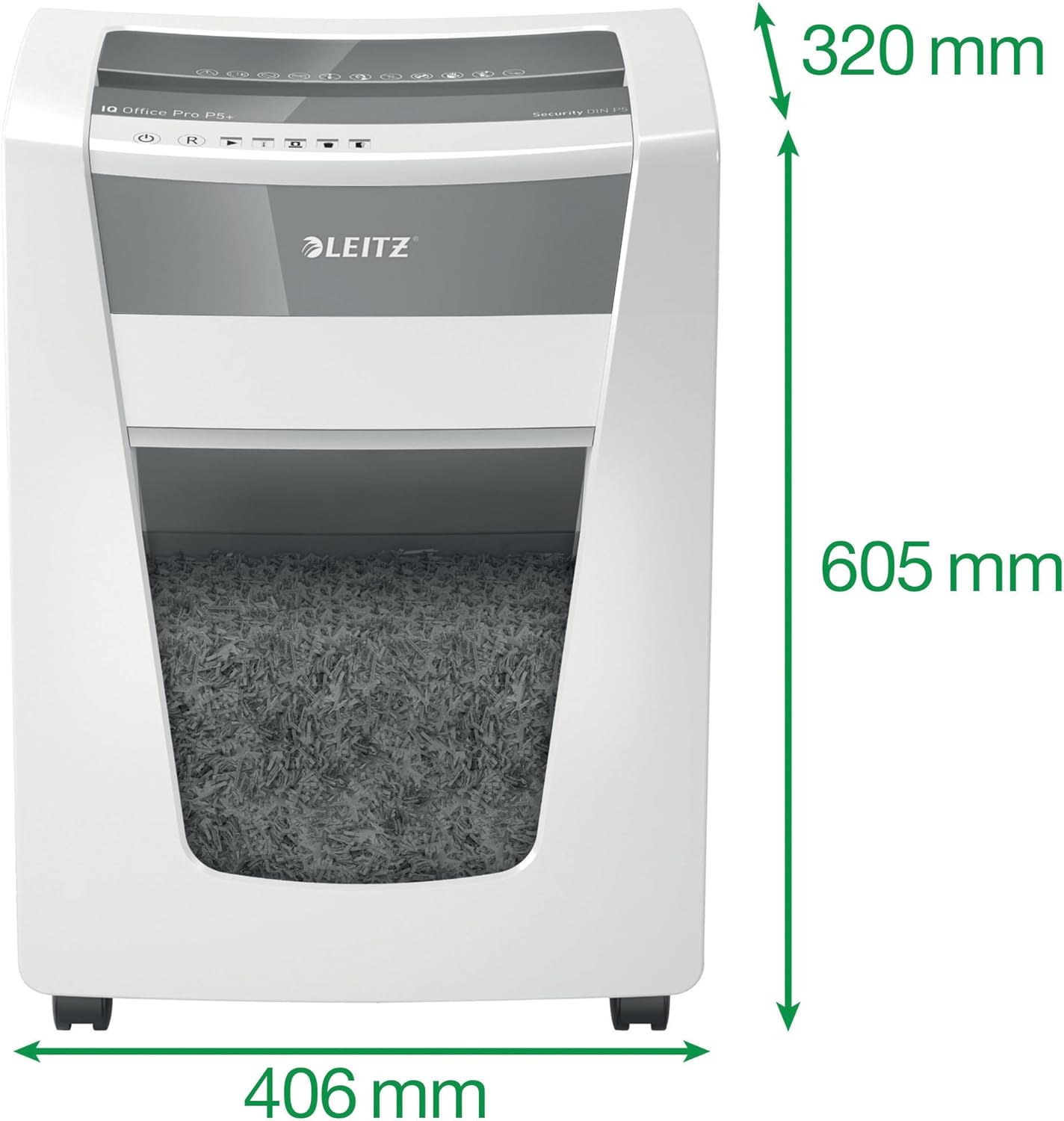
Image: The shredder with its key dimensions (height, width, depth) clearly marked.
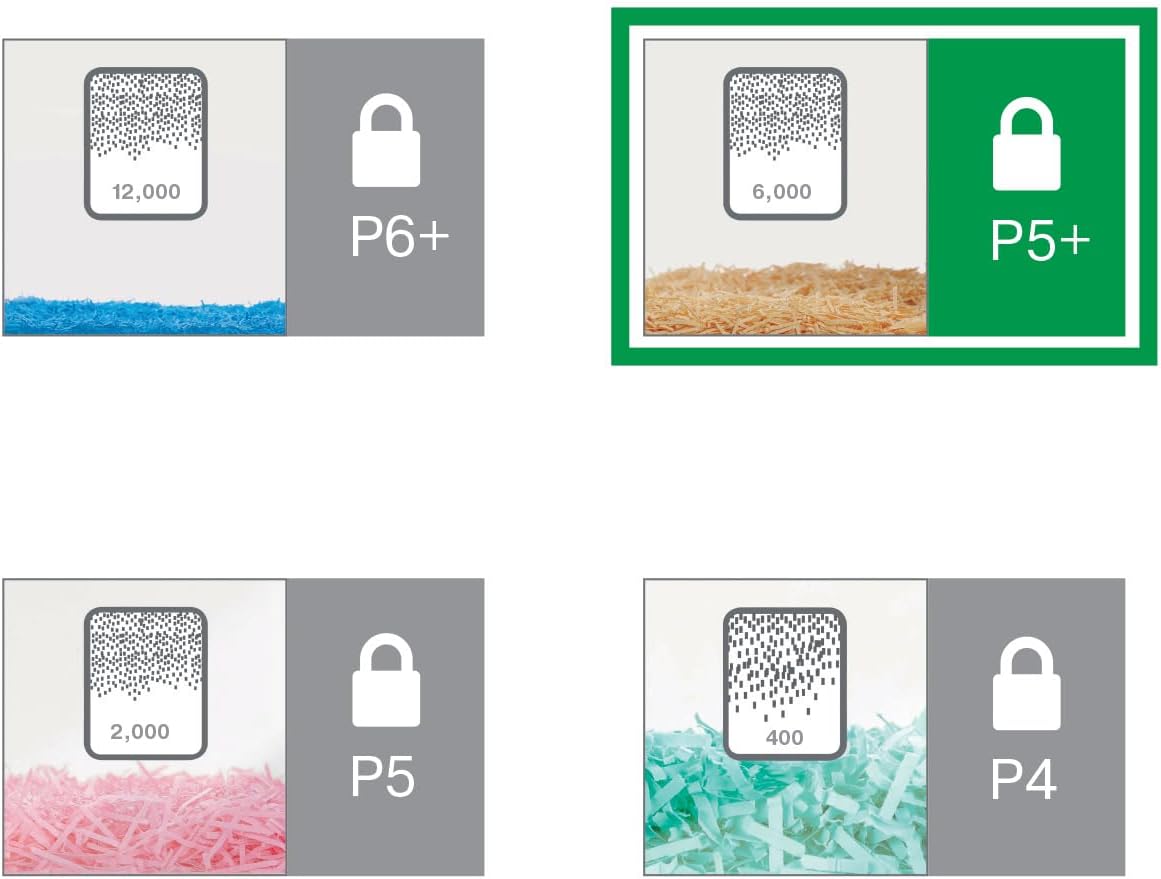
Image: A visual comparison of different DIN security levels (P4, P5, P5+, P6+), illustrating the decreasing particle size for higher security.
9. Garanti ak sipò
Enfòmasyon sou Garanti
This Leitz IQ Office Pro P5+ Shredder comes with a 2-year warranty. An additional 1-year warranty (total 3 years) can be obtained upon product registration. Please refer to the warranty card included with your product for detailed terms and conditions, or visit the official Leitz websit pou anrejistreman.
Sipò pou Kliyan
For technical assistance, spare parts, or any inquiries regarding your Leitz shredder, please contact Leitz customer support. Contact information can typically be found on the official Leitz websit la oubyen sou anbalaj pwodwi a.
Ou ka vizite tou Leitz official websit pou plis enfòmasyon ak resous sipò.


