1. Entwodiksyon
This manual provides essential instructions for the safe and efficient use of your Sonim XP8 XP8800 rugged smartphone. The Sonim XP8 is designed for durability and performance in challenging environments, featuring IP68/IP69 water and dust resistance and MIL-STD-810G compliance.

Image 1.1: The Sonim XP8 rugged smartphone displayed with its packaging box.
2. Enstalasyon
2.1 Kontni pake a
Before beginning, ensure all items are present in your Sonim XP8 package:
- Sonim XP8 Smartphone
- Mi Charger
- USB-C kab
- Gid Quick Start

Image 2.1: The Sonim XP8 package contents, including the device, charger, USB-C cable, and documentation.
2.2 Enstalasyon Kat SIM ak Batri
The Sonim XP8 supports dual SIM cards. Follow these steps to install your SIM cards and battery:
- Retire kouvèti dèyè telefòn lan.
- Locate the SIM card slots (SIM 1 and SIM 2).
- Unlock the SIM card tray by sliding it as indicated.
- Carefully insert your SIM card(s) into the designated slots.
- Lock the SIM card tray back into place.
- Mete pil la nan konpatiman li.
- Remèt kouvèti dèyè a, epi asire w li byen tache pou l reziste dlo ak pousyè.

Image 2.2: Detailed instructions for SIM card insertion into the Sonim XP8, showing unlock, insert, and lock steps.
2.3 Premye Chaje ak Limen
Before first use, fully charge your Sonim XP8. Connect the USB-C cable to the phone's charging port and the wall charger to a power outlet. Once charged, press and hold the power button located on the side of the device until the Sonim logo appears.
3. Operasyon Enstriksyon
3.1 Navigasyon debaz
The Sonim XP8 operates on Android 7.0. Navigate the device using the touchscreen for gestures like tap, swipe, and pinch. Physical buttons are also available for common functions:
- Bouton pouvwa: Limen/etenn aparèy la, bloke/debloke ekran an.
- Bouton Volim: Ajiste volim medya ak apèl.
- Bouton pwogramasyon: Customizable for quick access to specific applications or functions.

Imaj 3.1: Devan view of the Sonim XP8, showing the display and physical navigation buttons.
3.2 Fè apèl epi voye mesaj
To make a call, open the Phone app, enter the number, and tap the call icon. To send a message, open the Messages app, select a contact or enter a number, type your message, and tap send.
3.3 Koneksyon
The Sonim XP8 supports GSM networks for cellular communication and Wi-Fi for internet access. To connect to Wi-Fi, go to Anviwònman> Wi-Fi, select your desired network, and enter the password if required. The device also features GPS for location services.
4. Antretyen
4.1 Netwaye aparèy ou an
Due to its rugged design, the Sonim XP8 can be cleaned with mild soap and water. Ensure all port covers are securely closed before cleaning. Rinse thoroughly with fresh water and dry completely with a soft cloth.
4.2 Swen Batri
The Sonim XP8 uses a Lithium Ion battery. To maximize battery life, avoid extreme temperatures and do not allow the battery to fully discharge frequently. For optimal performance, use only Sonim-approved charging accessories.
NAN. Depanaj
If you encounter issues with your Sonim XP8, consider the following common solutions:
- Aparèy pa soumen: Asire w batri a chaje. Konekte l nan plato a pou omwen 15 minit anvan ou eseye limen l ankò.
- Pa gen siyal rezo: Verify that your SIM card is correctly inserted and activated. Check network settings and ensure you are within a GSM service area.
- Apps freezing or slow performance: Restart the device. Clear cache for problematic apps via Anviwònman > Aplikasyon.
- Water or dust ingress: Ensure all port covers and the back cover are properly sealed. If water has entered, power off the device immediately and contact support.
For persistent issues, refer to the Sonim support websit oswa kontakte sèvis kliyan.
6. Espesifikasyon
The following table details the technical specifications of the Sonim XP8 XP8800 smartphone:
| Karakteristik | Spesifikasyon |
|---|---|
| Nimewo Modèl | XP8800 |
| Sistèm operasyon | Android 7.0 |
| RAM | 4 GB |
| Depo Entèn | 64 GB |
| Teknoloji san fil | Cellular (GSM Only), Wi-Fi |
| GPS | Wi |
| Karakteristik espesyal | Rugged Body, IP68/IP69, MIL-STD-810G |
| Teknoloji ekspozisyon | LCD |
| Rezolisyon ekspozisyon | 1920 x 1080 |
| Antre Entèfas Imèn | Bouton |
| Karakteristik Kamera | Kamera devan |
| Faktè fòm | Smartphone |
| Koulè | Nwa |
| Tan pou pale nan telefòn | 720 èdtan |
| Manifakti | Sonim |
| Pwa atik | 8 ons |
| Dimansyon pwodwi | 4 x 4 x 4 pous |
| Batri | 1 batri ityòm Ion (enkli) |
7. Garanti ak sipò
7.1 Enfòmasyon sou Garanti
The Sonim XP8 XP8800 comes with an unmatched 3-year Comprehensive Warranty. This warranty covers manufacturing defects and ensures your device performs as expected under normal use conditions. Please retain your proof of purchase for warranty claims.
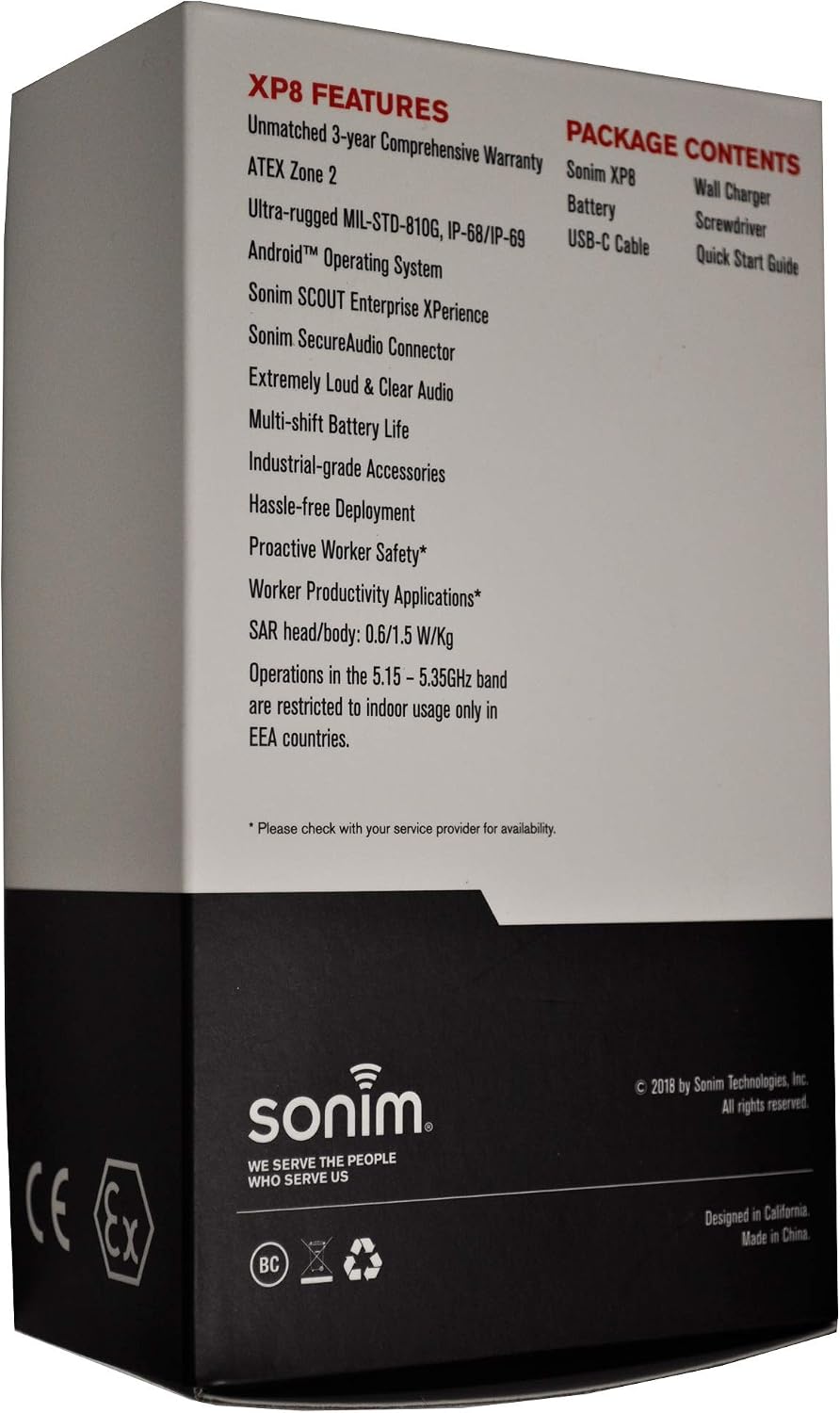
Image 7.1: The back of the Sonim XP8 packaging, highlighting key features and the 3-year comprehensive warranty.
7.2 Sipò pou Kliyan
For further assistance, technical support, or warranty claims, please visit the official Sonim website or contact their customer service department. Contact details can typically be found in the Quick Start Guide included with your device or on the Sonim corporate websit.


