Entwodiksyon
This manual provides detailed instructions for the assembly, operation, and maintenance of your Monarch Specialties Computer Desk, Model I 7412. Please read all instructions carefully before beginning assembly and retain this manual for future reference.
Enfòmasyon sou Sekirite
Always follow the safety guidelines provided in the instruction manual. Ensure all components are securely fastened before use. Do not overload the desk. Keep small parts away from children during assembly.
Kontni pake
Before assembly, verify that all parts and hardware are present and undamaged. Refer to the parts list included in your product packaging. If any parts are missing or damaged, contact Monarch Specialties customer support.

Imaj 1: Devan view of the assembled Monarch Specialties Computer Desk. This desk features a brown reclaimed wood-look finish with black metal legs and three drawers.
Enstalasyon ak Asanble
Assembly typically requires two adults. Ensure you have adequate space and the necessary tools (e.g., screwdriver, Allen wrench, if not provided). Follow the steps below in sequence.
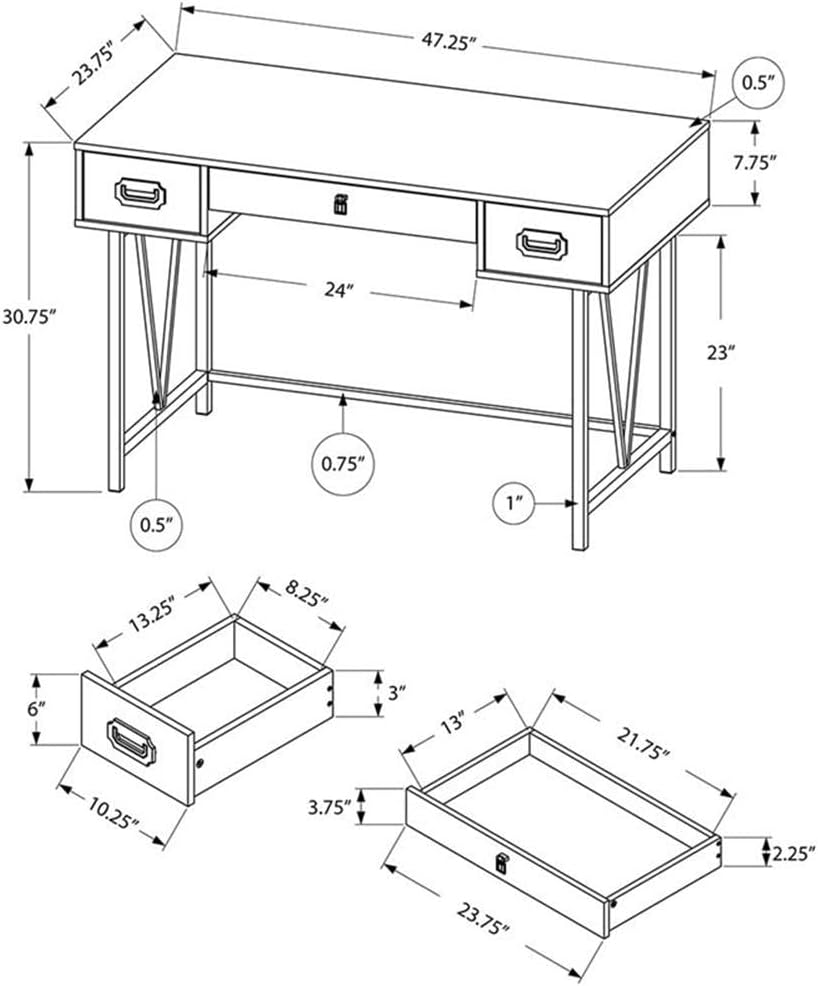
Image 2: Dimensional drawing of the Monarch Specialties Computer Desk, showing overall dimensions and an exploded view of the drawer components. This diagram is essential for identifying parts and understanding assembly.
- Depake konpozan: Retire tout pyès yo nan anbalaj la avèk prekosyon. Mete yo sou yon sifas mou epi pwòp pou evite reyur.
- Rasanble tiwa yo: Construct the two side drawers and the one wide middle drawer according to the detailed instructions in your physical assembly guide. Note the different pull types for the side drawers (black metal) and the middle drawer (black leather).
- Attach Drawer Glides: Secure the metal drawer glides to the desk frame and the drawers themselves, ensuring smooth operation.
- Assemble Metal Legs: Attach the black metal legs to the underside of the desk top. Ensure all screws are tightened securely. The legs feature a distinctive V-shape design.
- Enstale ba kwaze a: Connect the horizontal metal crossbar between the two leg frames for added stability.
- Mete tiwa yo: Carefully slide the assembled drawers into their respective compartments. Test their movement to ensure they open and close smoothly.
- Tcheke final la: Verify that all connections are tight and the desk is stable.
Enstriksyon Operasyon
The Monarch Specialties Computer Desk is designed for general office and home use. Its features include:
- Drawer Functionality: The desk includes two side drawers with smooth metal glides and black metal pulls, and one wide middle drawer with metal glides and a black leather pull. These drawers are suitable for storing office supplies, documents, and personal items.
- Kapasite pwa: Distribute weight evenly across the desk surface. Avoid placing excessively heavy items on the desk or in the drawers to prevent damage.
- Itilizasyon andigman: The thick paneled top with a brown reclaimed wood-look finish provides a durable work surface. Consider using coasters for beverages and protective mats for hot items to preserve the finish.

Image 3: The Monarch Specialties Computer Desk positioned in a room, showcasing its use as a workstation with a laptop and office accessories. This image illustrates the desk's functional design in a typical setting.
Antretyen
- Netwayaj: Wipe the desk surface and metal legs with a soft, damp twal. Evite pwodui netwayaj abrazif oswa pwodui chimik ki agresif, paske sa yo ka domaje fini an.
- Devèsman: Clean spills immediately to prevent staining, especially on the wood-look laminate surface.
- Tcheke Materyèl: Tcheke tout vis ak eleman fikse yo detanzantan pou asire yo rete byen sere. Sere yo ankò si sa nesesè pou kenbe estabilite.
- Swen tiwa: If drawers become stiff, a small amount of silicone lubricant can be applied to the metal glides.
Depanaj
- Wobbly Desk: Ensure all leg connections and the crossbar are securely tightened. Check that the desk is on a level surface.
- Tiwa yo pa glise fasilman: Verify that the drawer glides are correctly aligned and free of obstructions. Ensure the drawers are assembled correctly. Lubricate glides if needed.
- Reyurti oswa mak: Minor scratches on the laminate surface may be touched up with a furniture repair marker matching the finish. Deep dents may require professional repair or replacement of the affected component.
Espesifikasyon
| Nimewo Modèl | mwen 7412 |
| Mak | Espesyalite Monak |
| Dimansyon pwodwi (L x W x H) | 120.02 santimèt x 60.33 santimèt x 78.11 santimèt (47.25" longè x 23.75" lajè x 30.75" wotè) |
| Pwa | 27.67 kg (61 liv) |
| Materyèl | Wood (top material type), Metal (base material) |
| Fini Kalite | Laminated (brown reclaimed wood-look) |
| Koulè | Brown (reclaimed wood-look) / Black (metal legs) |
| Karakteristik espesyal | Compact design, 3 drawers (2 side, 1 middle) |
Garanti ak sipò
Warranty information for the Monarch Specialties Computer Desk, Model I 7412, is typically included with the product packaging or available directly from the manufacturer. Please refer to these resources for details regarding coverage and terms.
For technical support, missing parts, or warranty claims, please contact the retailer where the product was purchased or visit the official Monarch Specialties websit pou jwenn enfòmasyon pou kontakte sèvis kliyan.


