1. Entwodiksyon
The Digitus DN-93903 CAT 6 Connection Box is a passive network component designed for extending or repairing CAT 6 network cables. It provides a reliable and secure connection point for joining two CAT 6 cables without the need for specialized tools beyond basic wiring equipment. This product is suitable for various network installations where a robust and compliant CAT 6 connection is required.
2. Pake kontni
- 3 x Digitus DN-93903 CAT 6 Connection Boxes
3. Enfòmasyon sou Sekirite
Please read and understand the following safety guidelines before installation:
- Ensure all network equipment is powered off before making any connections to prevent electrical hazards or damage to devices.
- Handle network cables and components with care.
- Do not expose the connection box to moisture or extreme temperatures.
- Pwodwi sa a fèt pou itilize andedan kay la sèlman.
4. Gid Enstalasyon
4.1. Zouti obligatwa
- Fil retire rad sou ou
- Small Flathead Screwdriver (for terminal connections)
- Network Cable Tester (recommended)
4.2. Enstriksyon fil elektrik
- Prepare the Cables: Carefully strip approximately 2-3 cm (1 inch) of the outer jacket from the ends of the CAT 6 network cables you intend to connect. Be careful not to cut or nick the inner insulated wires.
- Untwist and Straighten Wires: Untwist the four pairs of wires and straighten each individual wire.
- Open the Connection Box: Use a small flathead screwdriver to gently pry open the metal casing of the Digitus DN-93903 connection box. The two halves should separate, revealing the internal terminal blocks.
-
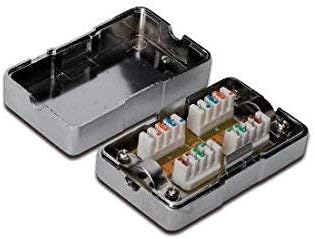
Imaj 1: Entèn view of the Digitus DN-93903 Connection Box, showing the color-coded wiring terminals.
This image displays the Digitus DN-93903 CAT 6 Connection Box in an open state, revealing the internal components. The metal casing is visible, along with the color-coded wiring terminals designed for CAT 6 network cable connections. Each terminal block is clearly marked for proper wire placement.
- Connect Wires to Terminals: The connection box features color-coded terminals. Match the individual wires from your CAT 6 cable to the corresponding color-coded slots on the terminal blocks. There are two common wiring standards: T568A and T568B. Ensure you use the same standard for both ends of the connection to maintain proper network functionality. Gently insert each wire into its designated slot and use the small flathead screwdriver to tighten the screw, securing the wire firmly. Ensure no bare copper wire is exposed outside the terminal.
- Repeat for Second Cable: Connect the wires of the second CAT 6 cable to the opposite side of the terminal blocks, following the same color-coding and wiring standard (T568A or T568B) as the first cable.
- Sekirize kab yo: Ensure the cables are securely seated and that there is no strain on the terminal connections.
- Close the Box: Carefully align the two halves of the metal casing and snap or screw them back together, ensuring the cables exit through the designated openings without being pinched.
- Teste Koneksyon an: It is highly recommended to use a network cable tester to verify the continuity and correct wiring of the newly formed connection. This will confirm that all pairs are correctly connected and that there are no shorts or open circuits.
5. Itilizasyon
The Digitus DN-93903 CAT 6 Connection Box is a passive device. Once properly installed and wired, it functions as a seamless extension or repair point for your CAT 6 network cable. No further operation or power supply is required. Data transmission will occur automatically through the established connection.
6. Swen ak Antretyen
- Netwayaj: If necessary, gently wipe the exterior of the connection box with a dry, soft cloth. Do not use liquid cleaners or solvents.
- Enspeksyon: Periodically inspect the connection box and cables for any signs of physical damage, loose connections, or corrosion.
- Anviwònman: Ensure the connection box remains in a dry, indoor environment, away from direct sunlight, heat sources, and excessive dust.
NAN. Depanaj
Pwoblèm komen ak solisyon:
- Pa gen koneksyon rezo:
- Verify that both network cables connected to the box are properly seated and secured in their respective terminals.
- Check the wiring standard (T568A or T568B) used on both sides of the connection box. Ensure consistency.
- Use a network cable tester to confirm continuity and correct wiring.
- Enspekte kab yo pou wè si gen domaj oswa pli.
- Vitès rezo a ba:
- Ensure all wires are correctly terminated and making good contact within the terminals. Loose connections can degrade performance.
- Confirm that the cables used are indeed CAT 6 compliant and not damaged.
- Verify that the total length of the extended cable run does not exceed CAT 6 specifications (typically 100 meters for full performance).
- Koneksyon tanzantan:
- Check for any physical movement or strain on the cables connected to the box.
- Re-seat or re-terminate any wires that appear loose or improperly connected.
- Ensure the connection box casing byen fèmen.
8. Espesifikasyon teknik
| Nimewo Modèl | DN-93903 |
| Mak | Chif |
| Espesifikasyon rezo | CHAT 6 |
| Dimansyon pwodwi (L x W x H) | 24 x 15 x 2 cm |
| Pwa | 460 gram |
| Konpozan ki enkli | 3 x Connection Boxes |
| Sous pouvwa | Passive (No external power required) |
| Batri obligatwa | Non |
9. Enfòmasyon sou Garanti
Specific warranty details for the Digitus DN-93903 Connection Box are not provided in the product information. Please refer to the retailer or manufacturer's official websit la pou wè kondisyon garanti aktyèl yo.
10. Sipò pou Kliyan
For technical assistance or further inquiries regarding the Digitus DN-93903 Connection Box, please contact Digitus customer support or visit their official website. Contact information is typically available on the manufacturer's packaging or websit.


