1. Entwodiksyon
This manual provides detailed instructions for the setup, operation, and maintenance of your DIERYA DK68 60% Wireless Mechanical Gaming Keyboard. Please read this manual thoroughly before using the product to ensure proper functionality and to maximize your user experience.

Image 1.1: DIERYA DK68 keyboard highlighting its main features.
2. Pake kontni
Verifye ke tout atik yo prezan nan pakè a:
- DIERYA DK68 60% Wireless Mechanical Gaming Keyboard
- USB-C pou USB-A kab
- Keycap Puller
- Manyèl Itilizatè (dokiman sa a)
3. Pwodwi souview
The DIERYA DK68 is a compact 60% mechanical keyboard designed for versatility and performance. It features a 68-key layout, tri-mode connectivity, RGB backlighting, and durable mechanical switches.
Karakteristik kle:
- Koneksyon Tri-Mòd: Sipòte koneksyon Bluetooth 5.0, koneksyon san fil 2.4GHz, ak koneksyon filaire USB-C.
- Aranjman Konpak 68-Kle: Saves desk space while retaining essential keys.
- Clicky Blue Mechanical Switches: Provide tactile feedback and an audible click, ideal for typing and gaming.
- Ekleraj RGB: Customizable lighting with multiple modes and brightness levels.
- N-Key Rollover & Anti-Ghosting: Ensures accurate registration of multiple simultaneous key presses.
- 3000mAh batri: Long-lasting rechargeable battery for extended wireless use.
- Kle doub-kou: Durable and fade-resistant keycaps.
- Konsepsyon ergonomique: Features two-stage adjustable feet and anti-slip pads for comfortable and stable use.

Image 3.1: Details of the Clicky Blue Mechanical Switches.

Image 3.2: Ergonomic features including double-shot keycaps, adjustable feet, and anti-slip pads.
4. Enstalasyon
The DK68 keyboard offers three connection modes: wired, 2.4GHz wireless, and Bluetooth. Choose the mode that best suits your device and needs.
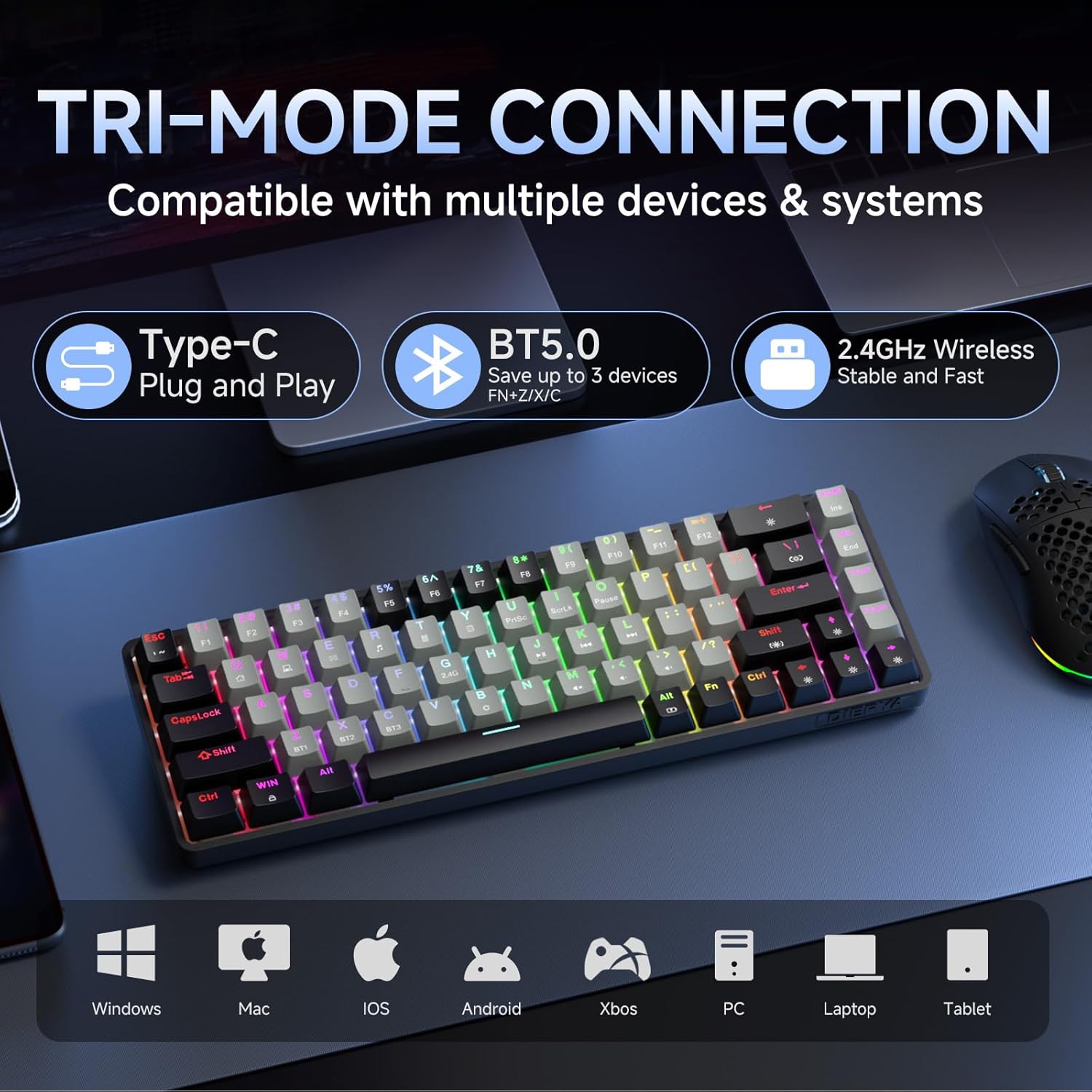
Image 4.1: Tri-mode connectivity and device compatibility.
4.1 Wired Connection (USB-C)
- Konekte kab USB-C ki vini ak li a nan pò USB-C klavye a.
- Konekte bout USB-A kab la nan yon pò USB ki disponib sou òdinatè w la.
- The keyboard will automatically be recognized and ready for use. The keyboard will also charge in this mode.
4.2 Koneksyon san fil 2.4GHz
- Locate the 2.4GHz USB receiver (usually stored in a compartment on the keyboard or included separately).
- Ploge reseptè USB 2.4GHz la nan yon pò USB ki disponib sou òdinatè w lan.
- Limen klavye a. Klavye a ta dwe konekte otomatikman ak reseptè a.
- Si koneksyon an pa etabli, peze Fn + 2.4G (usually indicated by a specific keycap legend) to activate 2.4GHz pairing mode.
4.3 Bluetooth Koneksyon
Klavye a sipòte koneksyon ak jiska twa aparèy Bluetooth.
- Asire w ke klavye a limen.
- Peze epi kenbe Fn + BT1, Fn + BT2, oswa Fn + BT3 for 3-5 seconds until the corresponding key (BT1, BT2, or BT3) flashes rapidly. This indicates pairing mode.
- Sou aparèy ou an (òdinatè, tablèt, telefòn entelijan), ouvri paramèt Bluetooth yo epi chèche nouvo aparèy.
- Select "DIERYA DK68" (or similar name) from the list of available devices to pair.
- Once paired, the BT key will stop flashing and remain steadily lit.
- Pou chanje ant aparèy Bluetooth ki asosye yo, jis peze Fn + BT1/BT2/BT3.
5. Operasyon Enstriksyon
5.1 Kontwòl ekleraj dèyè RGB
The DK68 features dynamic RGB backlighting with multiple modes and customization options.
- Fn + Retounen: Turn backlighting on/off.
- Fn + Shift: Switch between different lighting colors (for static modes).
- Fn + \| Cycle through 20 different lighting modes.
- Fn + ↓: Diminye klète.
- Fn + ↑: Ogmante klète.
- Fn + ←: Decrease lighting speed (for dynamic modes).
- Fn + →: Increase lighting speed (for dynamic modes).

Image 5.1: RGB Backlighting control key combinations.
5.2 Konbinezon kle fonksyon
Due to its compact 60% layout, many functions are accessed via the Fn key combined with other keys.
- Fn + F1-F12: Access multimedia and system functions (e.g., volume, media control). Specific functions are often indicated by secondary legends on the keycaps.
- Fn + Genyen: Kle fèmen/debloke Windows.
- Fn + P: Enprime ekran.
- Fn + [: Lakay.
- Fn +]: Fen.
- Fn + ;: Page Up.
- Fn + ': Paj anba.
- Fn + Enter: Mete.
- Fn + Efase: Efase.
- Fn + Spacebar: Check battery indicator (when wired, it pulsates blue while charging).
5.3 Chaje
Klavye a ekipe ak yon batri ityòm rechargeable 3000mAh.
- Connect the keyboard to a USB power source using the provided USB-C cable.
- The spacebar will typically indicate charging status (e.g., pulsating blue).
- A full charge provides approximately 12 hours of use with backlighting on, or up to 333 hours with backlighting off.
- The keyboard features an auto-stop function after 3 minutes of inactivity to conserve battery.

Imaj 5.2: Dire batri a ak enfòmasyon sou chaj la.
6. Antretyen
Bon antretyen asire lonjevite ak pèfòmans klavye ou a.
- Netwayaj kle yo: Use the provided keycap puller to carefully remove keycaps. Clean them with a soft, damp twal ak savon dou si sa nesesè. Asire w ke yo byen sèk anvan ou tache yo ankò.
- Netwayaj kò klavye a: Use a soft, dry cloth to wipe down the keyboard body. For dust between keys, use compressed air.
- Evite likid: Do not expose the keyboard to excessive moisture or liquids. If spills occur, immediately disconnect the keyboard and allow it to dry completely before reuse.
- Depo: Sere klavye a nan yon kote ki fre epi sèk, lwen limyè solèy dirèk ak tanperati ekstrèm.
NAN. Depanaj
If you encounter issues with your DIERYA DK68 keyboard, refer to the following common solutions:
- Klavye a pa reponn:
- Ensure the keyboard is charged. Connect it via USB-C cable to check if it works in wired mode.
- For wireless modes, ensure the keyboard is powered on and correctly paired (2.4GHz receiver plugged in, or Bluetooth paired to the correct channel).
- Eseye rekòmanse òdinatè w la oswa aparèy ou an.
- Pwoblèm koneksyon Bluetooth:
- Asire w ke Bluetooth aktive sou aparèy ou an.
- Forget the keyboard in your device's Bluetooth settings and re-pair it.
- Asire w pa gen okenn lòt aparèy k ap entèfere ak siyal Bluetooth la.
- 2.4GHz wireless lag or disconnection:
- Ensure the 2.4GHz receiver is plugged into a direct USB port, not a hub.
- Move the keyboard closer to the receiver.
- Avoid placing large metal objects between the keyboard and receiver.
- RGB backlighting not working:
- Peze Fn + Backspace to ensure backlighting is turned on.
- Ogmante klète a lè l sèvi avèk Fn + ↑.
- Keys not registering correctly (ghosting):
- The keyboard features N-Key rollover, so this should be rare. Ensure no debris is under the keycap.
- If the issue persists, try resetting the keyboard (refer to manufacturer's website for specific reset procedures if available).
8. Espesifikasyon
| Karakteristik | Spesifikasyon |
|---|---|
| Modèl | DK68 |
| Layout | 68-Key (60% Compact) |
| Chanje Kalite | Clicky Blue Mechanical Switches |
| Fòs Aksyon | 60gf (±15gf) |
| Keystroke Travel | 2.3mm (±0.6mm) |
| Chanje validite | 50 milyon klik |
| Koneksyon | Bluetooth 5.0, 2.4GHz san fil, USB-C ak fil |
| Ekleraj | RGB (20 Modes) |
| Kapasite batri | 3000mAh Lityòm Polymère |
| Battery Life (Light On) | Apeprè. 12 èdtan |
| Battery Life (Light Off) | Apeprè. 333 èdtan |
| Auto dòmi | 3 minit inaktivite |
| Kle Rollover | N-Kle Rollover |
| Dimansyon (L x W x H) | 372 x 115 x 51 mm (14.65 x 4.53 x 2.01 pous) |
| Pwa | 820 g (1.79 liv) |
| OS konpatib | Windows, macOS, Linux, iOS, andwad |

Image 8.1: Keyboard dimensions.
9. Garanti ak sipò
DIERYA products are designed for reliability and performance. For warranty information and technical support, please refer to the official DIERYA websit la oubyen kontakte sèvis kliyan yo dirèkteman.
- Ofisyèl Websit: Visit the DIERYA Store on Amazon
- Sèvis Kliyan: Gade enfòmasyon kontak ki sou anbalaj pwodwi a oubyen sou sit ofisyèl la. websit pou sipò.
Tanpri kenbe prèv ou achte pou reklamasyon garanti.


