1. Entwodiksyon
Thank you for choosing the MXR M293 Booster Mini Guitar Effects Pedal. This compact and powerful pedal combines the sought-after sonic characteristics of the Echoplex Preamp with the robust boosting capabilities of the MXR Micro Amp. Designed for guitarists seeking to enhance their tone, add grit, and achieve significant volume boosts, the Booster Mini is an essential addition to any pedalboard.
This manual provides detailed instructions for setting up, operating, and maintaining your MXR M293 Booster Mini pedal, along with information on the included accessories.
2. Pwodwi Features
- Combines the sonic characteristics of the Echoplex Preamp with the boosting power of the MXR Micro Amp.
- Compact, pedalboard-friendly mini housing.
- Volume control provides up to +25dB of clean boost.
- Tone control allows for high-frequency roll-off, shaping your boosted signal.
- Internal Echoplex Preamp level control for adding subtle to significant grit to your signal.
3. Pake kontni
Your MXR M293 Booster Mini Guitar Effects Pedal bundle includes:
- 1 x MXR M293 Booster Mini Guitar Effects Pedal
- 2 x 6-inch Right Angle Patch Cables
- 1 x Dunlop Pick Pack (assorted gauges and materials)

Image: The complete MXR M293 Booster Mini bundle, showing the pedal, two right-angle patch cables, and a selection of Dunlop guitar picks.

Imaj: Yon gwo plan view of the assorted Dunlop guitar picks included in the bundle, showcasing various gauges and materials.

Image: One of the included 6-inch right-angle patch cables, designed for efficient pedalboard connections.
4. Kontwòl ak Koneksyon
The MXR M293 Booster Mini features a straightforward control layout for ease of use.

Imaj: Anwo-anba view of the MXR M293 Booster Mini pedal, highlighting the Volume and Tone control knobs and the footswitch.
- Bouton VOLIM: Controls the overall output level of the pedal. Turn clockwise to increase the boost, up to +25dB.
- Bouton TONE: Adjusts the high-frequency content of the boosted signal. Turn clockwise for a brighter tone, counter-clockwise to roll off highs.
- Footswitch: Angaje oswa kontourne efè a.
- Antre Jack: Connect your guitar or the output of another pedal here.
- Sòti Jack: Konekte ak ou amplifier or the input of the next pedal in your signal chain.
- Antre pouvwa (9V DC): Connect a standard 9-volt DC power adapter (center-negative) here. The pedal operates at 9 Volts and 9 Milliamps.
- Internal Echoplex Preamp Kontwòl Nivo: Located inside the pedal, this trim pot allows for fine-tuning the amount of grit or saturation added to your signal. Adjust with a small screwdriver.
5. Enstalasyon
Follow these steps to integrate the MXR M293 Booster Mini into your guitar rig:
- Koneksyon pouvwa: Connect a 9-volt DC power adapter (center-negative) to the pedal's power input. Ensure the power supply meets the 9 Volts and 9 Milliamps requirement.
- Chèn siyal:
- Connect your guitar (or the output of a preceding pedal) to the Booster Mini's Antre Jack.
- Connect the Booster Mini's Sòti Jack pou ou amplifier (or the input of a subsequent pedal). Use the included patch cables for connecting to other pedals on your board.
- Premye Anviwònman: Start with the VOLUME knob at a low setting (e.g., 9 o'clock) and the TONE knob at noon.
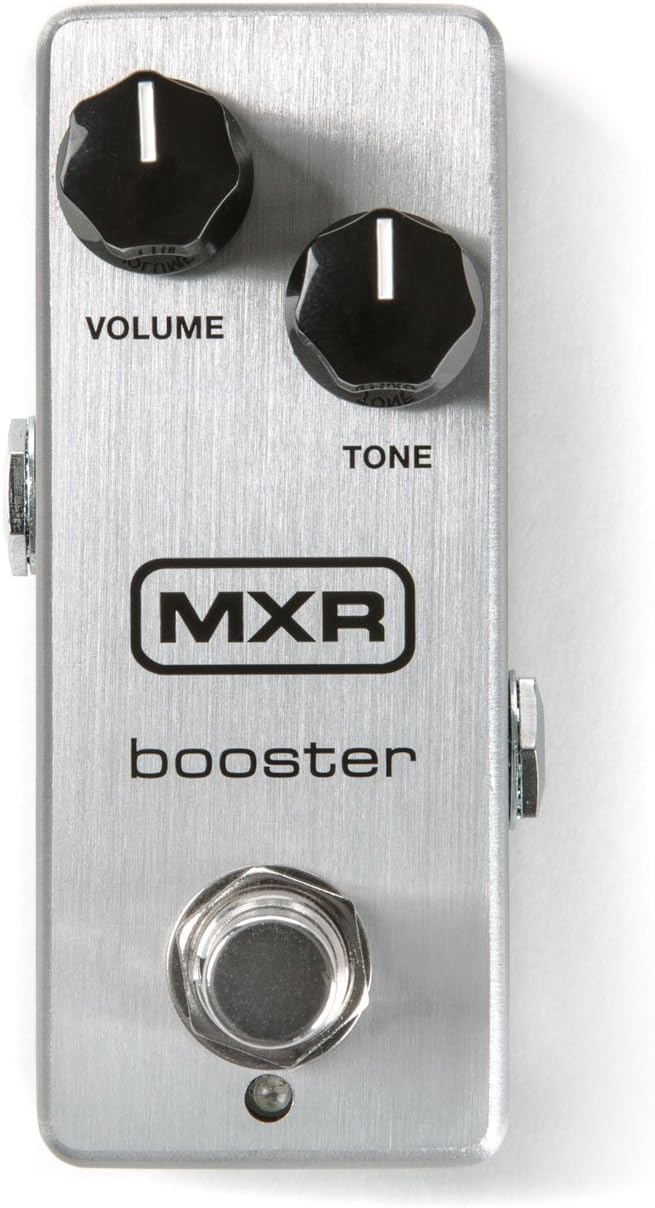
Image: The MXR M293 Booster Mini pedal shown alongside a compatible 9V DC power adapter, illustrating the power connection.
6. Operasyon Enstriksyon
Once connected, you can begin using your MXR M293 Booster Mini:
- Angaje efè a: Press the footswitch to engage the Booster Mini. The LED indicator will illuminate when the effect is active. Press again to bypass the effect.
- Ajiste Volim: Slowly turn the VOLUME knob clockwise to increase the boost level. Be mindful of your amplifier's volume to avoid sudden loud sounds. This control provides a clean boost, perfect for pushing your amp into overdrive or for solos.
- Shaping Tone: Use the TONE knob to fine-tune the high-end response. Turn it clockwise for a brighter, more present sound, or counter-clockwise to smooth out harsh frequencies or achieve a warmer tone.
- Adding Grit (Internal Control): For a subtle to pronounced overdriven character, adjust the internal Echoplex Preamp level control. This requires opening the pedal. Use a small screwdriver to carefully turn the trim pot. Experiment to find your desired level of saturation.
- Placement in Signal Chain:
- Before Overdrive/Distortion: Placing the Booster Mini before gain pedals will increase the input signal to those pedals, resulting in more saturation and sustain.
- After Overdrive/Distortion: Placing it after gain pedals will increase the overall volume of your distorted sound without adding more distortion, ideal for solo boosts.
7. Antretyen
Proper care will ensure the longevity and optimal performance of your MXR M293 Booster Mini:
- Netwayaj: Wipe the pedal with a soft, dry cloth. Do not use abrasive cleaners or solvents.
- Depo: Store the pedal in a dry environment, away from extreme temperatures and humidity.
- Pouvwa: Always use a regulated 9V DC center-negative power supply. Disconnect power when not in use for extended periods.
- Koneksyon: Periodically check all cable connections for wear and tear. Ensure jacks are clean and free of debris.
NAN. Depanaj
| Pwoblèm | Kòz posib | Solisyon |
|---|---|---|
| Pa gen son lè pedal la peze. |
|
|
| Bri oswa ronfleman endezirab. |
|
|
| LED not illuminating. |
|
|
9. Espesifikasyon
| Atribi | Detay |
|---|---|
| Modèl | M293 |
| Mak | MXR |
| Pwa atik | 1.01 liv (apeprè 0.46 kg) |
| Dimansyon pake | 11.61 x 2.99 x 2.83 pous (apeprè 29.5 x 7.6 x 7.2 cm) |
| Fòma siyal | Analòg |
| Voltage Kondisyon | 9 Vòlt DC (sant-negatif) |
| Ampepòk Trase | 9 Miliamps |
| Koulè | Nwa, Ajan |
10. Enfòmasyon sou Sekirite
Tanpri li epi respekte gid sekirite sa yo:
- Do not expose the pedal to water or excessive moisture.
- Avoid operating the pedal in direct sunlight or near heat sources.
- Use only the specified power supply (9V DC, center-negative). Using an incorrect power supply can damage the unit and void your warranty.
- Do not attempt to open or service the unit beyond adjusting the internal trim pot. Refer all servicing to qualified personnel.
- Kenbe soti nan atenn timoun yo.
11. Garanti ak sipò
MXR products are known for their quality and reliability. For warranty information, technical support, or service inquiries, please visit the official MXR websit la oubyen kontakte depatman sèvis kliyan yo. Kenbe resi acha w la kòm prèv acha pou reklamasyon garanti.
MXR ofisyèl Websit: www.jimdunlop.com/mxr/