Entwodiksyon
Mèsi pou acha aasing the Aduro LED Wireless Speaker. This portable speaker combines high-quality audio with dynamic LED lighting, creating an immersive experience for any setting. Designed for ease of use and portability, it features wireless connectivity, hands-free calling, and multiple light modes. Please read this manual carefully to ensure proper operation and to maximize your enjoyment of the product.
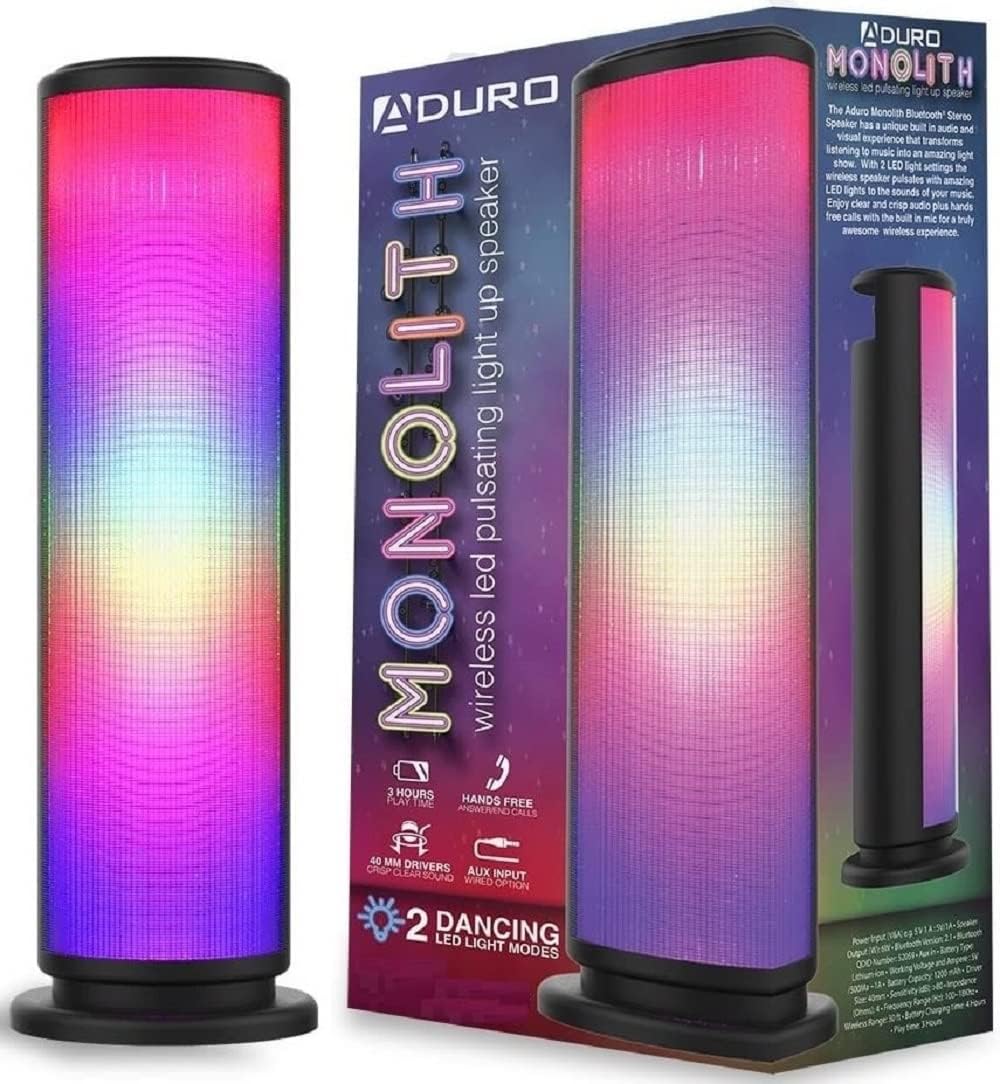
Image: The Aduro LED Wireless Speaker, showcasing its vibrant pulsating LED lights and sleek black design.
Enfòmasyon sou Sekirite
- Pa ekspoze oratè a nan tanperati ekstrèm, limyè solèy dirèk, oswa imidite ki wo.
- Evite jete oswa soumèt oratè a nan gwo enpak.
- Pa demonte, repare, oswa modifye oratè a tèt ou. Konfye tout antretyen bay pèsonèl kalifye.
- Keep the speaker away from water and liquids. This product is not waterproof.
- Sèvi sèlman ak kab chaje ak adaptè kouran ki espesifye a.
- Do not operate the speaker near medical equipment or in environments where radio frequency interference is prohibited.
Ki sa ki nan bwat la
Tanpri verifye sa ki nan pake a pou asire w tout atik yo la:
- Aduro LED Wireless Speaker (1 unit)
- Kab chaje USB (1 inite)
- Manyèl Itilizatè (dokiman sa a)
Note: Wall adapter for charging is not included.
Pwodwi souview
Familyarize w avèk konpozan ak kontwòl oratè a:
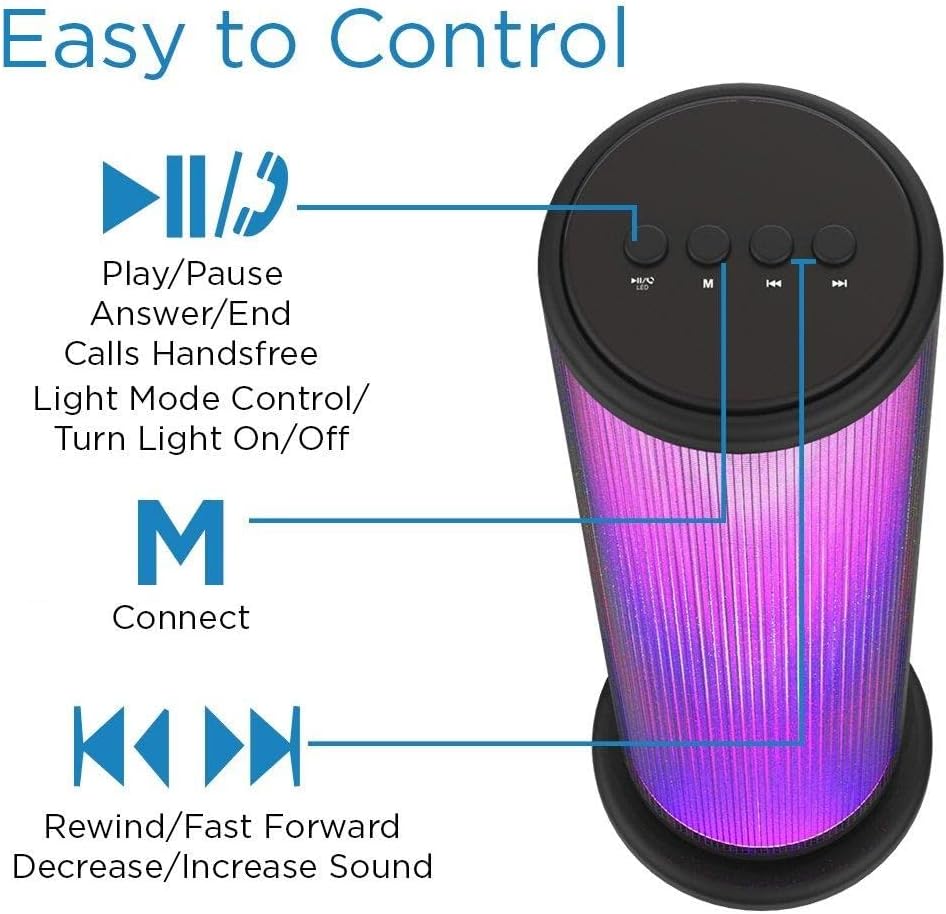
Image: Top panel of the Aduro speaker, illustrating the control buttons for play/pause, light mode, connect, and track/volume control.
Panèl Kontwòl (Anlè)
- Bouton Jwe/Pòz (►▮▮): Press to play or pause audio. Also used to answer/end calls.
- Light Mode Button (●/LED): Press to switch between LED light modes (Rhythmic Lights, Still Pattern) or turn lights on/off.
- Mode/Connect Button (M): Press to switch between Bluetooth and AUX input modes. Long press to enter Bluetooth pairing mode.
- Previous Track/Volume Down (◀◀): Short press for previous track. Long press to decrease volume.
- Next Track/Volume Up (►►): Short press for next track. Long press to increase volume.

Image: Bottom panel of the Aduro speaker, showing the Micro USB charging port and the AUX input port.
Ports (Bottom)
- Mikwo USB Port: Pou chaje oratè a.
- AUX Antre: For wired audio connection using a 3.5mm audio cable.
Enstalasyon
Chaje Oratè a
- Connect the Micro USB end of the charging cable to the Micro USB port on the speaker.
- Connect the USB-A end of the charging cable to a USB power source (e.g., computer USB port, USB wall adapter).
- Endikatè LED la ap limen pandan chaj la epi li ap etenn lè li fin chaje nèt.
- A full charge takes approximately 4 hours. The speaker provides up to 3 hours of playtime with LED lights active.
Enstriksyon Operasyon
Power On/Off
- To power on, press and hold the Play/Pause button (►▮▮) for a few seconds until you hear an audible prompt.
- To power off, press and hold the Play/Pause button (►▮▮) again for a few seconds.
Pè Bluetooth
- Ensure the speaker is powered on and in Bluetooth mode (indicated by a flashing blue LED). If not, press the 'M' button to switch modes.
- Sou aparèy ou an (telefòn entelijan, tablèt, elatriye), aktive Bluetooth epi chèche aparèy ki disponib yo.
- Select "Aduro Monolith" from the list of devices.
- Once paired, the speaker will provide an audible confirmation, and the blue LED will stop flashing and remain solid.
- Oratè a ap otomatikman eseye rekonekte ak dènye aparèy ki konekte a lè li limen.
Sèvi ak Antre AUX
- Konekte yon bout kab odyo 3.5mm (pa enkli) nan pò antre AUX ki sou oratè a.
- Connect the other end of the audio cable to the headphone jack or audio output of your device.
- Oratè a ap chanje otomatikman nan mòd AUX.
- Control audio playback and volume from your connected device.
Ki ap dirije mòd limyè
The speaker features two LED light modes. Press the Light Mode button (●/LED) to cycle through the options:
- Rhythmic Lights: Lights pulsate and change color in sync with the music.
- Still Pattern: Lights display a continuous, non-pulsating color pattern.
- Pressing the button again will turn the lights off.

Image: The Aduro speaker demonstrating its two distinct LED light modes: Rhythmic Lights and Still Pattern.
Rele men-gratis
Lè li konekte via Bluetooth, mikwofòn entegre nan oratè a pèmèt ou fè apèl men lib:
- Reponn Rele: Press the Play/Pause button (►▮▮) once.
- Fini apèl: Press the Play/Pause button (►▮▮) once during a call.
- Rejte apèl: Press and hold the Play/Pause button (►▮▮) for 2 seconds.
Antretyen
- Netwaye oratè a avèk yon twal mou epi sèk. Pa sèvi ak pwodui netwayaj abrazif oswa solvan.
- Sere oratè a nan yon kote ki fre, sèk lè li pa itilize.
- Evite ekspozisyon pwolonje nan limyè solèy dirèk oswa tanperati ekstrèm.
- Chaje batri a regilyèman, menm si ou pa itilize li souvan, pou kenbe batri a an bon eta.
Depanaj
| Pwoblèm | Kòz posib | Solisyon |
|---|---|---|
| Oratè pa limen. | Batri ap vide. | Chaje oratè a nèt. |
| Pa ka konekte atravè Bluetooth. | Oratè a pa an mòd koneksyon oswa li twò lwen aparèy la. | Ensure speaker is in Bluetooth pairing mode (flashing blue LED). Move device closer to speaker (within 10 meters). Turn off and on Bluetooth on your device. |
| Pa gen son ki soti nan oratè a. | Volume is too low or device is not connected properly. | Increase volume on both speaker and connected device. Re-pair Bluetooth or re-connect AUX cable. |
| Limyè ki ap dirije yo pa travay. | Lights are turned off or battery is low. | Press the Light Mode button (●/LED) to turn lights on. Charge the speaker. |
| Bon kalite son pòv yo. | Device is too far, interference, or low battery. | Move device closer. Avoid obstacles. Charge the speaker. |
Espesifikasyon
| Karakteristik | Detay |
|---|---|
| Non modèl | Monolith |
| Nimewo Modèl | AY-MTSP-01 |
| Kalite Oratè | Deyò, Pòtab |
| Koneksyon Teknoloji | Bluetooth, AUX |
| Gamme Bluetooth | Jiska 10 mèt (33 pye) |
| Audio Sòti Mode | Stereo |
| Oratè maksimòm pwodiksyon pouvwa | 6 Watts |
| Gwosè Chofè | 40mm |
| Kalite batri | Lityòm Ion |
| Kapasite batri | 1200mAh |
| Lavi batri | Up to 3 hours (with LED lights active) |
| Tan pou chaje | Apeprè 4 èdtan |
| Dimansyon (L x W x H) | 3.5 x 5.8 x 11.8 pous |
| Pwa atik | 15 ons (0.94 liv) |
| Koulè | Nwa |
| Konpozan ki enkli | 40mm Drivers, rechargeable battery, sensitive control panel, speakers, built-in microphone |
Garanti ak sipò
Aduro products are designed with quality and reliability in mind. This product comes with a manufacturer's warranty. For specific warranty details and duration, please refer to the warranty card included with your purchase or visit the official Aduro websit.
For technical support, troubleshooting assistance, or warranty claims, please contact Aduro customer service through their official channels. Please have your model number (AY-MTSP-01) and proof of purchase ready when contacting support.
Ou ka jwenn plis enfòmasyon ak enfòmasyon pou kontakte yo sou Aduro Store on Amazon.


