1. Plis paseview
This manual provides essential instructions for the safe and efficient use of your HP 120W AC Adapter Power Charger. This adapter is designed to provide reliable power to compatible HP laptops and other devices, ensuring optimal performance and charging.
Karakteristik kle yo enkli:
- Inivèsèl Antre Voltage: Supports AC input from 100V to 240V, 50-60Hz, for worldwide compatibility.
- Segondè pwodiksyon pouvwa: Delivers 19.5V at 6.15A, totaling 120W, suitable for various HP devices requiring this power profile.
- Fanatik refwadisman entelijan: Incorporates a smart cooling fan for efficient heat dissipation, contributing to the adapter's longevity and stable operation.
- Konsepsyon dirab: Constructed for everyday use, resisting wear and bending.
2. Ki sa ki nan bwat la
Upon unpacking your HP 120W AC Adapter, you should find the following components:
- 1 x HP 120W AC Adapter Unit
- 1 x AC Power Cord (for wall outlet connection)
- 1 x DC Output Cable with 7.4mm Tip (integrated with adapter)
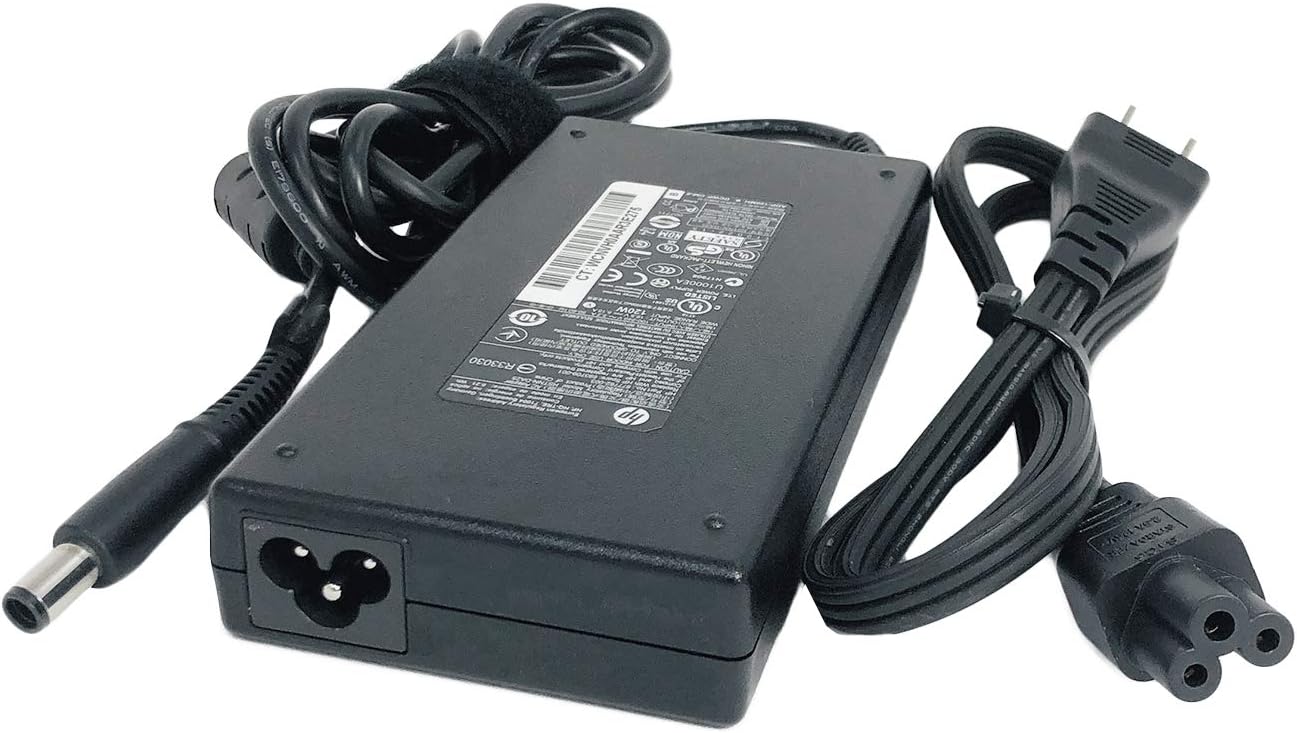
Image: The HP 120W AC Adapter unit shown with its detachable AC power cord and the integrated DC output cable featuring a 7.4mm tip.
3. Enstriksyon Enstalasyon
Follow these steps to correctly set up your HP 120W AC Adapter:
- Konekte kòd pouvwa AC: Insert the female end of the AC power cord firmly into the input port on the HP 120W AC Adapter unit.
- Konekte ak òdinatè pòtab: Plug the 7.4mm DC output tip of the adapter's integrated cable into the power input port on your compatible HP laptop. Ensure the connection is secure.
- Konekte nan priz kouran: Insert the male end of the AC power cord into a standard wall power outlet.

Imaj: Yon gwo plan view of the 7.4mm DC output tip, which connects to the laptop's power port.

Image: The HP 120W AC Adapter with its label clearly visible, displaying technical specifications and various safety certifications. The product identifier WCNVH0AAR3E275 is also visible on the label.
4. Operasyon
Once properly connected, the HP 120W AC Adapter will begin charging your laptop. Most HP laptops have an indicator light near the power port or on the adapter itself to show charging status.
The adapter is designed to operate within a wide input voltage range (100-240V), making it suitable for use in various regions. Its 120W output ensures efficient power delivery for demanding tasks and quick battery charging.
For optimal performance, ensure the adapter is placed in a well-ventilated area to allow the smart cooling fan to function effectively.
Video: This video demonstrates the connection and use of an HP 120W charger with a 7.4mm tip, highlighting its compatibility and ease of use. It shows the adapter being connected to a laptop and a power outlet.
5. Antretyen
To ensure the longevity and optimal performance of your HP 120W AC Adapter, consider the following maintenance tips:
- Manyen ak Swen: Avoid dropping the adapter or subjecting it to physical impact.
- Jesyon kab: Do not sharply bend, twist, or crimp the cables. Use the included Velcro straps (if applicable) to keep cables neatly organized when not in use or during travel.
- Kenbe sèk: Protect the adapter from moisture and liquids. Do not operate it in wet conditions.
- Vantilasyon: Ensure the adapter is placed in an area with adequate airflow to prevent overheating. Do not cover it with cloths or place it on soft surfaces that can block ventilation.
- Netwayaj: Disconnect the adapter from power before cleaning. Use a soft, dry cloth to wipe the exterior. Avoid using harsh chemicals or abrasive materials.
NAN. Depanaj
If you encounter issues with your HP 120W AC Adapter, refer to the following common troubleshooting steps:
- Pa gen kouran/Pa gen chaj:
- Verify that both the AC power cord and the DC output cable are securely connected to the adapter and your laptop.
- Asire w ke priz miray la fonksyone byen lè w teste li avèk yon lòt aparèy.
- Check for any visible damage to the cables or adapter unit.
- Surchof:
- Asire w adaptè a nan yon zòn ki byen ayere epi ki pa kouvri.
- Confirm that your laptop's power requirements do not exceed 120W.
- Chaje tanzantan:
- Check for loose connections at both the adapter and laptop ends.
- Inspect the DC tip for any bending or damage.
If these steps do not resolve the issue, contact HP customer support for further assistance.
7. Espesifikasyon
| Karakteristik | Spesifikasyon |
|---|---|
| AC Antre Voltage | 100 ~ 240V, 50 ~ 60Hz |
| DC Sòti Voltage | 19.5V |
| Ampepòk | 6.15 Amps |
| Wattage | 120 Watts |
| Kalite Connector | Proprietary 7.4mm Tip |
| Aparèy konpatib | HP laptops and other devices requiring 19.5V, 6.15A, 120W with a 7.4mm tip. |
| Nimewo Pati konpatib | 677762-002, 644699-001, 644699-003, 645156-001, 463556-001, 463555-002, 463556-002, 463557-001, 391174-001, 463953-001, 463959-001, 384023-001, ADP-120MH D, ADP-120MH B, PA-1121-52HH, HSTNN-CA25, HSTNN-DA25, HSTNN-LA25, VE025AA#ABA, NW199AA#ABA, ED519AA |
| Koulè | Nwa |
| Pwa atik | 1.39 liv |
| Dimansyon pake | 8.66 x 4.92 x 2.52 pous |
| Karakteristik espesyal | Fanatik refwadisman entelijan |
8. Garanti ak sipò
This HP 120W AC Adapter is subject to a 30-day return policy. For specific warranty details, please refer to the documentation provided with your purchase or contact HP customer support.
Plan pwoteksyon opsyonèl disponib pou yon pwoteksyon pwolonje:
- Plan Pwoteksyon 2 Zan
- Plan Pwoteksyon 3 Zan
- Complete Protect (covers eligible past and future purchases)
For technical assistance or warranty claims, please visit the official HP support websit oswa kontakte sèvis kliyan yo.