1. Pwodwi souview
The Acctim 71893 Cole Radio Controlled Alarm Clock is designed for precise timekeeping and user convenience. It automatically sets itself by receiving signals from the UK's Atomic Clock transmitter, ensuring absolute accuracy and adjusting for seasonal time changes. Its Superbrite backlight enhances visibility in low-light conditions, and the multi-function LCD displays time, calendar, and indoor temperature.
Karakteristik kle:
- Radio Controlled (UK & Ireland only): Automatic time synchronization with the UK's Atomic Clock, including automatic summer/winter time adjustments.
- Acctim Superbrite White Backlight: Provides a clear and bright display for easy night time viewing.
- Multi-function LCD Display: Shows current time, full calendar (date and day), and indoor temperature.
- Alarm with Snooze Function: Reliable alarm with a convenient snooze feature for extra rest.
- Konsepsyon kontra enfòmèl ant: Dimensions of 6 x 7.2 x 4 cm, weighing 0.10 kg, making it ideal for bedside tables or desks.
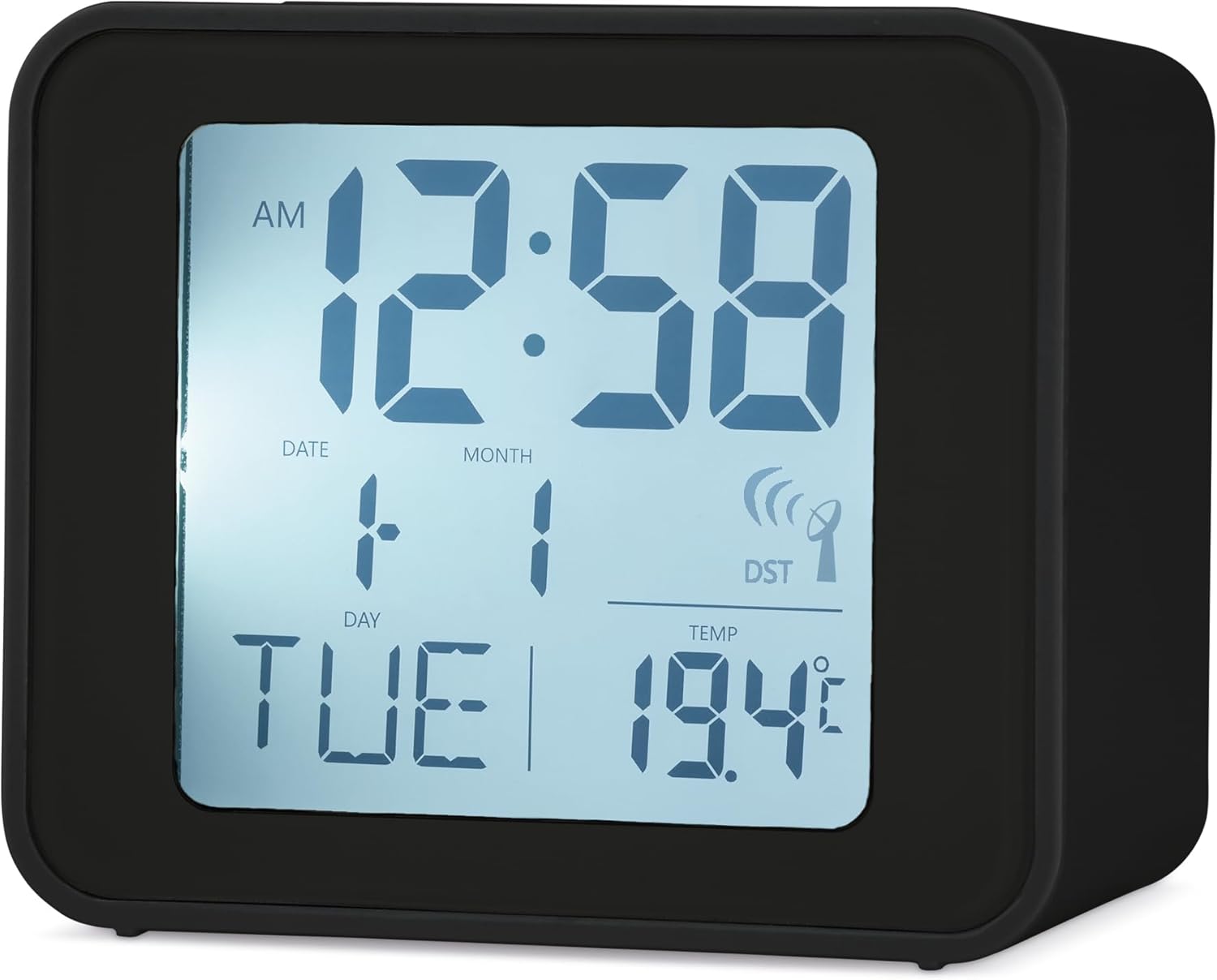
Figi 1: Devan view of the Acctim 71893 Cole Radio Controlled Alarm Clock, displaying the time, date, day of the week, and indoor temperature.
2. Enstalasyon
2.1 Enstalasyon batri
The clock requires 2x AAA batteries (not included). To install:
- Jwenn kouvèti konpatiman pil la sou dèyè revèy la.
- Glise kouvèti a anba pou ouvri li.
- Insert 2 new AAA batteries, ensuring the correct polarity (+ and -) as indicated inside the compartment.
- Remèt kouvèti konpatiman batri a lè w glise l anlè jiskaske li fè yon klik pou l antre nan plas li.

Figi 2: Dèyè view of the clock, highlighting the battery compartment and control buttons.
2.2 Initial Setup and Radio Control Signal Acquisition
Upon battery installation, the clock will automatically attempt to receive the radio control signal (MSF signal from Anthorn, UK). This process may take a few minutes to several hours, depending on your location and environmental conditions.
- Place the clock near a window, away from electronic devices that may cause interference.
- A signal icon (often resembling a radio tower or waves) will flash on the display during signal acquisition.
- Once the signal is successfully received, the icon will become solid, and the time, date, and day will automatically set to the correct values.
2.3 Manual Time Setting (If Radio Control Fails)
In areas with poor radio signal reception, you may need to set the time manually. Refer to the 'Operating Instructions' section for details on adjusting time and date using the control buttons.
3. Operasyon Enstriksyon
The Acctim Cole alarm clock features several buttons for operation, typically located on the top and back of the unit.
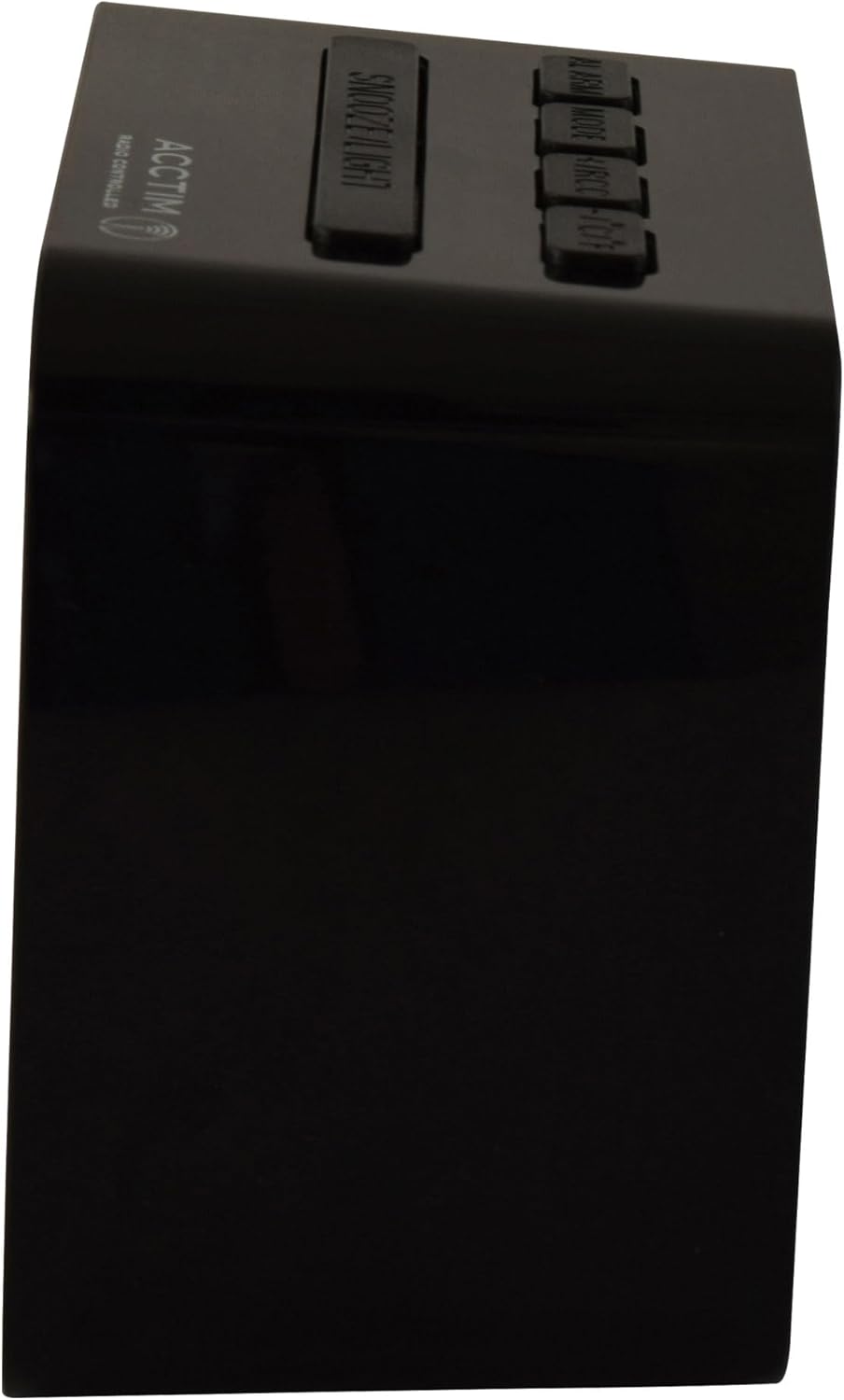
Figi 3: Side view showing the top control buttons.
3.1 Mete alam la
- Peze a ALAM button (usually on the back or top) to enter alarm setting mode. The alarm time will flash.
- Sèvi ak la + or - buttons (often labeled as UP/DOWN or ADJ) to adjust the hour.
- Peze ALAM ankò pou konfime lè a epi ale nan ajisteman minit la.
- Sèvi ak la + or - bouton pou ajiste minit yo.
- Peze ALAM once more to confirm and exit alarm setting mode.
- Pou aktive oswa dezaktive alam lan, peze bouton an ALARM ON / OFF switch or button. An alarm icon will appear on the display when active.
3.2 Itilizasyon Fonksyon Snooze a
Lè alam lan sonnen, peze gwo bouton an SNOOZE / limyè button on the top of the clock. The alarm will temporarily stop and sound again after approximately 5-10 minutes (duration may vary by model).
3.3 Aktive ekleraj dèyè a
Peze a SNOOZE / limyè button on the top of the clock to activate the Superbrite white backlight. The backlight will illuminate the display for a few seconds, making it easy to read in the dark.
3.4 Display Modes (Time, Date, Temperature)
The clock's LCD display cycles through various information. Typically, the time is always visible. The date, day, and temperature are also displayed simultaneously. No specific button is usually required to switch between these, as they are part of the multi-function display.
4. Antretyen
4.1 Ranplasman batri
When the display becomes dim or the clock stops functioning, it is time to replace the batteries. Follow the battery installation steps in Section 2.1. Always use new AAA batteries and dispose of old batteries responsibly.
4.2 Netwayaj
To clean the clock, gently wipe the surface with a soft, dry cloth. Do not use abrasive cleaners, solvents, or chemical sprays, as these can damage the casing or display. Avoid getting moisture into the clock's internal components.
4.3 Konsiderasyon Anviwònman
Keep the clock away from direct sunlight, extreme temperatures, and high humidity. These conditions can affect the clock's performance and lifespan. Ensure it is placed on a stable, flat surface.
NAN. Depanaj
5.1 Clock Not Setting Automatically
- Tcheke Kote yo ye: Ensure the clock is placed near a window and away from potential sources of interference such as TVs, computers, or other electronic devices.
- Fòs siyal: Radio signals can be weaker during certain times of day or due to atmospheric conditions. Allow up to 24 hours for the clock to acquire the signal.
- Tcheke batri: Ensure batteries are new and correctly inserted. Low batteries can hinder signal reception.
- Manyèl seri: If automatic setting consistently fails, set the time and date manually as described in Section 2.3.
5.2 Display is Dim or Blank
- Ranplasman batri: This is the most common cause. Replace the AAA batteries with new ones.
- Tanperati: Extreme cold can sometimes affect LCD display performance. Move the clock to a warmer environment.
5.3 Alam pa sonnen
- Aktivasyon alam: Ensure the alarm is activated (check for the alarm icon on the display).
- Tan alam: Verify that the alarm time is set correctly.
- Nivo batri: Low batteries may prevent the alarm from sounding effectively.
5.4 Incorrect Temperature Reading
- Vantilasyon: Ensure the clock's ventilation holes (usually on the back) are not blocked, as this can affect temperature sensor accuracy.
- Faktè ekstèn: Avoid placing the clock near heat sources (e.g., radiators, direct sunlight) or cold drafts, which can skew readings.
6. Espesifikasyon
| Karakteristik | Detay |
|---|---|
| Mak | Acctim |
| Nimewo Modèl | 71893D |
| Koulè | Nwa |
| Dimansyon pwodwi (L x W x H) | 4 x 7.2 x 6 cm |
| Pwa atik | 120 g |
| Materyèl | Crystal (referring to display material) |
| Kalite ekspozisyon | Digital LCD |
| Sous pouvwa | Battery Powered (2x AAA, not included) |
| Karakteristik espesyal | Alarm, Radio Controlled, Backlight, Temperature Display |
| Style | Modèn |
| Kalite chanm | Living Room (suitable for various rooms) |
| Fòm | Rektangilè |
7. Garanti ak sipò
This Acctim product is manufactured to high-quality standards. For information regarding warranty coverage, please refer to the warranty card included with your purchase or visit the official Acctim website. If you encounter any issues not covered in this manual or require further assistance, please contact Acctim customer support through their official channels.
Tanpri konsève prèv acha ou a pou nenpòt reklamasyon garanti.


