1. Entwodiksyon
The VILTROX DC-70 II is a 7-inch full HD camera monitor designed to enhance your video production workflow. Featuring a 1024x600 high-resolution display, tight pixel density, and high brightness, it delivers excellent image quality and a professional visual experience. This monitor serves as an external display for various cameras, including DSLRs, mirrorless cameras, and digital camcorders, transmitting real-time 4K video signals.

The VILTROX DC-70 II monitor provides professional monitoring, designed to restore standard colors for accurate visual feedback during shooting.
2. Pake kontni
Tanpri verifye ke tout atik yo prezan nan pakè ou a:
- VILTROX DC-70 II 7-inch Camera Video Monitor
- Kapuchon parapli
- NP-F550 batri
- Battery Charging Cable (USB)
- Standard Cold Shoe Adapter
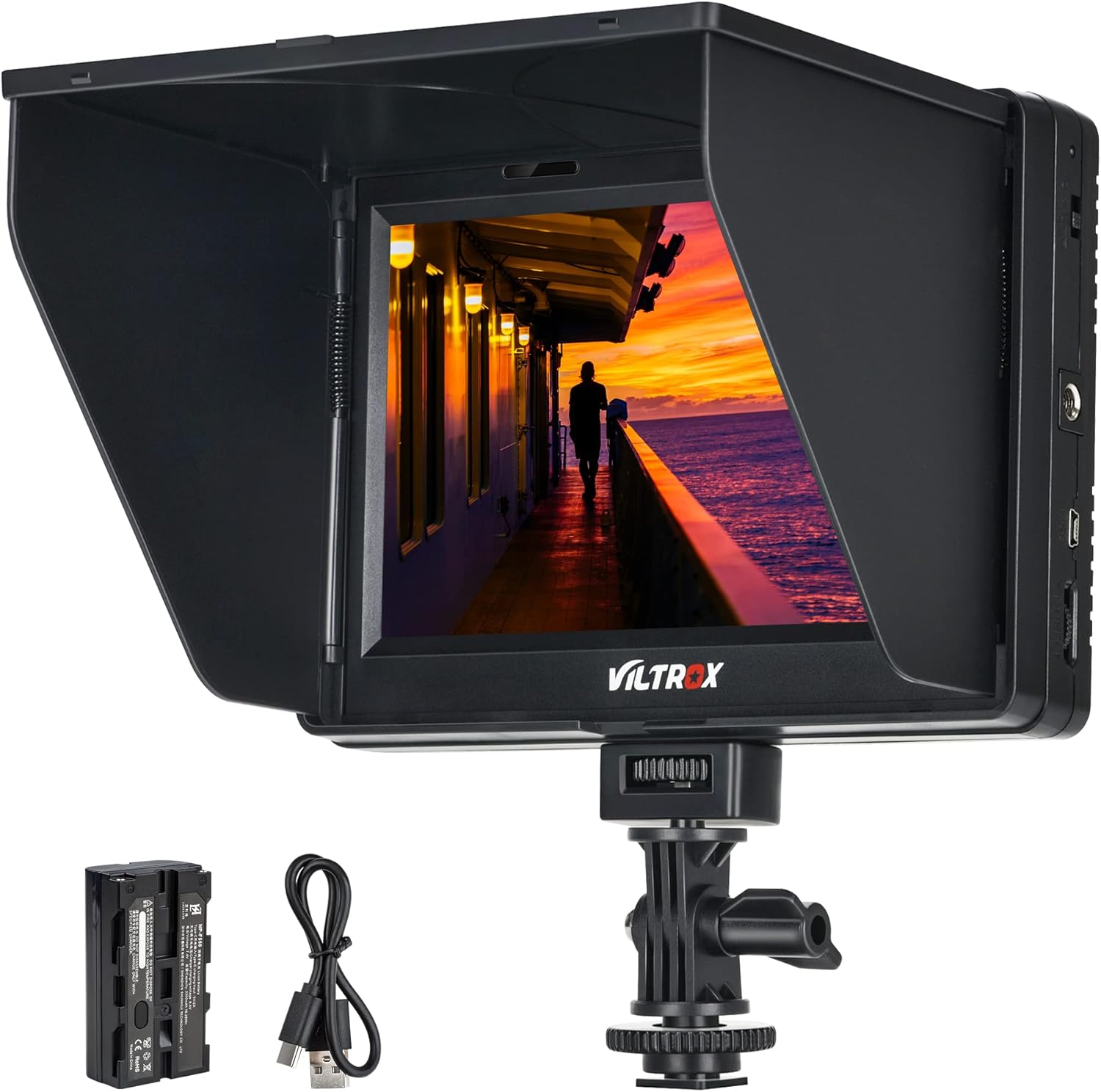
The VILTROX DC-70 II monitor kit includes the 7-inch monitor, a detachable sunshade, an NP-F550 battery, and a USB charging cable.
3. Pwodwi Features
The VILTROX DC-70 II monitor offers a range of features designed for professional video monitoring:
- Ekspozisyon Full HD 7 pous: 1024x600 resolution with high brightness for clear visuals.
- Professional Monitoring Functions: Includes Color Temperature Settings, False-color, Peaking Focus Assist, Histogram, Monochrome, Zooming Pixel, Safe Frames, Image Flip, Check Field, and Pixel to Pixel.
- Koneksyon versatile: HDMI input/output, AV input, headphone jack, and USB update port for broad compatibility.
- Opsyon pouvwa doub: Can be powered by an AC adapter or the included NP-F550 battery.
- Lajè View Angle IPS LCD Panel: Ensures excellent visibility from various angles.
- Removable Sunshade: Reduces glare in bright conditions and protects the screen during transport.
- Standard 1/4" Hot Shoe Mount: Allows for flexible mounting on cameras and rigs.

Equipped with a 7-inch IPS 4K HD display, the monitor offers an Ultra HD 1280x800 resolution with a 1200:1 color contrast ratio, supporting features like zoom in, focus assist, and pixel to pixel.
4. Enstalasyon
4.1 Enstalasyon Monitè a
Attach the monitor to your camera, rig, or stabilizer using the provided standard cold shoe adapter. The adapter allows for multi-directional adjustment to achieve optimal viewang ing.

The monitor features a standard 1/4 inch hot shoe mount, enabling attachment to DSLRs, cameras, micro-single cameras, or handheld stabilizers for versatile use.
4.2 Alimente monitè a
The DC-70 II monitor can be powered in two ways:
- AC adaptè: Connect an appropriate AC adapter (not included) to the DC IN port for continuous power.
- Batri: Insert the included NP-F550 lithium-ion battery into the battery bay. Use the provided USB charging cable to recharge the battery.
4.3 Konekte Sous Videyo
Connect your camera or video source to the monitor using an HDMI cable (not included) to the HDMI IN port. The monitor supports 4K video signals. An AV input is also available for older devices.

This diagram details the monitor's versatile power options, the protective sun hood, the 360-degree adjustable hot shoe for flexible viewing angles, and its support for 4K HDMI input and output for connecting various camera devices.
5. Operasyon Enstriksyon
The DC-70 II monitor features intuitive controls for accessing its various functions. Use the menu function keys (labeled 4 in the dimensions diagram) to navigate and adjust settings.
5.1 Operasyon debaz
- Limen/Etenyen: Use the power switch (labeled 1 in the dimensions diagram) to turn the monitor on or off.
- Navigasyon nan meni: Press the menu button to access the on-screen display (OSD) menu. Use the directional buttons to navigate and select options.
5.2 Advanced Monitoring Functions
Access these functions through the OSD menu to optimize your monitoring experience:
- Asistans pou Konsantrasyon Maksimòm: Highlights in-focus areas to aid in precise manual focusing.
- False-color: Displays exposure levels using a spectrum of colors, helping to identify over- or under-exposed areas.
- Istogram: Provides a graphical representation of the tonal distribution in your image.
- Monokrom: Switches the display to black and white, or specific color channels (red, green, blue) for detailed analysis.

The monitor supports auxiliary adjustment of camera color settings, allowing display in monochrome, red, green, or blue to drive pixels. This feature aids in precise color monitoring.
- Zooming Pixel: Magnifies a portion of the screen to check fine details.
- Ankadreman ki an sekirite: Displays guides for various aspect ratios and safe areas for broadcast.
- Imaj Flip: Flips the image horizontally, vertically, or both, useful for different mounting orientations.

The image flip function allows for horizontal and vertical flipping of the display, accommodating various installation and monitoring needs, such as tripod, magic arm, or stabilizer setups.
- Tcheke jaden: Displays only red, green, or blue channels, or monochrome, to check color calibration.
- Piksèl a piksèl: Displays the image at its native resolution without scaling, useful for critical focus and detail checking.
6. Antretyen
To ensure the longevity and optimal performance of your VILTROX DC-70 II monitor, follow these maintenance guidelines:
- Netwaye ekran an: Use a soft, lint-free cloth specifically designed for electronics screens. Do not use harsh chemicals or abrasive materials.
- Netwaye kò a: Wipe the monitor's body with a soft, dry cloth. Avoid moisture near ports.
- Depo: When not in use, store the monitor in a dry, cool place, away from direct sunlight and extreme temperatures. Use the sunshade to protect the screen during travel.
- Swen batri: Fully charge the battery before first use. For long-term storage, charge the battery to approximately 50% and store it separately from the monitor.
NAN. Depanaj
If you encounter issues with your VILTROX DC-70 II monitor, refer to the following common problems and solutions:
- Pa gen pouvwa:
- Ensure the battery is correctly inserted and charged, or the AC adapter is securely connected.
- Check the power switch is in the 'ON' position.
- Pa gen siyal videyo:
- Verify that the HDMI or AV cable is securely connected to both the camera and the monitor.
- Confirm the camera is outputting a video signal and is set to the correct output resolution.
- Ensure the monitor's input source is correctly selected in the menu.
- Image Quality Issues (e.g., blurry, incorrect colors):
- Adjust the monitor's brightness, contrast, and color settings in the OSD menu.
- Check the camera's output settings.
- If using Peaking Focus Assist, ensure your lens is properly focused.
- Bouton ki pa reponn:
- Restart the monitor.
- Asire w pa gen okenn debri ki bloke bouton yo.
If the problem persists after attempting these solutions, please contact VILTROX customer support.
8. Espesifikasyon
Detailed technical specifications for the VILTROX DC-70 II monitor:

Dyagram sa a bay yon detay view of the monitor's physical dimensions and its various interfaces, such as HDMI input/output, AV interface, USB port, headphone jack, and battery bay with release button.
| Karakteristik | Spesifikasyon |
|---|---|
| Nimewo Modèl | FSDC-90HD |
| Gwosè ekran | 7 pous |
| Kalite ekspozisyon | IPS LCD |
| Rezolisyon | 1024 x 600 (HD) |
| Aspè rapò | 16:9 |
| Imaj klète | 1000 Cd/m2 |
| Antre Videyo | HDMI, AV |
| Sòti videyo | HDMI |
| Sòti odyo | Jack kas ekoutè |
| Mizajou Port | USB |
| Sous pouvwa | AC Adapter (not included), NP-F550 Battery (included) |
| Pwa atik | 2.4 liv |
| Dimansyon pake | 9.17 x 8.39 x 2.95 pous |
| Premye Dat ki disponib | 18 avril 2018 |
9. Garanti ak sipò
VILTROX products typically come with a limited warranty. Please refer to the warranty card included with your product or visit the official VILTROX websit la pou wè tèm ak kondisyon garanti detaye yo.
For technical support, service, or inquiries, please contact VILTROX customer service through their official channels. Contact information can usually be found on the product packaging or the VILTROX websit.


