1. Entwodiksyon
This instruction manual provides detailed guidance for the proper use and care of your Olympus DS-9500 Digital Voice Recorder. The DS-9500 is designed for professional dictation, offering enhanced clarity and flexible workflow management through features such as WiFi connectivity, advanced noise cancellation, and robust construction. Please read this manual thoroughly to ensure optimal performance and longevity of your device.
2. Pwodwi souview
The Olympus DS-9500 is a sophisticated digital voice recorder equipped with various controls and ports for efficient operation. Familiarize yourself with the device's components as illustrated below.
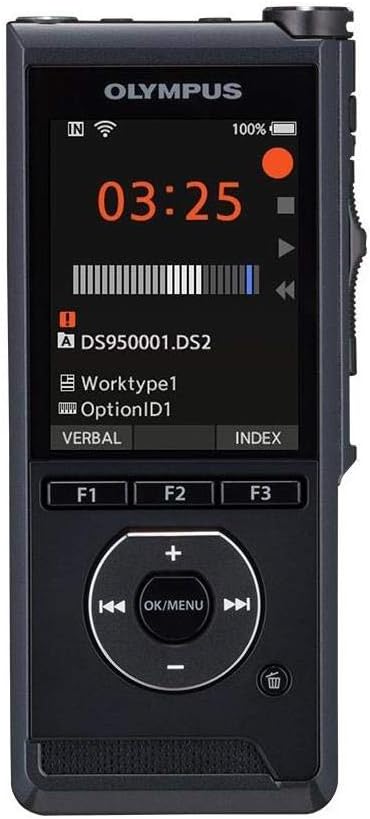
Figi 2.1: Devan View. This image displays the front of the Olympus DS-9500, highlighting its color display, recording status indicators, and the central navigation pad with OK/MENU button, along with three programmable function buttons (F1, F2, F3).
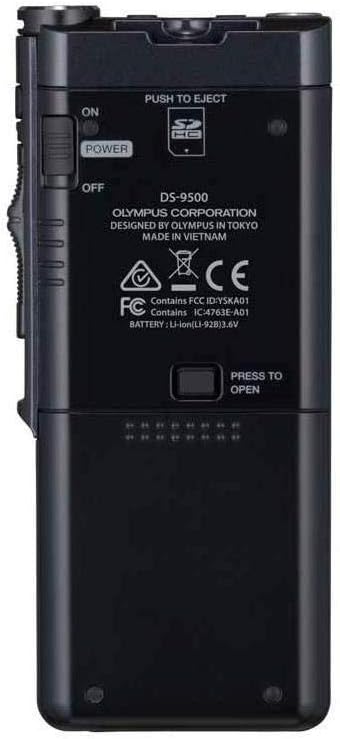
Figi 2.2: Retounen View. The rear of the DS-9500 features the power switch (ON/OFF), a 'PUSH TO EJECT' mechanism for the SD card slot, and the battery compartment release. Model information and regulatory markings are also visible.

Figi 2.3: Bò gòch la View. This image shows the left side of the device, which typically houses volume controls or other secondary buttons, contributing to its ergonomic design.

Figi 2.4: Bò dwat View. The right side of the DS-9500 features the optical slide switch, a key control for recording, stopping, and playback functions, designed for tactile and reliable operation.

Figi 2.5: Anba View. The bottom of the device includes the USB ports for charging and data transfer, facilitating connectivity with a computer or docking station.
3. Enstalasyon
3.1. Enstalasyon batri
- Asire w ke aparèy la etenn.
- Jwenn konpatiman batri a sou dèyè aparèy la (gade Figi 2.2).
- Slide the battery cover release and open the compartment.
- Insert the supplied Li-ion battery, ensuring correct polarity.
- Fèmen kouvèti konpatiman batri a jiskaske li fè yon klik byen fèm nan plas li.
3.2. Premye Limen ak Paramèt Debaz yo
- Slide the power switch (located on the back, Figure 2.2) to the 'ON' position.
- Upon first use, the device may prompt you to set the date and time. Follow the on-screen instructions using the navigation pad.
- Charge the device fully before first use using the supplied USB cable.
4. Operasyon Enstriksyon
4.1. Anrejistreman
The DS-9500 features intelligent dual microphones and a studio-quality pop filter for clear audio capture.
- Kòmanse anrejistreman: Slide the optical slide switch (Figure 2.4) to the 'REC' position. The recording indicator will illuminate.
- Poz anrejistreman: Slide the optical slide switch to the 'STOP' position to pause. Slide back to 'REC' to resume.
- Sispann anrejistreman: Slide the optical slide switch to the 'STOP' position and hold briefly, or press the 'STOP' button on the navigation pad.
- Direksyon mikwofòn: Access the menu to select between 'Narrow' directionality for single-speaker dictation in noisy environments (e.g., airports) or 'Wide' directionality for conference settings with multiple speakers.
4.2. lèktur
- Chwazi File: Use the navigation pad to browse and select the desired audio file from the list on the display.
- Kòmanse Lekti: Press the 'PLAY' button on the navigation pad or slide the optical slide switch to the 'PLAY' position.
- Ajiste Volim: Use the volume buttons (typically on the side or navigation pad) to increase or decrease playback volume.
- Vit Avant/Remonte: Use the fast forward and rewind buttons on the navigation pad to navigate within the audio file.
- One Stop lèktur: Press the 'STOP' button on the navigation pad or slide the optical slide switch to the 'STOP' position.
4.3. WiFi Functionality
The DS-9500's WiFi capability allows for wireless transfer of dictation files.
- Konekte ak WiFi: Navigate to the WiFi settings in the device menu. Select your desired network (e.g., personal hotspot or office network) and enter the password if required.
- File Transfè: Yon fwa konekte, files can be sent to a designated transcriptionist or server. Refer to the accompanying software manual for detailed instructions on configuring wireless transfer destinations.
- Tcheke estati: The device allows you to check the status of transcription files directly on its display.
4.4. Karakteristik sekirite
The DS-9500 incorporates security measures to protect sensitive information.
- AES chifreman: The device supports 256-bit AES encryption for recorded files. Enable this feature through the device settings to secure your dictations.
- Device PIN Lock: Set a PIN lock to prevent unauthorized access to the device and its contents.
5. Antretyen
- Netwayaj: Sèvi ak yon twal mou epi sèk pou netwaye deyò aparèy la. Pa sèvi ak pwodui netwayaj likid oswa solvan.
- Depo: Sere aparèy la nan yon kote ki fre epi sèk, lwen limyè solèy dirèk ak tanperati ekstrèm.
- Swen batri: Pou yon batri ki dire pi lontan, evite dechaje batri a nèt souvan. Si w ap sere l pou yon bon bout tan, chaje batri a apeprè 50%.
- Mizajou mikrolojisyèl: Tcheke sipò Olympus la regilyèman. websit la pou mizajou firmwèr pou asire aparèy ou an gen dènye karakteristik ak amelyorasyon pèfòmans yo.
NAN. Depanaj
If you encounter issues with your DS-9500, refer to the following common solutions:
- Aparèy pa limen: Ensure the battery is correctly installed and charged. Connect the device to a power source using the USB cable.
- Pwoblèm anrejistreman: Check microphone settings (directionality). Ensure the pop filter is clean. Verify sufficient storage space on the SD card.
- Pwoblèm koneksyon WiFi: Confirm correct network password. Ensure the device is within range of the WiFi signal. Restart the device and attempt reconnection.
- Aparèy la bloke/pa reponn: If the device becomes unresponsive, try performing a soft reset by holding down the power button for several seconds. If this does not work, temporarily remove and reinsert the battery.
- Slow Startup/Battery Drain: Ensure all unnecessary background processes or WiFi connections are disabled when not in use. Consider performing a factory reset if issues persist after backing up data.
- Lojisyèl konpatibilite: Ensure you are using the latest version of the Olympus dictation management software compatible with your operating system.
For persistent issues, contact Olympus customer support.
7. Espesifikasyon
| Karakteristik | Spesifikasyon |
|---|---|
| Mak | Olympus |
| Nimewo Modèl | DS-9500 |
| Pwa atik | 1.82 liv |
| Dimansyon pwodwi | 7.4 x 6.5 x 4.2 pous |
| Kapasite Depo memwa | 16 GB |
| Gwosè ekran | 2.4 pous |
| Tan anrejistreman dijital | 1275 èdtan |
| Mòd Operasyon Mikwofòn | Stereo |
| Entèfas Materyèl | Kat dijital an sekirite, USB |
| Ekoutè Jack | 3.5 milimèt |
| Aparèy konpatib | Odinatè pèsonèl |
| Nimewo Pati Manifakti | V741010BU000 |
8. Garanti ak sipò
For information regarding the product warranty, please refer to the warranty card included with your purchase or visit the official Olympus support website. For technical assistance, software downloads, or further inquiries, please contact Olympus customer support directly. Contact details can typically be found on the Olympus websit oswa nan anbalaj pwodwi a.


