1. Entwodiksyon
Mèsi pou acha aasing the Ematic EMHD130LED HD 16GB Music Player. This compact and portable device allows you to enjoy your favorite music on the go. Featuring a 1.3-inch OLED display and a MicroSD slot for expanded storage, it is designed for ease of use and portability. This manual provides detailed instructions for setting up, operating, and maintaining your music player.
2. Enfòmasyon enpòtan sou sekirite
- Pa ekspoze aparèy la nan tanperati ekstrèm, limyè solèy dirèk, oswa imidite ki wo.
- Evite jete oswa sibi aparèy la nan gwo enpak.
- Pa eseye demonte oswa repare aparèy la tèt ou. Konfye tout antretyen bay pèsonèl kalifye.
- Kenbe aparèy la lwen dlo ak lòt likid.
- Sèvi ak sèlman akseswa manifakti apwouve.
- Jete aparèy la ak batri li yon fason responsab dapre règleman lokal yo.
3. Pake kontni
Tanpri tcheke pake a pou atik sa yo:
- Ematic EMHD130LED HD 16GB Music Player
- Manyèl Itilizatè (dokiman sa a)
- Note: A USB charging/data transfer cable is typically required and may be sold separately.
4. Pwodwi souview
Familiarize yourself with the components and controls of your Ematic music player.
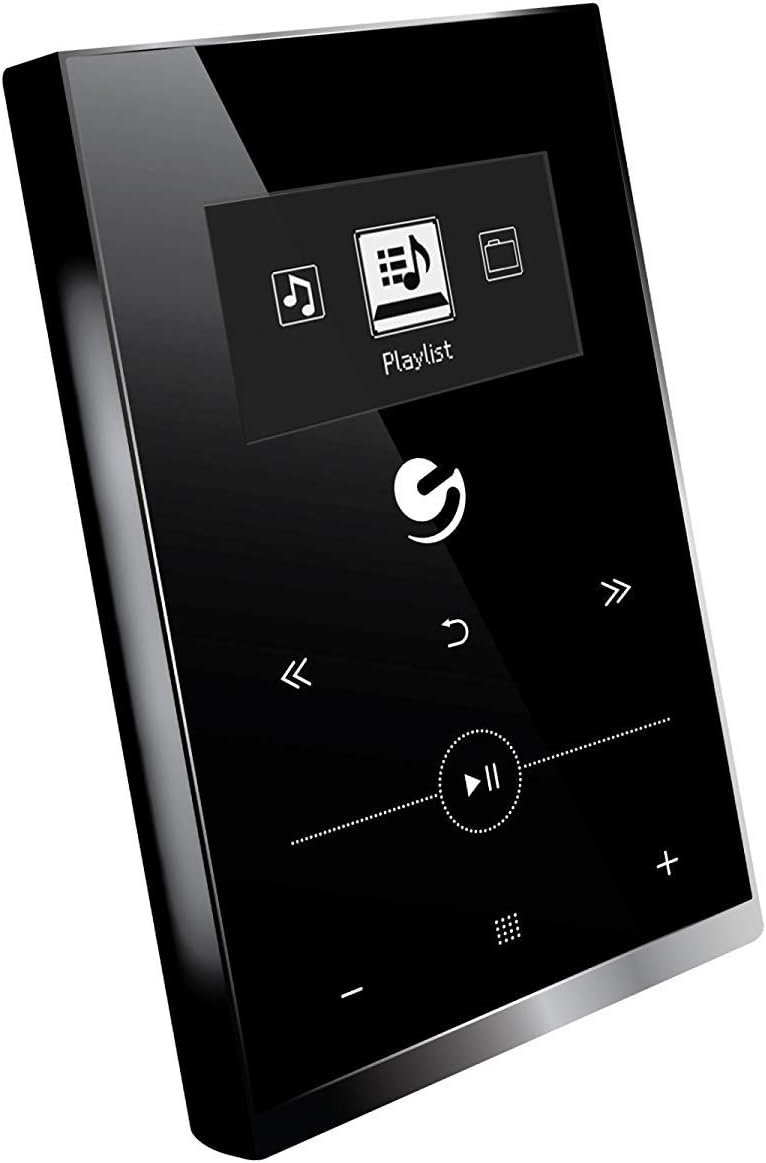
Figi 4.1: Devan view of the Ematic EMHD130LED Music Player, highlighting its 1.3-inch OLED display and touch-sensitive controls for navigation and playback.

Figi 4.2: The Ematic EMHD130LED Music Player shown in a typical usage scenario, demonstrating its small form factor suitable for connection to a computer for media transfer.
Kontwòl ak pò:
- Ekspozisyon OLED: 1.3-inch screen for track information and menu navigation.
- Bouton Navigasyon: (Implied from image) Up, Down, Left, Right, Select/Play/Pause.
- Kontwòl Volim: (Implied from image) Plus (+) and Minus (-) buttons for adjusting audio output.
- Plas MicroSD: For expanding storage capacity beyond the internal 16GB.
- Pò USB: For connecting to a computer for charging and data transfer.
5. Enstalasyon
5.1 Chaje Aparèy la
Before first use, fully charge your music player. Connect the device to a computer's USB port or a compatible USB wall adapter using a USB cable. The OLED display will indicate charging status. A full charge typically takes a few hours.
5.2 Loading Music
The Ematic EMHD130LED has 16GB of internal storage. You can add more music using a MicroSD card (sold separately).
- Via Odinatè: Plug your media player directly into your computer using a USB cable. The device will appear as a removable drive. Drag and drop your MP3 audio files into the player's music folder.
- Via MicroSD Card: Insert a MicroSD card into the designated slot on the player. You can transfer music files directly to the MicroSD card via a card reader on your computer, or transfer them to the card once it's in the player and connected to the computer.
6. Operasyon Enstriksyon
6.1 Power On/Off
Press and hold the Power button (location not specified, typically a side button or integrated with Play/Pause) for a few seconds to turn the device on or off.
6.2 Navigasyon debaz
Use the navigation buttons (Up, Down, Left, Right) to browse through menus and select options on the 1.3-inch OLED display. Press the central Select button to confirm a selection or play a track.
6.3 Mizik lèktur
- From the main menu, navigate to 'Music' or 'Playlist'.
- Browse through your stored music by artist, album, genre, or all songs.
- Select a track and press the Play/Pause button to begin playback.
- Use the Skip Forward/Backward buttons to change tracks.
- Adjust the volume using the Volume Up (+) and Volume Down (-) buttons.
6.4 Using the MicroSD Card
Once a MicroSD card is inserted and contains music, the player will automatically detect it. You can typically switch between internal storage and MicroSD card content through the music menu settings.
7. Antretyen
- Netwayaj: Use a soft, dry, lint-free cloth to clean the device. Do not use abrasive cleaners or solvents.
- Depo: Lè w pa itilize aparèy la pou yon bon bout tan, sere l nan yon kote ki fre epi sèk, lwen limyè solèy dirèk.
- Swen batri: Pou pwolonje lavi batri a, evite dechaje batri a nèt souvan. Chaje aparèy la regilyèman, menm si w pa ap itilize l.
NAN. Depanaj
| Pwoblèm | Kòz posib | Solisyon |
|---|---|---|
| Aparèy la pa vire. | Batri ap vide. | Chaje aparèy la pou omwen 30 minit. |
| Pa gen son. | Volume is too low or muted; Headphones not connected properly. | Increase volume; Ensure headphones are fully plugged in. |
| Pa ka transfere files. | Incorrect USB connection; Driver issue; Corrupted files. | Ensure USB cable is securely connected; Try a different USB port or cable; Restart computer and player; Check file format (only MP3 supported). |
| Ekran an vid oswa li bloke. | Pwoblèm lojisyèl. | Peze epi kenbe bouton Pouvwa a pandan 10-15 segonn pou fòse yon rekòmanse. |
9. Espesifikasyon
| Karakteristik | Detay |
|---|---|
| Mak | Ematik |
| Modèl | EMHD130LED |
| Non modèl | 16GB High Definition Music Player with 1.3-inch OLED Display |
| Kapasite Depo memwa | 16 GB (Entèn) |
| Kapasite depo dijital | 16 GB |
| Aparèy konpatib | Laptop, òdinatè pèsonèl |
| Kalite ekspozisyon | OLED |
| Gwosè ekran | 1.3 pous |
| Kalite Connector | USB |
| Kalite Medya Konpatib | MP3 |
| Kalite Medya | Mikwo SD |
| Dimansyon pwodwi | 11.99 x 8.48 x 2.84cm; 312.98g |
| Konpozisyon selil batri | Lityòm Ion |
| Batri rechargeable | Wi |
| Manifakti | Shaghai LTD |
| Premye Dat ki disponib | 26 mas 2018 |
10. Garanti ak sipò
For warranty information and customer support, please refer to the warranty card included with your product or visit the official Ematic website. You may also contact Ematic customer service directly for assistance with product issues or inquiries.
Ematic Official Websit: www.ematic.us (Note: This is a general placeholder link for Ematic's website. Please verify the correct support URL pou rejyon ou.)


