Entwodiksyon
The House of Marley No Bounds portable Bluetooth speaker is designed for outdoor use, featuring a rugged construction with sustainable materials. It offers wireless audio streaming, speakerphone functionality, and is built to withstand water and dust exposure.
Kontni pake
- No Bounds Portable Bluetooth Speaker
- USB Chaje Kab
- Mosad
Pwodwi souview
Familyarize w ak konpozan ak kontwòl oratè a.
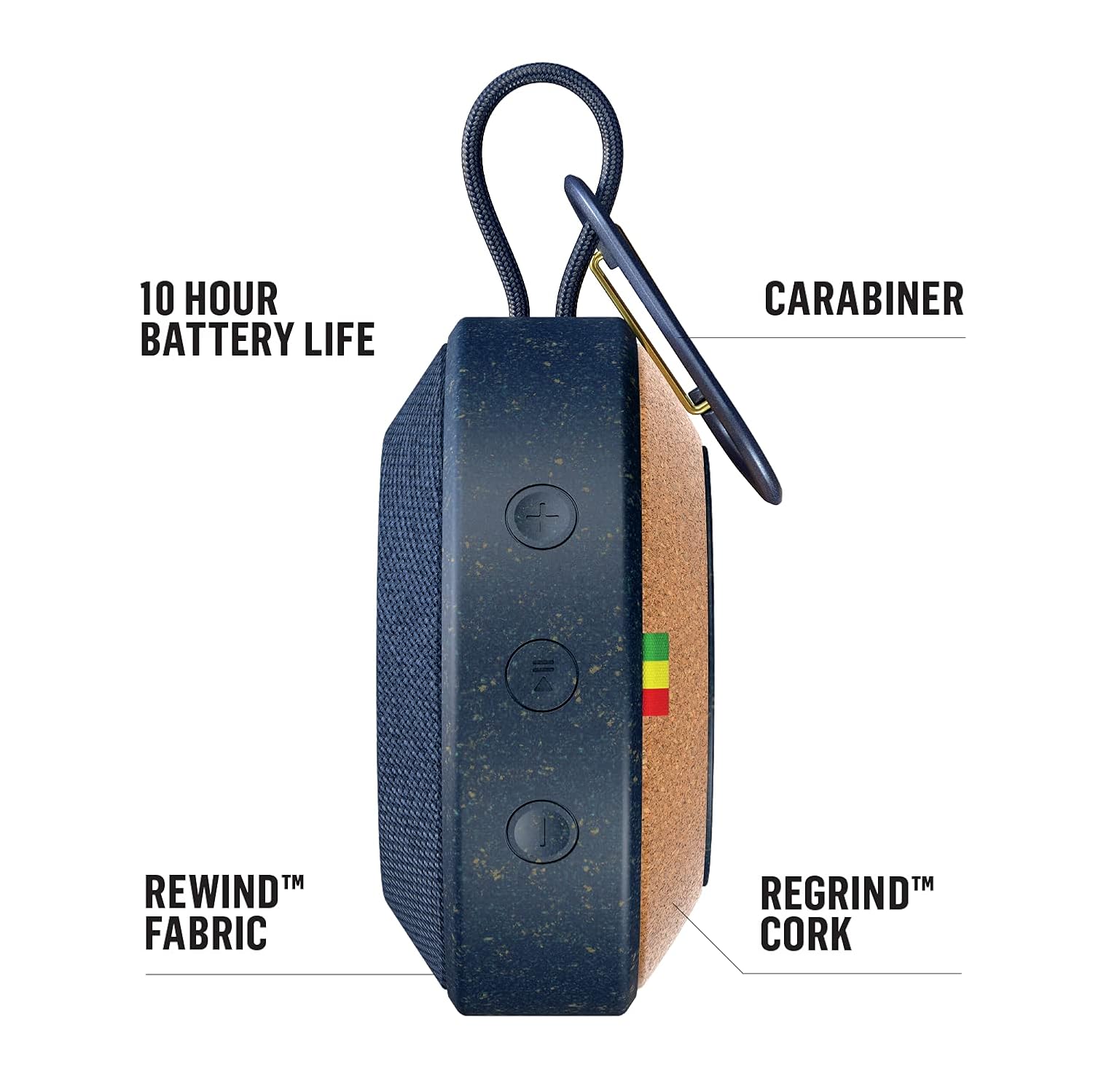

Kontwòl ak pò:
- Bouton pouvwa: Peze epi kenbe pou limen oswa etenn oratè a.
- Bouton Volim (+/-): Ajiste volim odyo a.
- Bouton appariement Bluetooth: Lanse mòd koneksyon Bluetooth la.
- Pò Aux-in: For wired audio connection using a 3.5mm audio cable (not included).
- USB chaje Port: Pou chaje batri entèn lan.
Enstalasyon
1. Chaje Oratè a
- Connect the provided USB charging cable to the speaker's USB charging port.
- Konekte lòt bout kab USB a nan yon adaptè kouran USB (pa enkli) oubyen nan yon pò USB òdinatè.
- Limyè endikatè chaj la ap limen. Kite apeprè 2-3 èdtan pou yon chaj konplè.
- Yon fwa li fin chaje nèt, limyè endikatè a ap chanje oubyen etenn. Dekonekte kab chaje a.
2. Powering On / Off
- To power on, press and hold the Power button until you hear an audible tone and the indicator light illuminates.
- To power off, press and hold the Power button again until you hear an audible tone and the indicator light turns off.
3. Pè Bluetooth

- Asire w ke oratè a limen.
- Press the Bluetooth pairing button. The Bluetooth indicator light will flash, indicating it is in pairing mode.
- Sou aparèy ou an (telefòn entelijan, tablèt, elatriye), aktive Bluetooth epi chèche aparèy ki disponib yo.
- Select "No Bounds" from the list of devices.
- Yon fwa li konekte, limyè endikatè Bluetooth la ap vin fiks, epi w ap tande yon son konfimasyon.
4. Wireless Dual Speaker Pairing
The No Bounds speaker supports pairing with another No Bounds speaker for a stereo audio experience.
- Ensure both No Bounds speakers are powered on and not connected to any other Bluetooth device.
- On one speaker, press and hold the Bluetooth button for 3 seconds until you hear a tone. This speaker will be the primary speaker.
- On the second speaker, press the Bluetooth button briefly. This speaker will connect as the secondary speaker.
- Once connected, the indicator lights on both speakers will confirm the successful pairing.
- Connect your device to the primary speaker via Bluetooth as described in step 3.
Operasyon
1. Jwe Audio
- Bluetooth: After successful pairing, play audio from your connected device. The sound will stream wirelessly to the speaker.
- Aux-in: Connect a 3.5mm audio cable from your audio source to the speaker's Aux-in port. The speaker will automatically switch to Aux-in mode.
2. Fonksyon Oratè
When connected via Bluetooth to a smartphone, the built-in microphone allows you to answer calls directly through the speaker.
- Pou reponn yon apèl k ap antre, peze bouton Jwe/Pòz la.
- Pou fini yon apèl, peze bouton Jwe/Pòz la ankò.
- Pou rejte yon apèl k ap fèk ap rantre, peze epi kenbe bouton Jwe/Paz la.
3. Using the Carabiner
The integrated metal carabiner allows for convenient portability. Clip the speaker to your bag, belt loop, or other secure points for easy transport.
4. Rezistans dlo ak pousyè (IP67)

The No Bounds speaker is rated IP67, meaning it is protected against dust ingress and can withstand immersion in water up to 1 meter for 30 minutes. This makes it suitable for use by the pool, at the beach, or in other outdoor environments. Ensure all ports are securely closed before exposing the speaker to water or dust.
Antretyen
1. Netwayaj
- Siye oratè a ak yon mou, damp twal.
- Pa sèvi ak pwodui netwayaj abrazif, solvan, oswa pwodui chimik ki fò.
- Ensure the speaker is dry before charging or using.
2. Depo
- Sere oratè a nan yon kote ki fre epi sèk, lwen tanperati ekstrèm.
- Evite ekspoze pwolonje a limyè solèy la dirèk.
3. Swen batri
- Pou pwolonje lavi batri a, chaje oratè a nèt anvan premye itilizasyon an.
- Evite vide batri a nèt souvan.
- Si w ap sere l pou yon peryòd tan pwolonje, chaje batri a apeprè 50% chak kèk mwa.
Depanaj
| Pwoblèm | Kòz posib | Solisyon |
|---|---|---|
| Oratè pa limen | Batri ki ba | Chaje oratè a nèt. |
| Pa gen son | Volume too low; Not paired; Incorrect input source | Increase volume on speaker and device; Re-pair Bluetooth; Ensure correct input (Bluetooth/Aux) is selected. |
| Aparèy Bluetooth echwe | Oratè a pa nan mòd koneksyon; Aparèy la twò lwen; Entèferans | Ensure speaker is in pairing mode; Move device closer; Turn off other Bluetooth devices. |
| Pòv kalite odyo | Device too far; Obstructions; Low battery | Move device closer to speaker; Remove obstructions; Charge the speaker. |
Espesifikasyon

| Karakteristik | Detay |
|---|---|
| Non modèl | EM-JA015-BL |
| Mak | Marley |
| Kalite Oratè | Deyò, Pòtab |
| Koneksyon Teknoloji | Bluetooth, oksilyè |
| Kominikasyon san fil | Bluetooth |
| Evalyasyon ki enpèmeyab | IP67 |
| Sous pouvwa | Batri Powered (1 batri ityòm Ion obligatwa) |
| Lavi batri | Jiska 10 èdtan |
| Oratè maksimòm pwodiksyon pouvwa | 10 Watts |
| Ranje pouvwa RMS | 3 Watts |
| Audio Sòti Mode | Stereo |
| Materyèl | Aluminum, Metal, Rewind Fabric, Regrind Silicone, Regrind Cork |
| Pwa atik | 227 g (0.5 liv) |
| Metòd kontwòl | Aplikasyon, bouton sou aparèy la |
| Aparèy konpatib | Odinatè pòtab, lektè MP3, telefòn entelijan, tablèt |
Garanti ak sipò
Pou enfòmasyon sou garanti a ak sipò kliyan, tanpri al gade paj ofisyèl House of Marley la. website or contact your retailer. You can also visit the Marley Store on Amazon pou plis detay sou pwodwi a ak resous sipò.


