1. Entwodiksyon
Thank you for choosing the Fifine K670 USB Microphone. This manual provides essential information for setting up, operating, and maintaining your microphone to ensure optimal performance. The K670 is a versatile condenser microphone designed for high-quality audio capture on Mac and Windows computers, suitable for various applications including recording, streaming, podcasting, and voice overs.

The Fifine K670 USB Microphone, shown with its included desktop stand and USB cable, ready for connection.
2. Pwodwi souview & Karakteristik
- Koneksyon USB: Plug-and-play operation for seamless connection to Mac and Windows computers.
- Son kalite siperyè: Optimized for clear, rich, and warm audio capture, ideal for various vocal applications.
- Konstriksyon dirab: Features an all-metal body for enhanced durability and a premium feel.
- Kontwòl entegre: Includes a convenient volume control knob and a 3.5mm headphone jack for real-time, zero-latency monitoring.
- Kanpe reglabl: Comes with a detachable desktop stand that allows for height and angle adjustments, offering flexibility in placement.
- Sound Isolation: Designed to minimize background noise and prevent echo, ensuring crisp and clean audio output.
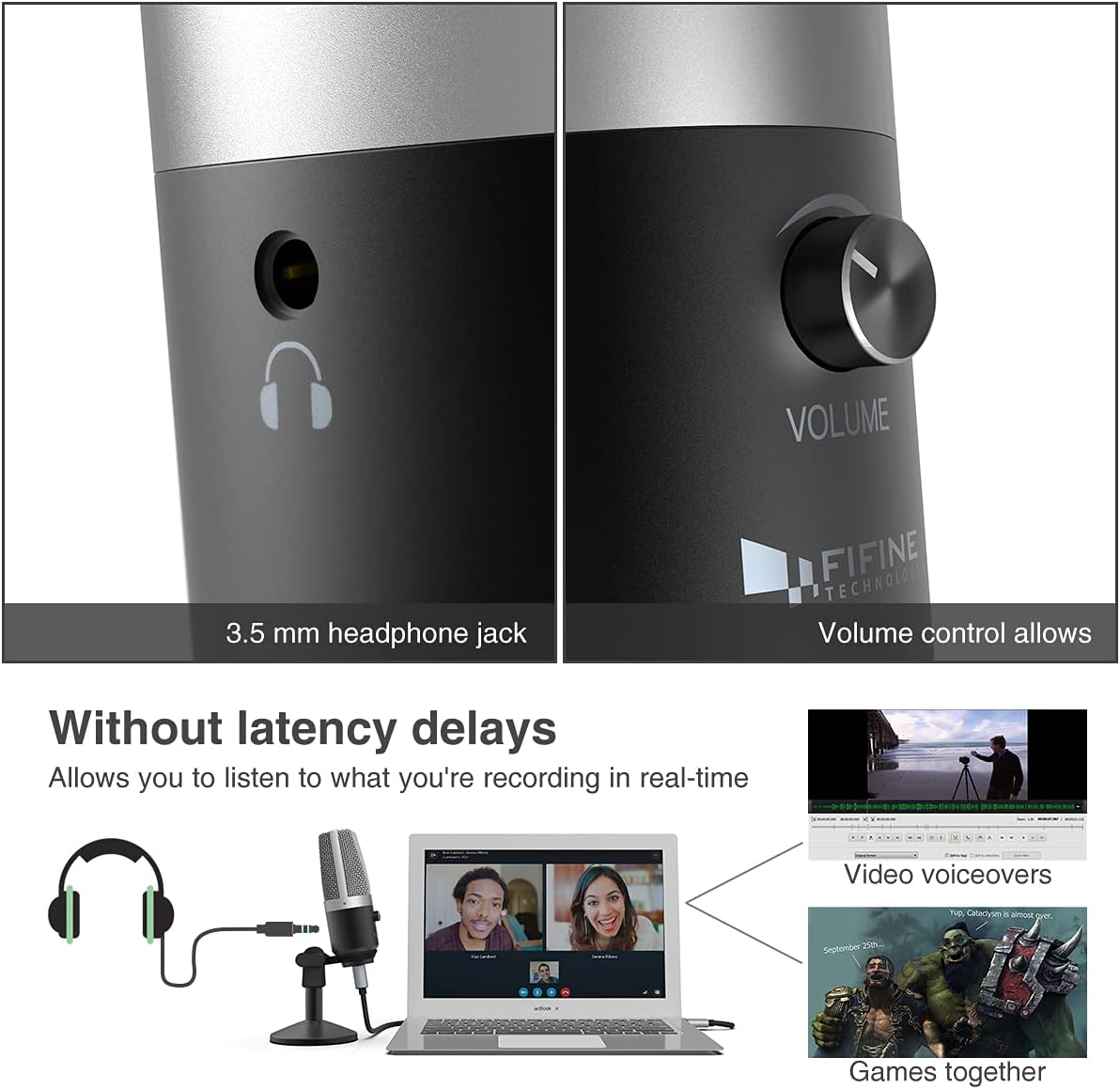
Yon fèmen view highlighting the 3.5mm headphone jack for real-time monitoring and the integrated volume control knob for easy audio adjustments.
3. Ki sa ki nan bwat la
Your Fifine K670 USB Microphone package includes the following items:
- Fifine K670 USB Microphone
- Detachable Desktop Stand (base and adjustable pole sections)
- USB Cable (approximately 6.56 ft / 2 meters)
- 3/8" to 5/8" Adapter (for compatibility with various boom arms)
- Gid itilizatè
All components included in the package: the K670 microphone, a 6.56 ft USB cable, a detachable desktop stand, a 3/8" to 5/8" adapter, and the user's guide.
4. Enstalasyon
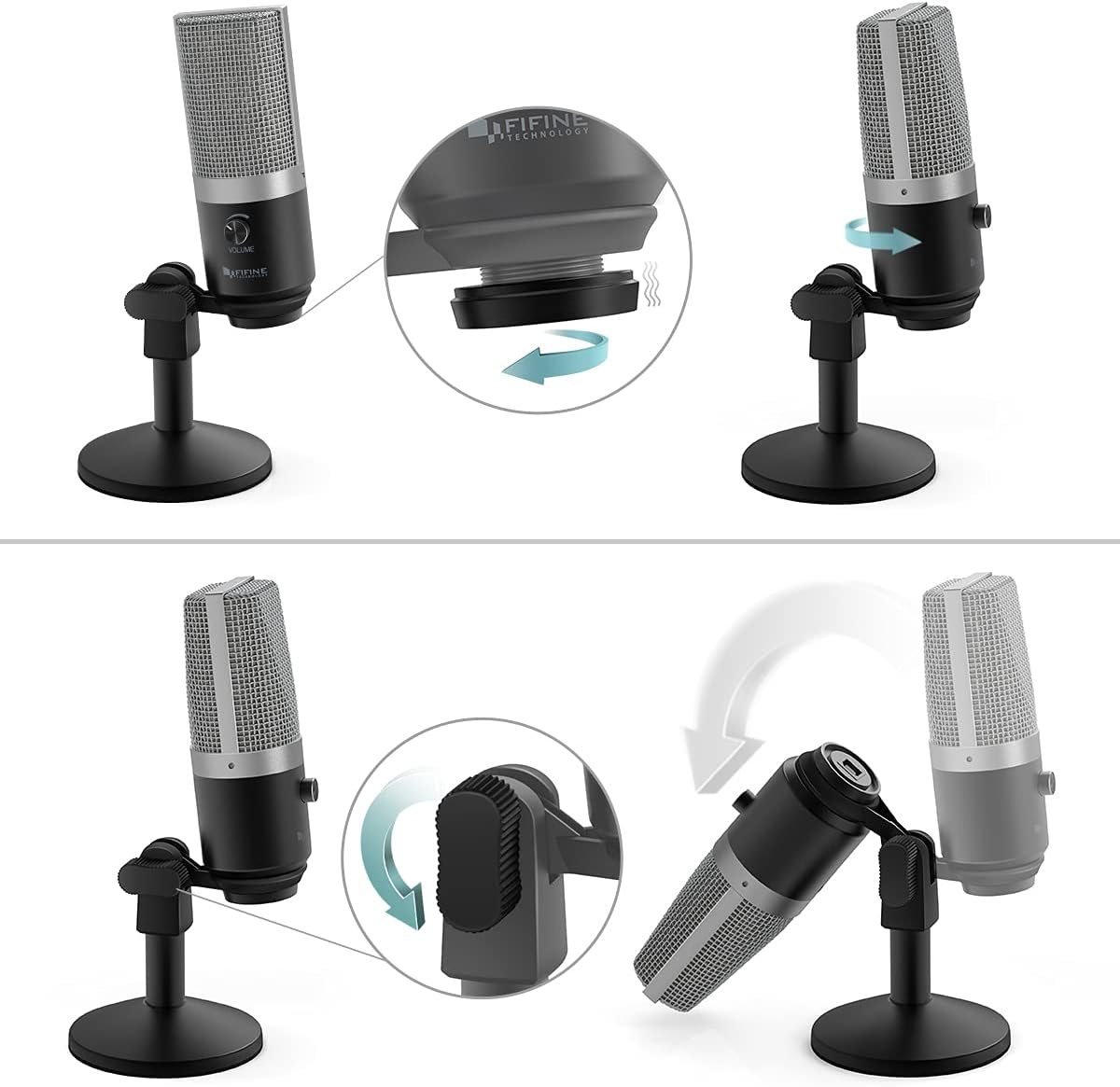
- Rasanble kanpe la: Screw the microphone onto the desktop stand. The stand is designed for stability and can be adjusted for height and angle.
- Konekte kab USB a: Plug the USB-C end of the provided cable into the microphone's USB port. Connect the USB-A end to an available USB port on your Mac or Windows computer.
- Plug-and-Play: The microphone is plug-and-play, meaning no additional drivers are typically required. Your computer should automatically recognize the device.
- Optional: Boom Arm Connection: If using a boom arm, attach the included 3/8" to 5/8" adapter to the microphone, then mount it onto your boom arm.

Visual guide on assembling the microphone stand and adjusting the microphone's angle for optimal positioning.

Yon detaye view of the USB port on the microphone, where the included USB cable connects for power and data.
An official product video from Fifine showcasing the K670 USB Microphone, highlighting its ease of use and suitability for PC recording on Mac and Windows computers.
5. Operasyon Enstriksyon
- Ajiste Volim: Use the volume knob on the microphone to control the input gain. Adjust it to an appropriate level to avoid distortion or low audio.
- Siveyans an tan reyèl: Plug your headphones into the 3.5mm jack on the microphone to monitor your audio in real-time with zero latency. This allows you to hear exactly what is being recorded or transmitted.
- Fonksyon bèbè: (If applicable) Refer to the microphone's physical controls for a dedicated mute button, if present.

The Fifine K670 USB Microphone in use for video voiceovers and gaming, demonstrating real-time monitoring capabilities.
6. Konpatibilite
The Fifine K670 USB Microphone is compatible with:
- Odinatè Mac
- Odinatè Windows
- Gaming Consoles (check specific console compatibility)
- Odinatè pòtab ak òdinatè pèsonèl
It is optimized for use with various applications including:
- Recording music and vocals
- Streaming (Twitch, OBS)
- Podcasting
- Voice Overs
- Online communication (Skype, Zoom, Discord)

The microphone connected to a computer, illustrating its simple plug-and-play functionality for various uses.
7. Antretyen
- Kenbe mikwofòn nan pwòp lè w siye l avèk yon twal mou epi sèk.
- Evite ekspoze mikwofòn nan nan tanperati ekstrèm, imidite, oswa limyè solèy dirèk.
- Sere mikwofòn nan yon kote ki an sekirite lè w pa ap itilize li pou evite li domaje.
NAN. Depanaj
- Microphone not picking up sound (Windows 10): If the microphone suddenly stops working after a Windows 10 update, navigate to Settings > Privacy > Microphone and ensure that apps are allowed to access the microphone.
- Pa gen son nan kas ekoutè: Ensure your headphones are properly plugged into the 3.5mm jack and the volume knob on the microphone is turned up. Check your computer's audio settings to ensure the microphone is selected as the input device.
- Odyo defòme: Lower the microphone's volume knob to prevent clipping. Ensure you are not speaking too close to the microphone.
9. Espesifikasyon
| Karakteristik | Spesifikasyon |
|---|---|
| Pwa atik | 1.96 liv (890 gram) |
| Enpedans | 2200 Ohms |
| Mikwofòn Fòm Faktè | Gwo dyafram |
| Dimansyon atik L x W x H | 4.88 x 2.6 x 7.28 pous |
| Sous pouvwa | Mikwofòn USB |
| Materyèl | Metal |
| Siyal-a-bwi Pwopòsyon | 78 dB |
| Platfòm pyès ki nan konpitè | Konsole jwèt, Laptop, PC |
| Kantite Chanèl | 1 |
| Repons Frekans | 15 KHz |
| Nimewo modèl atik | K670 |
| Itilizasyon Rekòmande Pou Pwodwi | Podcasting, Streaming |
| Koneksyon Teknoloji | USB |
| Kalite Connector | Jack 3.5 mm, USB |
| Karakteristik espesyal | 1-Touch Recording |
| Koulè | Ajan |
| Modèl polè | Inidireksyon |
10. Garanti & Sipò
For warranty information or technical support, please refer to the contact details provided in your product packaging or visit the official Fifine Technology websit la. Kenbe resi acha ou a pou nenpòt reklamasyon garanti.


