Entwodiksyon
Mèsi pou acha aasing the VONYX SPX-PA9210 Portable PA System. This manual provides essential information for the safe and efficient operation of your device. Please read it thoroughly before use and retain it for future reference.
Enstriksyon Sekirite
- Li tout enstriksyon yo ak anpil atansyon anvan ou opere aparèy la.
- Kenbe aparèy la lwen dlo, imidite, ak tanperati ekstrèm.
- Pa ouvri c laasing; konfye tout antretyen bay pèsonèl kalifye.
- Sèvi sèlman ak adaptè kouran ki espesifye a pou chaje.
- Asire bon vantilasyon pou anpeche surchof.
- Evite ekspoze pwolonje nan nivo volim ki wo pou anpeche domaj tande.
Kontni pake
Verifye ke tout atik yo prezan nan pakè a:
- VONYX SPX-PA9210 Portable PA System Unit
- 2 x Mikwofòn san fil UHF
- Adaptè kouran/Kab chaje
- Manyèl Itilizatè (dokiman sa a)
Pwodwi souview
The VONYX SPX-PA9210 is a portable PA system designed for various audio applications. It features integrated speakers, media playback options, and wireless microphones for versatile use.
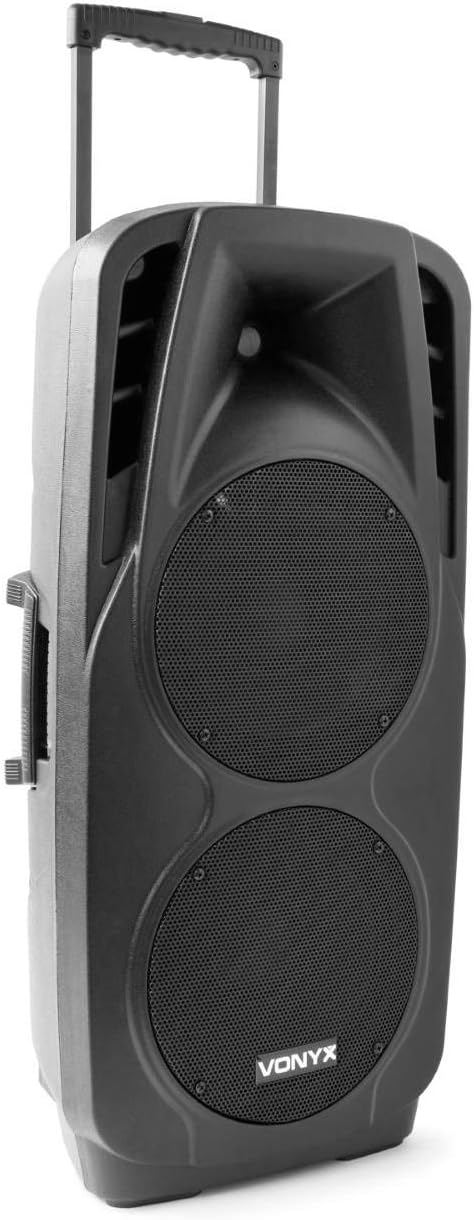
An image showing the VONYX SPX-PA9210 portable PA system. It features a black casing, two large speaker grilles on the front, and a retractable handle at the top for easy transport. A side handle is also visible.
Karakteristik kle:
- Integrated 2x 10-inch speakers with titanium tweeter controller.
- Built-in media player with USB and SD/MMC card slots.
- Koneksyon Bluetooth pou difizyon odyo san fil.
- High-performance 12V/7A rechargeable battery for 4-6 hours of autonomy.
- Two UHF wireless microphones with up to 50m range.
- Integrated trolley with telescopic handle and wheels for portability.
- LCD screen for media information display.
Enstalasyon
1. Premye Chajman
Before first use, fully charge the internal 12V/7A battery. Connect the provided power adapter to the charging port on the PA system and then to a suitable power outlet. The charging indicator will show the charging status. A full charge typically provides 4-6 hours of operation.
2. Powering On / Off
- To power on the unit, locate the power switch (usually on the rear or control panel) and set it to the "ON" position.
- To power off, set the switch to the "OFF" position.
3. Enstalasyon Mikwofòn
- Insert fresh batteries into the two UHF wireless microphones.
- Turn on the microphones. They should automatically connect to the PA system.
- Adjust the microphone volume on the PA system's control panel. The wireless range is up to 50 meters.
Enstriksyon Operasyon
1. Media Playback (USB/SD/MMC)
- Insert a USB flash drive or an SD/MMC card into the corresponding slot on the control panel.
- The system will automatically detect the media and begin playback, or you may need to select the input source using the "Mode" button.
- Use the playback controls (Play/Pause, Next, Previous) on the control panel to manage your music.
- The LCD screen will display track information.
2. Pè Bluetooth
- Press the "Mode" button on the PA system until "Mode" button on the PA system until "Bluetooth" is selected.
- Sou telefòn entelijan ou, tablèt ou, oswa lòt aparèy ki gen Bluetooth, aktive Bluetooth epi chèche aparèy ki disponib yo.
- Select "VONYX SPX-PA9210" (or similar name) from the list to pair.
- Once paired, you can stream audio wirelessly from your device to the PA system.
3. Volume and Tone Controls
- Adjust the master volume knob to control the overall sound output.
- Separate volume controls are available for microphones and media playback.
- Use the bass and treble controls (if available) to adjust the tone of the audio.
Antretyen
1. Netwayaj
Wipe the exterior of the unit with a soft, dry cloth. Do not use abrasive cleaners or solvents. Ensure no liquids enter the device.
2. Swen batri
- Pou pwolonje lavi batri a, evite dechaje batri a nèt souvan.
- Charge the unit regularly, even if not in use, to maintain battery health.
- Sere aparèy la nan yon kote ki fre epi sèk lè w pa itilize li pou yon bon bout tan.
Depanaj
- Pa gen pouvwa: Ensure the unit is charged or connected to a power source, and the power switch is in the "ON" position.
- Pa gen son: Check all volume controls (master, microphone, media player). Ensure the correct input source is selected. Verify microphone batteries.
- Bluetooth pa konekte: Ensure the PA system is in Bluetooth mode and discoverable. Turn off and on Bluetooth on your device and try pairing again. Move closer to the PA system.
- Son defòme: Reduce the volume. Check audio cables if using wired inputs. Ensure microphones are not too close to the speakers (feedback).
Espesifikasyon
| Mak | VONYX |
| Nimewo Modèl | Sky-170.082 (SPX-PA9210) |
| Dimansyon (L x W x H) | 27 x 38.5 x 81 cm |
| Pwa | 16.25 kg |
| Koneksyon Teknoloji | Bluetooth, USB |
| Itilizasyon pwodwi rekòmande | Smartphones oswa tablèt |
| Karakteristik espesyal | Bluetooth, USB Port, Portable, LCD Screen |
| Sous pouvwa | Wireless (Internal Battery) |
| Batri | 12V/7A, 4-6 hours autonomy |
| Materyèl | Akrilonitrile butadien stirèn (ABS) |
| Kantite Chanèl | 5 |
| Moun kap pale | 2x 10-inch woofers, Titanium tweeter controller |
| Mikwofòn | 2x UHF Wireless Microphones (up to 50m range) |
Garanti ak sipò
For warranty information and technical support, please refer to the documentation provided with your purchase or contact VONYX customer service directly.
Disponibilite pyès rezèv: Information regarding the availability of spare parts for this product is currently unavailable.
Mizajou lojisyèl: Information regarding guaranteed software updates for this product is currently unavailable.


