1. Entwodiksyon
The MOOER Micro Preamp M013 Matchbox is a compact digital preamp pedal designed to accurately recreate the sound and feel of a Matchless amplifier. It features dual channels (Clean and Gain), a 3-band EQ, and an integrated cabinet simulator, making it suitable for direct recording, practice, or integration into a pedalboard setup.
2. Enfòmasyon sou Sekirite
- Use only the specified 9V DC power adapter (center negative).
- Pa ekspoze aparèy la nan dlo, imidite, oswa tanperati ekstrèm.
- Evite lage pedal la oswa soumèt li a gwo enpak.
- Pa eseye demonte oswa modifye inite a.
- Kenbe soti nan atenn timoun yo.
3. Pwodwi souview
The M013 Matchbox pedal features a robust metal casing and intuitive controls for shaping your tone.

Figi 1: Anwo-anba view of the MOOER Micro Preamp M013 Matchbox pedal, illustrating the layout of controls and jacks.
Kontwòl:
- VOL (Volim): Adjusts the overall output level of the selected channel.
- TRE (Treble): Kontwole repons wo-frekans lan.
- MID (Middle): Kontwole repons nan mitan-frekans.
- BASS (Bass): Controls the low-frequency response.
- GAY: Adjusts the amount of overdrive/distortion for the selected channel.
- CH/CAB Switch: This toggle switch has two functions:
- In normal operation, it switches between the Clean and Gain channels.
- When holding down the footswitch, it toggles the cabinet simulator on/off.
- Footswitch: Toggles between the two channels (Clean/Gain) or bypasses the pedal.
Koneksyon:

Figure 2: Input Jack (left side)

Figure 3: Output Jack (right side)
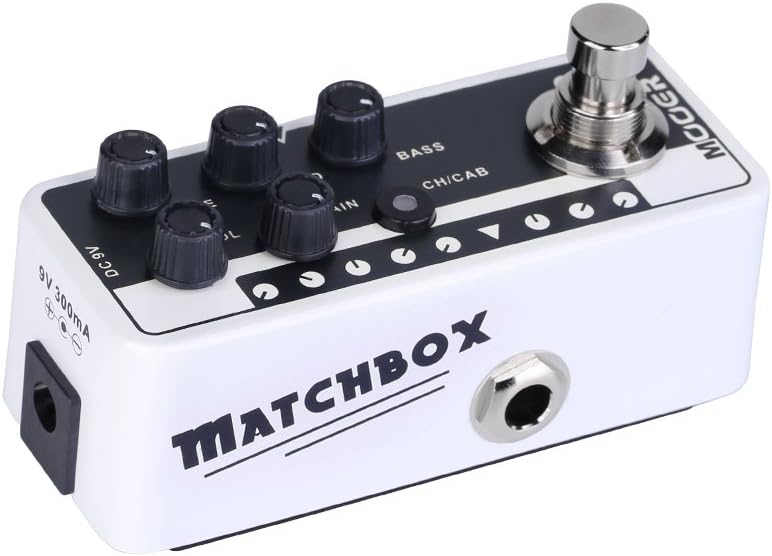
Figure 4: DC 9V Power Input
- Antre Jack: Konekte gita ou oswa lòt enstriman ou isit la.
- Sòti Jack: Konekte ak ou amplifier, mixer, oswa koòdone odyo.
- DC 9V: Power input for a 9V DC (center negative) power supply.
4. Enstalasyon
- Konekte gita ou a Antre Jack on the right side of the pedal.
- Konekte a Sòti Jack on the left side of the pedal to your amplifier's input, a mixer, or an audio interface.
- Connect a 9V DC (center negative) power adapter to the DC 9V opinyon.
- Asire w tout koneksyon yo byen fèm anvan ou limen aparèy ou an. amplifier oswa sistèm odyo.
5. Operasyon Enstriksyon
Seleksyon chanèl:
The M013 Matchbox offers two distinct channels: Clean and Gain. Use the CH/CAB switch to toggle between these channels. The LED indicator will change color to show the active channel (typically blue for Clean, red for Gain).
Cabinet Simulator:
The integrated cabinet simulator can be toggled on or off. To activate or deactivate the cabinet simulator, press and hold the Footswitch for approximately 1 second. The LED will flash to indicate the change in status.
Ton fòm:
Ajiste a VOL, TRE, MID, BASS, ak PRAN knobs to achieve your desired tone for each channel. Experiment with different settings to explore the full range of sounds this pedal can produce.
Fonksyonalite switch pye a:
A quick press of the Footswitch will toggle between the currently selected channel and bypass mode. The LED will indicate whether the pedal is active or bypassed.
Videyo Demonstrasyon:
Video 1: Official MOOER demonstration of the Micro Preamp M013 Matchbox, showcasing both Clean and Gain channels with and without cabinet simulation. This video provides examples of the pedal's tonal capabilities.
6. Antretyen
- Clean the pedal with a soft, dry cloth. Do not use abrasive cleaners or solvents.
- Sere pedal la nan yon anviwònman sèk, lwen limyè solèy dirèk ak tanperati ekstrèm.
- Tcheke koneksyon kab yo regilyèman pou wè si gen siy mete ak chire.
NAN. Depanaj
Pa gen pouvwa:
- Asire w adaptè kouran 9V DC a byen konekte epi li fonksyone byen.
- Verifye ke priz elektrik la aktif.
Pa gen son:
- Tcheke tout koneksyon kab yo (gita pou antre, sòti pou amp/mixer).
- Ensure the pedal is not in bypass mode (check LED indicator).
- Verify that the volume knobs on the pedal and your amplifier are turned up.
- Test with different cables and a different power supply if possible.
Bri/ronfleman endezirab:
- Ensure you are using a regulated 9V DC (center negative) power supply. Unregulated power supplies can introduce noise.
- Check for ground loops by trying different power outlets or isolating the pedal's power.
- Keep the pedal away from other electronic devices that may cause interference.
8. Espesifikasyon
- Pwa atik: 5.8 ons (165 gram)
- Dimansyon pwodwi: 3.58 x 1.26 x 1.42 pous
- Sous pouvwa: Fil elektrik
- Voltage: 9 Volts DC
- Sòti Wattage: 30 Watts (referring to the amp model it simulates, not the pedal's power output)
- Kalite konektè: 6.35mm Jack
- Aparèy konpatib: gita
- Koulè: Nwa
9. Garanti ak sipò
For warranty information and technical support, please refer to the official MOOER website or contact your local dealer. Keep your purchase receipt as proof of purchase for any warranty claims.


