Entwodiksyon
Thank you for choosing the Redragon Nothosaur M606 Gaming Mouse. This manual provides detailed instructions to help you set up, operate, and maintain your new gaming mouse. Please read this manual thoroughly before use to ensure optimal performance and longevity of your device.
The Redragon Nothosaur M606 is a wired gaming mouse designed for precision and comfort, featuring adjustable DPI, programmable buttons, and customizable LED lighting.
Pwodwi souview
The Redragon Nothosaur M606 gaming mouse is engineered for an enhanced gaming experience. It features a comfortable ergonomic design, a high-precision optical sensor, and customizable functions.

Figure 1: Redragon Nothosaur M606 Gaming Mouse, showcasing its design and red LED illumination.
Karakteristik kle:
- High-Precision Sensor: Equipped with a PMW3168 optical sensor for accurate tracking.
- DPI reglabl: Four customizable DPI levels for varying sensitivity needs.
- Bouton pwogramasyon: Side buttons can be configured for macros and in-game functions.
- Ki ap dirije ekleraj: Features 4 distinct lighting colors, each corresponding to a DPI setting.
- Konsepsyon ergonomique: Crafted for comfortable use during extended gaming sessions.

Figure 2: Various angles of the Redragon Nothosaur M606 mouse, highlighting its ergonomic shape and button placement.
Enstalasyon
- Depake Sourit la: Carefully remove the Redragon Nothosaur M606 mouse from its packaging. Ensure all components are present (mouse, user manual).
- Konekte ak òdinatè: Ploge konektè USB sourit la nan yon pò USB ki disponib sou òdinatè w lan.
- Enstalasyon chofè: The mouse is typically plug-and-play, and your operating system should automatically detect and install the necessary drivers. No additional software is required for basic functionality. For advanced customization of buttons and macros, please refer to the Redragon official website for any available software or drivers, though some models may not offer dedicated software.
- Fonksyonalite tès: Once connected, move the mouse to check cursor movement. Click the left and right buttons to ensure they are responsive.
Enstriksyon Operasyon
DPI Ajisteman
The Redragon Nothosaur M606 features a dedicated DPI button located behind the scroll wheel, allowing you to switch between four preset DPI levels. Each DPI level is indicated by a specific LED color:
- Wouj ki ap dirije: 1000 DPI
- Dirije ble: 1600 DPI
- Green ki ap dirije: 2400 DPI
- Koulè wouj violèt ki ap dirije: 3200 DPI
Press the DPI button repeatedly to cycle through these sensitivity settings to find the one that best suits your needs.
Bouton pwogramasyon
The mouse includes side buttons that can be configured for macros and in-game functions. While the mouse is plug-and-play for basic use, advanced customization for these buttons typically requires specific software. Please check the Redragon support website for any available software for the M606 model to set up macros.
Ki ap dirije ekleraj
The Nothosaur M606 features dynamic LED backlighting. The color of the LED lighting directly corresponds to the currently selected DPI setting, as detailed in the DPI Adjustment section. There is no independent control for the LED colors; they change automatically with DPI selection.
Antretyen
Proper maintenance ensures the longevity and optimal performance of your Redragon Nothosaur M606 mouse.
- Netwayaj: Sèvi ak yon twal mou epi sèk pou siye sifas sourit la. Pou pousyè tè ki difisil pou retire, siye yon ti kras.ampRense twal la avèk dlo oswa yon solisyon netwayaj dou. Evite itilize pwodui chimik ki agresif oswa materyèl abrazif.
- Netwayaj Capteur: Occasionally, dust or debris may accumulate around the optical sensor. Use a cotton swab lightly dampened with isopropyl alcohol to gently clean the sensor area. Ensure the mouse is disconnected from the computer before cleaning.
- Swen kab: Evite pliye byen file oswa rale kab USB a twòp pou anpeche li domaje.
- Depo: Lè w pa ap itilize sourit la, sere l nan yon anviwònman pwòp epi sèk, lwen tanperati ekstrèm.
Depanaj
If you encounter issues with your Redragon Nothosaur M606 mouse, refer to the following common solutions:
- Sourit la pa reponn:
- Asire w kab USB a byen branche nan yon pò USB ki fonksyone sou òdinatè w la.
- Eseye branche sourit la nan yon lòt pò USB.
- Rekòmanse òdinatè w lan.
- Mouvman Kurseur Iregilye:
- Netwaye detèktè optik ki anba sourit la.
- Asire w ke w ap itilize sourit la sou yon sifas pwòp, ki pa reflete limyè, epi ki inifòm (pa egzanp, yon tapi sourit).
- Tcheke pou nenpòt obstak fizik ozalantou detèktè a.
- DPI Button Not Changing Sensitivity/Color:
- Peze bouton DPI a byen fèm.
- Ensure the mouse is properly connected and recognized by your computer.
- Side Buttons Not Working:
- For basic forward/backward functionality, ensure your operating system or browser supports these actions.
- For custom macros, verify that any necessary Redragon software is installed and configured correctly (if available for this model).
Espesifikasyon
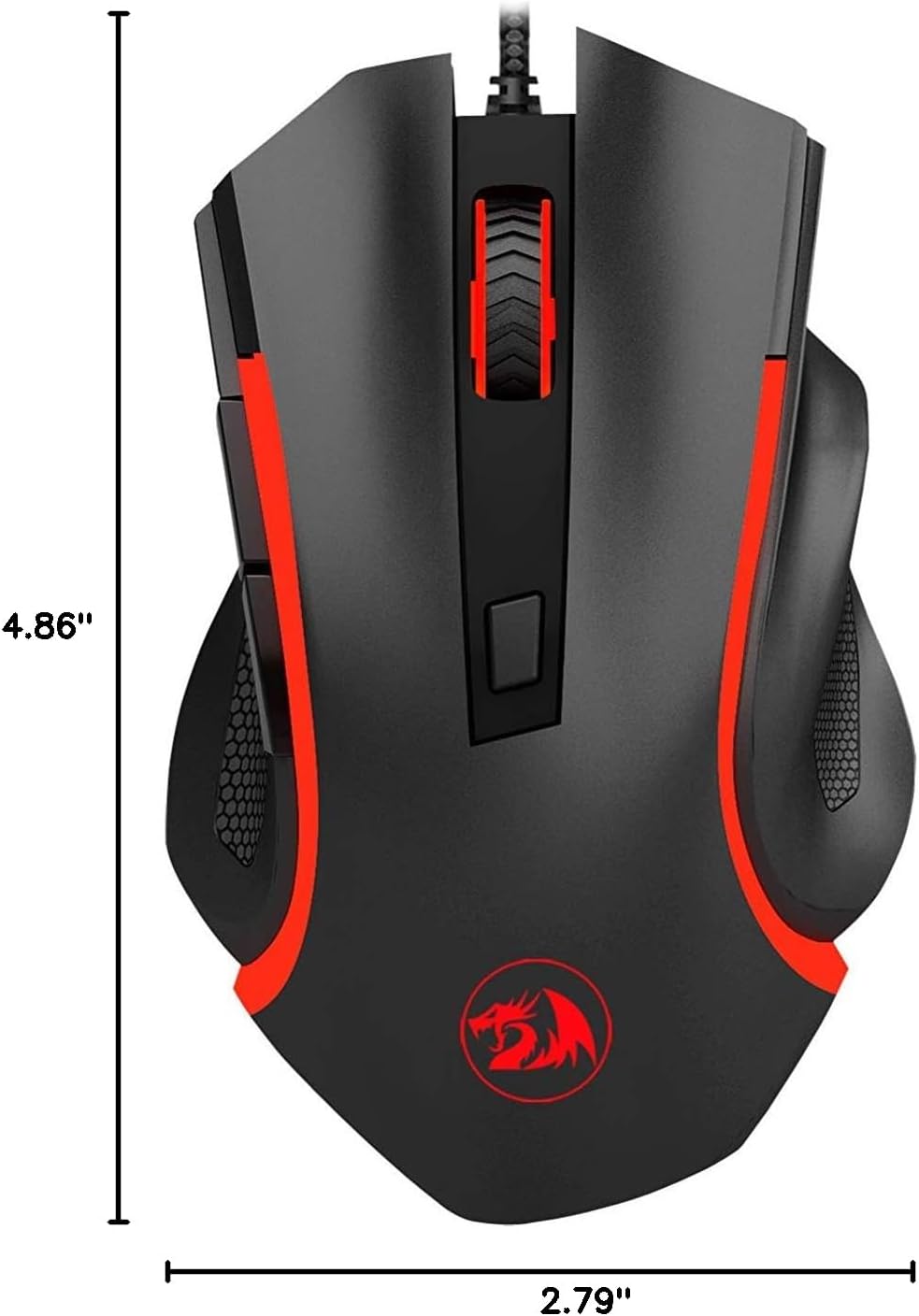
Figure 3: Physical dimensions of the Redragon Nothosaur M606 mouse.
| Karakteristik | Detay |
|---|---|
| Nimewo Modèl | M606 |
| Koneksyon Teknoloji | Branche (USB) |
| Teknoloji deteksyon mouvman | Optik (Capteur PMW3168) |
| Anviwònman DPI | 1000 / 1600 / 2400 / 3200 DPI |
| Karakteristik espesyal | LED Backlit (4 Colors corresponding to DPI) |
| Bouton | 6 (Left, Right, Scroll Click, DPI, 2 Side Buttons) |
| Dimansyon pwodwi | 4.84 x 2.91 x 0.1 pous (apeprè 12.3 x 7.4 x 0.25 cm) |
| Pwa atik | 0.01 ounces (approx. 0.28 grams) - Note: This weight seems unusually low and may be a data entry error. Actual weight is likely higher. |
| Koulè | Black with Red accents |
| Manifakti | Redragon |
Enfòmasyon sou Garanti
Redragon products typically come with a limited manufacturer's warranty. The specific terms and duration of the warranty may vary by region and retailer. Please refer to the warranty card included with your purchase or visit the official Redragon websit la pou jwenn enfòmasyon detaye sou garanti a ak pwosedi anrejistreman yo.
Kenbe prèv acha ou a (resi oswa fakti) paske w ap bezwen li pou nenpòt reklamasyon garanti.
Sipò
For further assistance, technical support, or to download the latest drivers and software (if available for your model), please visit the official Redragon support websit:
Ou ka jwenn tou FAQ itil ak fowòm kominotè sou yo websit.


