1. Entwodiksyon
This manual provides detailed instructions for the setup, operation, and maintenance of your CAMECHO 10.1-inch Portable HD Monitor (Model K0202UK-Monitor). Please read this manual thoroughly before using the product to ensure proper functionality and safety.
Karakteristik kle:
- 10.1-inch TFT LCD Widescreen Display with 1024 x 600 HD Resolution.
- Aspect Ratio: 16:9.
- Power Supply: 9 - 30 V.
- Multiple Input Support: VGA, AV, HDMI, BNC.
- Versatile Compatibility: Suitable for PC, DVD, TV, surveillance cameras, and vehicle backup screens.
- Built-in Dual Speakers for audio output.
- Portable design with an adjustable stand for flexible placement.
2. Pake kontni
Please check the package contents upon unboxing to ensure all items are present and undamaged. If any items are missing or damaged, please contact customer support.
- 1 x CAMECHO 10.1-inch Portable HD Monitor
- 1 x Adaptè Kouran (Plug Inyon Ewopeyen)
- 1 x HDMI kab
- 1 x VGA kab
- 1 x AV kab
- 1 x kontwòl remote
- 1 x Adjustable Bracket/Stand
- 1 x manyèl itilizatè
- 1 x Adhesive Sticker (for stand mounting)
- 1 x Kab BNC

Figure 2.1: Contents of the CAMECHO 10.1-inch Portable HD Monitor package.
Video 2.1: Unboxing and initial assembly of the CAMECHO 10.1-inch Portable HD Monitor.
3. Pwodwi souview
3.1 Connections and Controls
The monitor features various input ports and control buttons for versatile connectivity and easy operation.
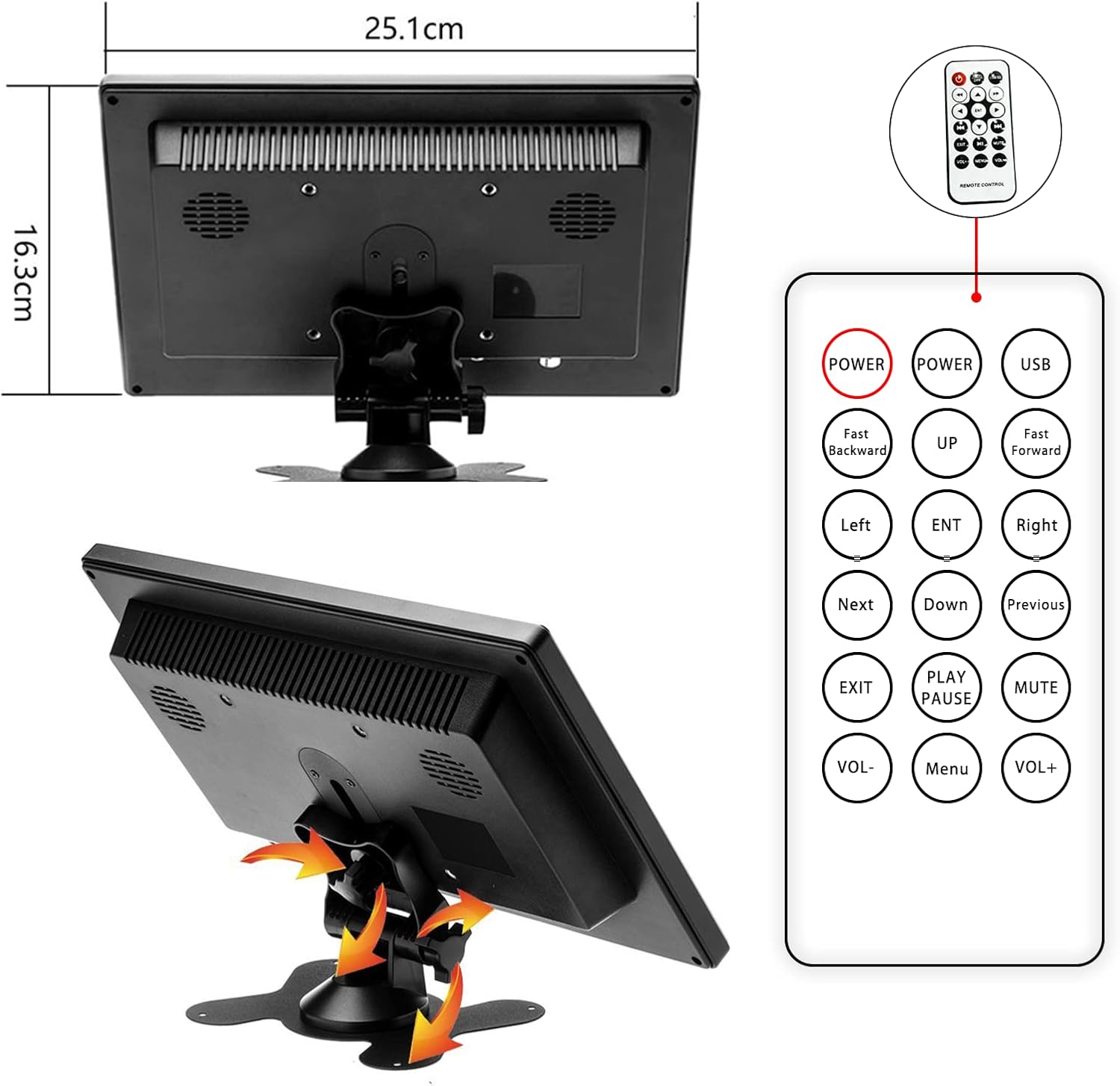
Figure 3.1: Rear panel connections of the monitor.
- Power Input (AC/DC): Konekte adaptè kouran ki founi an isit la.
- Pò VGA: For connecting to computers or other devices with VGA output.
- HDMI Port: For high-definition digital video and audio input. (Note: HDMI version 1.1)
- AV Ports (RCA): For analog video and audio input (yellow for video, white/red for audio).
- Pò USB: For connecting USB devices (e.g., U disk, card reader).
- Pò BNC: For connecting to surveillance cameras or other BNC-compatible devices.
- Bouton kontwòl: Located on the front panel (AV1/AV2, MENU, +, -, Power).
3.2 Dimensions and Adjustable Stand
The monitor is designed to be compact and portable, featuring an adjustable stand for optimal viewang ing.

Figure 3.2: Monitor dimensions and remote control layout.
- Product Dimensions: 25.1 x 16.3 x 3.7 cm (approximately 9.88 x 6.42 x 1.46 inches).
- Weight: Approximately 499 grams (1.1 lbs).
- The adjustable stand allows for tilting the monitor to achieve a comfortable viewang ang.
3.3 Oratè Entegre
The monitor includes built-in dual speakers for audio output, supporting HDMI, AV, and USB signal modes.

Figure 3.3: Location of built-in dual speakers.
4. Enstriksyon Enstalasyon
4.1 Asanble kanpe la
- Unpack the monitor and the adjustable bracket components.
- Assemble the stand by connecting the base to the adjustable arm. Secure it with the provided screw.
- Attach the assembled stand to the back of the monitor using the designated screw holes. Ensure it is securely fastened.
- Adjust the tilt of the monitor to your preferred viewang ang.
Video 4.1: Step-by-step guide for assembling the monitor stand.
4.2 Konekte ak Aparèy
Connect the monitor to your desired device using the appropriate cable (HDMI, VGA, AV, or BNC).
- Pou PC/Laptop: Use the HDMI or VGA cable to connect the monitor to your computer's output port.
- For DVD/Gaming Console: Use the HDMI or AV cable.
- For Surveillance Camera (CCTV): Use the BNC cable.
- Koneksyon pouvwa: Connect the power adapter to the monitor's AC/DC input and then to a power outlet.
5. Operasyon Enstriksyon
5.1 Limen/Etenyen
- Peze a Pouvwa button on the front panel or the remote control to turn the monitor on or off.
5.2 Changing Input Modes
- Peze a AV1/AV2 button on the front panel or the remote control to cycle through available input modes (HDMI, VGA, AV1, AV2, BNC).
- Once the desired input mode is highlighted, press the MENI bouton oswa a "-" bouton pou konfime seleksyon an.
5.3 Ajisteman Paramèt (Meni OSD)
- Peze a MENI button to access the On-Screen Display (OSD) menu.
- Sèvi ak la + epi - bouton pou navige nan opsyon meni yo.
- Peze MENI ankò oswa la ENT button on the remote to select an option or confirm a setting.
- Common adjustable settings include: Brightness, Contrast, Color Temperature, Aspect Ratio, and Volume.
- Peze a Sòti button on the remote or cycle through menu options to exit the OSD.
5.4 Display Modes (for PC/Laptop)
When connected to a computer, the monitor can operate in various display modes:
- Mòd kopi: Duplicates the content of your primary display.
- Pwolonje mòd: Extends your desktop space, allowing you to have different content on each screen.
- Only Mode: Displays content only on the CAMECHO monitor, turning off the primary display.

Figure 5.1: Various display modes when connected to a computer.
5.5 Aplikasyon
The CAMECHO monitor is suitable for a variety of uses:
- Reyinyon biznis: Use as an auxiliary display for presentations.
- Gaming: Connect to gaming consoles for an immersive experience.
- Surveillance Monitoring: Display feeds from CCTV cameras.
- Divètisman: Watch movies or TV shows.
- Itilizasyon Veyikil: Function as a backup camera display.
Video 5.1: Demonstrating the monitor's use for gaming and CCTV monitoring.
Video 5.2: Demonstrating camera connection and display on the monitor.
6. Antretyen
- Netwayaj: Use a soft, dry cloth to clean the monitor screen and casing. Pou mak ki difisil pou retire, yon ti kras dampRense twal la avèk dlo. Evite itilize pwodui chimik ki agresif oswa pwodui netwayaj abrazif.
- Fim pwoteksyon: It is recommended not to remove the protective film from the screen, as it does not affect product usage and helps protect the display.
- Depo: Lè w pa itilize monitè a pou yon bon bout tan, sere l nan yon kote ki fre epi sèk, lwen limyè solèy dirèk ak tanperati ekstrèm.
- Vantilasyon: Asire w ouvèti vantilasyon yo sou monitè a pa bloke pou anpeche li chofe twòp.
NAN. Depanaj
If you encounter any issues with your CAMECHO monitor, please refer to the following common problems and solutions:
| Pwoblèm | Kòz posib / Solisyon |
|---|---|
| Pa gen imaj sou ekran an. |
|
| Screen flickers or turns off intermittently. |
|
| Pa gen odyo. |
|
| HDMI connection issues with newer devices. |
|
| Remote kontwòl pa travay. |
|
8. Espesifikasyon
Detailed technical specifications for the CAMECHO 10.1-inch Portable HD Monitor (Model K0202UK-Monitor).
| Karakteristik | Detay |
|---|---|
| Mak | CAMECHO |
| Non modèl | K0202UK-Monitor |
| Gwosè ekran | 10.1 pous |
| Teknoloji ekspozisyon | TFT LCD |
| Rezolisyon | 1024 x 600 pixels (SVGA Wide) |
| Aspè rapò | 16:9 |
| Klète | 400 cd/m² |
| Pwopòsyon kontras | 500:1 |
| Tan repons | 3 Milisegond |
| Rafrechisman pousantaj | 60 Hz |
| Viewing Ang | 85 Degre |
| Entèfas Antre | HDMI (v1.1), VGA, AV (RCA), BNC, USB |
| Oratè ki entegre yo | Yes (1 Watt output) |
| Antre pouvwa | 9 - 30 Vòlt |
| Dimansyon pwodwi | 25.1 x 16.3 x 3.7 cm |
| Pwa pwodwi | 499 g |
| Kalite enstalasyon | Tabletop (with adjustable stand) |
8.1 Enfòmasyon sou Efikasite Enèji
The monitor's energy efficiency rating and detailed product data sheet are provided below.


Figure 8.1: Energy Label and Product Data Sheet.
For more details, refer to the official EU EPREL database: https://eprel.ec.europa.eu/qr/1438817
9. Garanti ak sipò
CAMECHO products typically come with a standard manufacturer's warranty. Please refer to your purchase documentation for specific warranty terms and conditions.
Sipò Kliyan:
For technical assistance, warranty claims, or any product-related inquiries, please contact CAMECHO customer support. You can often find contact details on the product packaging, the official CAMECHO websit entènèt la, oubyen atravè revandè ou a.
Imèl: CAMECHOVIP@126.com


