Manyèl Itilizatè Kontwolè Jwèt San Fil Tronsmart Mars G02 la
Modèl: G02
Entwodiksyon
Thank you for choosing the Tronsmart Mars G02 Wireless Game Controller. This manual provides detailed instructions for setting up, operating, and maintaining your controller to ensure optimal performance across various compatible devices, including smartphones, tablets, PCs, and smart TVs.
Kontni pake
Tanpri verifye ke tout atik yo prezan nan pakè ou a:
- Tronsmart Mars G02 Wireless Game Controller
- USB Chaje Kab
- 2.4GHz USB Reseptè
- Manyèl Itilizatè (dokiman sa a)

Image: Contents of the Tronsmart Mars G02 Wireless Game Controller package, showing the controller, USB receiver, charging cable, and user manual.
Pwodwi souview
Familiarize yourself with the various components and controls of your Tronsmart Mars G02 controller.

Imaj: Devan view of the Tronsmart Mars G02 controller, highlighting the D-pad, left and right joysticks, A/B/X/Y buttons, Start, Select, Home, and Turbo buttons.

Image: The Tronsmart Mars G02 controller with its integrated smartphone holder extended, ready to secure a mobile device for gaming.
Karakteristik kle:
- Dual Connectivity: Supports both Bluetooth and 2.4GHz wireless connections.
- Integrated Phone Holder: Adjustable holder for smartphones (3.5 to 6 inches).
- Multi-Platform Compatibility: Works with Android devices, PCs, and smart TVs.
- Ergonomic Design: Comfortable grip for extended gaming sessions.
- Turbo Function: Programmable turbo button for rapid fire.
Enstalasyon
1. Chaje Kontwolè a
Before initial use, fully charge the controller. Connect the supplied USB charging cable to the controller's charging port and the other end to a USB power source (e.g., computer USB port, USB wall adapter). The charging indicator light will show the charging status and turn off when fully charged.
2. Konekte ak Aparèy yo
The Tronsmart Mars G02 offers two primary connection methods:
2.1. Bluetooth Connection (for Android Smartphones/Tablets)
- Asire w ke kontwolè a etenn.
- Peze epi kenbe la Bouton Kay epi Yon bouton simultaneously for 3 seconds until the indicator light flashes rapidly, indicating pairing mode.
- Sou aparèy Android ou a, ale nan Anviwònman > Bluetooth epi aktive Bluetooth la.
- Scan for available devices and select "Tronsmart Mars G02" from the list.
- Yon fwa konekte, limyè endikatè a sou kontwolè a ap vin fiks.
2.2. 2.4GHz Wireless Connection (for PC/Smart TV/TV Box)
- Insert the 2.4GHz USB receiver into an available USB port on your PC, Smart TV, or TV Box.
- Asire w ke kontwolè a etenn.
- Peze epi kenbe la Bouton Kay epi bouton X simultaneously for 3 seconds until the indicator light flashes rapidly.
- The controller will automatically connect to the USB receiver. Once connected, the indicator light will become solid.
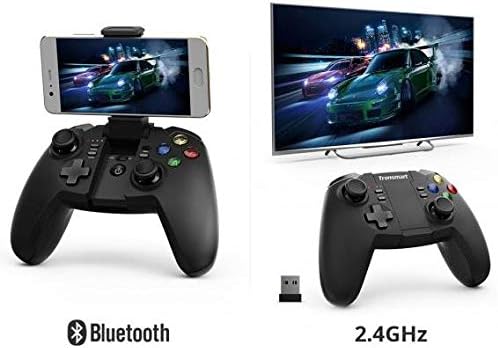
Image: Illustration showing the Tronsmart Mars G02 controller connecting to a smartphone via Bluetooth and to a television via its 2.4GHz USB receiver.
3. Attaching a Smartphone (Optional)
The integrated phone holder can accommodate smartphones between 3.5 and 6 inches.
- Gently pull up the phone holder from the center of the controller.
- Adjust the angle to your preference (up to 135 degrees).
- Carefully place your smartphone into the holder, ensuring it is securely gripped.

Imaj: Bò kote view of the Tronsmart Mars G02 controller demonstrating the adjustable angles (90 and 135 degrees) of the integrated phone holder, designed for phones between 3.5 and 6 inches.
Enstriksyon Operasyon
Power On/Off
- Pouvwa sou: Peze a Bouton Kay once. The controller will attempt to reconnect to the last paired device.
- Pouvwa Off: Peze epi kenbe la Bouton Kay for 5 seconds until the indicator lights turn off. The controller will also automatically power off after 5 minutes of inactivity.
Fonksyon bouton
The Tronsmart Mars G02 features standard gaming controller buttons:
- Left/Right Analog Joysticks: Pou yon mouvman 360 degre presi.
- D-Pad (Pad Direksyon): Pou antre direksyonèl.
- Bouton A/B/X/Y: Action buttons, typically color-coded.
- L1/R1 (Bumpers): Bouton zepòl.
- L2/R2 (Deklanchè): Analog triggers for variable input.
- Bouton kòmanse: Typically used to pause or confirm actions.
- Chwazi bouton: Often used for menu navigation or secondary functions.
- Bouton Kay: Powers the controller on/off, and returns to the home screen on some devices.
- bouton Turbo: Activates rapid-fire for assigned buttons.
Turbo Fonksyon
To enable the Turbo function for a specific button:
- Peze epi kenbe la Bouton turbo.
- While holding Turbo, press the desired action button (e.g., A, B, X, Y, L1, R1, L2, R2) once. The Turbo function is now active for that button.
- To disable Turbo for that button, repeat the process: hold Turbo and press the action button again.

Image: The Tronsmart Mars G02 controller positioned in front of a range of compatible devices, including a smartphone, tablet, laptop, and television, illustrating its multi-platform support.
Antretyen
- Keep the controller dry. Avoid exposure to moisture or liquids.
- Clean the controller with a soft, dry cloth. Do not use harsh chemicals or abrasive cleaners.
- Sere kontwolè a nan yon kote ki fre epi sèk, lwen limyè solèy dirèk ak tanperati ekstrèm.
- Evite lage kontwolè a oswa soumèt li a gwo enpak.
- When not in use for extended periods, charge the controller periodically to maintain battery health.
Depanaj
| Pwoblèm | Solisyon |
|---|---|
| Kontwolè pa limen. | Asire w ke kontwolè a chaje. Konekte l nan yon sous kouran avèk kab USB a. |
| Pa ka konekte via Bluetooth. |
|
| Cannot connect via 2.4GHz receiver. |
|
| Bouton yo pa reponn oswa yo gen ralanti. |
|
Espesifikasyon
- Dimansyon pwodwi: 7.4 x 18 x 13.8 cm
- Pwa: 400 g
- Koneksyon: Bluetooth, 2.4GHz san fil
- Konpatibilite: Multi (Android, PC, Smart TV, TV Box)
- Referans manifakti: 2724572970803
- ASIN: B0777SKFX6


