Entwodiksyon
The DigiTech TRIO Band Creator Pedal is an innovative device designed to automatically generate bass and drum parts that complement your guitar playing. It listens to your chords and rhythm, then creates a virtual band to accompany you. This manual provides detailed instructions for setting up, operating, maintaining, and troubleshooting your TRIO pedal.
The TRIO offers seven distinct music genres and twelve song styles within each genre, allowing for versatile musical accompaniment. It supports both 3/4 and 4/4 time signatures.
Pwodwi souview
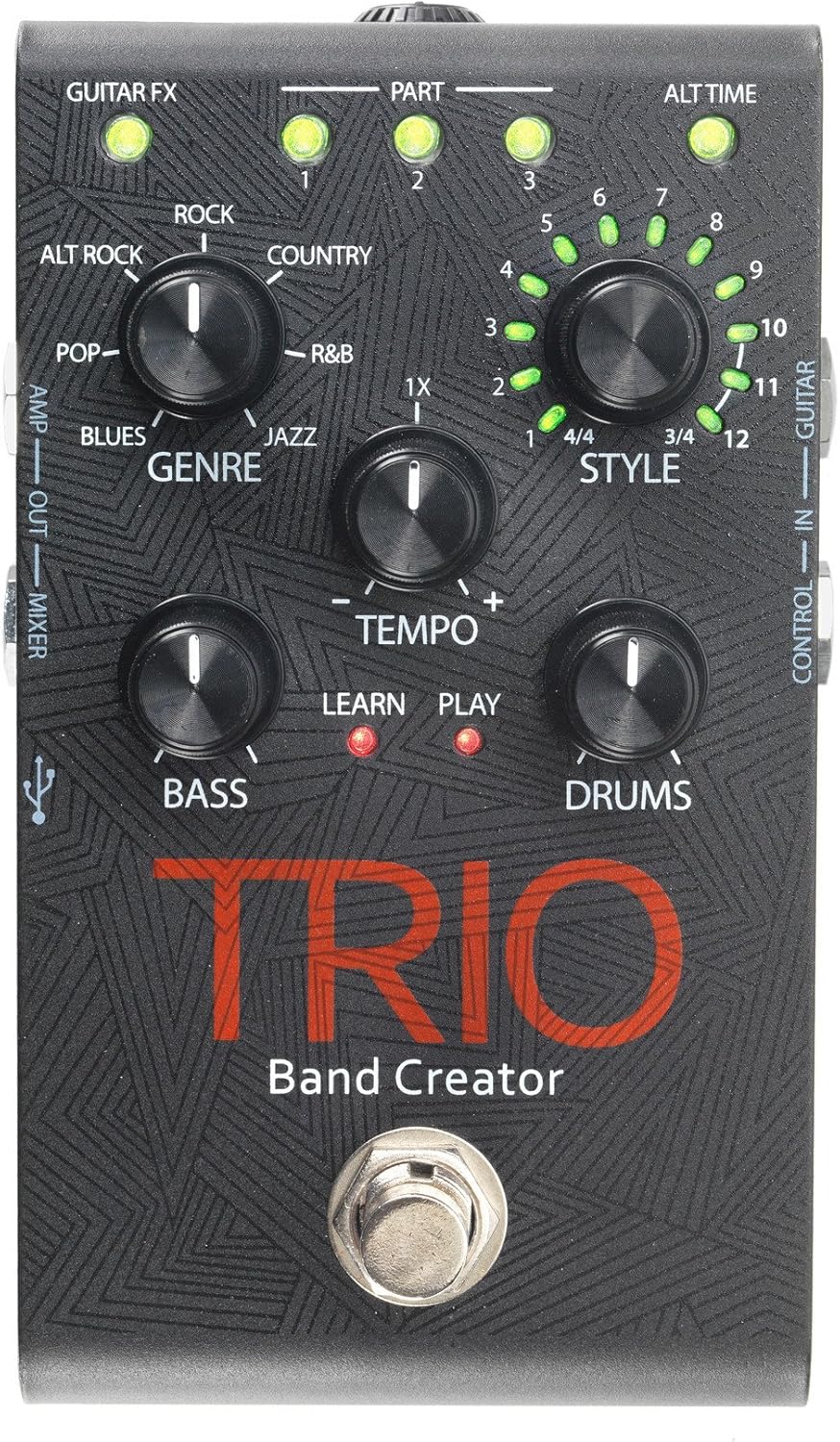
Figure 1: DigiTech TRIO Band Creator Pedal Front Panel. This image displays the pedal's layout, including the Genre, Style, Tempo, Bass, and Drums knobs, the footswitch, and various LED indicators and input/output jacks.
The TRIO pedal features a robust design with intuitive controls. Key components include:
- Genre Knob: Selects one of seven music genres (Blues, Pop, Alternative Rock, Rock, Country, R&B, Jazz).
- Style Knob: Chooses from twelve song styles within the selected genre, and also indicates 3/4 or 4/4 time signatures.
- Tempo Knob: Adjusts the playback speed of the generated band.
- Bouton bas: Controls the volume level of the generated bass line.
- Drums Knob: Controls the volume level of the generated drum track.
- Footswitch: Used for teaching the pedal your song, starting/stopping playback, and switching song parts.
- Endikatè ki ap dirije: Provide visual feedback for Guitar FX, Part (1, 2, 3), Alt Time, Learn, and Play status.
- Antre / Sòti krik: Include Guitar In, Control In, Amp Out, Mixer Out, and Headphone Out.
- Pò USB: Pou mizajou firmwèr.
Enstalasyon
Before using your DigiTech TRIO pedal, ensure all connections are made correctly.
- Koneksyon pouvwa: Connect the included 9V DC power supply (300mA minimum) to the TRIO's power input jack. Plug the power supply into a standard AC outlet.
- Antre gita: Konekte gita ou a GITA NAN jack on the TRIO pedal using a standard 1/4-inch instrument cable.
- Sòti a Amplifier/Mixer:
- For connecting to a guitar amplifier, use the AMP SOTI jack. This output includes your guitar signal and is optimized for guitar amps.
- For connecting to a mixing console, PA system, or headphones, use the MIXER SOTI jack. This output provides a full-range signal suitable for these devices.
- Sòti ekoutè: For private practice, connect headphones to the TÈT SOTI jack. Adjust the headphone level using the dedicated control.
- Optional Footswitch (DigiTech FS3X): If using an optional FS3X footswitch for extended control, connect it to the KONTWÒL NAN Jack.
Ensure all cables are securely connected before powering on your amplifier oswa sistèm odyo.
Enstriksyon Operasyon
Basic Operation: Creating a Song
- Chwazi Jan: Vire a GENRE knob to choose your desired musical style (e.g., Rock, Blues, Jazz).
- Chwazi Stil: Vire a STYLE knob to select a specific song style within the chosen genre. The LEDs around the knob indicate the style number (1-12) and the time signature (3/4 or 4/4).
- Teach the TRIO:
- Press the TRIO's footswitch once. The APRANN LED will illuminate red.
- Play your guitar chords and rhythm for the first section of your song. Play clearly and consistently for 4-8 measures.
- Press the footswitch again to stop teaching. The APRANN LED will turn off, and the JWE LED will illuminate red. The TRIO will then generate and play the bass and drum parts based on what you played.
- Play with the Band: Once the band starts playing, you can play along with your guitar.
Karakteristik avanse
- Adjusting Tempo: Sèvi ak la TEMPO knob to increase or decrease the speed of the generated band.
- Adjusting Bass and Drum Levels: Sèvi ak la BASS epi TAMBRI knobs to set the individual volume levels of the bass and drum parts relative to your guitar.
- Song Parts: The TRIO can learn up to three distinct song parts. After teaching the first part, press the footswitch twice quickly to enter "Part 2" learn mode, and three times for "Part 3". You can then switch between these parts during playback by pressing the footswitch. The PART 1, 2, 3 LEDs indicate the active part.
- Alternate Time: Some styles offer an "Alternate Time" option (e.g., half-time or double-time). The ALT TIME LED will illuminate when this option is available and active.
- Guitar FX: La GUITAR FX LED indicates if the TRIO is applying a subtle guitar effect (e.g., compression, chorus) to your signal, which is often genre-dependent.
- Using the FS3X Footswitch: The optional DigiTech FS3X footswitch provides hands-free control over various functions, such as cycling through song parts, stopping/starting playback, and more. Refer to the FS3X manual for detailed usage.
Antretyen
Proper care will ensure the longevity and optimal performance of your DigiTech TRIO pedal.
- Netwayaj: Use a soft, dry cloth to clean the pedal's exterior. Avoid using abrasive cleaners, solvents, or waxes, as these can damage the finish and internal components.
- Depo: Lè w pa itilize pedal la pou yon bon bout tan, sere l nan yon kote ki fre epi sèk, lwen limyè solèy dirèk ak tanperati ekstrèm.
- Pwovizyon pou pouvwa: Always use the specified 9V DC power supply. Using an incorrect power supply can damage the unit and void the warranty.
- Koneksyon: Periodically check all cable connections for wear and tear. Replace damaged cables to prevent signal loss or short circuits.
Depanaj
If you encounter issues with your TRIO pedal, refer to the following common problems and solutions:
| Pwoblèm | Kòz posib | Solisyon |
|---|---|---|
| No sound from pedal. | Incorrect power supply; loose cables; incorrect input/output connections. | Ensure correct 9V DC power supply is used and connected. Check all instrument cables are securely plugged into the correct jacks (Guitar In, Amp Out/Mixer Out). Verify amplifier/mixer is on and volume is up. |
| Band not generating or sounds incorrect. | Poor "teaching" performance; incorrect genre/style selected; low input signal. | Ensure you play clearly and consistently during the "Learn" phase. Try re-teaching the song part. Experiment with different Genres and Styles. Ensure your guitar's volume is adequate. |
| Bass or Drums are too loud/quiet. | Bass/Drums knob setting. | Ajiste a BASS epi TAMBRI knobs to your desired levels. |
| Tempo is too fast/slow. | Tempo knob setting. | Ajiste a TEMPO knob to increase or decrease the playback speed. |
| LEDs not illuminating. | No power; pedal malfunction. | Check power connection. If power is confirmed and LEDs still don't light up, contact customer support. |
Espesifikasyon
| Karakteristik | Detay |
|---|---|
| Nimewo Modèl | TRIOV01 |
| Pwa atik | 1.32 liv |
| Dimansyon pake | 17.24 x 9.25 x 6.5 pous |
| Koulè | Nwa |
| Entèfas Materyèl | HP-HSC |
| Fòma siyal | Analòg |
| Sous pouvwa | Fil elektrik |
| Voltage | 9 Volts |
| Ampepòk | 300 Miliamps |
Garanti ak sipò
For warranty information and technical support, please refer to the official DigiTech websit la oubyen kontakte depatman sèvis kliyan yo. Kenbe resi acha w la kòm prèv acha pou nenpòt reklamasyon garanti.
You can often find additional resources, FAQs, and firmware updates on the manufacturer's support pages.


