1. Entwodiksyon
Thank you for choosing the Lorelli 1028013 Digital Video Baby Monitor. This device is designed to provide parents with peace of mind by allowing continuous monitoring of their child. Featuring advanced digital technology, this monitor ensures a secure and clear connection. Please read this manual thoroughly before using the product to ensure proper operation and safety.
2. Pwodwi souview
The Lorelli 1028013 Digital Video Baby Monitor is a 100% digital, FHSS (Frequency Hopping Spread Spectrum) system designed for low interference and secure communication. It includes a parent unit with an LCD screen and a baby unit (camera).
Karakteristik kle:
- 2.4-inch color LCD screen on the parent unit.
- Automatic infrared night vision for clear monitoring in low light.
- Up to 300 meters (approx. 984 feet) outdoor transmission range.
- Two-way communication (talk-back function).
- VOX function (Voice Operated eXchange) for sound-activated monitoring.
- Baby room temperature sensor.
- Built-in lullabies.
- Feeding alarm.
- Low battery alert and out-of-range alert.
- High/low temperature alert.
- Rechargeable batteries for both camera and monitor units.
- Portable parent unit with belt clip and stand.
Eleman:
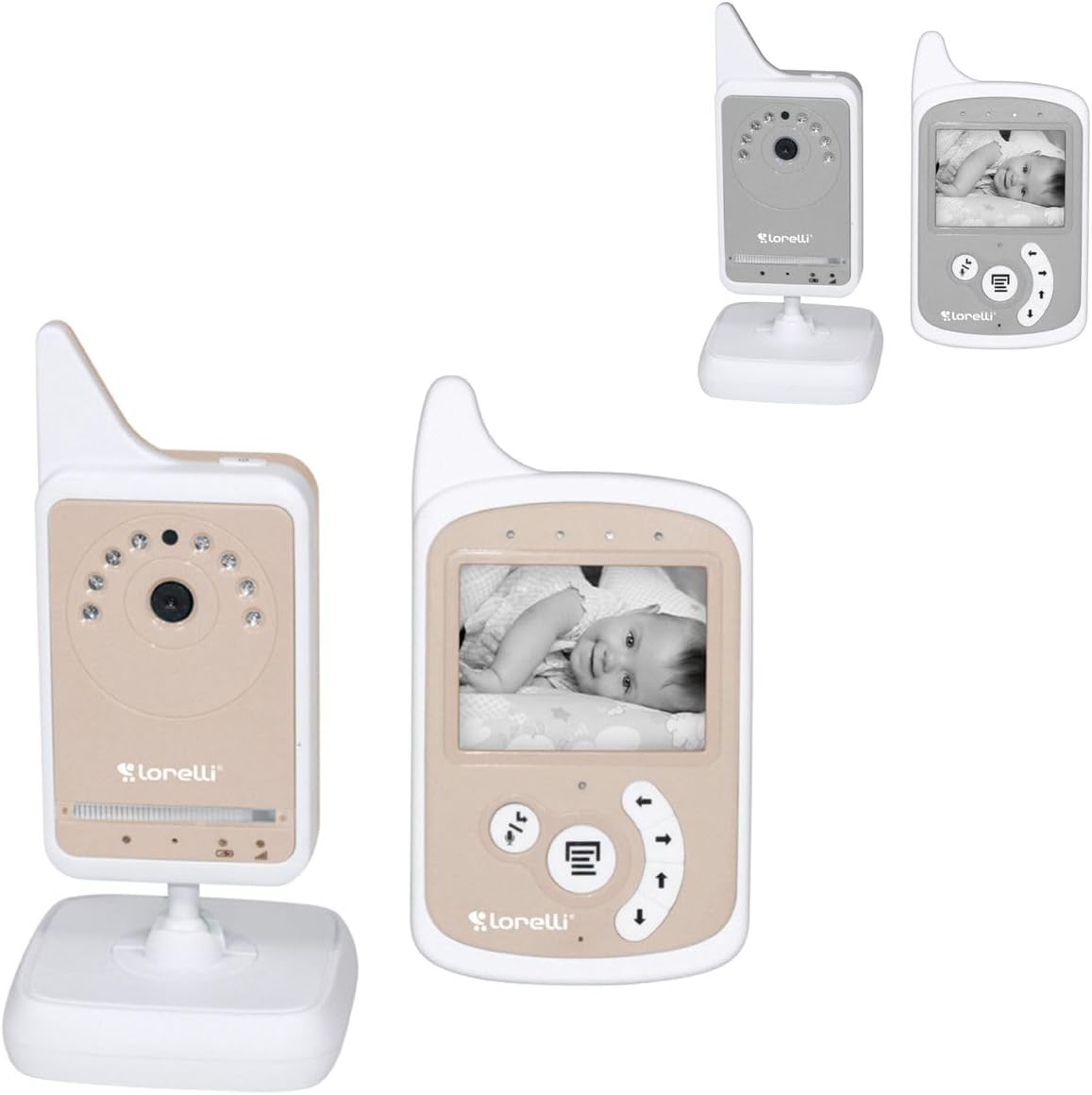
Imaj 1: The Lorelli 1028013 Digital Video Baby Monitor, displaying both the baby unit (camera) and the parent unit (monitor) with a baby's image on its screen. The units are beige and white.

Imaj 2: Yon pi pre view of the Lorelli 1028013 baby monitor units. The baby unit features an array of infrared LEDs around the camera lens, and the parent unit shows a clear image of a sleeping baby on its screen, with control buttons below.
3. Avètisman Sekirite
AVÈTISMAN:
- Pwodwi sa a se pa yon jwèt. Kenbe soti nan atenn timoun yo.
- Not suitable for children under 1 month of age.
- Danje trangle: Keep all cords out of reach of children (at least 1 meter / 3 feet away). Never place the camera or cords within a crib or playpen.
- Danje toufe: Pwodwi sa a gen ti pati. Granmoun asanble obligatwa.
- Danje chòk elektrik: Do not expose the product to water or moisture. Do not open the units.
- Sèvi ak adaptè kouran yo bay la sèlman.
- Ensure proper ventilation around both units. Do not cover them with cloth or other materials.
- Pwodwi sa a fèt pou itilize andedan kay la sèlman.
4. Enstalasyon
4.1 Charging the Units
- Connect the power adapter to the Baby Unit (camera) and plug it into a wall outlet.
- Connect the power adapter to the Parent Unit (monitor) and plug it into a wall outlet.
- Charge both units for at least 8 hours before first use to ensure optimal battery life. The battery indicator on the Parent Unit will show charging status.
- Both units come with rechargeable batteries. The Parent Unit is designed for portability, and the Baby Unit can also operate on battery power for short periods or during power outages.
4.2 Pozisyonman Inite Tibebe a (Kamera)
- Place the Baby Unit on a flat surface in the baby's room, such as a dresser or shelf.
- Asire w ke kamera a gen yon vizyon klè, san obstak. view of the baby's crib or sleeping area.
- Enpòtan: Keep the Baby Unit and its power cord at least 1 meter (3 feet) away from the crib or playpen to prevent strangulation hazards.
- Evite mete aparèy la anba limyè solèy dirèk oswa toupre sous chalè.
4.3 Positioning the Parent Unit (Monitor)
- Place the Parent Unit in a location where you can easily see and hear your baby.
- The unit has a built-in stand for tabletop use and a belt clip for portability.
- For optimal signal, try to minimize obstacles between the Parent Unit and Baby Unit. The maximum range is 300 meters in open areas; walls and furniture will reduce this range.
5. Operasyon Enstriksyon
5.1 Limen/Etenyen
- To turn on the Baby Unit, slide the ON/OFF switch to the "ON" position.
- To turn on the Parent Unit, press and hold the Power button until the screen illuminates.
- To turn off either unit, reverse the process.
5.2 Siveyans Debaz
Once both units are powered on and within range, the Parent Unit will automatically connect to the Baby Unit and display live video and audio from your baby's room.
- Kontwòl Volim: Use the UP/DOWN arrow buttons on the Parent Unit to adjust the listening volume.
- Kontwòl klète: Refer to the Parent Unit's menu for screen brightness adjustments.
5.3 VOX Function (Voice Operated eXchange)
The VOX function puts the Parent Unit into standby mode when no sound is detected from the baby's room, conserving battery power. When the Baby Unit detects sound above a certain threshold, the Parent Unit's screen will activate, and audio will resume.
- Activate/Deactivate VOX mode via the Parent Unit's menu.
- Adjust VOX sensitivity (low, medium, high) to suit your environment. Higher sensitivity means the monitor will activate with softer sounds.
5.4 Two-Way Communication (Talk-Back)
To speak to your baby through the Baby Unit:
- Press and hold the Talk button (often represented by a microphone icon) on the Parent Unit.
- Speak clearly into the microphone on the Parent Unit.
- Release the Talk button to resume listening to your baby.
5.5 Vizyon lannwit
The Baby Unit is equipped with automatic infrared night vision. When the room light is low, the camera will automatically switch to night vision mode, providing a clear black and white image on the Parent Unit's screen.
5.6 Lullabies
To play lullabies to your baby:
- Aksè meni Lullaby a sou Inite Paran an.
- Select a lullaby to play. You may also have options to loop or stop playback.
5.7 Temperature Monitoring and Alerts
The Baby Unit has a built-in temperature sensor that displays the room temperature on the Parent Unit's screen. You can set high and low temperature alert thresholds in the Parent Unit's menu. If the temperature goes outside these limits, an alarm will sound.
5.8 Other Alerts
- Feeding Alarm: Set reminders for feeding times through the Parent Unit's menu.
- Avètisman batri ki ba: An icon and/or audible alert will indicate when the Parent Unit's battery is low and needs recharging.
- Alèt Deyò Ranje: If the Parent Unit loses connection with the Baby Unit (e.g., due to distance or interference), an alert will sound. Move the units closer together or reduce obstacles.

Imaj 3: A young child holding the Lorelli 1028013 parent unit, demonstrating its portable size. A baby's crib is visible in the background, indicating the monitor's use in a nursery setting.
6. Antretyen
- Netwayaj: Wipe the units with a dry, soft cloth. Do not use abrasive cleaners or solvents.
- Swen batri: To prolong battery life, fully charge the units before first use and avoid completely draining the batteries regularly. If storing the unit for an extended period, charge the batteries every few months.
- Depo: Sere monitè a nan yon kote ki fre epi sèk, lwen limyè solèy dirèk ak tanperati ekstrèm.
NAN. Depanaj
| Pwoblèm | Kòz posib | Solisyon |
|---|---|---|
| Pa gen imaj/son sou inite paran an. | Units are not powered on, out of range, or battery is low. | Ensure both units are turned on and charged. Move Parent Unit closer to Baby Unit. Reduce obstacles. |
| Poor picture/sound quality. | Interference from other devices, units too far apart, or obstacles. | Move units closer. Adjust antenna (if applicable). Move away from other electronic devices (Wi-Fi routers, microwaves). |
| Parent Unit beeps (Out of Range). | Parent Unit has lost connection with Baby Unit. | Move Parent Unit closer to Baby Unit. Ensure Baby Unit is powered on. |
| VOX not activating. | VOX sensitivity is too low. | Increase VOX sensitivity in the Parent Unit's menu. |
| Batri vide byen vit. | Frequent use, old battery, or VOX not enabled. | Ensure full charge before use. Enable VOX mode. Consider battery replacement if very old. |
8. Espesifikasyon
- Modèl: Lorelli 1028013
- Koneksyon Teknoloji: Wireless (FHSS Digital)
- Gwosè ekran: Ekran LCD koulè 2.4 pous
- Ranje: Jiska 300 mèt (nan jaden ouvè)
- Karakteristik espesyal: Lullabies, Night Vision, VOX, Two-Way Talk, Temperature Sensor, Various Alerts
- Sous pouvwa: Battery Powered (Rechargeable batteries included)
- Dimansyon (L x W x H): Approximately 30 x 30 x 30 cm (for packaging/overall product, individual units are smaller)
- Pwa: Approximately 300 grams (total product)
- Laj rekòmande: 1 mwa ak plis
9. Garanti ak sipò
Specific warranty information is not provided in the product details. Please refer to the retailer or manufacturer's websit la pou wè tèm ak kondisyon garanti detaye yo.
For technical support or further assistance, please contact Lorelli customer service or your point of purchase. Keep your purchase receipt as proof of purchase.


