1. Entwodiksyon
The AUNA Stealth Bar 60 is a compact 2.1 soundbase designed to significantly enhance your home entertainment audio experience. This manual provides essential information for the safe operation, proper setup, and effective maintenance of your device. Please read this manual thoroughly before using the product and retain it for future reference.

Figi 1.1: The AUNA Stealth Bar 60 soundbase integrated into a home entertainment setup.
2. Enstriksyon Sekirite
Pou asire yon operasyon an sekirite epi pou anpeche domaj, tanpri obsève prekosyon sekirite sa yo:
- Li tout enstriksyon ak anpil atansyon anvan ou itilize yo epi kenbe yo pou referans nan lavni.
- Pa ekspoze aparèy la nan dlo, imidite, oswa tanperati ekstrèm.
- Asire w ke gen ase vantilasyon toutotou aparèy la. Pa bloke okenn ouvèti vantilasyon.
- Install the device according to the manufacturer's instructions.
- Pwoteje kòd elektrik la pou yo pa mache oswa kwense, sitou nan priz, resipyan konvenyans, ak pwen kote yo sòti nan aparèy la.
- Deploge aparèy la pandan tanpèt zèklè oswa lè li pa itilize pou yon tan long.
- Refere tout sèvis yo bay pèsonèl sèvis kalifye. Reparasyon nesesè lè aparèy la domaje nenpòt fason, tankou kòd kouran oswa ploge domaje, likid koule oswa objè tonbe nan aparèy la, aparèy la te ekspoze a lapli oswa imidite, li pa fonksyone nòmalman. , oswa li te tonbe.
3. Pake kontni
Carefully unpack the box and ensure all items listed below are present and in good condition:
- 1 x AUNA Stealth Bar 60 Soundbase
- 1 x kontwòl remote
- 1 x kab RCA
- 1 x Audio Cable (3.5mm AUX)
- 1 x Manyèl Itilizatè (Angle ak Alman)
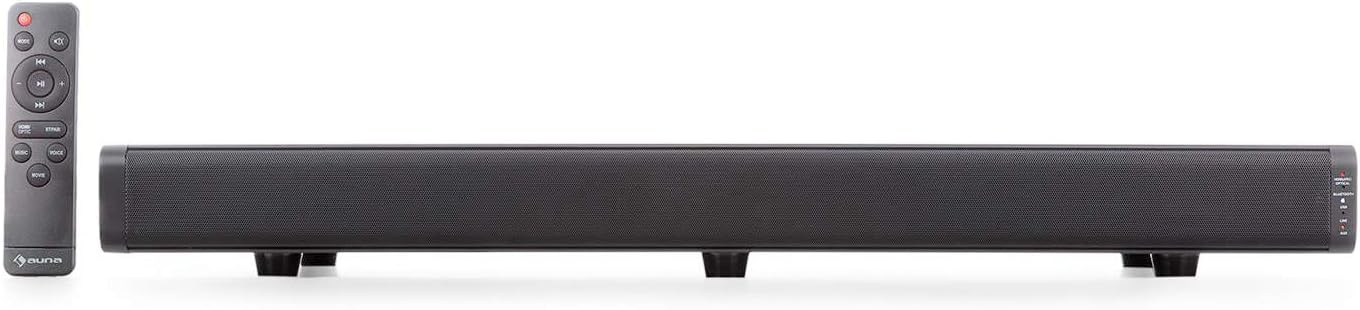
Figi 3.1: The AUNA Stealth Bar 60 soundbase and its remote control.
4. Pwodwi Features
The AUNA Stealth Bar 60 offers a range of features designed for an immersive audio experience:
- 2.1 Compact Soundbase: Designed for TVs between 32-55 inches, supporting a maximum weight of 22kg.
- Koneksyon versatile: Includes USB, HDMI (ARC), Optical, and AUX inputs for various digital and analog sources.
- Difizyon Bluetooth: Wirelessly stream audio from compatible devices like smartphones and tablets.
- Integrated DSP 3D Surround Stereo: Enhances audio depth and immersion.
- Prereglaj EQ: Three selectable equalizer modes (Music, Voice, Movie) to optimize sound for different content.
- Kontwòl pratik: Operate directly from the unit or via the included remote control.
- Fonksyonalite pò USB: Supports MP3 playback from USB drives (up to 32GB) and can also serve as a charging port for other devices.

Figi 4.1: Devan view of the AUNA Stealth Bar 60 soundbase.
5. Kontwòl ak Koneksyon
5.1 Kontwòl Panèl Front ak Endikatè
The right side of the soundbase features control buttons and LED indicators for easy operation and status monitoring.
- Power / Mode Button: Press to power on/off or cycle through input sources (HDMI, Optical, Bluetooth, USB, Line In, AUX).
- PAIR / Play / Pause Button: In Bluetooth mode, press and hold to initiate pairing. Press briefly to play or pause audio.
- VOL+ / Next Track Button: Press to increase volume. In Bluetooth/USB mode, press and hold to skip to the next track.
- VOL- / Previous Track Button: Press to decrease volume. In Bluetooth/USB mode, press and hold to skip to the previous track.
- Endikatè ki ap dirije: Lights indicate the currently selected input source (HDMI, Optical, Bluetooth, USB, Line In, AUX).

Figi 5.1: Front panel controls and LED indicators.
5.2 Side and Rear Panel Connections
The soundbase offers various ports for connecting external audio sources.
- Pò USB: For connecting USB storage devices (max 32GB) for MP3 playback or charging external devices.
- LINE IN (AUX) Port: 3.5mm jack for connecting analog audio sources.
- Antre HDMI (ARC): For connecting to a TV's HDMI ARC port to receive audio.
- Antre OPTIC: For connecting to a TV or other device with an optical digital audio output.
- Antre AUX: RCA stereo input for connecting analog audio sources.
- Antre pouvwa: Pou konekte adaptè pouvwa a.

Figi 5.2: USB and Line In ports on the side panel.
6. Enstalasyon
6.1 Plasman
- Place the AUNA Stealth Bar 60 on a stable, flat surface directly below your television.
- Ensure there is adequate space around the soundbase for proper ventilation.
- The soundbase is designed to support TVs weighing up to 22 kg. Do not exceed this weight limit.
6.2 Konekte sou pouvwa
- Connect the power cable to the Power Input port on the soundbase.
- Plug the other end of the power cable into a suitable wall outlet (110-220 V~ | 50/60 Hz).
6.3 Konekte Sous Odyo yo
Choose one of the following connection methods based on your TV or audio source:
- HDMI (ARC): Connect an HDMI cable from the soundbase's HDMI (ARC) port to your TV's HDMI (ARC) port. This allows the TV to send audio to the soundbase and often enables control of the soundbase volume with your TV remote.
- Optik: Connect an optical audio cable from the soundbase's OPTICAL input to your TV's optical digital audio output.
- AUX (RCA): Use the provided RCA cable to connect the soundbase's AUX input to the RCA audio output jacks on your TV or other audio device.
- LINE IN (3.5mm): Use the provided 3.5mm audio cable to connect the soundbase's LINE IN port to the headphone jack or 3.5mm audio output of your device.
- USB: Insert a USB flash drive (formatted to FAT32, max 32GB) into the USB port for direct MP3 playback.
7. Operasyon Enstriksyon
7.1 Power On/Off
Peze a Pouvwa / mòd button on the soundbase or the remote control to turn the unit on or off.
7.2 Seleksyon Sous
Peze a Mode button repeatedly on the soundbase or remote control to cycle through the available input sources: HDMI, Optical, Bluetooth, USB, Line In, and AUX. The corresponding LED indicator on the front panel will illuminate to show the active source.
7.3 Kontwòl Volim
Sèvi ak la VOL+ epi VOL- buttons on the soundbase or remote control to adjust the volume level.
7.4 Bluetooth Pairing
- Turn on the soundbase and select Bluetooth mode using the Mode button. The Bluetooth LED indicator will flash, indicating it is in pairing mode.
- Aktive Bluetooth sou telefòn entelijan ou, tablèt ou, oswa lòt aparèy ou.
- Chèche pou available devices and select "AUNA Stealth Bar 60" from the list.
- Once successfully paired, the Bluetooth LED indicator on the soundbase will glow solid.
- You can now play audio from your device through the soundbase. Use the PAIR / Play / Pause, VOL+ / Next Track, ak VOL- / Previous Track bouton pou kontwòl lèktur.
7.5 prereglaj EQ
Use the dedicated buttons on the remote control to select one of the three equalizer presets:
- MIZIK: Optimize pou koute mizik an jeneral.
- VWA: Amelyore klète vokal la, ideyal pou nouvèl oswa kontni ki gen anpil dyalòg.
- FILM: Bay son dinamiktage for movies and cinematic experiences.
8. Antretyen
Proper care ensures the longevity and performance of your soundbase:
- Netwayaj: Use a soft, dry cloth to clean the exterior of the soundbase. Do not use liquid cleaners, aerosols, or abrasive chemicals, as they may damage the finish.
- Vantilasyon: Periodically check that the ventilation openings are clear of dust and debris to prevent overheating.
- Depo: If storing the unit for an extended period, unplug it from the power outlet and store it in a cool, dry place, preferably in its original packaging.
NAN. Depanaj
If you encounter issues with your AUNA Stealth Bar 60, refer to the following table for common problems and solutions:
| Pwoblèm | Kòz posib | Solisyon |
|---|---|---|
| Pa gen pouvwa | Kab kouran an pa konekte; Priz kouran an pa aktif. | Asire w kab kouran an byen konekte. Tcheke si priz kouran an ap fonksyone. |
| Pa gen son | Incorrect input source selected; Volume too low; Audio cables not connected properly. | Select the correct input source. Increase the volume. Check all audio cable connections. |
| Bluetooth pa konekte | Soundbase not in pairing mode; Device Bluetooth off; Device too far. | Ensure soundbase is in Bluetooth pairing mode (flashing LED). Turn on Bluetooth on your device. Move device closer to the soundbase. |
| Remote kontwòl pa travay | Batteries depleted; Obstruction between remote and soundbase. | Replace batteries in the remote control. Ensure there is a clear line of sight to the soundbase's sensor. |
10. Espesifikasyon
Technical specifications for the AUNA Stealth Bar 60:
| Karakteristik | Spesifikasyon |
|---|---|
| Nimewo Modèl | KTCLJ4O-Q |
| Pouvwa Sòti (RMS) | 2 x 20W + 40W |
| Enpedans | 8 Ohm |
| Bluetooth vèsyon | V3.0 + EDR |
| Max USB Storage Size | 32GB |
| Max TV Load | 22 kg |
| Dimansyon (W x H x P) | 68 x 6 x 27 cm |
| Pwa | 5 kg |
| Pwovizyon pou pouvwa | 110-220 V~ | 50/60 Hz |
| Koneksyon | HDMI (ARC), USB, Optical, AUX (RCA), Line In (3.5mm) |
| EQ Prereglaj | Music, Voice, Movie |
11. Garanti ak sipò
For detailed warranty information, terms, and conditions, please refer to the warranty card or documentation included with your purchase. For technical support, service inquiries, or to obtain replacement parts, please visit the official AUNA website or contact your local dealer. Please have your model number (KTCLJ4O-Q) and purchase date available when contacting support.