Entwodiksyon
The Pure Siesta S6 is a sophisticated DAB/DAB+ and FM alarm clock radio designed to enhance your bedside experience. It features a large, ultra-clear CrystalVue display, impressive audio quality via Bluetooth, and a convenient USB port for charging your devices. This manual provides comprehensive instructions for setting up, operating, and maintaining your Siesta S6.
Karakteristik kle
- Difizyon odyo san fil: Use Siesta S6 as a wireless speaker to stream audio content from your smartphone, laptop, or tablet via Bluetooth.
- CrystalVue+ Display: Large, ultra-clear display for optimal readability, with adaptive brightness.
- Siesta Timer: Program a short nap with a single button press.
- Integrated USB Power Port: Keep your phone, tablet, or other devices fully charged by connecting them to the built-in USB port.
- Radyo DAB/DAB+ ak FM: Jwenn aksè a yon pakèt estasyon radyo dijital ak analòg.
- Alam miltip: Set up to three independent alarms with customizable days, sources (tone, last station, preset), and volume.
Gid Enstalasyon
Follow these steps to set up your Pure Siesta S6 for the first time.
- Depake aparèy la: Carefully remove the Siesta S6 from its packaging.
- Konekte pouvwa: Insert the supplied mains adapter into the DC IN port on the back of the unit. Plug the adapter into a wall outlet.
- Pozisyon antèn la: Uncoil the wire antenna fully for optimal DAB/DAB+ and FM reception. Position it away from other electronic devices.
- Premye eskanè: Upon first power-up, the Siesta S6 will automatically scan for available DAB/DAB+ radio stations and set the clock. This process may take a few minutes.
- Adjust Display Brightness (Optional): The display brightness adjusts automatically. If desired, you can manually adjust this setting via the "Menu" section.

Imaj: Dèyè view of the Siesta S6, highlighting the USB charging port and the power input.

Imaj: Devan angilè view of the Pure Siesta S6, displaying the time and alarm indicators.
Enstriksyon Operasyon
This section details the various functions and controls of your Siesta S6.
Kontwòl souview
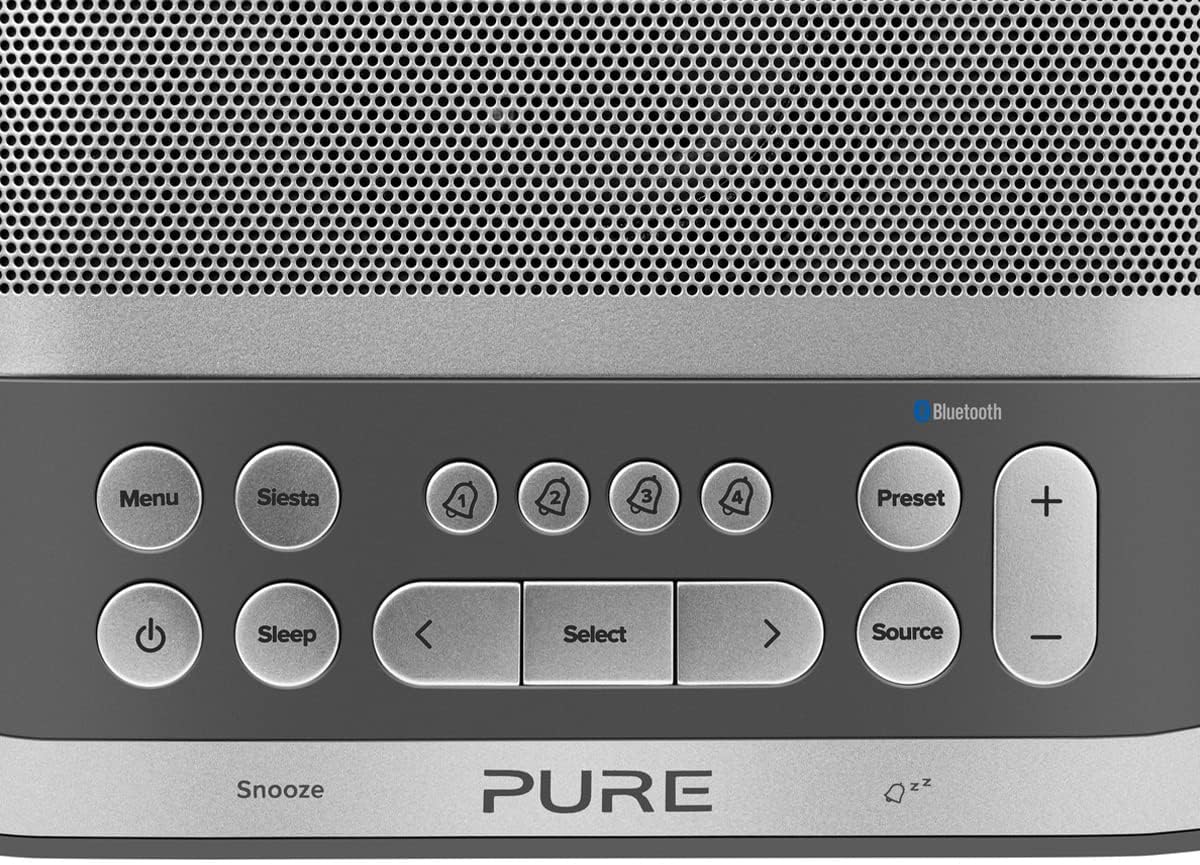
Image: Close-up of the top panel buttons, including Menu, Siesta, Alarm 1-4, Preset, Volume, Power, Sleep, Source, and Navigation buttons.
- Bouton pouvwa (●): Peze pou limen oswa etenn inite a.
- Bouton meni: Access system settings and options.
- Siesta Button: Activates the Siesta timer for short naps.
- Alarm Buttons (1, 2, 3, 4): Press to activate/deactivate or configure individual alarms.
- Bouton Prereglaj: Save and recall your favorite radio stations.
- Bouton Volim (+/-): Ajiste volim odyo a.
- Bouton dòmi: Set a sleep timer for the radio to turn off automatically.
- Sous bouton: Chanje ant mòd DAB, FM, ak Bluetooth.
- Bouton Navigasyon (< Select >): Navige nan meni yo epi chwazi opsyon yo.
- Snooze Bar: Press to temporarily silence an active alarm.
Radio Operation (DAB/DAB+ and FM)
- Chwazi mòd: Peze a Sous button to cycle between DAB and FM radio modes.
- Estasyon mizik:
- DAB: Nan mòd DAB, sèvi ak < epi > buttons to browse available stations. Press Chwazi pou branche yon estasyon.
- FM: Nan mòd FM, peze Chwazi to auto-scan for the next available station. Use < epi > pou ajisteman.
- Sove Prereglaj: Pou sove yon estasyon, peze epi kenbe bouton an Prereglaj bouton. Sèvi ak < epi > to choose a preset number, then press Chwazi pou konfime.
- Rapèl Prereglaj: Yon ti tan peze la Prereglaj bouton. Sèvi ak < epi > to select a preset, then press Chwazi.
Koneksyon ak difizyon Bluetooth
- Antre nan mòd Bluetooth: Peze a Sous button until "Bluetooth" is displayed. The Siesta S6 will enter pairing mode, indicated by a flashing Bluetooth icon.
- Pè aparèy ou an: On your smartphone, tablet, or computer, enable Bluetooth and search for "Pure Siesta S6" in the list of available devices. Select it to pair.
- Kòmanse difizyon an: Once paired, you can play audio from your device, and it will stream wirelessly to the Siesta S6.
Mete Alam

Image: A hand interacting with the top controls of the Siesta S6, demonstrating alarm setting.
- Select Alarm: Peze youn nan la Alarm (1, 2, 3, or 4) buttons to select an alarm to configure.
- Konfigirasyon Anviwònman: Sèvi ak la < epi > buttons to adjust the time, alarm source (DAB, FM, Tone, Last Station), volume, and days of the week (Everyday, Weekdays, Weekends, Once). Press Chwazi konfime chak anviwònman.
- Aktive / Dezaktive: Peze yon ti kras bouton ki koresponn lan Alam button to toggle the alarm on or off. An active alarm will show its indicator on the display.
- Repetisyon: Lè yon alam sonnen, peze bouton an Snooze bar to temporarily silence it. The alarm will sound again after the snooze period.
- One Stop Alam: Pou etenn yon alam k ap sonnen nèt, peze bouton an Pouvwa bouton.
Using the Siesta Timer
The Siesta timer allows you to set a short nap timer.
- Aktive: Peze a Swèd bouton.
- Mete dire: Sèvi ak la < epi > buttons to set the desired nap duration (e.g., 5, 10, 15 minutes).
- Konfime: Peze Chwazi to start the Siesta timer. The display will show the countdown.
USB chaje
The USB port on the back of the Siesta S6 can be used to charge your mobile devices.
- Connect your device's USB charging cable to the USB port on the Siesta S6.
- Ensure the Siesta S6 is powered on and connected to mains electricity.
- Chaje ap kòmanse otomatikman.
Antretyen
Proper care will ensure the longevity of your Siesta S6.
- Netwayaj: Wipe the unit with a soft, dry, lint-free cloth. Do not use abrasive cleaners, waxes, or solvents.
- Plasman: Avoid placing the unit in direct sunlight, near heat sources, or in environments with high humidity or dust.
- Vantilasyon: Asire w ke gen ase vantilasyon toutotou aparèy la pou anpeche l chofe twòp. Pa bloke ouvèti vantilasyon yo.
Depanaj
If you encounter issues with your Siesta S6, refer to the following common problems and solutions.
| Pwoblèm | Solisyon |
|---|---|
| Pa gen pouvwa | Asire w adaptè kouran an byen konekte ak aparèy la ak yon priz miray ki fonksyone. |
| Move Resepsyon Radyo | Fully extend and reposition the wire antenna. Try moving the unit to a different location, away from other electronic devices that may cause interference. Perform a full scan for DAB stations. |
| Bluetooth pa konekte | Ensure the Siesta S6 is in Bluetooth pairing mode (flashing icon). Make sure Bluetooth is enabled on your device and it is within range. Try unpairing and re-pairing the device. |
| Alam Pa Sonnen | Verify that the alarm is activated (indicator on display). Check the alarm volume setting. Ensure the alarm time is correctly set. |
| Display Too Dim/Bright | Access the Menu settings to adjust the display brightness or toggle the automatic brightness feature. |
Espesifikasyon
| Karakteristik | Detay |
|---|---|
| Mak | Pi |
| Nimewo Modèl | P149584 |
| Koulè | Nwa (Nwa) |
| Kalite pwodwi | Radyo Digital Alam Clock |
| Gwosè ekspozisyon | 3.9 pous |
| Koneksyon | Bluetooth |
| Karakteristik espesyal | Alarm, Siesta Timer, USB Charging Port |
| Aparèy konpatib | Telefòn mobil, Tablèt |
| Sous pouvwa | Mains Powered |
| Dimansyon pwodwi | 14.6L x 7H centimeters |
Garanti ak sipò
Pure products are designed and manufactured to the highest standards. For warranty information and technical support, please refer to the warranty card included with your product or visit the official Pure websit la. Kenbe prèv acha ou pou reklamasyon garanti.
For further assistance, you may also contact Pure customer service through their official channels.


