Entwodiksyon
Mèsi pou acha aasing the Max Power MPD125L Karaoke DJ Speaker System. This portable 12-inch speaker system is designed to deliver powerful sound and vibrant LED lighting for your entertainment needs. It features a built-in rechargeable battery, multiple connectivity options including USB, SD, AM/FM radio, and Bluetooth, along with a strong amplifier pou yon eksperyans odyo immersion.
Please read this manual thoroughly before operating the device to ensure proper use, optimal performance, and to prevent damage.
Enfòmasyon sou Sekirite
- Pa ekspoze aparèy la anba lapli oswa imidite pou evite dife oswa chòk elektrik.
- Pa ouvri c laasing. Pa gen pyès ki ka sèvi ak men itilizatè a anndan an. Konfye tout antretyen bay pèsonèl kalifye.
- Mete aparèy la sou yon sifas ki plat e ki estab pou anpeche l tonbe.
- Kenbe aparèy la lwen limyè solèy dirèk, sous chalè, ak twòp pousyè.
- Asire bon vantilasyon. Pa bloke ouvèti vantilasyon yo.
- Sèvi ak adaptè pouvwa a sèlman ak inite a.
- Deploge inite a pandan tanpèt zèklè oswa lè li pa itilize pou yon tan long.
- Evite mete objè lou sou fil elektrik la.
- Do not insert any objects into the unit's openings.
Kontni pake
Tanpri verifye ke tout atik yo prezan epi yo an bon kondisyon:
- Max Power MPD125L Karaoke DJ Speaker System
- Mikwofòn san fil
- Wireless Remote Control
- Adaptè kouran/Kab chaje
- Manyèl Itilizatè (dokiman sa a)
Karakteristik pwodwi
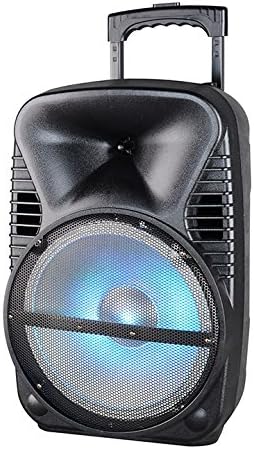
Imaj: Devan view of the Max Power MPD125L Karaoke DJ Speaker System. It is a black, portable speaker with a retractable handle on top and wheels at the bottom. The front features a large speaker grille with blue LED lights illuminating the woofer, indicating its active state.
- Konsepsyon pòtab: 12-inch speaker with built-in retractable handle and wheels for easy transport.
- Odyo pwisan: 4000W peak power output for loud and clear sound with good bass.
- Batri rechargeable entegre: Provides up to 4 hours of continuous playback. (Battery size: 12V/2.6A)
- LED Dance Lights: Integrated LED lights that flash, transforming any room into a disco club.
- Opsyon Koneksyon miltip:
- Bluetooth: Wireless streaming from compatible devices (laptops, smartphones).
- Plas USB: Pou jwe odyo files soti nan kondui USB.
- SD plas: Pou jwe odyo files from SD cards.
- Radyo AM/FM: Built-in tuner for radio broadcasts.
- Fonksyonalite Karaoke: Includes a wireless microphone for karaoke sessions.
- Full-Function Wireless Remote Control: Pou operasyon pratik nan yon distans.
- Enpedans: 4 Ohms.
- Repons frekans: 40 Hz - 20 kHz.
Enstalasyon
1. Chaje Oratè a
- Locate the DC input port on the speaker (usually on the rear panel).
- Connect the supplied power adapter to the DC input port.
- Ploge adaptè pouvwa a nan yon priz elektrik estanda.
- The charging indicator light (if present) will illuminate, typically red, during charging and turn green when fully charged.
- Allow approximately 4-6 hours for a full charge before first use. The speaker can be used while charging.
2. Enstalasyon Mikwofòn San Fil
- Insert appropriate batteries (not included, usually AA) into the wireless microphone.
- Limen mikwofòn nan. Li ta dwe konekte otomatikman ak oratè a.
- Adjust the microphone volume knob on the speaker's control panel to your desired level.
3. Enstalasyon kontwòl Remote
- Insert appropriate batteries (not included, usually AAA) into the wireless remote control.
- Point the remote control towards the speaker's IR receiver (usually on the front panel or near the controls) to operate.
Enstriksyon Operasyon
1. Power On/Off
Locate the Power switch (usually a rocker switch) on the speaker's control panel. Flip it to the "ON" position to power on the speaker. Flip it to "OFF" to power off.
2. Seleksyon mòd
Press the "MODE" button on the control panel or remote control to cycle through available input modes: Bluetooth, USB, SD, FM Radio, AM Radio, AUX (if available).
3. Pè Bluetooth
- Turn on the speaker and select Bluetooth mode. The speaker will typically announce "Bluetooth Mode" or display "BT" and enter pairing mode (indicated by a flashing Bluetooth indicator).
- On your smartphone, tablet, or laptop, enable Bluetooth and search for new devices.
- Select "MPD125L" (or similar name) from the list of available devices.
- Once paired, the speaker will confirm with an audible tone or a solid Bluetooth indicator light. You can now play audio wirelessly.
4. Lekti USB/SD
- Insert a USB flash drive or SD card (pre-loaded with MP3 or compatible audio files) into the respective slot.
- The speaker should automatically switch to USB/SD mode and begin playing the first track. If not, press the "MODE" button to select USB or SD mode.
- Use the Play/Pause, Next Track, and Previous Track buttons on the control panel or remote to navigate.
5. Operasyon Radyo AM/FM
- Select FM or AM radio mode using the "MODE" button.
- Press and hold the Play/Pause button (often labeled "SCAN") to automatically scan and save available radio stations.
- Use the Next Track and Previous Track buttons to switch between saved stations.
- Extend the telescopic antenna (if present) for better reception.
6. Fonksyon Karaoke
Ensure the wireless microphone is powered on and paired. Play your desired music through any input mode (Bluetooth, USB, etc.). Speak or sing into the microphone. Adjust the microphone volume and echo effects (if available) using the dedicated knobs on the control panel.
7. LED Dance Lights
The LED lights typically activate automatically when the speaker is powered on. There may be a dedicated button (e.g., "LIGHT" or "LED") on the control panel or remote to toggle them on/off or change patterns.
8. Kontwòl Volim
Adjust the master volume using the main volume knob on the speaker's control panel or the volume buttons on the remote control.
Antretyen
- Netwayaj: Use a soft, dry cloth to wipe the exterior of the speaker. Do not use liquid cleaners or abrasive chemicals.
- Depo: Lè w pa itilize oratè a pou yon bon bout tan, sere l nan yon kote ki fre epi sèk, lwen limyè solèy dirèk ak tanperati ekstrèm.
- Swen batri: To prolong battery life, avoid fully discharging the battery frequently. Recharge the battery at least once every 3 months if not in regular use.
- Vantilasyon: Ensure the speaker's ventilation openings are clear of dust and debris to prevent overheating.
Depanaj
| Pwoblèm | Kòz posib | Solisyon |
|---|---|---|
| Oratè a pa limen. | Batri ap vide. Kab kouran an pa byen konekte. | Connect the speaker to a power outlet and allow it to charge. Ensure the power cable is securely plugged into both the speaker and the outlet. |
| Pa gen son ki soti nan oratè a. | Volim twò ba. Mòd antre ki pa kòrèk la chwazi. Device not properly connected (Bluetooth/USB/SD). | Ogmante volim mèt la. Peze bouton "MÒD" la pou chwazi antre ki kòrèk la. Re-pair Bluetooth device, re-insert USB/SD, or check AUX cable connection. |
| Aparèy Bluetooth la pa vle konekte. | Oratè a pa nan mòd koneksyon. Aparèy la twò lwen oratè a. Bluetooth sou aparèy la etenn. | Ensure speaker is in Bluetooth mode and indicator is flashing. Deplase aparèy la pi pre oratè a (nan yon distans 10 mèt). Pèmèt Bluetooth sou aparèy ou an. |
| Mikwofòn pa mache. | Microphone is off or batteries are dead. Volim mikwofòn nan twò ba. | Turn on the microphone and replace batteries if necessary. Increase the microphone volume knob on the speaker. |
| Resepsyon radyo pa bon. | Siyal fèb. Antèn nan pa pwolonje. | Deplase oratè a nan yon zòn ki gen pi bon siyal. Konplètman pwolonje antèn teleskopik la. |
Espesifikasyon
| Nimewo Modèl | MPD125L |
| Mak | MAX POUVWA |
| Sòti pouvwa pik | 4000 Watts |
| Enpedans | 4 Ohms |
| Repons Frekans | 40 Hz - 20 kHz |
| Gwosè batri | 12V / 2.6A |
| Lavi batri | Jiska 4 èdtan |
| Dimansyon pwodwi (L x W x H) | 33.02 x 38.1 x 58.42 cm (13 x 15 x 23 pous) |
| Pwa pwodwi | 15.88 kg (35 liv) |
| Aparèy konpatib | Laptop, Smartphone |
| Kalite Connector | USB |
| UPC | 703510623201 |
Garanti ak sipò
Pou enfòmasyon sou garanti a ak sipò teknik, tanpri gade dokiman yo te bay lè w te achte a oswa kontakte revandè w la. Kenbe prèv acha w la pou nenpòt reklamasyon garanti.
For further assistance or inquiries, please visit the official MAX POWER websit oswa kontakte depatman sèvis kliyan yo.


