Radioddity Raddy RF23 AM FM Portable Pocket Radio MP3 Player User Manual
Modèl: RF23
Entwodiksyon
This manual provides detailed instructions for the Radioddity Raddy RF23, a compact and versatile portable radio and MP3 player. It features AM/FM radio reception, MP3 playback from Micro TF cards and USB disks, and an integrated flashlight. Please read this manual thoroughly before using the device to ensure proper operation and longevity.
Kontni pake
- 1 x Radioddity Raddy RF23 AM/FM Radio
- 1 x USB Chaje Kab
- 1 x Rechargeable Lithium-Ion Battery (BL-5C type)
- 1 x ponyèt braslè
Pwodwi souview
Familiarize yourself with the various parts and controls of your Raddy RF23 radio.

Figi 1: Devan View of Raddy RF23 - Displays the speaker grille, digital display, and numeric keypad with function buttons.

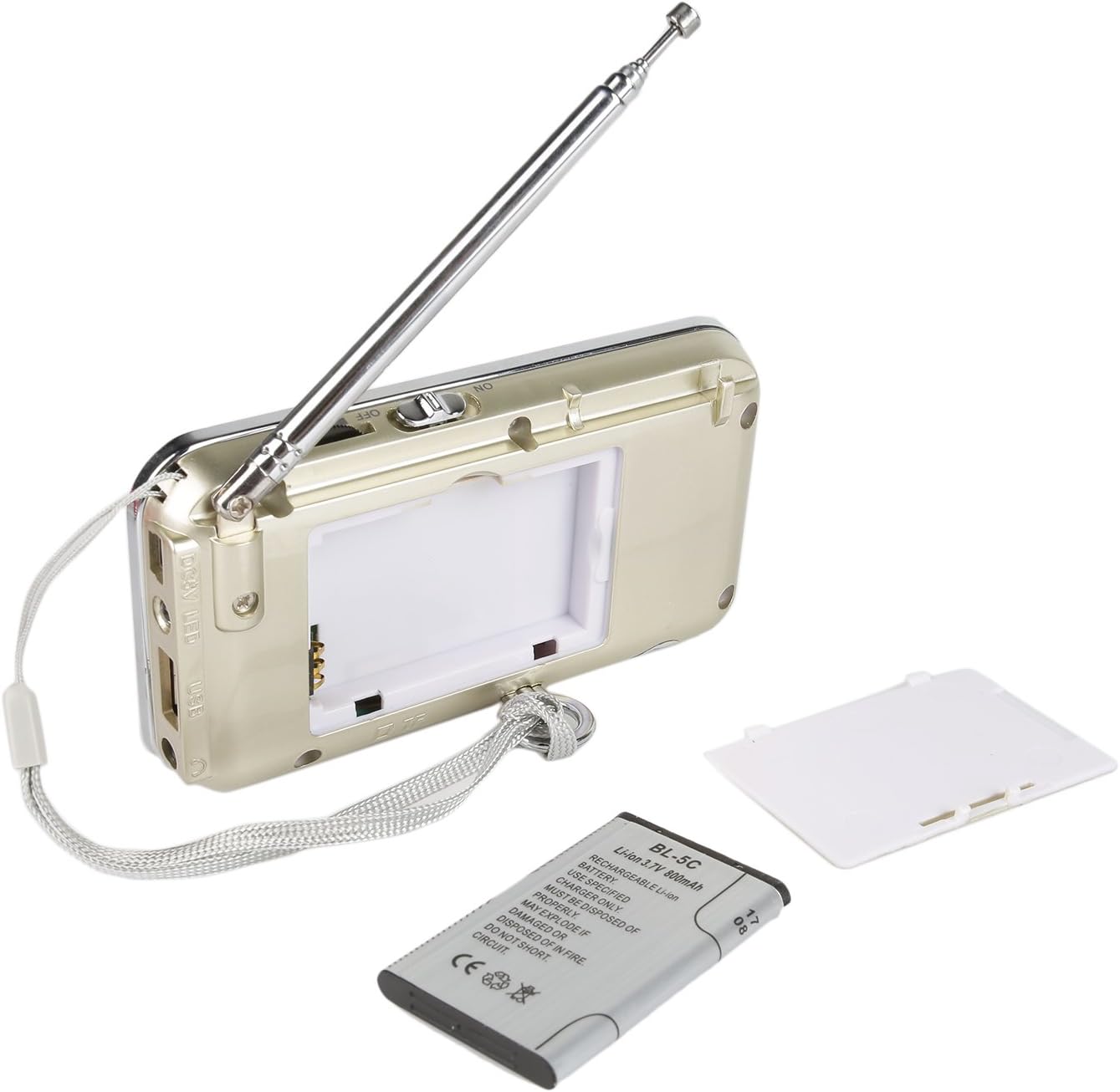
Figi 2: Retounen View of Raddy RF23 - Shows the battery cover, USB port, DC 5V charging port, and the wrist strap with its stand attachment.
Kontwòl ak pò
- Pouvwa switch: Slide switch on the side to turn the device ON or OFF.
- Antèn: Antèn teleskopik ki ka pwolonje pou pi bon resepsyon radyo.
- Ekspozisyon dijital: Shows frequency, mode, and track information.
- Oratè: Integrated speaker for audio output.
- Klavye nimerik (0-9): Used for direct frequency input or track selection.
- Bouton MODE: Switches between AM, FM, and MP3 playback modes.
- Play/Pause Button (▶⏸): Plays or pauses MP3 tracks.
- Previous/Rewind Button (◀◀): Skips to the previous track or rewinds during MP3 playback. In radio mode, short press for previous station, long press for auto-scan down.
- Next/Fast Forward Button (▶▶): Skips to the next track or fast forwards during MP3 playback. In radio mode, short press for next station, long press for auto-scan up.
- Bouton ki ap dirije: Activates or deactivates the built-in flashlight.
- DC 5V Antre: Pò mikwo USB pou chaje aparèy la.
- Pò USB: For connecting a USB flash drive for MP3 playback.
- TF Kat plas: For inserting a Micro TF (Micro SD) card for MP3 playback.
- Jack kas ekoutè (3.5mm): Pou konekte kas ekoutè pou koute mizik an prive.
Enstalasyon
1. Enstalasyon batri
- Jwenn kouvèti konpatiman batri a sou dèyè radyo a.
- Glise kouvèti a louvri.
- Insert the provided BL-5C Lithium-Ion battery, ensuring the contacts align correctly.
- Fèmen kouvèti lòj batri a byen.

Figi 3: Enstalasyon batri - Open the battery compartment and insert the BL-5C battery.
2. Chaje batri a
- Connect the small end of the included USB charging cable to the DC 5V input port on the side of the radio.
- Konekte pi gwo bout kab USB a nan yon adaptè kouran USB (pa enkli) oubyen nan yon pò USB òdinatè.
- The charging indicator light will illuminate. The light typically turns off or changes color when charging is complete.
- Yon chaj konplè pran apeprè 2-3 èdtan.
Figi 4: Chaje pa USB - Connect the radio to a USB power source using the provided cable.
3. Inserting a Micro TF Card or USB Disk (for MP3 Playback)
- Asire w radyo a etenn.
- For a Micro TF card: Gently insert the card into the TF card slot until it clicks into place.
- For a USB disk: Insert the USB disk into the USB port.
- The radio will automatically detect the storage device when powered on and switched to MP3 mode.

Figi 5: Mete Kat TF - Insert a Micro TF card into the designated slot.
Enstriksyon Operasyon
1. Power On/Off
Slide the power switch located on the side of the radio to the "ON" position to power on. Slide it to "OFF" to power off.
2. Seleksyon mòd
Peze a MÒD button repeatedly to cycle through the available modes: FM Radio, AM Radio, and MP3 Player (if a TF card or USB disk is inserted).
3. FM/AM Radio Operation
- Chwazi Mòd Radyo: Peze a MÒD bouton an jiskaske "FM" oswa "AM" parèt sou ekran an.
- Pwolonje antèn: Pou yon resepsyon optimal, lonje antèn teleskopik la nèt.
- Eskane Estasyon Otomatik: Long peze la Previous (◀◀) or Next (▶▶) button to automatically scan for and stop at the next available station.
- Manyèl akor: Use the numeric keypad to directly enter a frequency (e.g., for 106.7 FM, press 1-0-6-7).
- Ajisteman Volim: Adjust the volume using the dedicated volume controls, typically located on the side of the device or integrated with other function buttons.
4. MP3 Playback Operation
- Select MP3 Mode: Peze a MÒD button until "MP3" or a track number appears on the display.
- Jwe/Poz: Peze a Play/Pause (▶⏸) bouton pou kòmanse oswa pran yon poz lekti.
- Next / Previous Track: Peze a Next (▶▶) bouton pou ale nan pwochen track la. Peze a Previous (◀◀) bouton an pou ale nan kòmansman tras aktyèl la, oubyen peze l ankò pou ale nan tras anvan an.
- Ajisteman Volim: Adjust the volume using the dedicated volume controls, typically located on the side of the device or integrated with other function buttons.
- Seleksyon dirèk tras: Use the numeric keypad to enter the track number directly.
5. Fonksyon flach
Peze a dirije button to turn the built-in flashlight ON. Press it again to turn the flashlight OFF.
Antretyen
- Netwayaj: Wipe the radio with a soft, dry cloth. Do not use liquid cleaners or solvents.
- Depo: Lè w pa itilize radyo a pou yon bon bout tan, sere l nan yon kote ki fre epi sèk.
- Swen batri: If the radio will not be used for a long time, remove the battery to prevent leakage. Recharge the battery periodically to maintain its lifespan.
- Swen antèn: Manyen antèn teleskopik la avèk prekosyon pou evite li pliye oswa kraze.
Depanaj
| Pwoblèm | Kòz posib | Solisyon |
|---|---|---|
| Radyo a pa limen. | Battery is dead or not installed correctly. | Charge the battery or ensure it is inserted with correct polarity. |
| Resepsyon radyo pòv. | Antèn nan pa lonje, siyal la fèb, oswa entèferans. | Fully extend the antenna. Try repositioning the radio. Move away from electronic devices that may cause interference. |
| No sound from MP3 player. | Volume too low, incorrect mode, or no valid media. | Increase volume. Ensure MP3 mode is selected. Verify TF card/USB disk contains MP3 files and is inserted correctly. |
| Lanp lan pa mache. | Battery low or flashlight not activated. | Charge the battery. Press the LED button to turn on the flashlight. |
| Aparèy la etenn sanzatann. | Batri ki ba. | Rechaje batri a konplètman. |
Espesifikasyon
- Mak: Radyodite
- Modèl: RF23
- Dimansyon pwodwi: 4.61 x 0.79 x 2.5 pous
- Pwa atik: 6.7 ons
- Sous pouvwa: Batri Powered (1 batri ityòm Ion obligatwa)
- Kalite batri: BL-5C (Rechargeable)
- Koneksyon Teknoloji: USB
- Teknoloji sentonizè: AM, FM
- Gwoup Radyo Sipòte: AM, FM
- Gamme frekans: FM (87.5-108 MHz), AM (520-1710 KHz)
- Karakteristik espesyal: Built-In Flashlight, Portable
- Aparèy konpatib: Earphone, Micro TF Card, USB Disk
- Manifakti: Radyodite
Garanti ak sipò
For warranty information or technical support, please refer to the documentation provided with your purchase or visit the official Radioddity websit la. Kenbe resi acha ou kòm prèv acha pou reklamasyon garanti.
Ofisyèl Radyodite Websit: www.radioddity.com


