Entwodiksyon
This manual provides comprehensive instructions for the CHERRY MX Keyboard 1.0 TKL. This wired keyboard features a compact design, allowing for more desk space. It includes nonslip mounting feet for adjustable height and a comfortable typing experience. Dimmable illumination ensures convenient visibility in dark settings. The abrasion-resistant, laser-etched key caps are designed to prevent fading through extended use, and anti-ghosting technology helps eliminate input errors for reliable performance.
Enstalasyon
To set up your CHERRY MX Keyboard 1.0 TKL, follow these steps:
- Depake klavye a: Retire klavye a nan anbalaj li avèk prekosyon.
- Konekte ak òdinatè: Locate the USB-A connector on the keyboard's cable. Insert the USB-A connector into an available USB port on your computer. The keyboard is plug-and-play and should be recognized automatically by most operating systems.
- Ajiste wotè klavye a: The keyboard features adjustable non-slip mounting feet. Gently flip out the feet located on the underside of the keyboard to raise its angle for a more comfortable typing position. Ensure both feet are extended evenly.

Figure 1: The CHERRY MX Keyboard 1.0 TKL with its USB cable, ready for connection.

Figure 2: Illustration of the adjustable non-slip feet on the underside of the keyboard, allowing for ergonomic height adjustment.
Enstriksyon Operasyon
Basic Typing and Functionality
The CHERRY MX Keyboard 1.0 TKL operates as a standard QWERTY keyboard. Its tenkeyless (TKL) design provides a compact footprint while retaining all essential alphanumeric and function keys.
Dimmable Ekleraj
The keyboard features dimmable white backlighting for enhanced visibility in various lighting conditions. You can adjust the brightness and lighting modes using the function keys in combination with the FN kle.
- FN+F5: Diminye klète limyè dèyè a.
- FN+F6: Ogmante klète limyè dèyè a.
- FN+F7: Cycle through backlight modes (e.g., static, breathing).
- FN+F8: Adjust backlight effect speed.
- FN+F9: Kle fèmen/debloke Windows.

Figure 3: Comparison showing the keyboard with its backlight off (left) and with the white backlight illuminated (right).

Figure 4: Diagram illustrating the multi-function keys and their combinations with the FN key for controlling multimedia, backlight, and Windows key lock.
Teknoloji Anti-Ghosting
The CHERRY MX Keyboard 1.0 TKL features full N-key rollover (NKRO) anti-ghosting technology. This ensures that every key press is registered accurately, even when multiple keys are pressed simultaneously, which is beneficial for fast typing and gaming.

Figure 5: Visual representation of the full key anti-ghosting feature, highlighting the keyboard's ability to register multiple simultaneous key presses accurately.
Antretyen
Proper maintenance will extend the lifespan of your CHERRY MX Keyboard 1.0 TKL.
- Netwayaj:
- Dekonekte klavye a nan òdinatè w la anvan ou netwaye li.
- Sèvi ak yon ti moso twal mou, ki san pèl dampened with water or a mild cleaning solution to wipe down the keycaps and keyboard surface.
- Pou pousyè ak debri ant kle yo, sèvi ak lè konprese.
- Evite itilize pwodui chimik ki fò, pwodui netwayaj abrazif, oswa imidite twòp, paske sa yo ka domaje fini klavye a ak konpozan entèn yo.
- Swen kle: The keycaps are abrasion-resistant and laser-etched to prevent fading. Avoid scratching or picking at the key legends.
- Depo: Lè w pa itilize klavye a pou yon bon bout tan, sere l nan yon kote ki pwòp epi sèk, lwen limyè solèy dirèk ak tanperati ekstrèm.

Figi 6: Yon gwo plan view of the keyboard's keycaps, highlighting their texture and laser-etched legends.
Depanaj
If you encounter issues with your CHERRY MX Keyboard 1.0 TKL, please refer to the following common troubleshooting steps:
- Klavye a pa reponn:
- Asire w kab USB a byen konekte ak klavye a ak òdinatè a. Eseye yon lòt pò USB.
- Rekòmanse òdinatè w lan.
- Check your computer's device manager to see if the keyboard is recognized and if there are any driver issues.
- Limyè dèyè a pa fonksyone oswa li fèb:
- Sèvi ak la FN + F5 epi FN + F6 key combinations to adjust brightness.
- Ensure the backlight is not turned off via FN + F7 or FN + F8.
- Keys Not Registering or "Ghosting":
- While the keyboard has anti-ghosting, ensure no debris is lodged under the keycap preventing proper actuation.
- Teste klavye a sou yon lòt òdinatè pou elimine pwoblèm espesifik nan sistèm nan.
- Modifier Keys (Shift, Ctrl, Alt) Intermittent:
- Ensure no software conflicts are interfering with key inputs.
- Check for physical obstructions or damage to the key switch.
Espesifikasyon
| Karakteristik | Detay |
|---|---|
| Mak | Cherry |
| Non modèl | MX Keyboard 1.0 TKL |
| Nimewo Modèl Atik | G803811LYAE2 |
| Koneksyon Teknoloji | Wired, USB-A |
| Deskripsyon klavye | San Tenkey (TKL) |
| Koulè | Nwa |
| Pwa atik | 1.43 liv |
| Dimansyon pwodwi (LxWxH) | 14.92 x 5.83 x 1.18 pous |
| Karakteristik espesyal | Ekleraj |
| Aparèy konpatib | PC |
| Konpozan ki enkli | Keyboard wired |
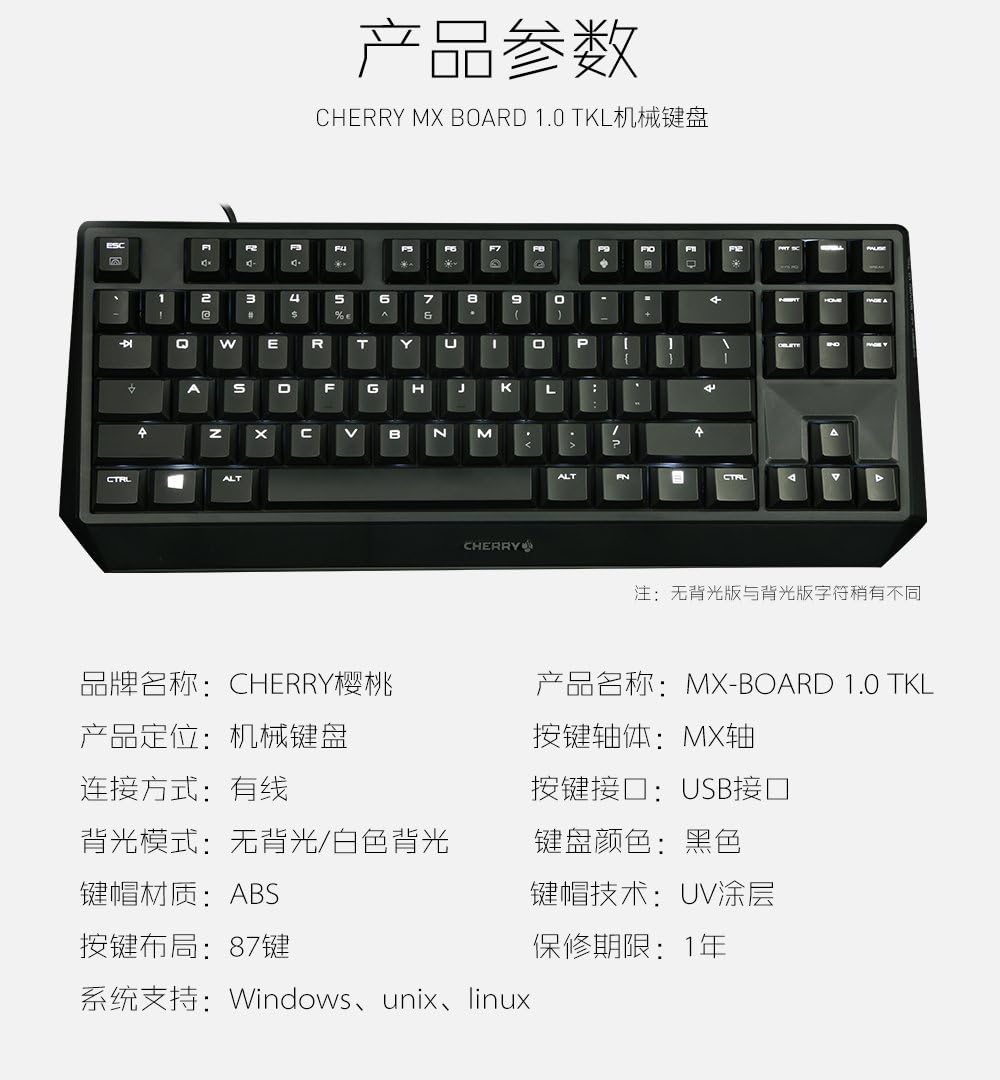
Figure 7: A detailed table outlining the technical specifications and parameters of the CHERRY MX Keyboard 1.0 TKL.
Garanti ak sipò
Enfòmasyon sou Garanti
The CHERRY MX Keyboard 1.0 TKL typically comes with a 1-ane garanti limite apati dat acha a. Garanti sa a kouvri domaj fabrikasyon anba itilizasyon nòmal. Tanpri konsève prèv acha ou pou reklamasyon garanti.
For specific warranty terms and conditions, please refer to the documentation included with your product or visit the official Cherry websit.
Sipò pou Kliyan
If you require technical assistance, have questions about your product, or need to initiate a warranty claim, please contact Cherry customer support. Contact information can usually be found on the official Cherry websit la oubyen sou anbalaj pwodwi a.
For more information, visit the official Cherry store: Cherry Store on Amazon.


