1. Enfòmasyon enpòtan sou sekirite
Please read all instructions carefully before using the NOVA NF-4021SR Multi Super Fan. Retain this manual for future reference.
- Toujou asire w ke vantilatè a mete sou yon sifas ki plat e ki estab pou anpeche li chavire.
- Do not insert fingers or any objects through the fan grilles when the fan is operating.
- Keep the fan away from water or other liquids. Do not use in wet environments.
- Debranche vantilatè a nan priz kouran an anvan ou netwaye li, deplase li, oswa fè nenpòt antretyen.
- Pa sèvi ak vantilatè a si fil elektrik la oswa ploge a domaje. Si fil elektrik la oswa ploge a domaje, kontakte pèsonèl sèvis ki kalifye.
- Aparèy sa a se pou itilizasyon andedan kay la sèlman. Pa sèvi ak deyò.
- Kenbe lwen timoun ak bèt kay.
- Do not cover the fan or obstruct its airflow during operation.
2. Pwodwi souview
The NOVA NF-4021SR Multi Super Fan is a versatile floor fan designed for indoor cooling. It features multiple fan units for enhanced airflow and comes with a remote control for convenient operation.
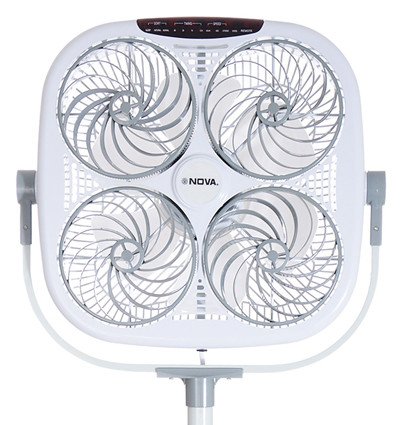
Figi 1: Devan view of the NOVA NF-4021SR Multi Super Fan. This image displays the square-shaped fan unit with four individual fan blades visible behind a protective grille. The NOVA brand logo is centered on the unit, and control buttons are located on the top edge. The fan is mounted on a stand.
Karakteristik kle:
- Multi-fan design for powerful and widespread airflow.
- Remote-controlled operation for convenience.
- Floor fan design suitable for various indoor spaces.
- Energy-efficient 5 Watt power consumption.
3. Pake kontni
Tanpri verifye pake a ak anpil atansyon pou asire w ke tout bagay yo la:
- 1 x NOVA NF-4021SR Multi Super Fan Unit
- 1 x Remote Control (pil pa enkli)
- 1 x Manyèl Itilizatè (dokiman sa a)
4. Enstriksyon Enstalasyon
Follow these steps to set up your NOVA NF-4021SR Multi Super Fan:
- Depake fanatik la: Retire tout konpozan yo nan anbalaj la avèk prekosyon. Kenbe materyèl anbalaj yo pou depo oswa transpò pita.
- Assemble the Stand (if required): If the fan unit and stand are separate, attach the fan unit securely to the stand according to the diagrams in the separate assembly guide (if provided). Ensure all screws are tightened.
- Pozisyon fanatik la: Place the fan on a firm, level surface in the desired location, ensuring there is adequate space around it for proper airflow. Avoid placing it near curtains or other objects that could obstruct the grilles.
- Mete pil yo nan telekòmand lan: Open the battery compartment on the remote control and insert the required batteries (e.g., 2 x AAA, not included), observing the correct polarity (+/-).
- Konekte ak pouvwa: Branche kòd kouran vantilatè a nan yon priz elektrik estanda.
5. Operasyon Enstriksyon
The NOVA NF-4021SR Multi Super Fan can be operated using the control panel on the unit or the included remote control.
5.1 Kontwòl Panel
The control panel is located on the top of the fan unit. It typically includes buttons for Power, Speed, Mode, and Timer.
- Bouton pouvwa: Peze pou limen oswa etenn vantilatè a.
- Bouton vitès: Press repeatedly to cycle through fan speeds (e.g., Low, Medium, High).
- bouton mòd: Press to select different operating modes (e.g., Normal, Natural, Sleep).
- Bouton revèy: Press to set an auto-off timer (e.g., 1 hour, 2 hours, up to X hours).
5.2 Kontwòl Remote
The remote control duplicates the functions of the control panel, allowing for convenient operation from a distance.
- Point the remote control towards the fan's receiver.
- Press the corresponding buttons for Power, Speed, Mode, and Timer as desired.
- Asire w ke pa gen okenn obstak ant remote la ak fanatik la.
6. Antretyen
Regular cleaning and maintenance will help ensure the longevity and optimal performance of your fan.
- Netwaye eksteryè a:
- Toujou debranche fanatik la anvan w netwaye.
- Siye sifas eksteryè yo ak yon mou, damp twal. Pa sèvi ak pwodui netwayaj abrazif oswa solvang.
- Asire w ke pa gen dlo ki antre nan konpozan entèn yo.
- Cleaning the Grilles and Blades:
- Dust can accumulate on the grilles and blades, reducing airflow.
- Use a vacuum cleaner with a brush attachment or a soft brush to remove dust from the grilles.
- If deeper cleaning is required, consult the manufacturer's instructions for grille removal (if applicable and safe to do so).
- Depo:
- When not in use for extended periods, unplug the fan and store it in a cool, dry place.
- Cover the fan to protect it from dust.
NAN. Depanaj
If you encounter issues with your NOVA NF-4021SR Multi Super Fan, refer to the table below for common problems and solutions.
| Pwoblèm | Kòz posib | Solisyon |
|---|---|---|
| Vantilatè a pa limen. | Pa gen ekipman pou pouvwa. Bouton pouvwa a pa peze. | Asire w ke kòd elektrik la byen konekte nan yon priz k ap travay. Press the Power button on the unit or remote. |
| Remote kontwòl pa travay. | Pil ki mouri. Obstriksyon ant kontwòl remote la ak vantilatè a. Telekòmand lan pa byen pwente. | Ranplase pil nan kontwòl remote la. Retire tout objè ki bloke chemen siyal la. Point the remote directly at the fan's receiver. |
| Flux lè fèb. | Vitès vantilatè a twò ba. Grilles are dusty or obstructed. | Ogmante vitès vantilatè a. Netwaye griy ak lam vantilatè yo jan sa dekri nan seksyon Antretyen an. |
| Bri dwòl pandan operasyon an. | Vantilatè a pa sou yon sifas ki plat. Pati ki lach oswa objè etranje. | Mete fanatik la sou yon sifas ki estab ak nivo. Unplug the fan and carefully inspect for any loose components or foreign objects. If the noise persists, discontinue use and contact customer support. |
8. Espesifikasyon
| Karakteristik | Detay |
|---|---|
| Mak | NOVA |
| Non modèl | NF-4021SR |
| Konsepsyon fanatik elektrik | Fan etaj |
| Sous pouvwa | Elektrik |
| Karakteristik espesyal | Kontwole Remote |
| Wattage | 5 Watts |
| Metòd kontwòl | Remote |
| Itilizasyon Andedan kay la / Deyò | Andedan kay la |
| Koulè | Gri blan |
| Pwa atik | 1 kg 500 g |
| Konpozan ki enkli | 1 PC NOVA Household appliance (Fan Unit) |
9. Garanti ak sipò
NOVA products are manufactured to high-quality standards. This product is covered by a warranty policy. For detailed information regarding warranty terms, conditions, and duration, please refer to the warranty card included with your purchase or visit the official NOVA websit.
For technical support, service, or inquiries, please contact NOVA customer service through the contact information provided on the product packaging or the official NOVA websit.