1. Pwodwi souview
The Albrecht DR 890 CD is a modern, versatile digital radio system designed to provide a comprehensive audio experience. It combines traditional analog and digital radio reception with advanced connectivity options, all housed in a high-quality wooden casing. This device supports a wide array of audio sources, including Internet Radio, DAB+, FM, CD, Bluetooth streaming, and USB playback.
Key features include a 2.8-inch TFT color display for clear information, an integrated alarm clock, and a sleep timer for convenience. With a powerful 2 x 15 W RMS output and an advanced equalizer, the DR 890 CD delivers rich, clear sound quality.
1.1. Inite Prensipal
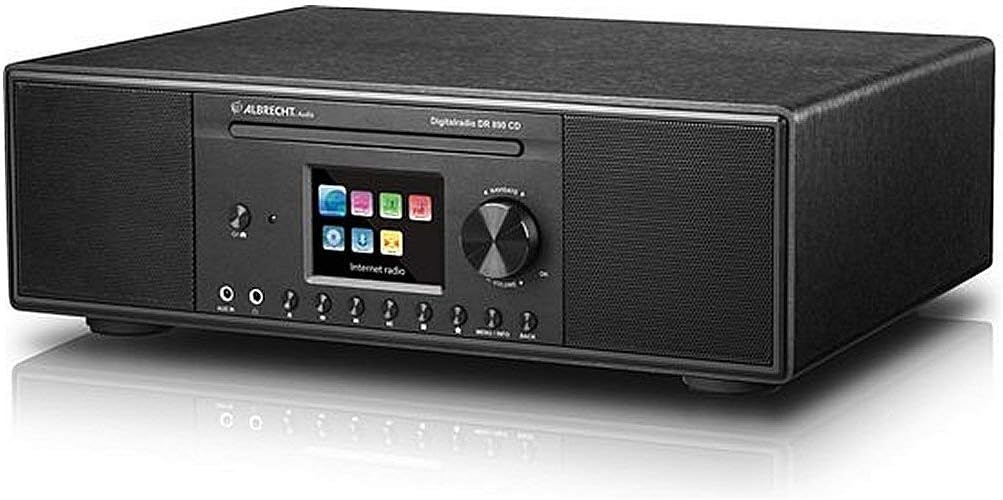
Figi 1.1: Devan view of the Albrecht DR 890 CD Digital Radio. The unit features a central color display, a CD slot above it, and various control buttons and a large rotary knob below the display. Speakers are located on both sides of the central panel.
The main unit of the Albrecht DR 890 CD is designed for intuitive interaction. It features a prominent 2.8-inch TFT color display that shows station information, track details, and menu options. A slot-loading CD player is integrated above the display. Below the display, you will find an array of control buttons for navigation, source selection, and playback, along with a large rotary knob for volume and menu selection. Stereo speakers are positioned on the left and right sides of the front panel, providing balanced audio output.
1.2. Koneksyon Panèl Dèyè
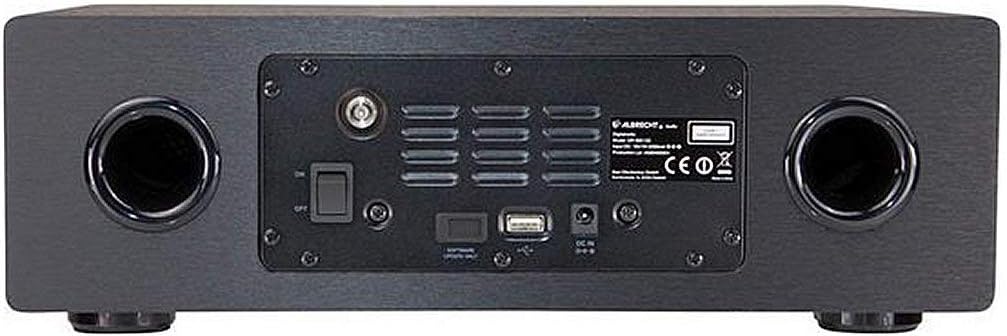
Figi 1.2: Dèyè view of the Albrecht DR 890 CD Digital Radio. This view shows the various input and output ports, including the antenna connection, USB port, and power input. Two bass reflex ports are visible on either side.
The rear panel of the DR 890 CD houses essential connections for power, antenna, and external devices. It includes a DC power input, a USB port for media playback, and an antenna connector for FM and DAB+ reception. Additionally, two bass reflex ports are present to enhance audio performance, contributing to the unit's full and clear sound.
1.3. Kontwòl Remote

Figure 1.3: The included remote control for the Albrecht DR 890 CD. It features buttons for power, menu navigation, volume, playback control, source selection, and numerical input for direct access.
The provided remote control offers convenient access to all functions of the DR 890 CD from a distance. It includes buttons for power, source selection, volume adjustment, menu navigation, playback control (play, pause, skip), equalizer settings, and direct numerical input for station selection or preset recall. The remote control requires batteries, which are included in the package.
2. Enstalasyon
This section guides you through the initial setup of your Albrecht DR 890 CD Digital Radio.
2.1. Debalaj ak Plasman
- Carefully remove the unit and all accessories from the packaging. Ensure all components listed in the package contents (DR 890 CD unit, remote control with batteries, power supply, wire antenna, user manual) are present.
- Place the unit on a stable, flat surface. Ensure adequate ventilation around the unit to prevent overheating.
- Avoid placing the unit near heat sources, direct sunlight, or in areas with high humidity or dust.
2.2. Konekte antèn la
- Connect the supplied wire antenna to the antenna input on the rear panel of the unit.
- Extend the antenna fully and position it for optimal reception of FM and DAB+ signals. You may need to adjust its position later to improve signal quality.
2.3. Koneksyon pouvwa
- Connect the power supply cable to the DC IN port on the rear of the unit.
- Branche adaptè kouran an nan yon priz miray ki apwopriye.
- The unit will power on or enter standby mode.
2.4. Inisyal Enstalasyon Sòsye
Upon first power-on, the unit will typically guide you through an initial setup wizard on the display. Follow the on-screen prompts to configure basic settings:
- Seleksyon Lang: Choose your preferred language for the menu and display.
- Network Setup (Wi-Fi):
- Chwazi rezo Wi-Fi ou a nan lis rezo ki disponib yo.
- Enter your Wi-Fi password using the on-screen keyboard and navigation buttons/rotary knob.
- Confirm the connection. A successful connection is required for Internet Radio and software updates.
- Lè ak Dat: The unit may automatically set the time and date via network connection or DAB+ signal. If not, you can set it manually.
- Eskane DAB+: The unit may initiate an automatic scan for DAB+ stations.
Once the setup wizard is complete, your DR 890 CD is ready for operation.
3. Operasyon
This section details how to operate your Albrecht DR 890 CD using the front panel controls, remote control, and the UNDOK smartphone application.
3.1. Kontwòl Panel Front
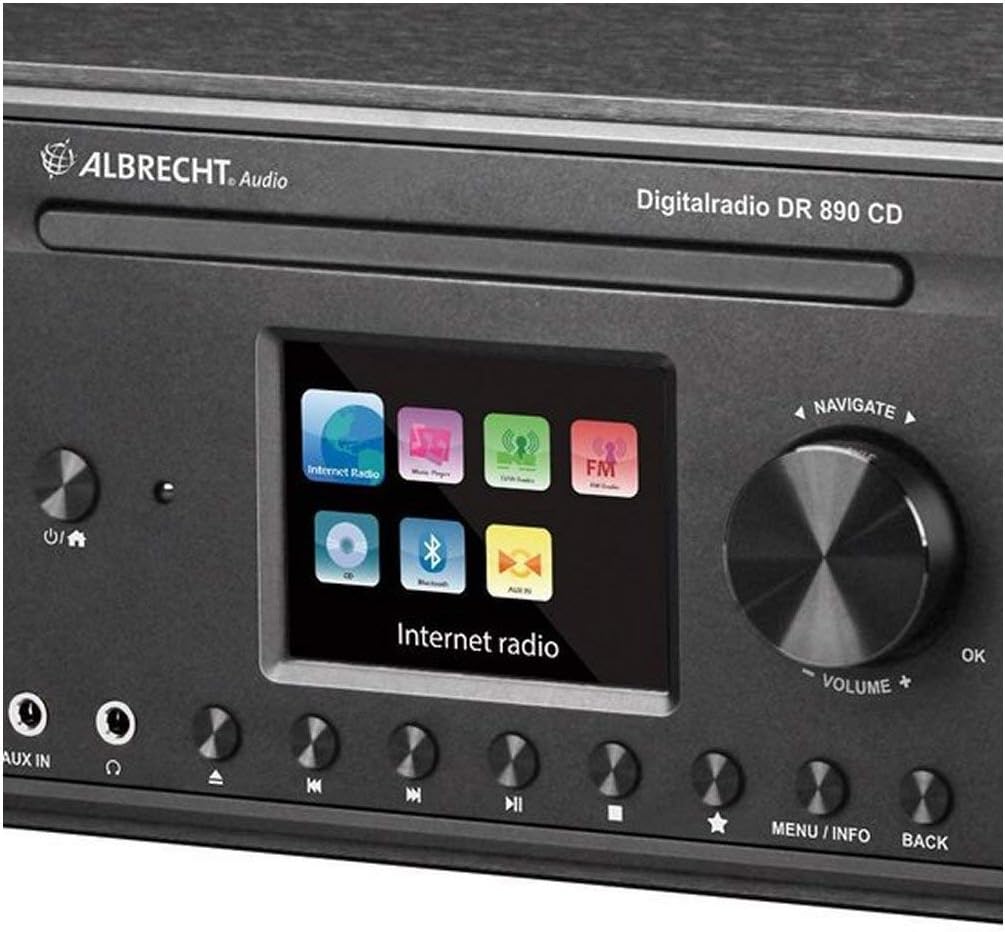
Figure 3.1: Close-up of the Albrecht DR 890 CD's front panel, highlighting the display, rotary knob, and various control buttons for navigation and source selection.
- Bouton pouvwa: Located on the left side, press to turn the unit on/off or enter standby.
- Sous bouton: Cycle through available audio sources (Internet Radio, DAB+, FM, CD, Bluetooth, AUX, USB).
- Rotary Knob (Volume/Navigate/OK):
- Rotate to adjust volume during playback.
- Rotate to navigate through menus and lists.
- Press to confirm a selection (OK).
- Bouton Navigasyon: Up, Down, Left, Right buttons around the rotary knob for menu navigation.
- Menu/Info Button: Access the main menu or display additional information about the current track/station.
- Bouton tounen: Return to the previous menu or screen.
- Bouton Prereglaj: Numbered buttons for quick access to stored favorite stations.
- AUX In (3.5mm jack): Konekte aparèy odyo ekstèn yo.
- Headphone Jack (3.5mm jack): Konekte kas ekoutè pou tande prive.
3.2. Remote Kontwòl Operasyon
The remote control provides full functionality and is often more convenient for navigating extensive menus or entering text.
- Bouton pouvwa: Vire inite a sou / sou.
- Bouton Sous: Dedicated buttons for different sources (e.g., Internet Radio, DAB, FM, CD, Bluetooth, AUX, USB).
- Volim +/-: Ajiste nivo volim.
- Bouton bèbè: Aktive/dezaktive odyo a.
- Navigation Pad (Arrows and OK): Navige nan meni yo epi konfime seleksyon yo.
- Meni/enfòmasyon: Access menus and display information.
- Retounen: Retounen nan ekran anvan an.
- EQ bouton: Access equalizer settings to adjust sound profiles.
- Klavye nimerik: For direct input of numbers or selecting presets.
- Kontwòl Lekti: Play/Pause, Stop, Skip Forward/Backward for CD, USB, and Bluetooth playback.
3.3. UNDOK App Control
The Albrecht DR 890 CD can be controlled using the UNDOK smartphone application, available for iOS and Android devices. This app provides an intuitive interface for managing your radio, including:
- Seleksyon sous: Easily switch between Internet Radio, DAB+, FM, Bluetooth, CD, and USB.
- Station Browsing: Browse and select stations from various services.
- Jesyon Prereglaj: Save and recall your favorite stations and podcasts.
- Kontwòl Volim: Adjust volume directly from your smartphone.
- Alarm and Sleep Timer: Set and manage alarm and sleep timer functions.
- Anviwònman egalize: Customize audio profiles.
To use the UNDOK app, ensure your smartphone and the DR 890 CD are connected to the same Wi-Fi network. Download the UNDOK app from your device's app store and follow the in-app instructions to connect to your radio.
3.4. Specific Operating Modes
3.4.1. Radyo Entènèt
- Ensure the unit is connected to a stable Wi-Fi network.
- Chwazi "Radyo Entènèt" kòm sous la.
- Browse estasyon yo pa kote, jan, oswa chèche estasyon espesifik.
- You can manage Internet Radio stations and podcasts more conveniently via the websit www.wifiradio-frontier.com (enskripsyon obligatwa).
3.4.2. DAB+ / FM Radio
- Select "DAB+" or "FM" as the source.
- For DAB+, perform a full scan to find all available digital stations.
- For FM, use the tuning function to manually or automatically scan for stations.
- Ajiste pozisyon antèn lan pou pi bon resepsyon.
3.4.3. Lektur CD
- Insert an audio CD into the slot-loading CD player. The unit will automatically switch to CD mode and begin playback.
- Use the playback controls (Play/Pause, Stop, Skip) on the unit or remote.
3.4.4. Bluetooth Streaming
- Select "Bluetooth" as the source. The unit will enter pairing mode.
- On your Bluetooth-enabled device (smartphone, tablet, laptop), search for "Albrecht DR 890 CD" in the Bluetooth settings and pair.
- Once connected, you can stream audio from your device to the DR 890 CD.
3.4.5. Lektur USB
- Insert a USB flash drive containing compatible audio files (MP3, AAC, AAC+, FLAC, WAV, WMA) into the USB port on the rear panel.
- Select "USB" as the source. The unit will read the files epi pèmèt ou browse epi jwe yo.
3.4.6. AUX Antre
- Connect an external audio device (e.g., MP3 player, smartphone) to the AUX IN jack on the front panel using a 3.5mm audio cable.
- Select "AUX" as the source. Audio from the connected device will be played through the DR 890 CD.
3.5. Alarm Clock and Sleep Timer
- Revèy Alam: Access the alarm settings through the main menu. You can set multiple alarms, choose the alarm source (buzzer, radio station), and set the alarm time and recurrence.
- Revèy dòmi: Access the sleep timer settings through the main menu. This feature allows the unit to automatically turn off after a set period (e.g., 15, 30, 60 minutes), ideal for falling asleep to music.
4. Antretyen
Proper care and maintenance will ensure the longevity and optimal performance of your Albrecht DR 890 CD.
4.1. Netwayaj
- Toujou deploge aparèy la nan priz kouran anvan w netwaye.
- Sèvi ak yon twal mou, sèk, ki pa gen pousyè pou siye sifas ekstèn yo.
- Pou mak ki difisil pou retire, yon ti kras dampen the cloth with water or a mild, non-abrasive cleaner. Do not use harsh chemicals, solvents, or abrasive cleaning agents, as they can damage the finish.
- Evite flite likid dirèkteman sou aparèy la.
- Keep the CD slot and USB port free of dust and debris. Do not insert any objects other than CDs or USB drives into these slots.
4.2. Swen Jeneral
- Do not block the ventilation openings on the unit, especially on the rear panel.
- Protect the unit from extreme temperatures, direct sunlight, and high humidity.
- Evite lage aparèy la oswa soumèt li a gwo enpak.
- Si w pa pral itilize aparèy la pou yon bon bout tan, debranche li nan priz kouran an.
NAN. Depanaj
This section provides solutions to common issues you might encounter with your Albrecht DR 890 CD. If the problem persists, please contact customer support.
| Pwoblèm | Kòz posib | Solisyon |
|---|---|---|
| Pa gen kouran / Aparèy la pa limen. | Power cable not connected; Power outlet not active; Unit in standby. |
|
| Pa gen son. | Volume too low; Mute activated; Incorrect source selected; Loose audio cables (AUX). |
|
| Poor DAB+/FM reception. | Weak signal; Antenna not properly positioned or connected. |
|
| Wi-Fi connection issues / Internet Radio not working. | Incorrect Wi-Fi password; Router issues; Unit too far from router; Software glitch. |
|
| CD player rattling or not reading discs. | Dirty or scratched CD; CD inserted incorrectly; Mechanical issue. |
|
| Unit unresponsive / Freezes. | Pwoblèm lojisyèl tanporè. |
|
5.1. Reset faktori
A factory reset can resolve many software-related issues by restoring the unit to its original settings. Avètisman: This will erase all your saved presets, network settings, and other personalized configurations.
- Navigate to the system settings menu on the unit's display.
- Look for an option like "System Reset," "Factory Reset," or "Restore Defaults."
- Confirm your selection. The unit will restart and go through the initial setup wizard again.
6. Espesifikasyon
Detailed technical specifications for the Albrecht DR 890 CD Digital Radio.
| Karakteristik | Detay |
|---|---|
| Non modèl | DR 890 CD (27389.01) |
| Mak | Albrecht |
| Koulè | Nwa |
| Sortie pouvwa | 2 x 15 W RMS |
| Koneksyon Teknoloji | Bluetooth, Wi-Fi, USB |
| Fòma odyo sipòte | MP3, AAC, AAC+, FLAC, WAV, WMA |
| Karakteristik espesyal | Hybrid radio with CD player, Internet/DAB+/FM/Bluetooth/CD/USB, Excellent sound via 2 x 15 W speakers |
| Dimansyon (L x W x H) | 35 x 25 x 10.5 cm (approximate, derived from product description) |
| Pwa | 3.5 kg (approximate, derived from product description) |
| Ekspozisyon | 2.8" TFT Color Display |
| Konpozan ki enkli | Remote control (with batteries), power supply, wire antenna |
| Kantite Chanèl | 2 |
| Jack kas ekoutè | 3.5 mm |
| AUX Antre | 3.5 mm |
7. Garanti ak sipò
For warranty information, technical support, or service inquiries regarding your Albrecht DR 890 CD, please refer to the warranty card included with your product or visit the official Albrecht website. Contact details for customer service are typically provided in the product packaging or on the manufacturer's support pages.
Always ensure you have your product model number (DR 890 CD or 27389.01) and purchase details ready when contacting support.


