1. Enstalasyon
1.1 Enstalasyon batri
The Insignia NS-RC03A-13 remote control requires two AAA batteries for operation. Follow these steps to install them:
- Jwenn kouvèti lòj batri a sou do kontwòl remote la.
- Glise kouvèti a anba oubyen peze latch la pou ouvri li.
- Mete de pil AAA ladan l, asire w ke tèminal pozitif (+) ak negatif (-) yo byen aliyen ak mak ki anndan konpatiman an.
- Glise kouvèti konpatiman batri a tounen nan plas li jiskaske li fè yon klik byen fèm.
Imaj: Dèyè view of the Insignia NS-RC03A-13 remote control, showing the battery compartment open with two AAA batteries inserted. The remote is black with gray buttons.
2. Operasyon Enstriksyon
This section details the primary functions and usage of your Insignia NS-RC03A-13 remote control.
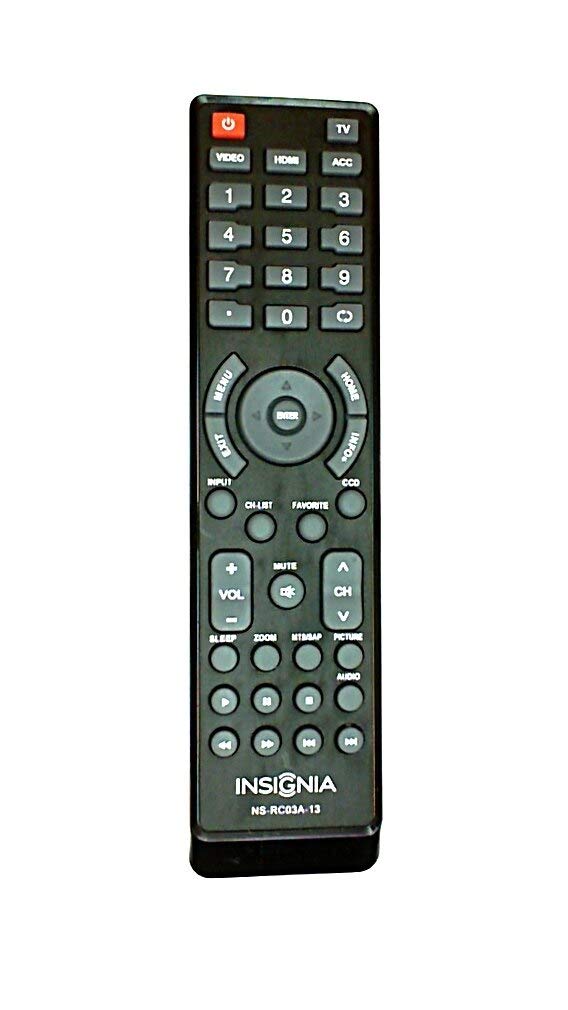
Imaj: Devan view of the Insignia NS-RC03A-13 remote control, displaying all buttons and their labels. The remote is black with gray buttons and white text.
2.1 Power On/Off
Peze a POUVWA button (usually located at the top left) to turn your television on or off.
2.2 Seleksyon Antre
To switch between different video sources (e.g., HDMI 1, HDMI 2, Video), press the Antre button. Continue pressing to cycle through available inputs until your desired source is selected.
2.3 Channel and Volume Control
- Volim: Sèvi ak la VOL+ epi VOLIM - buttons to increase or decrease the audio volume.
- Bèbè: Peze a BÈN button to instantly silence the television audio. Press it again to restore sound.
- Chanèl: Sèvi ak la CH + epi CH - buttons to navigate through television channels.
- Nimewo Pad: Directly enter channel numbers using the numeric keypad (0-9).
2.4 Navigasyon meni
Use the directional arrow buttons (Up, Down, Left, Right) around the ANTRE button to navigate through on-screen menus. Press ANTRE to confirm a selection. The MENI button typically opens the main menu, and Sòti fèmen li.
3. Antretyen
Bon swen asire lonjevite ak pèfòmans optimal kontwòl remote ou a.
- Netwayaj: Wipe the remote control with a soft, dry cloth. Avoid using liquid cleaners, abrasive materials, or chemical solvents, as these can damage the surface or internal components.
- Ranplasman batri: Ranplase pil yo lè repons remote la diminye. Toujou ranplase tou de pil yo an menm tan ak nouvo pil ki gen menm kalite (AAA).
- Depo: Sere telekòmand lan nan yon kote ki sèk, lwen limyè solèy dirèk, tanperati ekstrèm, ak imidite ki wo.
- Evite gout: Pwoteje telekòmand lan kont enpak fizik, paske si li tonbe, li ka domaje sikui entèn yo.
NAN. Depanaj
Si ou rankontre pwoblèm ak kontwòl remote ou a, eseye solisyon sa yo:
- Remote pa reponn:
- Tcheke si pil yo mete kòrèkteman ak polarite apwopriye a.
- Ranplase pil fin vye yo ak pil AAA nèf.
- Ensure there are no obstructions between the remote control and the TV's infrared (IR) receiver.
- Dirije telekòmand lan dirèkteman nan direksyon reseptè IR televizyon an.
- Bouton espesifik ki pa fonksyone:
- Clean around the unresponsive buttons with a soft, slightly damp cloth to remove any debris or stickiness.
- If cleaning does not resolve the issue, the button mechanism may be faulty, and the remote might require replacement.
- TV not responding to input changes:
- Ensure the remote is correctly paired or compatible with your Insignia TV model.
- Eseye peze la Antre button multiple times to cycle through all available sources.
5. Espesifikasyon
| Nimewo Modèl | NS-RC03A-13 |
| Mak | Insignia |
| Aparèy konpatib | Televizyon |
| Max Kantite Aparèy Sipòte | 1 |
| Batri obligatwa | 2 pil AAA |
| Koulè | Nwa |
| Karakteristik espesyal | Ergonomik |
| Pwa atik | 2.39 ons |
| Dimansyon pake | 7 x 2 x 1 pous |
6. Garanti ak sipò
For detailed warranty information, product registration, or technical support, please visit the official Insignia websit la oubyen kontakte depatman sèvis kliyan yo. Kenbe resi acha w la kòm prèv acha pou nenpòt reklamasyon garanti.
Sipò sou entènèt: www.insigniaproducts.com
Remak: Kondisyon garanti espesifik yo ka varye selon rejyon an ak détayan an.


