1. Entwodiksyon ak souview
The DS18 GEN-X1200.2D is a Class AB 2-channel high-power amplifier designed for car audio systems. It delivers 1200 watts peak output and 2 x 180 watts RMS at 2 Ohms. This amplifier series is stable at both 2 and 4 ohms, offering versatility for various speaker configurations. It incorporates advanced features to optimize sound performance and user control.
Karakteristik kle yo enkli:
- Class A/B Technology for efficient power delivery.
- Fully adjustable 12dB/Octave crossover with differential circuitry.
- Subsonic filter to protect subwoofers.
- Fully adjustable bass equalizer for precise sound tuning.
- Mute and delay soft start technology to prevent turn-on thumps.
- Phase control switch for optimal sound staging.
- Remote dashboard subwoofer control for convenient bass adjustment.
- Full IC-controlled protection circuitry for reliability.
- Professional peak limiter circuitry for distortion-free audio.

Figi 1: Devan view of the DS18 GEN-X1200.2 Amplifier with included bass remote.
2. Enfòmasyon sou Sekirite
Tanpri li tout enstriksyon yo ak anpil atansyon anvan ou enstale epi itilize ou amplifizè. Si ou pa swiv direktiv sa yo, ou ka domaje li. amplifier, speakers, or vehicle, and may void your warranty.
- Toujou dekonekte tèminal negatif batri machin nan anvan ou kòmanse nenpòt enstalasyon.
- Asire bon baz nan la amplifter pou chasi machin nan.
- Sèvi ak fil elektrik ak fil tè ki gen kalib ki apwopriye jan sa espesifye nan seksyon enstalasyon an.
- Evite monte a amplaviyan nan zòn ki ekspoze a chalè twòp, imidite oswa limyè solèy dirèk.
- Pwoteje tout fil elektrik yo kont kwen byen file ak pati k ap deplase.
- Pa eseye louvri oswa modifye la ampKonfere tout antretyen bay pèsonèl kalifye.
- Always use fuses of the specified rating.
3. Ki sa ki nan bwat la
Lè w ap ouvri pake a, verifye si tout bagay yo la:
- DS18 GEN-X1200.2 Amplifier
- Kontwòl Remote Bass
- Manyèl Pwopriyetè a (dokiman sa a)
- Montaj Vis

Figure 2: Packaging of the DS18 GEN-X1200.2 Amplifier.
4. Espesifikasyon
| Spesifikasyon | Valè |
|---|---|
| RMS Power @ 14.4VDC (4 Ohm) | 120W x 2 |
| RMS Power @ 14.4VDC (2 Ohm) | 180W x 2 |
| Bridge Power @ 14.4VDC (4 Ohm) | 300W x 1 |
| THD Distorsion | 0.08% |
| Filtè pasan ki ba (LPF) | 50Hz - 500Hz |
| High Pass Filter (HPF) | 50Hz - 500Hz |
| Repons Frekans | 20Hz - 20KHz |
| Fuse Rating | 25A x 2 |
| Kantite Chanèl | 2 |
| Voltage | 14.4V |
| Dimansyon (L x W x H) | 400 x 190 x 60 mm (15.74 x 7.5 x 2 pous) |
| Pwa atik | 8 liv |
5. Enstalasyon ak Enstalasyon
Bon enstalasyon enpòtan anpil pou yon pèfòmans ak yon sekirite optimal. Si ou pa sèten sou nenpòt etap, konsilte yon enstalatè odyo machin pwofesyonèl.
5.1 Monte a Amplifier
Choose a secure, dry location with adequate ventilation. Avoid mounting on carpet or directly to metal surfaces without insulation. Ensure the amplifier is easily accessible for wiring and adjustments.
5.2 Koneksyon fil elektrik
Refer to the diagram below for proper wiring connections. Use high-quality cables of appropriate gauge.

Figure 3: Rear panel showing power, ground, remote, fuse, and speaker output connections.
- Koneksyon kouran (B+): Connect a heavy-gauge power cable (e.g., 4 AWG) directly from the positive terminal of the vehicle's battery to the B+ terminal on the amplifier. Install an in-line fuse holder within 18 inches of the battery.
- Koneksyon tè (GND): Connect a heavy-gauge ground cable (same gauge as power) from the GND terminal on the amplifier to a clean, unpainted metal surface on the vehicle chassis. Ensure a solid, low-resistance connection.
- Aktivite a Distans (REM): Connect a remote turn-on wire (e.g., 18 AWG) from your head unit's remote output to the REM terminal on the amplifè. Sa a vire la amplimen epi etenn lifan an ak inite prensipal ou a.
- RCA Input Connection: Connect RCA cables from your head unit's pre-amp outputs to the CH1 and CH2 RCA input jacks on the amplifier.
- Koneksyon Sòti Oratè: Connect your speakers to the SPEAKER output terminals. Ensure correct polarity (+ to + and - to -). For bridged mode, connect to the designated bridged terminals.
5.3 Anviwònman Inisyal
Anvan ou limen l, mete amplifier's controls to their initial positions:
- PRAN: Set to minimum (fully counter-clockwise).
- X-KONTINYE: Set to FULL for initial setup, or LPF/HPF as needed for your speaker type.
- FREKANS: Set to the middle of the range.
- BASS BOOST: Set to 0dB.
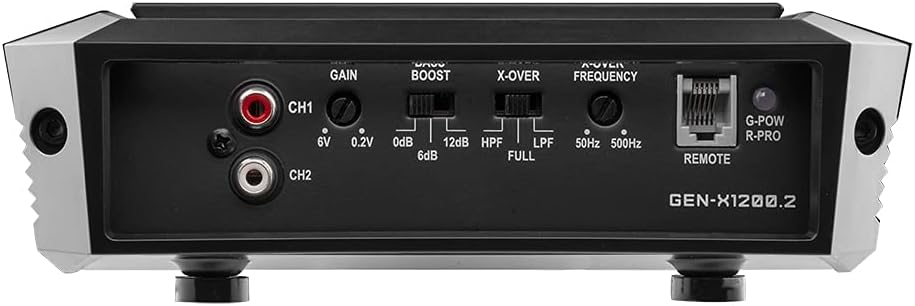
Figure 4: Front panel showing gain, bass boost, crossover, and frequency controls.
6. Operasyon Enstriksyon
Yon fwa enstale, swiv etap sa yo pou opere ou amplifier and fine-tune your audio system:
- Pouvwa sou: Turn on your vehicle and head unit. The amplifier's power indicator LED should illuminate.
- Akeri Ajisteman: Play a familiar piece of music at a moderate volume on your head unit (around 75% of max volume). Slowly increase the amplifier's GAIN control until you hear slight distortion, then back it off slightly. This matches the amplifier's input sensitivity to your head unit's output.
- Ajisteman kwazman: Adjust the X-OVER switch and FREQUENCY knob according to your speaker type. For full-range speakers, use FULL. For subwoofers, use LPF (Low Pass Filter) and set the frequency to cut off high notes. For component speakers, use HPF (High Pass Filter) and set the frequency to cut off low notes.
- Ajisteman pou ranfòse bas: Use the BASS BOOST control sparingly. Excessive bass boost can cause distortion and damage speakers. Adjust to enhance bass response as desired, ensuring clarity.
- Remote Bass Knob: Connect the included bass remote to the 'REMOTE' port on the amplifier. This allows convenient adjustment of the subwoofer level from the driver's seat.

Figure 5: Included bass remote control for convenient adjustment.
6.1 Videyo pwodwi Plis paseview
Gade videyo sa a pou yon vizyon anplisview of the DS18 GEN-X1200.2D amplifier ak karakteristik li yo.
Videyo 1: Finiview of the DS18 GEN-X1200.2D 2-Channel Amplifier, highlighting its design and features.
NAN. Depanaj
Si ou rankontre pwoblèm ak ou amplifier, gade pwoblèm ak solisyon komen sa yo:
| Pwoblèm | Kòz posib | Solisyon |
|---|---|---|
| Pa gen kouran / Amplifier pa limen | Fuzib boule, koneksyon kouran/tè a pa bon, pa gen siyal a distans. | Check in-line fuse and amplifier fuses. Verify power and ground connections are secure. Check remote wire for 12V signal. |
| Pa gen Sòti Son | RCA cables disconnected, speaker wires disconnected/shorted, amplifier nan mòd pwoteksyon. | Check RCA and speaker connections. Ensure speaker wires are not touching each other or chassis. If protect light is on, refer to ampseksyon pwoteksyon lifikatè. |
| Son defòme | Gain set too high, improper crossover settings, poor quality audio source. | Reduce gain setting. Adjust crossover frequencies. Test with a different audio source. |
| Amplifier Surchof | Inadequate ventilation, improper impedance load, prolonged high-volume use. | Asire bon jan koule lè toutotou a amplifier. Verifye enpedans oratè a koresponn amplifier's capabilities. Reduce listening volume. |
8. Antretyen
To ensure the longevity and performance of your DS18 GEN-X1200.2 amplifier, swiv gid antretyen senp sa yo:
- Kenbe pwòp: Regilyèman siye a ampNetwaye deyò aparèy la avèk yon twal mou epi sèk pou retire pousyè ak debri. Evite itilize pwodui chimik ki agresif oswa pwodui netwayaj abrazif.
- Tcheke Koneksyon yo: Periodically inspect all power, ground, remote, RCA, and speaker connections to ensure they are secure and free from corrosion. Loose connections can lead to poor performance or damage.
- Vantilasyon: Asire w ke amplifier's cooling fins are not obstructed. Proper airflow is essential to prevent overheating.
- Fuse Inspection: Si la amplifier stops working, check the fuses. Replace blown fuses only with fuses of the exact same type and rating.
9. Garanti ak sipò
Pwodwi DS18 yo fèt epi fabrike selon pi wo estanda kalite yo. Pou kondisyon garanti espesifik yo, tanpri al gade kat garanti ki vini ak pwodwi w la oswa vizite sit ofisyèl DS18 la. websit la. Kenbe resi acha ou kòm prèv acha pou reklamasyon garanti.
For technical support, troubleshooting assistance, or service inquiries, please contact DS18 customer support through their official website or authorized service centers. Provide your product model number (GEN-X1200.2) and a detailed description of the issue when seeking support.
Official DS18 Websit: ds18.com


