1. Pwodwi souview
The Yaskawa V1000 is a compact, high-performance AC microdrive designed for a wide range of industrial applications. It offers precise motor control, energy efficiency, and ease of use. This manual provides essential information for the safe and effective operation of your V1000 AC Drive.
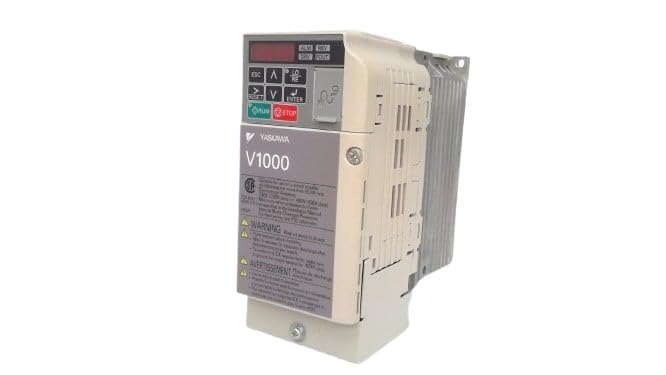
Figi 1: Devan view of the Yaskawa V1000 AC Drive (Model CIMR-VU2A0006FAA). This image shows the drive's compact design, control panel with display and buttons, and ventilation fins on the side.
2. Enfòmasyon sou Sekirite
AVÈTISMAN: Risk pou chòk elektrik. Asire w ke kouran an dekonekte anvan enstalasyon oswa antretyen.
Read this manual thoroughly before installing, operating, or performing maintenance on the V1000 AC Drive. Failure to follow these instructions may result in serious injury or equipment damage.
2.1 Prekosyon Sekirite Jeneral
- Se sèlman pèsonèl kalifye ki dwe enstale, opere, epi kenbe ekipman sa a an bon eta.
- Do not operate the drive with damaged cables or if the enclosure is open.
- Asire bon koneksyon atè a dapre kòd elektrik lokal yo.
- Verify opinyon voltage matches the drive's specifications.
- Do not touch internal components immediately after power-off, as residual voltage may be present. Wait for the charge lamp to extinguish.
2.2 Konsiderasyon Anviwònman
- Install the drive in a clean, dry, and well-ventilated area.
- Avoid direct sunlight, excessive dust, corrosive gases, and vibrations.
- Tanperati fonksyònman: 0°C a 50°C (32°F a 122°F).
3. Enstalasyon
Proper installation and wiring are crucial for the safe and reliable operation of the V1000 AC Drive.
3.1 Montaj
Mount the drive vertically on a flat, stable surface. Ensure adequate clearance for ventilation around the drive (minimum 50mm above and below, 25mm on sides).
3.2 fil elektrik
Refer to the wiring diagram provided in the full product manual for detailed connections. Key connections include:
- Power Input (R/L1, S/L2, T/L3): Connect the 3-phase 200-240V AC power supply.
- Sòti Motè (U, V, W): Konekte ak tèminal motè yo.
- Tè (PE): Connect to a reliable earth ground.
- Tèminal kontwòl: For external control signals (e.g., run/stop, speed reference, fault output).
Always use appropriate wire gauges and circuit protection devices as specified in local electrical codes and the drive's technical specifications.
4. Operating the V1000 AC Drive
The V1000 drive can be operated via its integrated control panel or external control signals.
4.1 Kontwòl Panel Overview
The control panel features a digital display and several buttons:
- ESC: Escape/Back button.
- Flèch ANWO/ANBA: Navigate menus, adjust parameters.
- LEFT/RIGHT Arrows: Shift cursor, change digits.
- ANTRE: Confirm selection, enter parameter edit mode.
- KOURI: Start motor operation.
- SISPANN: Stop motor operation.
4.2 Etap Operasyon Debaz yo
- Pouvwa sou: Apply power to the drive. The display will illuminate.
- Enstalasyon paramèt: Configure essential parameters such as motor data (voltage, current, frequency), acceleration/deceleration times, and control mode (V/f, vector control). Refer to the parameter list in the detailed manual.
- Start Command: Peze a KOURI button on the control panel or activate the external run command.
- Ajisteman vitès: Adjust the motor speed using the UP/DOWN arrows (if in local control mode) or via external speed reference.
- Stop Command: Peze a SISPANN button or deactivate the external stop command.
5. Antretyen
Regular maintenance ensures the longevity and optimal performance of your V1000 AC Drive.
5.1 Verifikasyon woutin
- Chak jou: Check for unusual noises, vibrations, or odors. Verify display for error codes.
- Chak mwa: Inspect cooling fans for proper operation and cleanliness. Clean dust from ventilation openings.
- Chak ane: Check terminal connections for tightness. Inspect wiring for signs of wear or damage. Measure input/output voltages ak kouran.
5.2 Netwayaj
Use a soft, dry cloth to clean the exterior of the drive. For internal cleaning (only by qualified personnel with power disconnected), use compressed air to remove dust from heat sinks and circuit boards.
Always disconnect power and wait for the charge lamp to extinguish before performing any maintenance.
NAN. Depanaj
This section provides common issues and their potential solutions. For complex problems, consult a qualified technician or Yaskawa support.
| Pwoblèm | Kòz posib | Solisyon |
|---|---|---|
| Drive does not power on. | No input power; Blown fuse. | Check power supply; Replace fuse (after identifying cause). |
| Motè pa mache. | No run command; Incorrect wiring; Motor fault. | Verify run command; Check motor and drive wiring; Inspect motor. |
| Defo surkouran (OC). | Motor overload; Short circuit; Rapid acceleration. | Reduce load; Check motor/cables for shorts; Increase acceleration time. |
| Overvoltagfòt e (OV). | Segondè opinyon voltage; Rapid deceleration. | Tcheke opinyon voltage; Increase deceleration time; Install braking resistor if needed. |
7. Espesifikasyon
Key technical specifications for the Yaskawa V1000 AC Drive (CIMR-VU2A0006FAA):
- Modèl: CIMR-VU2A0006FAA
- Seri: V1000 AC Drive
- Antre Voltage: 200-240V AC, 3-Phase
- Sòti Voltage: 240V AC
- Kouran pwodiksyon nominal: 6.0A (Heavy Duty) / 5.0A (Normal Duty)
- Pouvwa motè nominal: 1 HP (0.75 kW)
- Manifakti: YASKAWA ELECTRIC
- Dat premye disponib: 14 fevriye 2025
8. Garanti ak sipò
For detailed warranty information, please refer to the official Yaskawa warranty statement or contact your authorized Yaskawa distributor.
For technical support, service, or to obtain a full copy of the V1000 technical manual, please visit the official Yaskawa websit oswa kontakte depatman sèvis kliyan yo.
Yaskawa Electric Corporation
Websit: www.yaskawa.com


