Entwodiksyon
This manual provides comprehensive instructions for the safe and effective use of your Winplus AC55925-80 3-in-1 Emergency Socket Power Bank. This device combines a compact power bank, a USB car charger, and an emergency glass-breaking tool. Please read this manual thoroughly before operation and retain it for future reference.
Pwodwi souview
The Winplus 3-in-1 Emergency Socket Power Bank is designed for convenience and safety, offering multiple functionalities in a compact form factor.

Figure 1: Winplus 3-in-1 Emergency Socket Power Bank with key features highlighted.
Eleman:
- Compact Power Bank: Provides portable power for charging devices.
- USB Charger Machin: Plugs into a 12V car socket to charge devices and the power bank.
- Emergency Glass-Breaking Tool: Integrated for emergency situations.
- Pò Sòti USB: For connecting charging cables to devices.
- Pò Antre Mikwo USB: For charging the internal power bank.
- Endikatè ki ap dirije: Montre estati chaje.

Figi 2: Detaye view of the device's ports.
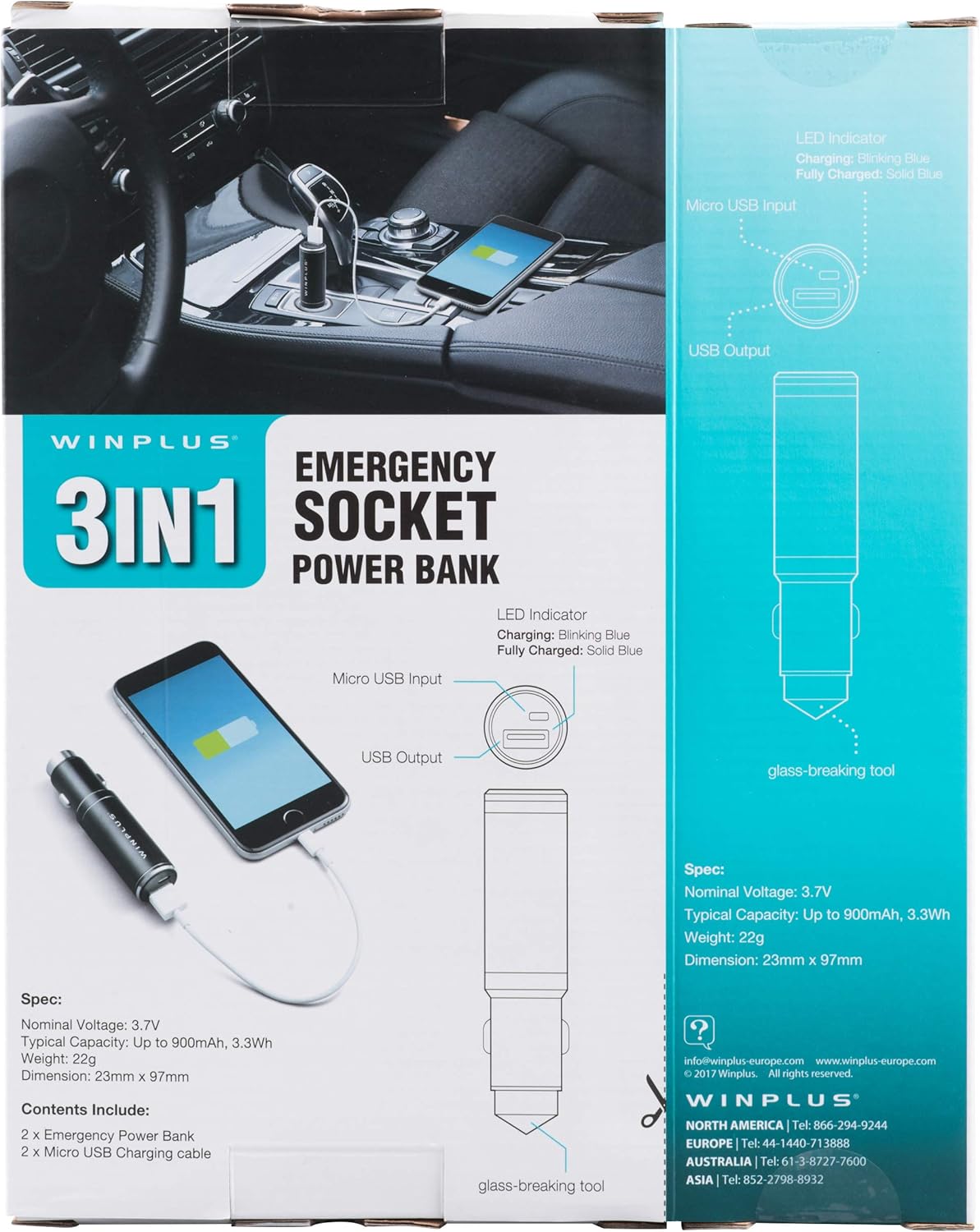
Figure 3: LED indicator status and glass-breaking tool location.
Enstalasyon
Premye Chajman Bank Pouvwa a:
- Locate the Micro USB Input port on the device.
- Connect the provided Micro USB charging cable to the Micro USB Input port.
- Connect the other end of the USB cable to a standard USB power source (e.g., a computer USB port, a wall adapter, or the car's 12V socket when used as a car charger).
- The LED indicator will blink blue during charging.
- Once fully charged, the LED indicator will turn solid blue.
Remak: Li rekòmande pou chaje bank pouvwa a nèt anvan premye itilizasyon li.
Enstriksyon Operasyon
Sèvi ak kòm yon bank pouvwa pòtab:
- Ensure the power bank is charged (solid blue LED indicator).
- Connect your device's charging cable to the USB Output port on the power bank.
- Connect the other end of the cable to your mobile device (smartphone, tablet, etc.).
- Bank pouvwa a ap kòmanse chaje aparèy ou an otomatikman.
Using as a USB Car Charger:
- Insert the Winplus 3-in-1 device into your vehicle's 12V accessory socket (cigarette lighter socket).
- Connect your device's charging cable to the USB Output port on the Winplus device.
- Konekte fen nan lòt nan kab la nan aparèy mobil ou.
- Your device will begin charging. The internal power bank will also charge simultaneously if it is not full.
Using the Emergency Glass-Breaking Tool:
The emergency glass-breaking tool is located at the tip of the device, opposite the USB ports. This tool is intended for emergency use only to break vehicle side windows in situations where occupants are trapped.
- In an emergency, firmly press the tip of the tool against a corner of a side window.
- Apply steady pressure until the spring-loaded mechanism activates and shatters the glass.
- Once the glass is broken, carefully clear any remaining shards before exiting the vehicle.
AVÈTISMAN: Use this tool only in genuine emergencies. Misuse can cause serious injury. Keep out of reach of children.
Antretyen
- Kenbe aparèy la sèk. Imidite ka domaje sikui entèn yo.
- Pa ekspoze a tanperati ekstrèm (cho oswa frèt).
- Netwaye aparèy la avèk yon twal mou epi sèk. Pa sèvi ak pwodui chimik ki agresif oswa pwodui netwayaj abrazif.
- Sere nan yon kote ki fre, sèk lè yo pa itilize.
- Evite jete oswa sibi aparèy la nan gwo enpak.
Depanaj
| Pwoblèm | Kòz posib | Solisyon |
|---|---|---|
| Aparèy pa chaje. | Batri a fini. Kab la gen pwoblèm. USB port is dirty or damaged. | Rechaje bank pouvwa a. Eseye yon lòt kab chaje. Clean the USB ports carefully or try another port. |
| Endikatè LED la pa limen. | Device is not connected to a power source. Device is fully charged (if solid blue). Aparèy la defo. | Ensure proper connection to a power source. Check if it's already solid blue. Kontakte sipò kliyan si pwoblèm pèsiste. |
| Chaje dousman. | Cable is not suitable. Power source is low current. Device being charged has high power requirements. | Use a high-quality charging cable. Connect to a higher current USB adapter. This device provides 2.1A output, which is standard for fast charging most phones. |
Espesifikasyon
- Modèl: AC55925-80
- Nominal Voltage: 3.6V
- Kapasite tipik: Up to 2500 mAh, 9 Wh
- Konpozisyon selil batri: Lityòm Polymère
- Sòti USB: 5V / 2.1A
- Mikwo USB Antre: 5V / 0.5A
- Dimansyon: 23mm x 127mm (approximate)
- Pwa atik: 510 g (for the 2-pack)
- Kalite konektè: Micro USB (Input), USB Type-A (Output)
Enfòmasyon sou Sekirite
- Pa demonte, ouvri, oswa chire pake batri a.
- Pa ekspoze pake batri a nan chalè oswa nan dife. Evite depo nan limyè solèy la dirèk.
- Pa kout-sikwi yon pake batri. Pa sere pake batri azar nan yon bwat oswa tiwa kote yo ka kout sikwi youn ak lòt oswa yo ka kout sikwi lòt objè metal.
- Pa soumèt pake batri a chòk mekanik.
- Si yon pil ta koule, pa kite likid la antre an kontak ak po a oswa je yo. Si gen kontak, lave zòn ki afekte a ak anpil dlo epi chèche konsèy medikal.
- Pa sèvi ak nenpòt chajè lòt pase sa ki espesyalman bay pou itilize ak ekipman an.
- Kenbe batri yo pa rive jwenn timoun yo.
- Chèche konsèy medikal imedyatman si yon pake batri yo te vale.
- Toujou achte pake batri ki kòrèk la pou ekipman an.
- Kenbe pake batri yo pwòp epi sèk.
- Pa kite yon batri sou chaj pwolonje lè li pa itilize.
- Dispose of battery packs properly according to local regulations.
Garanti ak sipò
For warranty information or technical support, please contact Winplus North America Inc. directly.
- Manifakti: Winplus North America Inc
- Enfòmasyon pou kontakte: Refer to product packaging or the official Winplus websit la pou jwenn detay sipò ki pi resan yo.
You can also visit the Winplus website for FAQs and additional product information: www.winplus-europe.com


