Entwodiksyon
Mèsi pou acha aasing the Trevi RR 501 BT Portable Bluetooth, USB, SD, MP3 Stereo Boombox. This manual provides essential information for the safe and efficient use of your new device. Please read these instructions carefully before operating the unit and retain them for future reference.
Enfòmasyon sou Sekirite
- Pa ekspoze aparèy sa a lapli oswa imidite.
- Pa bloke okenn ouvèti vantilasyon.
- Asire w ke yo pa kwense kòd elektrik la oswa mache sou li.
- Itilize sèlman atachman/akseswa manifakti a espesifye.
- Dekonekte aparèy la pandan tanpèt zèklè oswa lè ou pa itilize li pou yon bon bout tan.
- Refere tout sèvis yo bay pèsonèl sèvis kalifye.
- Pa louvri aparèy la casing; pa gen okenn pyès itilizatè a ka repare anndan an.
Kontni pake
Tanpri verifye si atik sa yo enkli nan pakè ou a:
- Trevi RR 501 BT Boombox Unit
- AC pouvwa kab
- Manyèl Itilizatè (dokiman sa a)
Pwodwi souview
Familiarize yourself with the main components of your Trevi RR 501 BT Boombox.
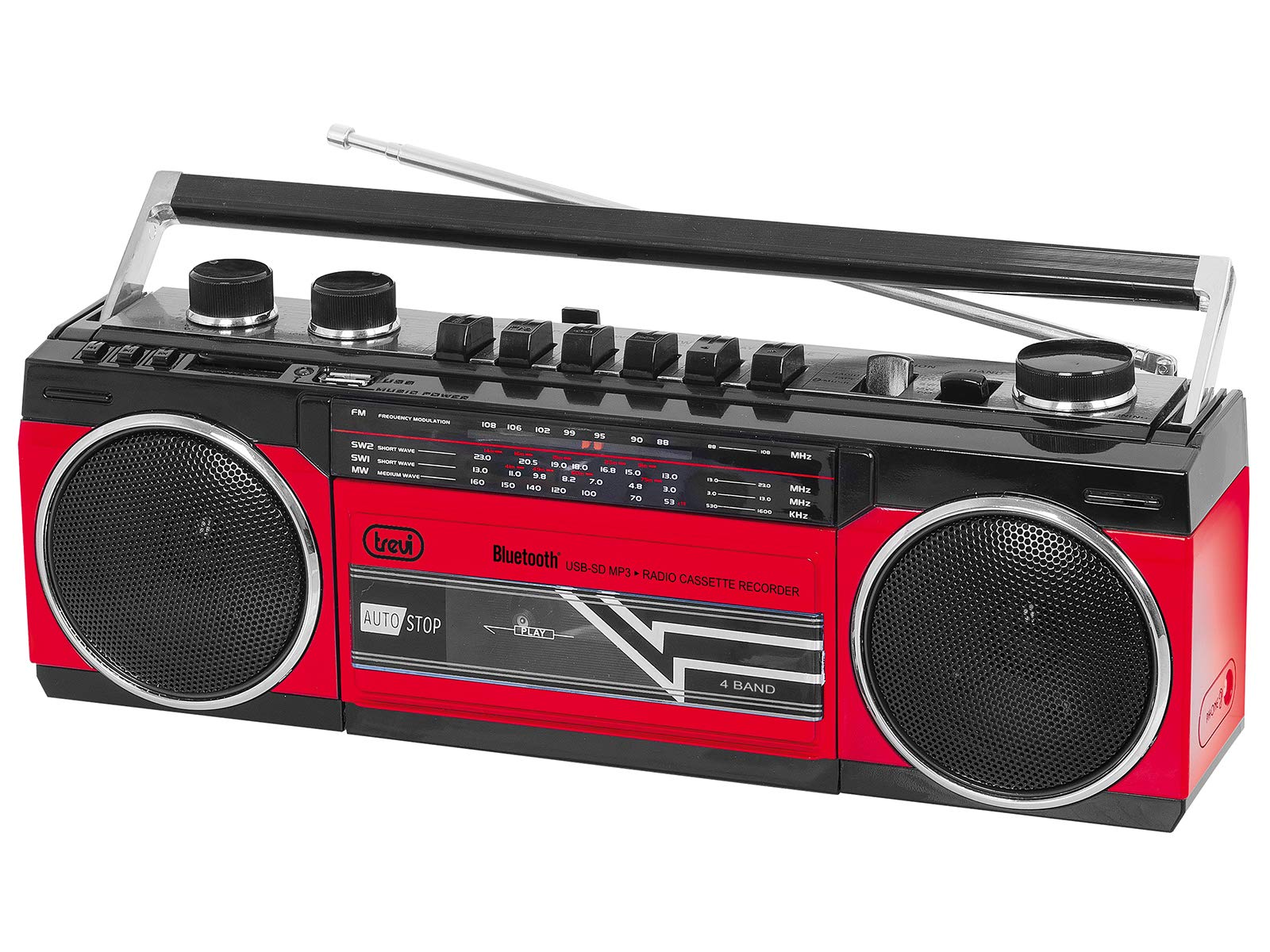
Figi 1: Devan view of the Trevi RR 501 BT Boombox, showing the dual speakers, control panel, and cassette deck.

Figi 2: Angle view of the Trevi RR 501 BT Boombox, highlighting the side profile ak manch.
Konpozan kle:
- Oratè: Two integrated stereo speakers.
- Kontwòl Panel: Buttons for playback, mode selection, and tuning.
- Volim bouton: Ajiste nivo pwodiksyon odyo a.
- Bouton akor: For radio frequency selection.
- Selektè mòd: Switches between Radio, Bluetooth, USB, SD, and Cassette modes.
- Plato kasèt: For playing and recording audio cassettes.
- Pò USB: Pou lekti sou yon kle USB.
- Plas kat SD: Pou lekti kat SD.
- Antèn: Telescopic antenna for FM radio reception.
- Antre pouvwa: Pou konekte kab kouran AC a.
- Lòj batri: (Located on the bottom/rear) For optional battery operation.
Enstalasyon
Koneksyon pouvwa:
- AC pouvwa: Insert the AC power cable into the AC input jack on the back of the unit, then plug the other end into a standard wall outlet.
- Pouvwa batri (Si ou vle): Open the battery compartment cover (usually on the bottom or rear). Insert the required number of D-size batteries (not included), ensuring correct polarity (+/-). Close the compartment cover securely.
Note: When using AC power, batteries are automatically disconnected. Remove batteries if the unit will not be used for an extended period.
Enstriksyon Operasyon
Limen/Etenyen:
To turn the unit on, rotate the Volim bouton clockwise until you hear a click. To turn off, rotate the Volim bouton counter-clockwise until it clicks off.
Radio Operation (FM):
- Limen inite a.
- Mete la Selektè mòd to "RADIO".
- Lonje antèn teleskopik la pou yon resepsyon optimal.
- Vire a Akor Knob to select your desired FM station.
- Ajiste a Volim bouton nan nivo koute ou prefere a.
Koneksyon Bluetooth:
- Limen inite a.
- Mete la Selektè mòd to "BT" (Bluetooth). The unit will enter pairing mode, indicated by a flashing LED.
- Sou aparèy ou ki gen Bluetooth la (pa egzanp, telefòn entelijan, tablèt), aktive Bluetooth epi chèche aparèy ki disponib yo.
- Select "Trevi RR 501 BT" from the list of devices.
- Once paired, the LED indicator will stop flashing and remain solid. You can now play audio from your device through the boombox.
Lektur USB/SD:
- Limen inite a.
- Mete yon kondwi flash USB nan Port USB oswa yon kat SD nan la Kat SD plas. Ensure the media contains MP3 audio files.
- Mete la Selektè mòd to "USB/SD". The unit will automatically begin playing the first compatible audio file.
- Use the playback control buttons (e.g., Play/Pause, Next, Previous) on the unit to manage your audio.
Lekti kasèt:
- Limen inite a.
- Peze a STOP/EJECT button on the cassette deck to open the cassette compartment.
- Insert an audio cassette with the open edge facing upwards and the tape side facing you. Close the compartment door.
- Mete la Selektè mòd to "TAPE".
- Peze a JWE bouton pou kòmanse lecture.
- Sèvi ak la RETIRE epi VIT VANSE bouton pou navige sou kasèt la.
- Peze STOP/EJECT to stop playback and open the compartment.
Cassette Recording:
- Insert a blank cassette into the cassette deck.
- Select the desired audio source (Radio, Bluetooth, USB, SD) using the Selektè mòd.
- Start playback of the source audio.
- Peze a DOSYE button (usually red) on the cassette deck. The JWE bouton an ap aktif tou. Anrejistreman an ap kòmanse.
- Pou sispann anrejistreman, peze la STOP/EJECT bouton.
Antretyen
- Netwayaj: Sèvi ak yon twal mou epi sèk pou netwaye deyò aparèy la. Pa sèvi ak pwodui netwayaj abrazif oswa solvan.
- Swen kasèt: Periodically clean the tape heads and pinch rollers with a cotton swab lightly dampfini ak alkòl izopropilik.
- Depo: When not in use for extended periods, store the unit in a cool, dry place, away from direct sunlight and extreme temperatures. Remove batteries if applicable.
Depanaj
| Pwoblèm | Kòz posib | Solisyon |
|---|---|---|
| Pa gen pouvwa | Kab kouran an pa konekte; Pil yo fin itilize oswa yo pa byen mete. | Check AC power connection; Replace batteries or ensure correct polarity. |
| Resepsyon radyo pòv | Antèn pa lonje; Siyal fèb. | Lonje antèn teleskopik la nèt; Repozisyone inite a pou yon pi bon siyal. |
| Bluetooth pa asosye | Unit not in BT mode; Device too far; Already paired with another device. | Ensure mode is set to BT; Move device closer; Disconnect from other devices. |
| USB/SD a pa ap jwe | Incorrect mode; Incompatible file format; Corrupted media. | Set mode to USB/SD; Ensure files are MP3; Try different USB/SD media. |
| Cassette playback issues | Cassette inserted incorrectly; Tape heads dirty. | Re-insert cassette correctly; Clean tape heads and pinch rollers. |
Espesifikasyon
| Mak | Trevi |
| Nimewo Modèl | 0RR50102 |
| Koneksyon Teknoloji | Bluetooth, USB |
| Kalite Oratè | Stereo |
| Dimansyon (L x W x H) | 50 x 50 x 28 santimèt |
| Sous pouvwa | AC |
| Pwa atik | 1.25 Kilogram |
| Sortie pouvwa | 6 Watts |
| Koulè | Wouj |
| Style | Retro |
Garanti ak sipò
For warranty information and technical support, please refer to the warranty card included with your product or visit the official Trevi website. Information regarding spare parts availability and software updates is not provided in the product specifications.
Tanpri konsève prèv acha ou a pou nenpòt reklamasyon garanti.


