1. Entwodiksyon
The MS8229 is an auto-ranging digital multimeter designed for professional and home use. It combines multiple measurement functions including AC/DC voltage and current, resistance, frequency, duty cycle, and capacitance. Additionally, it features built-in sensors for sound level, light (Lux), ambient temperature, and humidity, making it a versatile 5-in-1 testing instrument. Its large dual LCD display with backlight ensures clear readings in various conditions.

Figi 1.1: Devan view of the MS8229 Digital Multimeter, showing the display, rotary switch, and input jacks.
2. Karakteristik kle
- Ekspozisyon: 4000 counts, large dual LCD with backlight.
- Detèktè entegre: Built-in Sound Level Meter, Light Meter (Lux), Ambient Temperature, and Humidity Tester.
- Core Measurements: Tests AC/DC Voltage and Current, Resistance, Frequency, Duty Cycle, and Capacitance.
- Diode & Continuity: Diode Check and Continuity Test with audible buzzer (if resistance is less than 40 ohms).
- Mezi Tanperati: Type K thermocouple contact temperature measurement.
- Data Functions: Data Hold and Relative Measurement.
- Operasyon: Auto Ranging / Selection.
- Endikatè pouvwa: Afichaj batri ki ba.
3. Pake kontni
Lè w ap ouvri pake a, tanpri verifye si tout atik ki nan lis anba a yo la epi yo an bon eta:
- 1 x MASTECH MS8229 Digital Multimeter
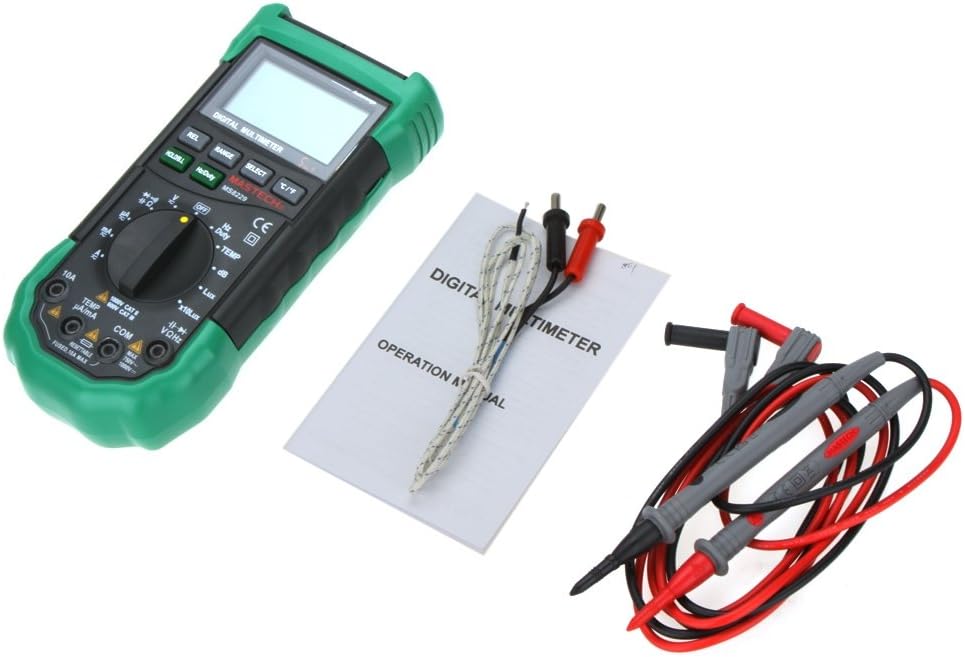
- 1 x Test Clip (Test Leads)
- 1 x Temperature Probe (Type K Thermocouple)
- 1 x manyèl angle

Figure 3.1: The MS8229 Multimeter shown with its included test leads, temperature probe, and user manual.
4. Enfòmasyon sou Sekirite
To ensure safe operation and service of the meter, follow these safety precautions:
- Always ensure the meter is in the correct function and range for the measurement being taken.
- Pa aplike voltage or current that exceeds the maximum rated input for the selected range.
- Pran prekosyon lè w ap travay ak voltagpi wo pase 30V AC RMS, 42V pik, oswa 60V DC. Volim sa yotages poze yon danje chòk.
- Before changing functions or ranges, disconnect the test leads from the circuit under test.
- Anvan ou itilize fil tès yo, enspekte yo pou wè si izolasyon an domaje oswa si metal la ekspoze. Ranplase yo si yo domaje.
- Pa sèvi ak mèt la si li sanble domaje oswa si bwat la louvri.
- Replace the batteries as soon as the low battery indicator appears to ensure accurate readings.
- Adhere to all local and national safety codes.
5. Enstalasyon
5.1 Enstalasyon batri
The MS8229 requires three (3) 1.5V AAA batteries (not included) for operation.
- Asire w ke mèt la etenn.
- Jwenn kouvèti konpatiman pil la sou dèyè mèt la.
- Sèvi ak yon tournevis pou dekole vis ki kenbe kouvèti batri a.
- Retire kouvèti a.
- Mete twa pil AAA, obsève polarite ki kòrèk la (+ ak -) jan yo endike anndan konpatiman an.
- Ranplase kouvèti batri a epi an sekirite li ak vis la.
Figi 5.1: View of the battery compartment, showing the slots for three AAA batteries and the fuse location.
5.2 Konekte fil tès yo
Bon koneksyon fil tès yo enpòtan anpil pou mezireman egzat e an sekirite.
- Pou pifò volimtage, mezi rezistans, frekans, kapasitans, dyòd, ak kontinite, mete fil tès wouj la nan VΩHz jack and the black test lead into the COM Jack.
- For current measurements (mA/µA), insert the red test lead into the TEMP µA/mA jack and the black test lead into the COM Jack.
- For high current measurements (10A), insert the red test lead into the 10A jack and the black test lead into the COM Jack.
- For temperature measurements, connect the Type K thermocouple probe to the TEMP µA/mA epi COM jacks, observing polarity if applicable.

Figure 5.2: The MS8229 Multimeter with red and black test leads properly inserted into the input jacks.
6. Operasyon Enstriksyon
The MS8229 features a rotary switch for function selection and several buttons for additional features.

Figure 6.1: The MS8229 Multimeter display showing typical readings for humidity and temperature, along with a main measurement.
6.1 Fonksyon switch wotasyon yo
Turn the rotary switch to select the desired measurement function:
- OFF: Turns the meter off.
- V ~: AC Voltage mezi.
- V-: DC Voltage mezi.
- Ω: Mezi rezistans.
- Dyòd/Kontinuite: Diode test and Continuity test.
- Hz/Duty: Frequency and Duty Cycle measurement.
- TANP: Temperature measurement using the Type K thermocouple.
- dB: Sound Level measurement.
- Lux / x10Lux: Light (Illumination) measurement.
- RH: Relative Humidity measurement.
- A~: AC Current measurement (400µA to 10A).
- POU-: DC Current measurement (400µA to 10A).
6.2 Fonksyon bouton
- HOLD/B.L: Press once to hold the current display reading. Press and hold to activate/deactivate the backlight.
- Hz/Duty: In Frequency/Duty Cycle mode, press to toggle between Hz and Duty Cycle display.
- REL: Activates relative measurement mode, displaying the difference between the current reading and a stored reference value.
- RANGE: Manually selects the measurement range (overrides auto-ranging).
- CHWAZI: Toggles between different functions within a single rotary switch position (e.g., AC/DC in voltage/current modes, Diode/Continuity).
- °C/°F: In Temperature mode, toggles between Celsius and Fahrenheit units.
6.3 Performing Measurements (ExampLA)
6.3.1 DC Voltage Mezi
- Mete switch la Rotary nan V-.
- Mete plon wouj tès la nan VΩHz jack and the black test lead into the COM Jack.
- Connect the test leads in parallel to the DC voltage source or component to be measured.
- Li voltage valè sou ekspozisyon an.
6.3.2 Mezi rezistans
- Asire w ke sikwi a oswa konpozan an pa gen enèji anvan ou mezire rezistans lan.
- Mete switch la Rotary nan Ω.
- Mete plon wouj tès la nan VΩHz jack and the black test lead into the COM Jack.
- Connect the test leads across the component whose resistance is to be measured.
- Li valè rezistans nan ekspozisyon an.
6.3.3 Mezi Tanperati
- Mete switch la Rotary nan TEMP.
- Connect the Type K thermocouple probe to the TEMP µA/mA epi COM jak.
- Place the tip of the thermocouple probe on or near the object/area whose temperature is to be measured.
- Peze a ° C / ° F. bouton pou chanje ant Celsius ak Fahrenheit.
- Li valè tanperati a sou ekran an.
7. Antretyen
7.1 Netwayaj
Siye ka a ak anonsamp twal ak yon savon dou. Pa sèvi ak pwodui abrazif oswa solvang. Kenbe tèminal antre yo pwòp san pousyè oswa debri.
7.2 Ranplasman batri
When the low battery indicator appears on the display, replace the batteries as described in Section 5.1. Prompt battery replacement ensures continued accuracy and proper operation.
7.3 Ranplasman Fuse
The 10A input jack is protected by a resettable fuse. If the 10A current measurement function stops working, it indicates the fuse has tripped. Disconnect the meter from the circuit, turn it off, and wait a few moments for the fuse to reset. If the fuse continues to trip, check for short circuits or excessive current draw in your application.
7.4 Depo
If the meter is not to be used for an extended period, remove the batteries to prevent leakage and damage to the meter.
NAN. Depanaj
If the meter does not function correctly, check the following:
- Pa gen ekspozisyon oswa ekspozisyon fèb: Tcheke enstalasyon batri a epi ranplase pil yo si sa nesesè.
- Lekti ki pa kòrèk: Ensure the correct function and range are selected. Verify test lead connections. Check for damaged test leads.
- "OL" oswa Endikasyon Surcharge: The measured value exceeds the selected range. Switch to a higher range or ensure the input is within the meter's maximum specifications.
- Mezi aktyèl la pa fonksyone: Check if the 10A fuse has tripped (see Section 7.3). Ensure test leads are connected to the correct current input jacks.
- Continuity Buzzer Not Sounding: Ensure the resistance is below 40 ohms for the buzzer to activate.
Si pwoblèm pèsiste, kontakte sipò kliyan.
9. Espesifikasyon
| Kalite Mezi | Ranje / Valè | Presizyon |
|---|---|---|
| DC Voltage (DCV) | 400m/4/40/400/1000V | 0.7%+2 |
| AC Voltage (ACV) | 400m/4/40/400V; 750V | 0.8%+3; 1%+3 |
| DC aktyèl (DCA) | 400/4000µ/40m/400mA; 4/10A | 1.2%+3; 2.0%+10 |
| AC aktyèl (ACA) | 400/4000µ/40m/400mA; 4/10A | 1.5%+5; 3.0%+10 |
| Rezistans | 400/4K/40K/400K/4MΩ; 40MΩ | 1.2%+5; 2%+5 |
| Kapasite | 40n/400n/4µ/40µ/100µF | 3.0%+3 |
| Frekans | 10/100/1K/10K/100KHz | 2.0%+5 |
| Tanperati | -20 ~ 1000°C; 4 ~ 1832°F | 2.0% |
| Imidite relatif (RH) | 20 a 95% | 5.0% |
| Limyè (Lux) | 4,000/40,000 Lux | 5.0% |
| Nivo son (dB) | 40 ~ 100dB | 3.5% |
| Tès dyòd | Wi | |
| Tester kontinwite | Buzzer if resistance < 40 ohms | |
| Sik devwa | 0.1% - 99.9% | 3.0% |
| Pwovizyon pou pouvwa | 3 * 1.5V AAA batteries (not included) | |
| Dimansyon | 195 * 92 * 55mm | |
| Pwa pwodwi | 390g |
10. Garanti ak sipò
This product is designed for reliability and performance. For any issues or inquiries not covered in this manual, please refer to your purchase documentation for warranty details or contact the retailer/manufacturer's customer support. Keep your purchase receipt as proof of purchase.


