1. Entwodiksyon
This user manual provides detailed instructions for the Logitech G533 Wireless 7.1 Dolby Surround Gaming Headset. It covers essential information regarding product features, setup, operation, maintenance, and troubleshooting to ensure optimal performance and longevity of your device. Please read this manual thoroughly before using your headset.
2. Pake kontni
Verifye ke tout atik ki nan lis anba a yo enkli nan pakè ou a:
- Logitech G533 Wireless Gaming Headset
- USB Wireless Adaptè
- USB Chaje Kab
- Dokimantasyon pou itilizatè a (manyèl sa a)
3. Pwodwi souview
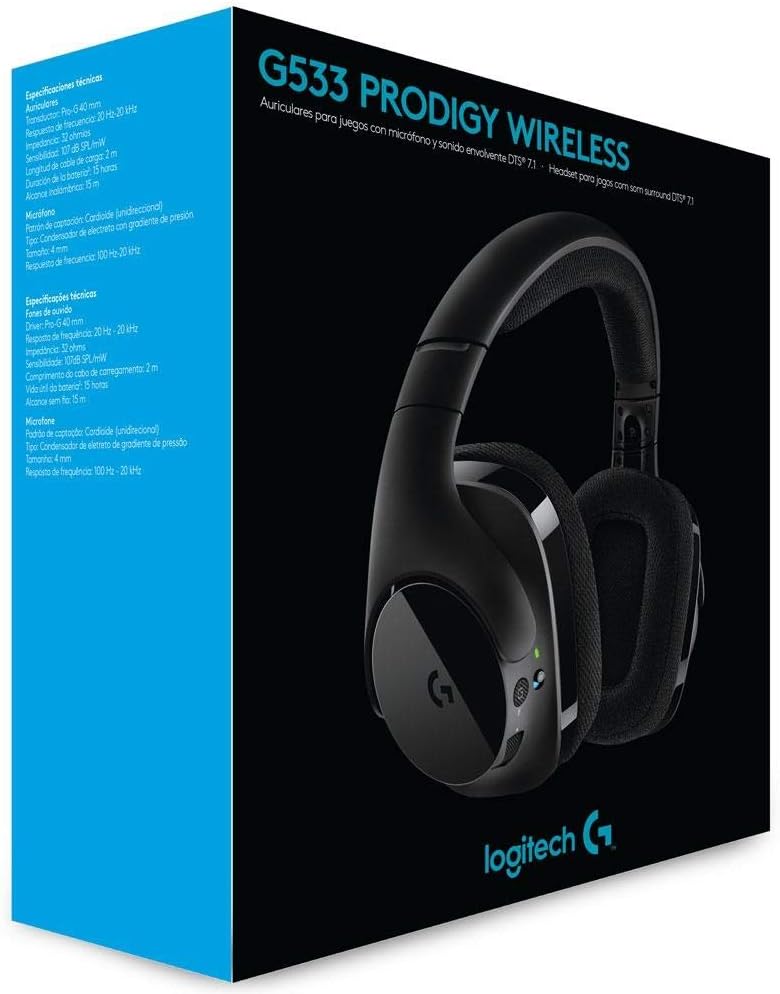
The Logitech G533 Wireless Gaming Headset is designed for immersive gaming audio with 7.1 Dolby Surround Sound and Pro-G audio drivers. It features a lightweight, durable design with breathable ear pads for extended comfort.

Figi 1: Logitech G533 Wireless Gaming Headset. This image shows the overall design of the headset, highlighting its sleek black finish and comfortable earcups.
3.1 Konpozan kas ekoutè
- Bando reglabl: Pou yon anfòm konfòtab.
- Breathable Ear Pads: Removable and washable for hygiene and comfort during long gaming sessions.
- Flip-up Microphone: Features noise reduction and automatically mutes when flipped up.
- On-ear Controls: Volume roller, microphone mute button, and power button located on the left earcup.

Figi 2: Left Earcup Controls. This image displays the volume roller, microphone mute button, and power button on the left earcup for easy access during use.

Figi 3: Flip-up Microphone. This image shows the flexible, noise-reducing microphone that can be flipped up to mute.
4. Gid Enstalasyon
Follow these steps to set up your Logitech G533 Wireless Gaming Headset:
- Chaje kas ekoutè a: Connect the USB charging cable to the headset and a powered USB port on your computer or a USB wall adapter. Allow the headset to fully charge before first use (approximately 2-3 hours). The LED indicator will show charging status.
- Connect the USB Wireless Adapter: Plug the USB wireless adapter into an available USB port on your computer.
- Power On the Headset: Press and hold the power button on the left earcup until the LED indicator lights up. The headset should automatically connect to the USB wireless adapter.
- Install Logitech G HUB Software (Optional but Recommended): For full functionality, including 7.1 surround sound customization, equalizer settings, and microphone adjustments, download and install the Logitech G HUB software from the official Logitech websit (www.logitechg.com/ghub).
- Configure Audio Settings: After installing G HUB, open the software to customize your audio experience. Ensure the Logitech G533 is selected as your default audio input and output device in your operating system's sound settings.

Figi 4: USB Wireless Adapter. This compact adapter provides the wireless connection between your headset and computer.
Figi 5: USB Charging Cable. Use this cable to recharge your headset's internal battery.
5. Operasyon Enstriksyon
5.1 Power On/Off
- To power on, press and hold the power button on the left earcup until the LED indicator illuminates.
- Pou etenn, peze epi kenbe bouton pouvwa a jiskaske endikatè ki ap dirije a etenn.
5.2 Kontwòl Volim
Adjust the audio volume using the scroll wheel located on the left earcup. This control is integrated with your computer's system volume.
5.3 Itilizasyon Mikwofòn
- Activate Microphone: Flip the microphone boom down to activate it.
- Mikwofòn bèbè:
- Flip the microphone boom up to automatically mute it. A distinct sound will indicate the mute status.
- Press the dedicated microphone mute button on the left earcup to mute/unmute.
- The microphone features noise reduction for clear communication.
5.4 DTS Headphone:X 7.1 Surround Sound
The G533 utilizes DTS Headphone:X technology to accurately reproduce 7.1 speaker placement and positional audio, enhancing in-game environmental effects. This feature is configurable via the Logitech G HUB software.
5.5 Dire batri ak chaje
The headset provides up to 15 hours of battery life on a single charge. Connect the USB charging cable to recharge. You can continue using the headset while it charges.
6. Antretyen
6.1 Netwaye kas ekoutè a
- Siye kas ekoutè a ak yon twal mou,amp twal. Evite itilize pwodwi chimik piman bouk oswa materyèl abrazif.
- The ear pads are removable and washable. Gently detach them and hand wash with mild soap and water. Allow them to air dry completely before reattaching.
6.2 Swen Batri
- Pou pwolonje lavi batri a, evite dechaje kas ekoutè a nèt souvan.
- Sere kas ekoutè a nan yon kote ki fre epi sèk lè w pa ap itilize li.
NAN. Depanaj
7.1 No Audio or Disconnection
- Asire w ke kas ekoutè a limen epi li chaje nèt.
- Verify the USB wireless adapter is securely plugged into a working USB port on your computer.
- Check your computer's sound settings to ensure the Logitech G533 is selected as the default playback and recording device.
- Try restarting both your computer and the headset.
- If using Logitech G HUB, ensure the software is running and the headset is recognized.
7.2 Mikwofòn nan pa fonksyone
- Ensure the microphone boom is flipped down and not muted via the mute button.
- Check your computer's sound settings to ensure the Logitech G533 is selected as the default recording device and microphone volume is not set to zero.
- In Logitech G HUB, verify microphone settings and ensure noise reduction is not causing issues (some users report issues with aggressive noise reduction settings).
- Test the microphone in different applications.
7.3 Robotic or Distorted Audio
- This can sometimes occur with multiple audio sources playing simultaneously. Try closing unnecessary applications.
- Ensure your wireless adapter is not too far from the headset and there are no significant obstructions.
- Update your audio drivers and Logitech G HUB software to the latest versions.
7.4 Annoying Noise While Charging
- Some users report a notification sound when the battery percentage increases during charging. This is a known characteristic of the device.
- If the noise is excessive or unusual, ensure you are using the provided charging cable and a stable power source.
8. Espesifikasyon teknik
| Karakteristik | Spesifikasyon |
|---|---|
| Non modèl | G533 |
| Koneksyon | San fil (2.4 GHz) |
| Wireless Range | Jiska 15 mèt (4.57 pye) |
| Chofè kas ekoutè | 40 mm Pro-G (Neodymium) |
| Repons sou frekans kask | 20 Hz - 20 kHz |
| Enpedans kas ekoutè | 32 Ohm |
| Nivo Presyon Son (SPL) | 107 dB SPL/mW |
| Kalite Mikwofòn | Fold-Up, Noise-Reducing |
| Repons Frekans Mikwofòn | 100 Hz - 20 kHz |
| Enpedans Mikwofòn | 2200 Ohm |
| Kalite batri | Rechargeable Lityòm-ion |
| Lavi batri | Jiska 15 èdtan |
| Kondisyon sistèm | Windows 10, Windows 8.1, Windows 8, Windows 7; USB Port; Internet connection for optional software download |
| Dimansyon pwodwi | 18.9 x 8.5 x 19.7 cm (7.44 x 3.35 x 7.76 pous) |
| Pwa pwodwi | 675 gram (1.49 liv) |
9. Garanti ak sipò
The Logitech G533 Wireless Gaming Headset comes with a two-year manufacturer's warranty. For detailed warranty information, technical support, or to contact customer service, please visit the official Logitech support websit:
Ensure you have your product model number (G533) and proof of purchase available when contacting support.


